Open-source RightAI Tools Directory
  • Discover AI
  • Submit
  • Startup
  • Blog
Open-source RightAI Tools Directory
Discover the best AI tools of 2025 with the RightAI Tools Directory!

Friend Links

AI Anime GeneratorToolsApp AI

Support

Tap4
Privacy policyTerms & ConditionsContact Us
Loading...
loading...

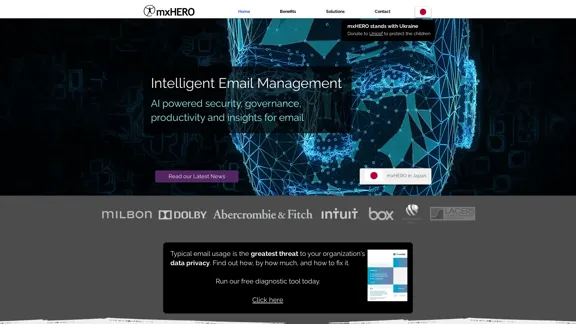
AI for Email Security & Sustainability | mxHERO Inc.

mxHERO AI combines the power of LLM AI with your email in a single dashboard. It offers robust email security, governance, and environmental sustainability features.
Visit Website
AI for Email Security & Sustainability | mxHERO Inc.
Visit Website

Introduction

mxHERO is an AI-powered platform offering intelligent email management solutions for enterprises. It focuses on email security, governance, productivity, and insights, integrating advanced AI technologies to streamline email processes and enhance organizational efficiency. With over a decade of experience in email-to-cloud storage integration, mxHERO provides scalable, secure, and easily deployable solutions for businesses of all sizes.

Feature

AI-Powered Email Management

  • Automatic email capture and filing based on custom criteria
  • Intelligent classification and routing of emails
  • Detection and securing of sensitive email attachments
  • Reduction of email data sprawl by up to 90%
  • Integration with existing email services, DLP systems, and cloud storage platforms

Advanced Security and Compliance

  • SOC 2 Type II certified
  • Enhances email security using generative AI
  • Detects sensitive content in attachments
  • Automatically secures attachments by replacing them with secure cloud storage links

Sustainability Initiative

  • Reduces CO2 emissions associated with standard email usage
  • Offers ROI Calculator to estimate potential CO2 reduction

Flexible Deployment and Integration

  • Typically deployed across enterprises in less than 90 minutes
  • Compatible with all email systems, DLP solutions, and enterprise cloud content platforms
  • Works automatically on all devices

Unique AI Capabilities

  • Applies AI to emails from various sources (cloud, on-premises, servers, PST files, archival systems)
  • Selective email collection for AI analysis
  • Multi-account email querying using AI
  • Rapid AI-powered archived email search
  • Real-time AI application for cybersecurity and productivity
  • Customizable prompt libraries
  • Choice of LLM AI technology

Centralized Control and Reporting

  • Powerful central controls
  • Comprehensive diagnostics and reports

FAQ

How does mxHERO enhance email security?

mxHERO utilizes generative AI to detect sensitive content in email attachments and can automatically secure them by replacing attachments with secure links to the organization's cloud storage service.

Can mxHERO work with existing email systems?

Yes, mxHERO seamlessly integrates with all email systems, DLP solutions, and enterprise cloud content platforms.

How does mxHERO contribute to sustainability?

By reducing email attachment processing and duplication, mxHERO helps organizations significantly reduce CO2 emissions associated with standard email usage.

Is mxHERO compliant with data privacy regulations?

mxHERO is SOC 2 Type II certified and does not store customer content. It only processes and routes according to customer configurations, ensuring data privacy and compliance.

How quickly can mxHERO be deployed in an organization?

Typically, mxHERO can be deployed across an enterprise of any size in less than 90 minutes, offering rapid implementation and immediate benefits.

Latest Traffic Insights

  • Monthly Visits

    20.76 K

  • Bounce Rate

    36.42%

  • Pages Per Visit

    7.20

  • Time on Site(s)

    287.09

  • Global Rank

    826366

  • Country Rank

    Spain 40275

Recent Visits

Traffic Sources

  • Social Media:
    1.60%
  • Paid Referrals:
    1.06%
  • Email:
    0.11%
  • Referrals:
    5.46%
  • Search Engines:
    43.20%
  • Direct:
    48.54%
More Data

Related Websites

Manus
View Detail

Manus

Manus

Manus is a general AI agent that transforms your thoughts into actions. It excels at a variety of tasks in both work and life, accomplishing everything while you relax.

13.88 M
Copilot for Microsoft 365 – Microsoft Adoption

Copilot for Microsoft 365 is a powerful AI assistant that helps you work smarter and faster across Microsoft 365 apps and services. It combines the power of large language models (LLMs) with your organization's data in the Microsoft Graph and Microsoft 365 apps to turn your words into the most powerful productivity tool on the planet.

Copilot is designed to help you:

β€’ Unleash creativity
β€’ Unlock productivity
β€’ Uplevel skills

Copilot is built on Microsoft's comprehensive approach to security, compliance, and privacy. Copilot in Microsoft 365 apps and services:

β€’ Does not use your data to train the underlying LLM
β€’ Does not replace human ingenuity and judgment
β€’ Is designed to keep humans in the loop

Copilot is currently available in Word, Excel, PowerPoint, Outlook, Teams, and more.

Getting Started with Copilot

To get started with Copilot, follow these steps:

1. Check availability: Ensure your organization has access to Copilot.
2. Learn the basics: Familiarize yourself with Copilot's capabilities and how to use it effectively.
3. Explore use cases: Discover how Copilot can help you in your specific role and tasks.
4. Practice and refine: Use Copilot regularly and refine your prompts for better results.
5. Share and collaborate: Collaborate with colleagues using Copilot and share best practices.

Best Practices for Using Copilot

1. Be specific in your prompts
2. Provide context for better results
3. Review and edit Copilot's output
4. Use Copilot as a starting point, not a final product
5. Experiment with different approaches
6. Stay informed about new features and updates

Copilot in Different Microsoft 365 Apps

β€’ Word: Draft, edit, summarize, and rewrite content
β€’ Excel: Analyze data, create formulas, and generate insights
β€’ PowerPoint: Create presentations, design slides, and generate content
β€’ Outlook: Compose emails, summarize threads, and manage your inbox
β€’ Teams: Summarize meetings, generate action items, and create meeting notes

Responsible AI and Copilot

Microsoft is committed to developing AI systems responsibly. When using Copilot, keep in mind:

β€’ AI-generated content may contain biases or inaccuracies
β€’ Always review and verify Copilot's output
β€’ Use your judgment and expertise alongside Copilot's suggestions
β€’ Be aware of your organization's policies regarding AI use

Conclusion

Copilot for Microsoft 365 is a powerful tool that can significantly enhance your productivity and creativity. By understanding its capabilities, following best practices, and using it responsibly, you can make the most of this AI assistant in your daily work.
View Detail

Copilot for Microsoft 365 – Microsoft Adoption Copilot for Microsoft 365 is a powerful AI assistant that helps you work smarter and faster across Microsoft 365 apps and services. It combines the power of large language models (LLMs) with your organization's data in the Microsoft Graph and Microsoft 365 apps to turn your words into the most powerful productivity tool on the planet. Copilot is designed to help you: β€’ Unleash creativity β€’ Unlock productivity β€’ Uplevel skills Copilot is built on Microsoft's comprehensive approach to security, compliance, and privacy. Copilot in Microsoft 365 apps and services: β€’ Does not use your data to train the underlying LLM β€’ Does not replace human ingenuity and judgment β€’ Is designed to keep humans in the loop Copilot is currently available in Word, Excel, PowerPoint, Outlook, Teams, and more. Getting Started with Copilot To get started with Copilot, follow these steps: 1. Check availability: Ensure your organization has access to Copilot. 2. Learn the basics: Familiarize yourself with Copilot's capabilities and how to use it effectively. 3. Explore use cases: Discover how Copilot can help you in your specific role and tasks. 4. Practice and refine: Use Copilot regularly and refine your prompts for better results. 5. Share and collaborate: Collaborate with colleagues using Copilot and share best practices. Best Practices for Using Copilot 1. Be specific in your prompts 2. Provide context for better results 3. Review and edit Copilot's output 4. Use Copilot as a starting point, not a final product 5. Experiment with different approaches 6. Stay informed about new features and updates Copilot in Different Microsoft 365 Apps β€’ Word: Draft, edit, summarize, and rewrite content β€’ Excel: Analyze data, create formulas, and generate insights β€’ PowerPoint: Create presentations, design slides, and generate content β€’ Outlook: Compose emails, summarize threads, and manage your inbox β€’ Teams: Summarize meetings, generate action items, and create meeting notes Responsible AI and Copilot Microsoft is committed to developing AI systems responsibly. When using Copilot, keep in mind: β€’ AI-generated content may contain biases or inaccuracies β€’ Always review and verify Copilot's output β€’ Use your judgment and expertise alongside Copilot's suggestions β€’ Be aware of your organization's policies regarding AI use Conclusion Copilot for Microsoft 365 is a powerful tool that can significantly enhance your productivity and creativity. By understanding its capabilities, following best practices, and using it responsibly, you can make the most of this AI assistant in your daily work.

Copilot for Microsoft 365 – Microsoft Adoption Copilot for Microsoft 365 is a powerful AI assistant that helps you work smarter and faster across Microsoft 365 apps and services. It combines the power of large language models (LLMs) with your organization's data in the Microsoft Graph and Microsoft 365 apps to turn your words into the most powerful productivity tool on the planet. Copilot is designed to help you: β€’ Unleash creativity β€’ Unlock productivity β€’ Uplevel skills Copilot is built on Microsoft's comprehensive approach to security, compliance, and privacy. Copilot in Microsoft 365 apps and services: β€’ Does not use your data to train the underlying LLM β€’ Does not replace human ingenuity and judgment β€’ Is designed to keep humans in the loop Copilot is currently available in Word, Excel, PowerPoint, Outlook, Teams, and more. Getting Started with Copilot To get started with Copilot, follow these steps: 1. Check availability: Ensure your organization has access to Copilot. 2. Learn the basics: Familiarize yourself with Copilot's capabilities and how to use it effectively. 3. Explore use cases: Discover how Copilot can help you in your specific role and tasks. 4. Practice and refine: Use Copilot regularly and refine your prompts for better results. 5. Share and collaborate: Collaborate with colleagues using Copilot and share best practices. Best Practices for Using Copilot 1. Be specific in your prompts 2. Provide context for better results 3. Review and edit Copilot's output 4. Use Copilot as a starting point, not a final product 5. Experiment with different approaches 6. Stay informed about new features and updates Copilot in Different Microsoft 365 Apps β€’ Word: Draft, edit, summarize, and rewrite content β€’ Excel: Analyze data, create formulas, and generate insights β€’ PowerPoint: Create presentations, design slides, and generate content β€’ Outlook: Compose emails, summarize threads, and manage your inbox β€’ Teams: Summarize meetings, generate action items, and create meeting notes Responsible AI and Copilot Microsoft is committed to developing AI systems responsibly. When using Copilot, keep in mind: β€’ AI-generated content may contain biases or inaccuracies β€’ Always review and verify Copilot's output β€’ Use your judgment and expertise alongside Copilot's suggestions β€’ Be aware of your organization's policies regarding AI use Conclusion Copilot for Microsoft 365 is a powerful tool that can significantly enhance your productivity and creativity. By understanding its capabilities, following best practices, and using it responsibly, you can make the most of this AI assistant in your daily work.

Microsoft Copilot combines the power of large language models (LLMs) with your organization's data to turn your words into one of the most powerful productivity tools on the planet.

608.60 K
Auto Generate Clicker - Chrome Web Store
View Detail

Auto Generate Clicker - Chrome Web Store

Auto Generate Clicker - Chrome Web Store

Automatically clicks the 'Continue Generation' and 'Regenerate' buttons on ChatGPT.

193.90 M
Integrity β€” Notes, Canvases, and AI all in one workspace
View Detail

Integrity β€” Notes, Canvases, and AI all in one workspace

Integrity β€” Notes, Canvases, and AI all in one workspace

Stop jumping between Notion, Miro, and ChatGPT. Integrity unifies structure, visual thinking, and AI so you can turn ideas into results faster.

0
Langtrace AI
View Detail

Langtrace AI

Langtrace AI

Discover Langtrace, the comprehensive tool for monitoring, evaluating, and optimizing large language models. Enhance your AI applications with real-time insights and detailed performance metrics.

15.51 K
AI Note Taking & Transcribe & Summarizer | AI Notebook App
View Detail

AI Note Taking & Transcribe & Summarizer | AI Notebook App

AI Note Taking & Transcribe & Summarizer | AI Notebook App

Generate transcripts and AI summarize for College Students in lectures. Specializing in YouTube Video Summarizer, PDF Summarizer, Article Summarizer. Save key insights and review with study guides, quizzes, and flashcards. Build your AI-powered notes library.

0
Flowith - AI for Deep Work
View Detail

Flowith - AI for Deep Work

Flowith - AI for Deep Work

Surpassing traditional chat-based tools, Flowith streamlines tasks on a multi-thread interface powered by a most advanced agent framework. The intuitive canvas and smart framework boost productivity, helping users stay in the flow.

13.71 K
Jestor - Build apps for operations without code
View Detail

Jestor - Build apps for operations without code

Jestor - Build apps for operations without code

Build scalable Apps, automations, and workflows for your entire company without any coding required. Do it yourself.

36.60 K