Open-source RightAI Tools Directory
  • Discover AI
  • Submit
  • Startup
  • Blog
Open-source RightAI Tools Directory
Discover the best AI tools of 2025 with the RightAI Tools Directory!

Friend Links

AI Anime GeneratorToolsApp AI

Support

Tap4
Privacy policyTerms & ConditionsContact Us
Loading...
loading...

Retainr - All-in-One Agency Management Software

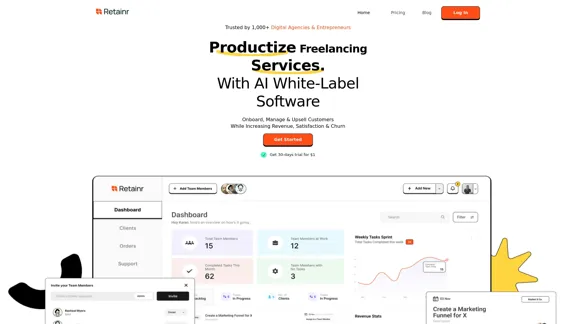
Elevate your brand, streamline operations, and foster stronger client relationships. The future of creative agency management starts here! From your own branded app to streamlined client management, Retainr.io empowers you at every step.
Visit Website
Retainr - All-in-One Agency Management Software
Visit Website

Introduction

Retainr is an all-in-one agency management software designed to help digital agencies and entrepreneurs streamline their operations, manage clients effectively, and increase revenue. It offers a comprehensive suite of tools for productizing freelancing services, onboarding and managing customers, and enhancing overall agency performance.

Feature

  1. White-Label Branding

    • Customizable app with agency's branding, colors, logo, and domain
    • Personalized client portal for a professional experience
    • Native mobile app deployment on App Store and Play Store
  2. Service Productization

    • Unified dashboard to showcase services with images and pricing
    • Custom service packages with flexible payment options
    • Magic Links for easy client onboarding and payments
  3. Client Management

    • Streamlined onboarding process with one-click functionality
    • Centralized communication hub for team and client interactions
    • Real-time task visibility and progress tracking
  4. Payment Processing

    • Integration with multiple payment gateways (Stripe, PayPal, Razorpay)
    • Support for one-time invoices, recurring invoices, and automatic payments
    • Customizable invoices with service packages and tax rates
  5. Automation and Integration

    • Automated emails, tasks, orders, and notifications
    • Zapier integration for connecting with 10,000+ workflow apps
    • Webhook support for custom integrations
  6. Analytics and Insights

    • Performance tracking and conversion monitoring
    • Integration with Google Analytics and Facebook Pixel
    • Revenue tracking and reporting capabilities
  7. Mobile Optimization

    • Responsive design for seamless mobile experience
    • iOS and Android apps for agency, clients, and team members
    • Push notifications for client engagement and support

How to Use?

  1. Leverage the white-label features to create a strong brand identity and build credibility with clients.

  2. Utilize the Magic Links feature for seamless client onboarding and payment collection, reducing friction in the sales process.

  3. Take advantage of the automation features to streamline repetitive tasks and improve overall efficiency.

  4. Use the analytics tools to gain insights into your agency's performance and make data-driven decisions.

  5. Explore the Retainr Accelerator program for additional resources, including SOPs, cheatsheets, and blueprints to boost your agency's growth.

FAQ

How does Retainr help agencies productize their services?

Retainr helps agencies productize their services by:

  • Standardizing service offerings for clear, repeatable packages
  • Automating repetitive tasks to focus on high-impact activities
  • Enabling scalability without proportionally increasing team size
  • Streamlining operations for improved efficiency
  • Enhancing client experience through automated reporting and communication

Is Retainr suitable for use as a CRM?

Yes, Retainr can be used as a CRM tool. It includes client profiles and comprehensive client management features, allowing you to track interactions, manage relationships, and store important client information.

How does Retainr ensure data security and privacy?

Retainr prioritizes data security and privacy by implementing:

  • Robust encryption measures
  • Access controls
  • Regular security audits
  • Authorized user-only access

Can I integrate Retainr with other tools and platforms?

Yes, Retainr offers integration flexibility:

  • Out-of-the-box integration with Google Analytics and Zapier
  • Zapier Webhook and API support for connecting to thousands of apps
  • Customizable integrations through webhook support

Price

Retainr offers a 30-day trial for $1. Specific pricing plans are not provided in the given content.

The price is for reference only, please refer to the latest official data for actual information.

Evaluation

  1. Retainr offers a comprehensive suite of tools that address many pain points for digital agencies and entrepreneurs, particularly in client management, service productization, and workflow automation.

  2. The white-label features and customization options are particularly strong, allowing agencies to maintain a professional brand image across all touchpoints.

  3. The integration capabilities with popular tools like Zapier and Google Analytics enhance its versatility and make it easier for agencies to incorporate Retainr into their existing tech stack.

  4. The mobile optimization and dedicated apps for iOS and Android demonstrate a commitment to modern, on-the-go agency management.

  5. While the feature set is impressive, the lack of transparent pricing information on the website may be a drawback for potential customers trying to evaluate the cost-effectiveness of the platform.

  6. The addition of the Retainr Accelerator program with SOPs, cheatsheets, and a community aspect adds value beyond just software, which could be particularly beneficial for growing agencies.

  7. Areas for potential improvement could include more detailed information about data security measures and possibly expanding the range of native integrations beyond Zapier and Google Analytics.

Latest Traffic Insights

  • Monthly Visits

    39.23 K

  • Bounce Rate

    45.04%

  • Pages Per Visit

    1.41

  • Time on Site(s)

    9.36

  • Global Rank

    852932

  • Country Rank

    United States 838690

Recent Visits

Traffic Sources

  • Social Media:
    5.73%
  • Paid Referrals:
    0.98%
  • Email:
    2.46%
  • Referrals:
    11.13%
  • Search Engines:
    49.74%
  • Direct:
    29.69%
More Data

Related Websites

Search | BaGooDex Meta Search
View Detail

Search | BaGooDex Meta Search

Search | BaGooDex Meta Search

AI-powered Meta Search

12.80 K
Abyss Hub
View Detail

Abyss Hub

Abyss Hub

Generated by Abyss Team.

0
Drive Business Performance With Planning Software | Anaplan
View Detail

Drive Business Performance With Planning Software | Anaplan

Drive Business Performance With Planning Software | Anaplan

See, plan, and lead financial, supply chain, and sales strategies that drive business performance using the Anaplan connected planning platform.

1.03 M
metastory · Empowering Product Owner with AI
View Detail

metastory · Empowering Product Owner with AI

metastory · Empowering Product Owner with AI

Fastest tool for requirements gathering

309
WordPress Transcribe AI - The Ultimate Audio Transcription Plugin
View Detail

WordPress Transcribe AI - The Ultimate Audio Transcription Plugin

WordPress Transcribe AI - The Ultimate Audio Transcription Plugin

Boost your WordPress site's content creation with WordPress Transcribe AI, the advanced audio transcription plugin. Convert audio files and YouTube links into precise, readable text, enhancing your website's SEO and user engagement.

0
Tila: Multi-Agent AI Platform for Automating Workflows and Creating Content
View Detail

Tila: Multi-Agent AI Platform for Automating Workflows and Creating Content

Tila: Multi-Agent AI Platform for Automating Workflows and Creating Content

Boost productivity with Tila, an AI canvas for workflow automation and multimodal content creation using generative AI across text, images, and video.

2.35 K
Copilot for Microsoft 365 – Microsoft Adoption

Copilot for Microsoft 365 is a powerful AI assistant that helps you work smarter and faster across Microsoft 365 apps and services. It combines the power of large language models (LLMs) with your organization's data in the Microsoft Graph and Microsoft 365 apps to turn your words into the most powerful productivity tool on the planet.

Copilot is designed to help you:

• Unleash creativity
• Unlock productivity
• Uplevel skills

Copilot is built on Microsoft's comprehensive approach to security, compliance, and privacy. Copilot in Microsoft 365 apps and services:

• Does not use your data to train the underlying LLM
• Does not replace human ingenuity and judgment
• Is designed to keep humans in the loop

Copilot is currently available in Word, Excel, PowerPoint, Outlook, Teams, and more.

Getting Started with Copilot

To get started with Copilot, follow these steps:

1. Check availability: Ensure your organization has access to Copilot.
2. Learn the basics: Familiarize yourself with Copilot's capabilities and how to use it effectively.
3. Explore use cases: Discover how Copilot can help you in your specific role and tasks.
4. Practice and refine: Use Copilot regularly and refine your prompts for better results.
5. Share and collaborate: Collaborate with colleagues using Copilot and share best practices.

Best Practices for Using Copilot

1. Be specific in your prompts
2. Provide context for better results
3. Review and edit Copilot's output
4. Use Copilot as a starting point, not a final product
5. Experiment with different approaches
6. Stay informed about new features and updates

Copilot in Different Microsoft 365 Apps

• Word: Draft, edit, summarize, and rewrite content
• Excel: Analyze data, create formulas, and generate insights
• PowerPoint: Create presentations, design slides, and generate content
• Outlook: Compose emails, summarize threads, and manage your inbox
• Teams: Summarize meetings, generate action items, and create meeting notes

Responsible AI and Copilot

Microsoft is committed to developing AI systems responsibly. When using Copilot, keep in mind:

• AI-generated content may contain biases or inaccuracies
• Always review and verify Copilot's output
• Use your judgment and expertise alongside Copilot's suggestions
• Be aware of your organization's policies regarding AI use

Conclusion

Copilot for Microsoft 365 is a powerful tool that can significantly enhance your productivity and creativity. By understanding its capabilities, following best practices, and using it responsibly, you can make the most of this AI assistant in your daily work.
View Detail

Copilot for Microsoft 365 – Microsoft Adoption Copilot for Microsoft 365 is a powerful AI assistant that helps you work smarter and faster across Microsoft 365 apps and services. It combines the power of large language models (LLMs) with your organization's data in the Microsoft Graph and Microsoft 365 apps to turn your words into the most powerful productivity tool on the planet. Copilot is designed to help you: • Unleash creativity • Unlock productivity • Uplevel skills Copilot is built on Microsoft's comprehensive approach to security, compliance, and privacy. Copilot in Microsoft 365 apps and services: • Does not use your data to train the underlying LLM • Does not replace human ingenuity and judgment • Is designed to keep humans in the loop Copilot is currently available in Word, Excel, PowerPoint, Outlook, Teams, and more. Getting Started with Copilot To get started with Copilot, follow these steps: 1. Check availability: Ensure your organization has access to Copilot. 2. Learn the basics: Familiarize yourself with Copilot's capabilities and how to use it effectively. 3. Explore use cases: Discover how Copilot can help you in your specific role and tasks. 4. Practice and refine: Use Copilot regularly and refine your prompts for better results. 5. Share and collaborate: Collaborate with colleagues using Copilot and share best practices. Best Practices for Using Copilot 1. Be specific in your prompts 2. Provide context for better results 3. Review and edit Copilot's output 4. Use Copilot as a starting point, not a final product 5. Experiment with different approaches 6. Stay informed about new features and updates Copilot in Different Microsoft 365 Apps • Word: Draft, edit, summarize, and rewrite content • Excel: Analyze data, create formulas, and generate insights • PowerPoint: Create presentations, design slides, and generate content • Outlook: Compose emails, summarize threads, and manage your inbox • Teams: Summarize meetings, generate action items, and create meeting notes Responsible AI and Copilot Microsoft is committed to developing AI systems responsibly. When using Copilot, keep in mind: • AI-generated content may contain biases or inaccuracies • Always review and verify Copilot's output • Use your judgment and expertise alongside Copilot's suggestions • Be aware of your organization's policies regarding AI use Conclusion Copilot for Microsoft 365 is a powerful tool that can significantly enhance your productivity and creativity. By understanding its capabilities, following best practices, and using it responsibly, you can make the most of this AI assistant in your daily work.

Copilot for Microsoft 365 – Microsoft Adoption Copilot for Microsoft 365 is a powerful AI assistant that helps you work smarter and faster across Microsoft 365 apps and services. It combines the power of large language models (LLMs) with your organization's data in the Microsoft Graph and Microsoft 365 apps to turn your words into the most powerful productivity tool on the planet. Copilot is designed to help you: • Unleash creativity • Unlock productivity • Uplevel skills Copilot is built on Microsoft's comprehensive approach to security, compliance, and privacy. Copilot in Microsoft 365 apps and services: • Does not use your data to train the underlying LLM • Does not replace human ingenuity and judgment • Is designed to keep humans in the loop Copilot is currently available in Word, Excel, PowerPoint, Outlook, Teams, and more. Getting Started with Copilot To get started with Copilot, follow these steps: 1. Check availability: Ensure your organization has access to Copilot. 2. Learn the basics: Familiarize yourself with Copilot's capabilities and how to use it effectively. 3. Explore use cases: Discover how Copilot can help you in your specific role and tasks. 4. Practice and refine: Use Copilot regularly and refine your prompts for better results. 5. Share and collaborate: Collaborate with colleagues using Copilot and share best practices. Best Practices for Using Copilot 1. Be specific in your prompts 2. Provide context for better results 3. Review and edit Copilot's output 4. Use Copilot as a starting point, not a final product 5. Experiment with different approaches 6. Stay informed about new features and updates Copilot in Different Microsoft 365 Apps • Word: Draft, edit, summarize, and rewrite content • Excel: Analyze data, create formulas, and generate insights • PowerPoint: Create presentations, design slides, and generate content • Outlook: Compose emails, summarize threads, and manage your inbox • Teams: Summarize meetings, generate action items, and create meeting notes Responsible AI and Copilot Microsoft is committed to developing AI systems responsibly. When using Copilot, keep in mind: • AI-generated content may contain biases or inaccuracies • Always review and verify Copilot's output • Use your judgment and expertise alongside Copilot's suggestions • Be aware of your organization's policies regarding AI use Conclusion Copilot for Microsoft 365 is a powerful tool that can significantly enhance your productivity and creativity. By understanding its capabilities, following best practices, and using it responsibly, you can make the most of this AI assistant in your daily work.

Microsoft Copilot combines the power of large language models (LLMs) with your organization's data to turn your words into one of the most powerful productivity tools on the planet.

608.60 K
eDiscovery & Legal Search Software Solutions
View Detail

eDiscovery & Legal Search Software Solutions

eDiscovery & Legal Search Software Solutions

Organizations worldwide utilize Relativity's secure, comprehensive legal software to address their most significant data challenges.

104.27 K