Open-source RightAI Tools Directory
  • Discover AI
  • Submit
  • Startup
  • Blog
Open-source RightAI Tools Directory
Discover the best AI tools of 2025 with the RightAI Tools Directory!

Friend Links

AI Anime GeneratorToolsApp AI

Support

Tap4
Privacy policyTerms & ConditionsContact Us
Loading...
loading...

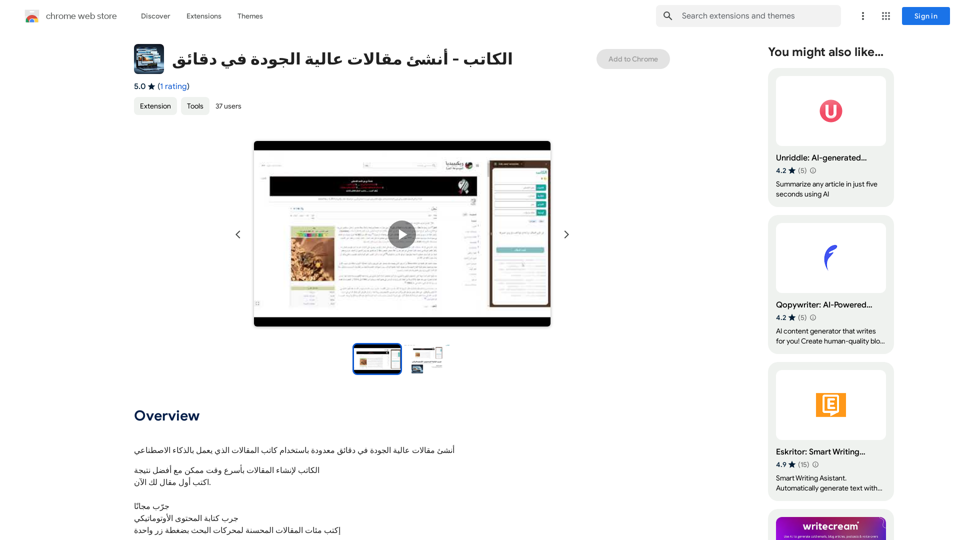
Writer - Create high-quality articles in minutes.

Create high-quality articles in minutes using an AI-powered writing assistant.
Visit Website
Writer - Create high-quality articles in minutes.
Visit Website

Introduction

Article Writer is an AI-powered platform designed to create high-quality articles quickly. It supports over 100 languages, making it a versatile tool for content creation across various genres. The platform offers features like automatic content generation, image integration, and unlimited editing capabilities, catering to students, professionals, and businesses alike.

Feature

Rapid Content Generation

Article Writer utilizes advanced AI technology to produce articles, blog posts, news, and press releases in seconds. Users can simply input a topic, and the platform generates high-quality content instantly.

Multilingual Support

With support for over 100 languages, Article Writer enables users to create content for global audiences, expanding their reach and impact.

Image Integration

The platform enhances content by incorporating relevant images, making articles more visually appealing and engaging for readers.

Human-like Writing Style

Article Writer's AI is designed to mimic human writing styles, ensuring that the generated content is natural, engaging, and of high quality.

Unlimited Editing

Users have the flexibility to refine and perfect their content with unlimited editing capabilities, allowing for customization and improvement.

Versatile Pricing Plans

Article Writer offers three pricing tiers to suit different needs:

PlanPriceTarget Audience
Basic$5 per pointStudents and individuals
Professional$30 per pointBusinesses and professionals
Creative$10 per pointCreatives and entrepreneurs

User-Friendly Interface

The platform is designed for ease of use, requiring minimal effort to generate content. Users can start creating articles with just a few clicks.

FAQ

Is there a free trial available for Article Writer?

Yes, Article Writer offers a free trial period for users to test the platform's capabilities before committing to a paid plan.

How do I begin using Article Writer?

Getting started with Article Writer is simple. Just sign up for an account on the platform, and you can immediately begin generating content.

Can I modify the content created by Article Writer?

Absolutely. Article Writer provides unlimited editing capabilities, allowing you to refine and customize the generated content to meet your specific needs and preferences.

What types of content can I create with Article Writer?

Article Writer is versatile and can generate various types of content, including articles, blog posts, news pieces, and press releases, among others.

Related Websites
Get ChatGPT for Free with Google

You can now access ChatGPT, a powerful language model, for free with Google. Here's how:

Method 1: Google Colab

* Open Google Colab ([colab.research.google.com](http://colab.research.google.com))
* Create a new notebook
* Install the `transformers` library by running `!pip install transformers`
* Import the `transformers` library and load the ChatGPT model using `from transformers import AutoModelForCausalLM, AutoTokenizer; model = AutoModelForCausalLM.from_pretrained('chatgpt'); tokenizer = AutoTokenizer.from_pretrained('chatgpt')`
* Use the model to generate text using `input_text = "Your input here"; inputs = tokenizer.encode_plus(input_text, return_tensors='pt', max_length=1024, padding='max_length', truncation=True); output = model(inputs['input_ids'], attention_mask=inputs['attention_mask']); print(tokenizer.decode(output.logits[0], skip_special_tokens=True))`

Method 2: Google Apps Script

* Open Google Apps Script ([script.google.com](http://script.google.com))
* Create a new project
* Install the `transformers` library by running `npm install transformers`
* Import the `transformers` library and load the ChatGPT model using `const { AutoModelForCausalLM, AutoTokenizer } = require('transformers'); const model = new AutoModelForCausalLM('chatgpt'); const tokenizer = new AutoTokenizer('chatgpt');`
* Use the model to generate text using `const inputText = "Your input here"; const inputs = tokenizer.encodePlus(inputText, { return_tensors: 'pt', max_length: 1024, padding: 'max_length', truncation: true }); const output = model(inputs.inputIds, inputs.attentionMask); console.log(tokenizer.decode(output.logits[0], { skipSpecialTokens: true }));`

Note: These methods require some technical knowledge and may have limitations compared to the original ChatGPT model.
View Detail

Get ChatGPT for Free with Google You can now access ChatGPT, a powerful language model, for free with Google. Here's how: Method 1: Google Colab * Open Google Colab ([colab.research.google.com](http://colab.research.google.com)) * Create a new notebook * Install the `transformers` library by running `!pip install transformers` * Import the `transformers` library and load the ChatGPT model using `from transformers import AutoModelForCausalLM, AutoTokenizer; model = AutoModelForCausalLM.from_pretrained('chatgpt'); tokenizer = AutoTokenizer.from_pretrained('chatgpt')` * Use the model to generate text using `input_text = "Your input here"; inputs = tokenizer.encode_plus(input_text, return_tensors='pt', max_length=1024, padding='max_length', truncation=True); output = model(inputs['input_ids'], attention_mask=inputs['attention_mask']); print(tokenizer.decode(output.logits[0], skip_special_tokens=True))` Method 2: Google Apps Script * Open Google Apps Script ([script.google.com](http://script.google.com)) * Create a new project * Install the `transformers` library by running `npm install transformers` * Import the `transformers` library and load the ChatGPT model using `const { AutoModelForCausalLM, AutoTokenizer } = require('transformers'); const model = new AutoModelForCausalLM('chatgpt'); const tokenizer = new AutoTokenizer('chatgpt');` * Use the model to generate text using `const inputText = "Your input here"; const inputs = tokenizer.encodePlus(inputText, { return_tensors: 'pt', max_length: 1024, padding: 'max_length', truncation: true }); const output = model(inputs.inputIds, inputs.attentionMask); console.log(tokenizer.decode(output.logits[0], { skipSpecialTokens: true }));` Note: These methods require some technical knowledge and may have limitations compared to the original ChatGPT model.

Get ChatGPT for Free with Google You can now access ChatGPT, a powerful language model, for free with Google. Here's how: Method 1: Google Colab * Open Google Colab ([colab.research.google.com](http://colab.research.google.com)) * Create a new notebook * Install the `transformers` library by running `!pip install transformers` * Import the `transformers` library and load the ChatGPT model using `from transformers import AutoModelForCausalLM, AutoTokenizer; model = AutoModelForCausalLM.from_pretrained('chatgpt'); tokenizer = AutoTokenizer.from_pretrained('chatgpt')` * Use the model to generate text using `input_text = "Your input here"; inputs = tokenizer.encode_plus(input_text, return_tensors='pt', max_length=1024, padding='max_length', truncation=True); output = model(inputs['input_ids'], attention_mask=inputs['attention_mask']); print(tokenizer.decode(output.logits[0], skip_special_tokens=True))` Method 2: Google Apps Script * Open Google Apps Script ([script.google.com](http://script.google.com)) * Create a new project * Install the `transformers` library by running `npm install transformers` * Import the `transformers` library and load the ChatGPT model using `const { AutoModelForCausalLM, AutoTokenizer } = require('transformers'); const model = new AutoModelForCausalLM('chatgpt'); const tokenizer = new AutoTokenizer('chatgpt');` * Use the model to generate text using `const inputText = "Your input here"; const inputs = tokenizer.encodePlus(inputText, { return_tensors: 'pt', max_length: 1024, padding: 'max_length', truncation: true }); const output = model(inputs.inputIds, inputs.attentionMask); console.log(tokenizer.decode(output.logits[0], { skipSpecialTokens: true }));` Note: These methods require some technical knowledge and may have limitations compared to the original ChatGPT model.

How to Add ChatGPT to All Google Searches ===================================================== Step 1: Create a Custom Search Engine -------------------------------------- * Go to the [Google Custom Search Engine](https://cse.google.com/) website and sign in with your Google account. * Click on the "New Search Engine" button. * Fill in the required information, such as the name and description of your search engine. * Click on the "Create" button. Step 2: Add ChatGPT to the Search Engine ----------------------------------------- * In the "Setup" tab, click on the "Add" button next to "Sites to search". * Enter the following URL: `https://chat.openai.com/` * Click on the "Add" button. Step 3: Configure the Search Engine -------------------------------------- * In the "Setup" tab, click on the "Edit" button next to "Search engine keywords". * Add the following keywords: `ChatGPT` * Click on the "Save" button. Step 4: Get the Search Engine Code ------------------------------------- * In the "Setup" tab, click on the "Get code" button. * Copy the HTML code provided. Step 5: Add the Search Engine to Your Browser ------------------------------------------------ * Open your browser and go to the "Settings" or "Options" page. * Look for the "Search engine" or "Default search engine" option. * Click on the "Add" or "Manage search engines" button. * Paste the HTML code you copied earlier. * Click on the "Add" or "Save" button. You're Done! =============== Now, whenever you search on Google, ChatGPT will be included in the search results. You can also use the custom search engine URL provided by Google to search directly.

193.90 M
GPTSnow - Supercharge your ChatGPT
View Detail

GPTSnow - Supercharge your ChatGPT

GPTSnow - Supercharge your ChatGPT

Unlock Search, Conversation History, Image Gallery, and Bookmarks for your ChatGPT.

193.90 M
Subtitle Wizard - Real-time Speech Recognition, AI Subtitle Translation
View Detail

Subtitle Wizard - Real-time Speech Recognition, AI Subtitle Translation

Subtitle Wizard - Real-time Speech Recognition, AI Subtitle Translation

Watch foreign TV series and learn without mistakes, the new subtitle translation elf is here to assist, a browser-based subtitle translation artifact.

193.90 M
AI Customer Service Assistant
View Detail

AI Customer Service Assistant

AI Customer Service Assistant

Your AI customer service assistant has the capabilities of AI replies, copywriting optimization, content summarization, and intelligent translation, driving improvements in customer service efficiency and quality.

193.90 M
Pulse App AI

Pulse App AI is an innovative artificial intelligence-powered healthcare platform that enables patients to take control of their health and wellness.
View Detail

Pulse App AI Pulse App AI is an innovative artificial intelligence-powered healthcare platform that enables patients to take control of their health and wellness.

Pulse App AI Pulse App AI is an innovative artificial intelligence-powered healthcare platform that enables patients to take control of their health and wellness.

The Power of Artificial Intelligence in Your Pocket

0
I Listen AI
View Detail

I Listen AI

I Listen AI

I Listen AI

193.90 M
super memory
View Detail

super memory

super memory

An extension for https://supermemory.ai - an AI hub for all your bookmarks.

193.90 M
Imagifi: 1-Click AI Art Anywhere
View Detail

Imagifi: 1-Click AI Art Anywhere

Imagifi: 1-Click AI Art Anywhere

Create original AI images from any page on the web Introducing Imagifi from Easyfi.ai, your personal AI image generator! With…

193.90 M