Open-source RightAI Tools Directory
  • Discover AI
  • Submit
  • Startup
  • Blog
Open-source RightAI Tools Directory
Discover the best AI tools of 2025 with the RightAI Tools Directory!

Friend Links

AI Anime GeneratorToolsApp AI

Support

Tap4
Privacy policyTerms & ConditionsContact Us
Loading...
loading...

Algae

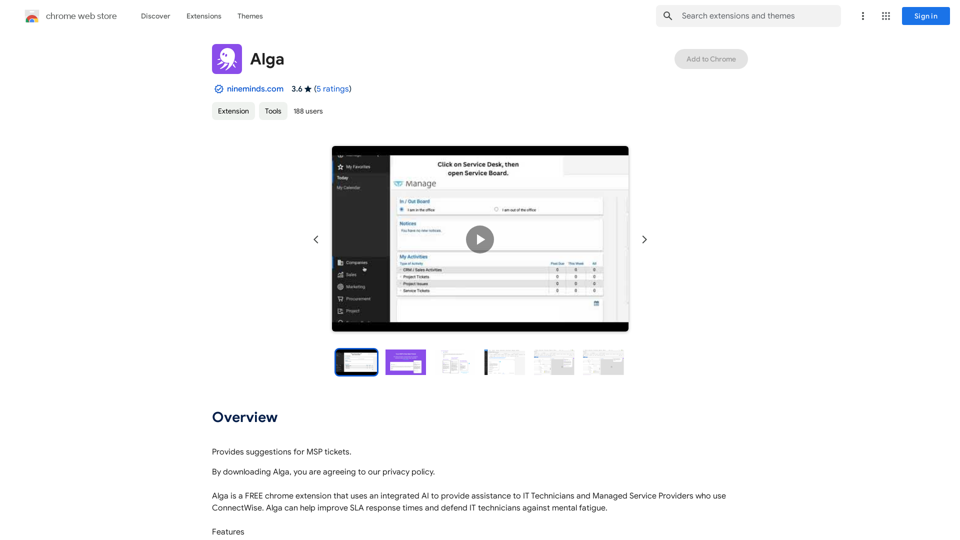
Offers ideas for MSP support requests.
Visit Website
Algae
Visit Website

Introduction

Alga is a free Chrome extension designed to assist IT technicians and managed service providers using ConnectWise. This AI-powered tool aims to enhance SLA response times and combat mental fatigue among IT professionals. Alga integrates seamlessly with ConnectWise and operates on any Chrome-enabled device, including Windows, Mac, and Linux systems.

Feature

Intelligent Ticket Title Generation

Alga crafts new service ticket titles based on the ticket's content, ensuring clarity and relevance.

Comprehensive Ticket Summary

The AI provides a concise synopsis of ticket activities, offering a quick overview of the situation.

Automated Ticket Categorization

Alga efficiently categorizes tickets, streamlining the organization and prioritization process.

Real-time Advice

The extension offers timely suggestions on how to handle tickets, improving response efficiency.

Customer Response Generation

With a single click, Alga can compose professional responses to customers on behalf of technicians.

Cross-platform Compatibility

Alga functions on any Windows, Mac, or Linux computer running Chrome, ensuring wide accessibility.

Cost-free Utilization

As a free extension, Alga provides all its features without any additional charges to users.

FAQ

What is Alga?

Alga is a free Chrome extension that leverages AI to assist IT technicians and managed service providers using ConnectWise. It aims to improve SLA response times and reduce mental fatigue among IT professionals.

How does Alga work?

Alga integrates with ConnectWise through a Chrome extension. It uses AI to analyze ticket content, generate summaries, categorize tickets, provide advice, and draft customer responses.

What are the main features of Alga?

Alga's key features include:

  1. Intelligent ticket title generation
  2. Comprehensive ticket summarization
  3. Automated ticket categorization
  4. Real-time advice for ticket handling
  5. Customer response generation

Is Alga compatible with my system?

Alga works on any Windows, Mac, or Linux computer running Chrome, making it widely accessible for most users.

How much does Alga cost?

Alga is completely free. Users can access all its features without any additional costs or hidden charges.

Related Websites
Midjourney SREF Codes Library for Style Reference

What are SREF Codes?

SREF codes are special text strings used in Midjourney to quickly and easily apply specific artistic styles to your image generations. 

How to Use SREF Codes:

Simply add an SREF code to your Midjourney prompt. For example:

`/imagine a majestic dragon, SREF:cyberpunk`

SREF Code Library:

This library contains a collection of SREF codes categorized by style. 

* Art Styles:
    * `photorealistic`: Creates images with high levels of realism.
    * `impressionistic`:  Captures the essence of a scene with loose brushstrokes and vibrant colors.
    * `cubist`:  Breaks down objects into geometric shapes.
    * `surrealist`:  Creates dreamlike and fantastical images.
    * `abstract`:  Focuses on form, color, and composition rather than representational imagery.

* Visual Effects:
    * `cinematic`:  Gives images a cinematic look and feel.
    * `HDR`:  Creates images with high dynamic range, resulting in greater detail and contrast.
    * `neon`:  Adds vibrant neon lights to the image.
    * `pixel art`:  Generates images in a retro pixel art style.

* Other Styles:
    * `anime`:  Creates images in the style of Japanese animation.
    * `manga`:  Similar to anime, but with a more comic book aesthetic.
    * `sketch`:  Generates images that resemble pencil sketches.
    * `watercolor`:  Creates images with the look and feel of watercolor paintings.

Note: This is just a small sample of the many SREF codes available. 

Explore and Experiment:

The best way to learn about SREF codes is to experiment with them! Try combining different codes to create unique and interesting styles.
View Detail

Midjourney SREF Codes Library for Style Reference What are SREF Codes? SREF codes are special text strings used in Midjourney to quickly and easily apply specific artistic styles to your image generations. How to Use SREF Codes: Simply add an SREF code to your Midjourney prompt. For example: `/imagine a majestic dragon, SREF:cyberpunk` SREF Code Library: This library contains a collection of SREF codes categorized by style. * Art Styles: * `photorealistic`: Creates images with high levels of realism. * `impressionistic`: Captures the essence of a scene with loose brushstrokes and vibrant colors. * `cubist`: Breaks down objects into geometric shapes. * `surrealist`: Creates dreamlike and fantastical images. * `abstract`: Focuses on form, color, and composition rather than representational imagery. * Visual Effects: * `cinematic`: Gives images a cinematic look and feel. * `HDR`: Creates images with high dynamic range, resulting in greater detail and contrast. * `neon`: Adds vibrant neon lights to the image. * `pixel art`: Generates images in a retro pixel art style. * Other Styles: * `anime`: Creates images in the style of Japanese animation. * `manga`: Similar to anime, but with a more comic book aesthetic. * `sketch`: Generates images that resemble pencil sketches. * `watercolor`: Creates images with the look and feel of watercolor paintings. Note: This is just a small sample of the many SREF codes available. Explore and Experiment: The best way to learn about SREF codes is to experiment with them! Try combining different codes to create unique and interesting styles.

Midjourney SREF Codes Library for Style Reference What are SREF Codes? SREF codes are special text strings used in Midjourney to quickly and easily apply specific artistic styles to your image generations. How to Use SREF Codes: Simply add an SREF code to your Midjourney prompt. For example: `/imagine a majestic dragon, SREF:cyberpunk` SREF Code Library: This library contains a collection of SREF codes categorized by style. * Art Styles: * `photorealistic`: Creates images with high levels of realism. * `impressionistic`: Captures the essence of a scene with loose brushstrokes and vibrant colors. * `cubist`: Breaks down objects into geometric shapes. * `surrealist`: Creates dreamlike and fantastical images. * `abstract`: Focuses on form, color, and composition rather than representational imagery. * Visual Effects: * `cinematic`: Gives images a cinematic look and feel. * `HDR`: Creates images with high dynamic range, resulting in greater detail and contrast. * `neon`: Adds vibrant neon lights to the image. * `pixel art`: Generates images in a retro pixel art style. * Other Styles: * `anime`: Creates images in the style of Japanese animation. * `manga`: Similar to anime, but with a more comic book aesthetic. * `sketch`: Generates images that resemble pencil sketches. * `watercolor`: Creates images with the look and feel of watercolor paintings. Note: This is just a small sample of the many SREF codes available. Explore and Experiment: The best way to learn about SREF codes is to experiment with them! Try combining different codes to create unique and interesting styles.

Explore a list of 177 unique Midjourney sref codes and style references to find your perfect Midjourney sref code effect.

149.96 K
Ponyrun
View Detail

Ponyrun

Ponyrun

Give our bots instructions, and they will explore and engage with websites to collect and arrange useful information for you.

193.90 M
Chatgpt PDF
===============

Ask your PDF
----------------
View Detail

Chatgpt PDF =============== Ask your PDF ----------------

Chatgpt PDF =============== Ask your PDF ----------------

Ask Your PDF AI Chapdf: Best AI Summarizer Plugin Powered by GPT Summarize Text and Have a Chat with Any PDF Pro Summary Generator

193.90 M
AI Text Shortener | Precise Text Adjuster | WordLimiter
View Detail

AI Text Shortener | Precise Text Adjuster | WordLimiter

AI Text Shortener | Precise Text Adjuster | WordLimiter

WordLimit helps you to shorten your text precisely without losing key information and your unique writing style. Feel free to use it because it will never make your Human-Written content become AI-Written!

834
UMLGenius
View Detail

UMLGenius

UMLGenius

A Chrome extension for generating UML diagrams

193.90 M
Chrome Web Store
View Detail

Chrome Web Store

Chrome Web Store

Enhance your browser with new features and customize your browsing experience.

193.90 M
Biolytics
View Detail

Biolytics

Biolytics

All your lab tests in one place.

527
WhatToTextAi
===============

WhatToTextAi is an AI-powered texting assistant that helps you come up with the perfect response to any situation.
View Detail

WhatToTextAi =============== WhatToTextAi is an AI-powered texting assistant that helps you come up with the perfect response to any situation.

WhatToTextAi =============== WhatToTextAi is an AI-powered texting assistant that helps you come up with the perfect response to any situation.

Overcome texting anxiety with WhatToText AI. Get personalized, human-like replies for any situation in seconds. Improve your English texting skills and build deeper connections. Perfect for non-native speakers and anyone looking to enhance their messaging game.

0