Open-source RightAI Tools Directory
  • Discover AI
  • Submit
  • Startup
  • Blog
Open-source RightAI Tools Directory
Discover the best AI tools of 2025 with the RightAI Tools Directory!

Friend Links

AI Anime GeneratorToolsApp AI

Support

Tap4
Privacy policyTerms & ConditionsContact Us
Loading...
loading...

Please provide the text you want to translate into English.

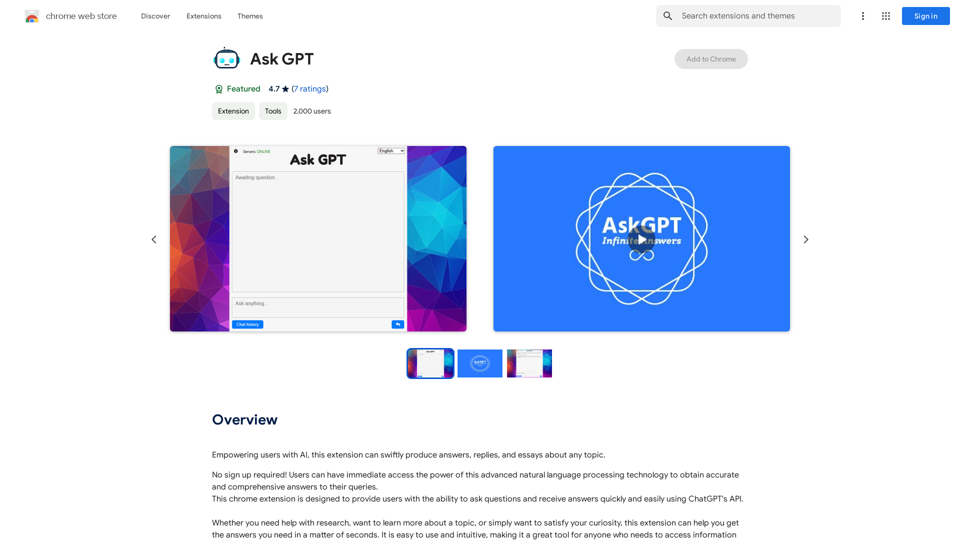
This extension empowers users with AI, swiftly producing answers, replies, and essays on any topic.
Visit Website
Please provide the text you want to translate into English.
Visit Website

Introduction

Ask GPT is a Chrome extension that harnesses the power of AI to provide users with quick and accurate answers, replies, and essays on any topic. This tool offers immediate access to advanced natural language processing technology without requiring sign-up, making it an efficient solution for various information needs.

Feature

Instant AI-Powered Responses

Ask GPT leverages cutting-edge natural language processing technology to generate fast and accurate answers to user queries, making it an invaluable tool for research, learning, and daily use.

User-Friendly Interface

The extension boasts an intuitive design, allowing users to access information quickly and efficiently without a steep learning curve.

No Sign-Up Required

Users can immediately start using Ask GPT's features without the need for registration or account creation, ensuring a seamless experience.

Free Access

Ask GPT is available as a free Chrome extension, with no subscription fees or hidden costs, making it accessible to all users.

Versatile Application

The tool caters to a wide range of users, including students, researchers, and anyone seeking quick access to information on various topics.

Chrome Integration

As a Chrome extension, Ask GPT seamlessly integrates with the popular web browser, providing convenient access to its features during online browsing sessions.

FAQ

How do I start using Ask GPT?

To begin using Ask GPT:

  1. Install the extension from the Chrome Web Store
  2. Type your question in the extension's interface
  3. Receive an AI-generated response

What types of questions can I ask?

Ask GPT can handle a wide range of topics, making it suitable for:

  • Research queries
  • General knowledge questions
  • Writing assistance
  • Information gathering on various subjects

Is the information provided by Ask GPT reliable?

Ask GPT utilizes advanced AI technology to generate responses. While it strives for accuracy, it's always recommended to verify important information from multiple sources.

Can Ask GPT be used for academic purposes?

Yes, Ask GPT can be a helpful tool for academic research and learning. However, students should follow their institution's guidelines on the use of AI-assisted tools for academic work.

Related Websites
Ads Society
View Detail

Ads Society

Ads Society

Ads Society is the best way to save ads from TikTok and Facebook Ads libraries with one click.

193.90 M
Doubao, Browser AI Assistant
View Detail

Doubao, Browser AI Assistant

Doubao, Browser AI Assistant

Beanbag is your AI assistant, residing in the browser sidebar, answering questions, summarizing translations of web pages, papers, and videos, and even helping you write emails quickly.

193.90 M
Faster GPT
View Detail

Faster GPT

Faster GPT

Excellent GPT assistant with useful extensions and powerful prompts. Use ChatGPT, Claude, Bard, Bing on any website.

193.90 M
super memory
View Detail

super memory

super memory

An extension for https://supermemory.ai - an AI hub for all your bookmarks.

193.90 M
Best AI Sound Effects Generator | Soundify.
View Detail

Best AI Sound Effects Generator | Soundify.

Best AI Sound Effects Generator | Soundify.

Discover the best AI sound effects generator for free. Generate unique sound effects for your videos and memes effortlessly with our AI tools!

2.37 K
Discord Translator
View Detail

Discord Translator

Discord Translator

Translate Messages in Discord ============================= What is the "Translate" feature in Discord? The "Translate" feature in Discord allows users to translate messages in real-time, making it easier for people who speak different languages to communicate with each other. How to use the "Translate" feature in Discord? #1. Enable the "Translate" feature To enable the "Translate" feature, you need to go to the "User Settings" and click on the "Language" tab. Then, toggle the switch next to "Translator" to the "On" position. #2. Set your preferred language After enabling the "Translate" feature, you need to set your preferred language. You can do this by clicking on the "Language" dropdown menu and selecting your preferred language from the list. #3. Translate messages Once you've set your preferred language, you can start translating messages. To translate a message, simply hover over the message and click on the "Translate" button that appears. #4. View translated messages After clicking the "Translate" button, the message will be translated into your preferred language. You can view the translated message below the original message. Benefits of the "Translate" feature in Discord The "Translate" feature in Discord has several benefits, including: * Improved communication: The "Translate" feature helps to break down language barriers, making it easier for people who speak different languages to communicate with each other. * Increased accessibility: The "Translate" feature makes Discord more accessible to people who may not speak the dominant language of a server or community. * Enhanced collaboration: The "Translate" feature enables people to collaborate more effectively, even if they speak different languages.

193.90 M
Know all, speak all.
View Detail

Know all, speak all.

Know all, speak all.

Seller Smart AI Assistant - The Scientific World for Cross-Border E-commerce People!

193.90 M
SliceX AI Tweet Analyzer
View Detail

SliceX AI Tweet Analyzer

SliceX AI Tweet Analyzer

Search for tweets and get real-time statistics: general sentiment, toxicity levels, and emotions expressed.

193.90 M