Open-source RightAI Tools Directory
  • Discover AI
  • Submit
  • Startup
  • Blog
Open-source RightAI Tools Directory
Discover the best AI tools of 2025 with the RightAI Tools Directory!

Friend Links

AI Anime GeneratorToolsApp AI

Support

Tap4
Privacy policyTerms & ConditionsContact Us
Loading...
loading...

Ask Sync

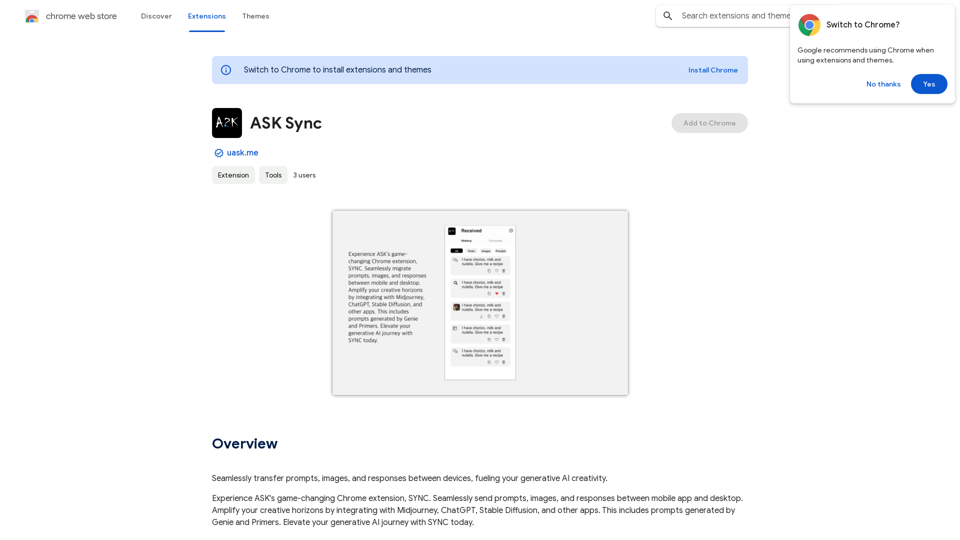
Effortlessly move your prompts, images, and responses between your devices, boosting your generative AI creativity.
Visit Website
Ask Sync
Visit Website

Introduction

SYNC is a Chrome extension developed by Absolute Disruption, LLC, designed to enhance generative AI creativity. It facilitates seamless transfer of prompts, images, and responses between devices, integrating with popular AI tools like Midjourney, ChatGPT, and Stable Diffusion. SYNC offers both free and subscription-based access, providing users with a platform to elevate their AI-driven creative processes.

Feature

Cross-Device Synchronization

SYNC enables users to transfer prompts, images, and responses seamlessly between devices, ensuring continuity in creative workflows.

AI Tool Integration

The extension integrates with leading generative AI applications:

  • Midjourney
  • ChatGPT
  • Stable Diffusion
  • Other compatible apps

Genie and Primers

SYNC incorporates Genie and Primers features for generating:

  • Prompts
  • Images

Subscription Benefits

While basic features are available to all users, subscribers gain:

  • Additional benefits
  • Extended access beyond free usage limits

User-Friendly Interface

SYNC is designed for ease of use, allowing both novice and experienced users to enhance their generative AI journey.

FAQ

What is SYNC?

SYNC is a Chrome extension created by Absolute Disruption, LLC that enables seamless transfer of prompts, images, and responses between devices, enhancing generative AI creativity.

How do I use SYNC?

Every user can utilize SYNC for transferring prompts, images, and responses between devices. Subscribing to the platform provides additional benefits and extended access beyond free usage limits.

What are the main benefits of using SYNC?

The key benefits include:

  1. Integration with Midjourney, ChatGPT, Stable Diffusion, and other AI apps
  2. Generation of prompts and images using Genie and Primers
  3. Seamless cross-device transfer of creative content
  4. Enhanced generative AI capabilities

Is there a cost associated with SYNC?

While the exact cost isn't specified, SYNC offers:

  • Free basic access
  • Subscription-based premium features with additional benefits and extended usage limits

Related Websites
Suinfy: AI YouTube Summarizer
View Detail

Suinfy: AI YouTube Summarizer

Suinfy: AI YouTube Summarizer

Save time by watching long videos. Generate key insights and subtitles.

193.90 M
Amolino Gmail Extension
View Detail

Amolino Gmail Extension

Amolino Gmail Extension

Amolino.AI is an AI-powered personal assistant that analyzes and learns from the emails you send and receive.

193.90 M
AI Group Tabs
View Detail

AI Group Tabs

AI Group Tabs

Group your tabs with AI This is a simple and effective way to organize your browser tabs using artificial intelligence. Here's how it works: * Select multiple tabs: Choose the tabs you want to group together. * AI grouping: Our AI will analyze the content of the selected tabs and suggest relevant groups. * Customize groups: You can adjust the suggested groups or create your own. * Save and access: Save your grouped tabs for easy access later. Let AI help you stay organized and productive!

193.90 M
EclecticIQ Threat Scout
View Detail

EclecticIQ Threat Scout

EclecticIQ Threat Scout

Turn information about online dangers into data that artificial intelligence can understand and use. This data will follow the STIX 2.1 standard, so you can easily include it in your security programs.

193.90 M
Claude to Notion

This is a guide on how to connect Claude, an AI assistant, with Notion, a note-taking and workspace app. 

Why connect Claude and Notion?

* Boost your productivity: Use Claude to generate content, summarize information, and automate tasks directly within Notion.
* Enhance your research: Ask Claude questions about your Notion notes and get insightful answers.
* Unlock new creative possibilities: Leverage Claude's generative capabilities to brainstorm ideas, write stories, or compose emails within your Notion workspace.

How to connect Claude and Notion:

1. API Keys: Obtain an API key for both Claude and Notion. 
2. Integration Tool: Explore integration tools like Zapier or Integromat to connect Claude and Notion. These platforms allow you to create workflows that trigger actions in one app based on events in the other.
3. Custom Development: For advanced users, you can develop your own custom integration using the Claude and Notion APIs. This gives you the most flexibility but requires coding knowledge.

Example Use Cases:

* Meeting Summarization: After a meeting, paste the transcript into Notion and use Claude to generate a concise summary.
* Content Creation:  Use Claude to write blog posts, articles, or social media captions directly within your Notion pages.
* Idea Generation: Brainstorm new ideas for projects or tasks by prompting Claude with specific questions within your Notion workspace.


Remember to review the documentation and terms of service for both Claude and Notion to ensure proper usage and security.
View Detail

Claude to Notion This is a guide on how to connect Claude, an AI assistant, with Notion, a note-taking and workspace app. Why connect Claude and Notion? * Boost your productivity: Use Claude to generate content, summarize information, and automate tasks directly within Notion. * Enhance your research: Ask Claude questions about your Notion notes and get insightful answers. * Unlock new creative possibilities: Leverage Claude's generative capabilities to brainstorm ideas, write stories, or compose emails within your Notion workspace. How to connect Claude and Notion: 1. API Keys: Obtain an API key for both Claude and Notion. 2. Integration Tool: Explore integration tools like Zapier or Integromat to connect Claude and Notion. These platforms allow you to create workflows that trigger actions in one app based on events in the other. 3. Custom Development: For advanced users, you can develop your own custom integration using the Claude and Notion APIs. This gives you the most flexibility but requires coding knowledge. Example Use Cases: * Meeting Summarization: After a meeting, paste the transcript into Notion and use Claude to generate a concise summary. * Content Creation: Use Claude to write blog posts, articles, or social media captions directly within your Notion pages. * Idea Generation: Brainstorm new ideas for projects or tasks by prompting Claude with specific questions within your Notion workspace. Remember to review the documentation and terms of service for both Claude and Notion to ensure proper usage and security.

Claude to Notion This is a guide on how to connect Claude, an AI assistant, with Notion, a note-taking and workspace app. Why connect Claude and Notion? * Boost your productivity: Use Claude to generate content, summarize information, and automate tasks directly within Notion. * Enhance your research: Ask Claude questions about your Notion notes and get insightful answers. * Unlock new creative possibilities: Leverage Claude's generative capabilities to brainstorm ideas, write stories, or compose emails within your Notion workspace. How to connect Claude and Notion: 1. API Keys: Obtain an API key for both Claude and Notion. 2. Integration Tool: Explore integration tools like Zapier or Integromat to connect Claude and Notion. These platforms allow you to create workflows that trigger actions in one app based on events in the other. 3. Custom Development: For advanced users, you can develop your own custom integration using the Claude and Notion APIs. This gives you the most flexibility but requires coding knowledge. Example Use Cases: * Meeting Summarization: After a meeting, paste the transcript into Notion and use Claude to generate a concise summary. * Content Creation: Use Claude to write blog posts, articles, or social media captions directly within your Notion pages. * Idea Generation: Brainstorm new ideas for projects or tasks by prompting Claude with specific questions within your Notion workspace. Remember to review the documentation and terms of service for both Claude and Notion to ensure proper usage and security.

Save Claude conversations to Notion with one click. Export Claude conversations.

193.90 M
Click
View Detail

Click

Click

Discover your core beliefs and put them into practice with your unique alignment score, powered by Google search data.

193.90 M
GetEm Jobs
View Detail

GetEm Jobs

GetEm Jobs

GetEm Jobs - AI-Powered Job Application Automation

193.90 M
Rivelio AI: Sentiment Analysis and Conversation Summary
View Detail

Rivelio AI: Sentiment Analysis and Conversation Summary

Rivelio AI: Sentiment Analysis and Conversation Summary

FREE AI-powered tool that analyzes customer feelings and summarizes conversations. It works with most popular customer service platforms.

193.90 M