Open-source RightAI Tools Directory
  • Discover AI
  • Submit
  • Startup
  • Blog
Open-source RightAI Tools Directory
Discover the best AI tools of 2025 with the RightAI Tools Directory!

Friend Links

AI Anime GeneratorToolsApp AI

Support

Tap4
Privacy policyTerms & ConditionsContact Us
Loading...
loading...

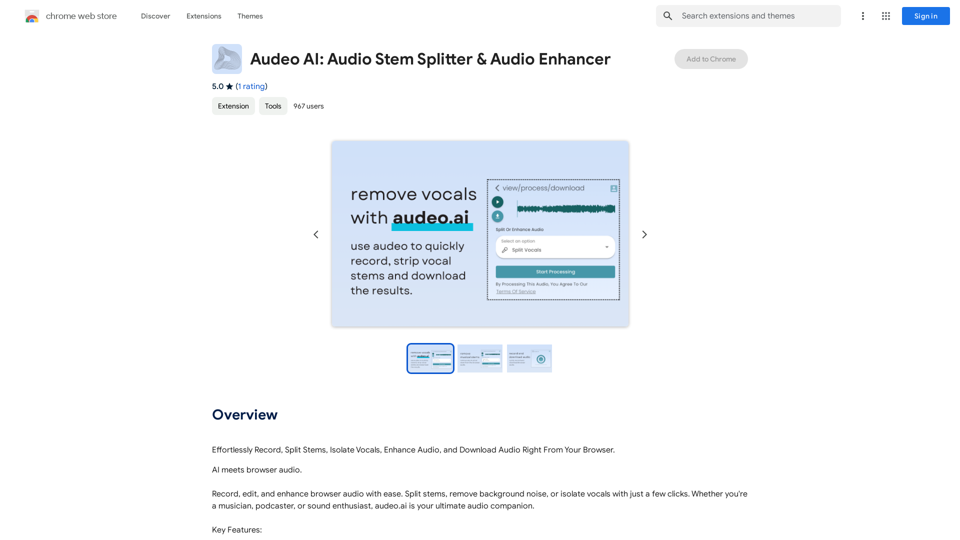
Audeo AI: Audio Stem Splitter & Audio Enhancer

Easily record, separate stems, isolate vocals, improve audio quality, and download audio directly from your web browser.
Visit Website
Audeo AI: Audio Stem Splitter & Audio Enhancer
Visit Website

Introduction

Audeo AI is an innovative AI-powered platform designed for audio processing and enhancement. It offers a comprehensive suite of tools for recording, stem splitting, vocal isolation, and audio enhancement, all accessible directly through your web browser. This user-friendly platform caters to both casual users and professionals seeking efficient audio manipulation solutions.

Feature

Browser-Based Audio Recording

Record high-quality audio directly from your browser without the need for additional software or technical expertise.

Advanced Stem Splitting

Easily separate audio tracks into individual components, allowing for precise editing and manipulation of specific elements within a recording.

Vocal Isolation Technology

Extract clean vocal tracks from mixed audio files, perfect for remixing, karaoke, or vocal-focused projects.

Noise Reduction Capabilities

Improve audio quality by removing unwanted background noise, resulting in cleaner, more professional-sounding recordings.

Intuitive Audio Editing Tools

Access a range of editing features to refine and enhance your audio files, suitable for various applications and skill levels.

High-Quality Audio Output

Download your edited and enhanced audio creations in high-quality formats, ready for immediate use or sharing.

Free Access Model

Enjoy basic features without subscription, with the option to upgrade for advanced functionalities and extended access.

Data Privacy Assurance

Prioritize user privacy by not using personal data for training purposes and offering account deletion options for complete data removal.

FAQ

What is the primary focus of Audeo AI?

Audeo AI is primarily an audio-focused platform, offering tools for recording, stem splitting, vocal isolation, and audio enhancement. It does not provide image generation or GPT model capabilities.

Is a subscription required to use Audeo AI?

No, basic features of Audeo AI are available to all users without subscription or payment. However, advanced features and extended access may require a subscription.

How can I maximize my use of Audeo AI?

To maximize your use of Audeo AI:

  1. Utilize the daily free uses of audio editing features
  2. Explore the range of AI-powered tools available
  3. Consider upgrading for access to advanced features if needed

Does Audeo AI use user data for training?

No, Audeo AI does not use user data for training purposes. They prioritize user privacy and allow account deletion for complete data removal.

Latest Traffic Insights

  • Monthly Visits

    193.90 M

  • Bounce Rate

    56.27%

  • Pages Per Visit

    2.71

  • Time on Site(s)

    115.91

  • Global Rank

    -

  • Country Rank

    -

Recent Visits

Traffic Sources

  • Social Media:
    0.48%
  • Paid Referrals:
    0.55%
  • Email:
    0.15%
  • Referrals:
    12.81%
  • Search Engines:
    16.21%
  • Direct:
    69.81%
More Data

Related Websites

Hottalks.ai - Enjoy the Ultimate AI Girlfriend Experience
View Detail

Hottalks.ai - Enjoy the Ultimate AI Girlfriend Experience

Hottalks.ai - Enjoy the Ultimate AI Girlfriend Experience

Your dream companion awaits! Uncensored AI chat experience with NSFW AI images. Experience adaptive AI-driven role-plays today.

40.45 K
Get ChatGPT for Free with Google

You can now access ChatGPT, a powerful language model, for free with Google. Here's how:

Method 1: Google Colab

* Open Google Colab ([colab.research.google.com](http://colab.research.google.com))
* Create a new notebook
* Install the `transformers` library by running `!pip install transformers`
* Import the `transformers` library and load the ChatGPT model using `from transformers import AutoModelForCausalLM, AutoTokenizer; model = AutoModelForCausalLM.from_pretrained('chatgpt'); tokenizer = AutoTokenizer.from_pretrained('chatgpt')`
* Use the model to generate text using `input_text = "Your input here"; inputs = tokenizer.encode_plus(input_text, return_tensors='pt', max_length=1024, padding='max_length', truncation=True); output = model(inputs['input_ids'], attention_mask=inputs['attention_mask']); print(tokenizer.decode(output.logits[0], skip_special_tokens=True))`

Method 2: Google Apps Script

* Open Google Apps Script ([script.google.com](http://script.google.com))
* Create a new project
* Install the `transformers` library by running `npm install transformers`
* Import the `transformers` library and load the ChatGPT model using `const { AutoModelForCausalLM, AutoTokenizer } = require('transformers'); const model = new AutoModelForCausalLM('chatgpt'); const tokenizer = new AutoTokenizer('chatgpt');`
* Use the model to generate text using `const inputText = "Your input here"; const inputs = tokenizer.encodePlus(inputText, { return_tensors: 'pt', max_length: 1024, padding: 'max_length', truncation: true }); const output = model(inputs.inputIds, inputs.attentionMask); console.log(tokenizer.decode(output.logits[0], { skipSpecialTokens: true }));`

Note: These methods require some technical knowledge and may have limitations compared to the original ChatGPT model.
View Detail

Get ChatGPT for Free with Google You can now access ChatGPT, a powerful language model, for free with Google. Here's how: Method 1: Google Colab * Open Google Colab ([colab.research.google.com](http://colab.research.google.com)) * Create a new notebook * Install the `transformers` library by running `!pip install transformers` * Import the `transformers` library and load the ChatGPT model using `from transformers import AutoModelForCausalLM, AutoTokenizer; model = AutoModelForCausalLM.from_pretrained('chatgpt'); tokenizer = AutoTokenizer.from_pretrained('chatgpt')` * Use the model to generate text using `input_text = "Your input here"; inputs = tokenizer.encode_plus(input_text, return_tensors='pt', max_length=1024, padding='max_length', truncation=True); output = model(inputs['input_ids'], attention_mask=inputs['attention_mask']); print(tokenizer.decode(output.logits[0], skip_special_tokens=True))` Method 2: Google Apps Script * Open Google Apps Script ([script.google.com](http://script.google.com)) * Create a new project * Install the `transformers` library by running `npm install transformers` * Import the `transformers` library and load the ChatGPT model using `const { AutoModelForCausalLM, AutoTokenizer } = require('transformers'); const model = new AutoModelForCausalLM('chatgpt'); const tokenizer = new AutoTokenizer('chatgpt');` * Use the model to generate text using `const inputText = "Your input here"; const inputs = tokenizer.encodePlus(inputText, { return_tensors: 'pt', max_length: 1024, padding: 'max_length', truncation: true }); const output = model(inputs.inputIds, inputs.attentionMask); console.log(tokenizer.decode(output.logits[0], { skipSpecialTokens: true }));` Note: These methods require some technical knowledge and may have limitations compared to the original ChatGPT model.

Get ChatGPT for Free with Google You can now access ChatGPT, a powerful language model, for free with Google. Here's how: Method 1: Google Colab * Open Google Colab ([colab.research.google.com](http://colab.research.google.com)) * Create a new notebook * Install the `transformers` library by running `!pip install transformers` * Import the `transformers` library and load the ChatGPT model using `from transformers import AutoModelForCausalLM, AutoTokenizer; model = AutoModelForCausalLM.from_pretrained('chatgpt'); tokenizer = AutoTokenizer.from_pretrained('chatgpt')` * Use the model to generate text using `input_text = "Your input here"; inputs = tokenizer.encode_plus(input_text, return_tensors='pt', max_length=1024, padding='max_length', truncation=True); output = model(inputs['input_ids'], attention_mask=inputs['attention_mask']); print(tokenizer.decode(output.logits[0], skip_special_tokens=True))` Method 2: Google Apps Script * Open Google Apps Script ([script.google.com](http://script.google.com)) * Create a new project * Install the `transformers` library by running `npm install transformers` * Import the `transformers` library and load the ChatGPT model using `const { AutoModelForCausalLM, AutoTokenizer } = require('transformers'); const model = new AutoModelForCausalLM('chatgpt'); const tokenizer = new AutoTokenizer('chatgpt');` * Use the model to generate text using `const inputText = "Your input here"; const inputs = tokenizer.encodePlus(inputText, { return_tensors: 'pt', max_length: 1024, padding: 'max_length', truncation: true }); const output = model(inputs.inputIds, inputs.attentionMask); console.log(tokenizer.decode(output.logits[0], { skipSpecialTokens: true }));` Note: These methods require some technical knowledge and may have limitations compared to the original ChatGPT model.

How to Add ChatGPT to All Google Searches ===================================================== Step 1: Create a Custom Search Engine -------------------------------------- * Go to the [Google Custom Search Engine](https://cse.google.com/) website and sign in with your Google account. * Click on the "New Search Engine" button. * Fill in the required information, such as the name and description of your search engine. * Click on the "Create" button. Step 2: Add ChatGPT to the Search Engine ----------------------------------------- * In the "Setup" tab, click on the "Add" button next to "Sites to search". * Enter the following URL: `https://chat.openai.com/` * Click on the "Add" button. Step 3: Configure the Search Engine -------------------------------------- * In the "Setup" tab, click on the "Edit" button next to "Search engine keywords". * Add the following keywords: `ChatGPT` * Click on the "Save" button. Step 4: Get the Search Engine Code ------------------------------------- * In the "Setup" tab, click on the "Get code" button. * Copy the HTML code provided. Step 5: Add the Search Engine to Your Browser ------------------------------------------------ * Open your browser and go to the "Settings" or "Options" page. * Look for the "Search engine" or "Default search engine" option. * Click on the "Add" or "Manage search engines" button. * Paste the HTML code you copied earlier. * Click on the "Add" or "Save" button. You're Done! =============== Now, whenever you search on Google, ChatGPT will be included in the search results. You can also use the custom search engine URL provided by Google to search directly.

193.90 M
Upword: AI Notes & Summarization Tool
View Detail

Upword: AI Notes & Summarization Tool

Upword: AI Notes & Summarization Tool

Get the key information from every webpage. Generate AI-powered notes and save time with Upword.

193.90 M
Clickque: search Google & your contacts
View Detail

Clickque: search Google & your contacts

Clickque: search Google & your contacts

Clickque Chrome Extension suggests your contacts for any Google™ search.

193.90 M
TubeInsights
View Detail

TubeInsights

TubeInsights

Boost your YouTube channel with automatic titles, descriptions, tags, and powerful media tools for effortless content improvement.

193.90 M
Smart AI Chat for WhatsApp Web
View Detail

Smart AI Chat for WhatsApp Web

Smart AI Chat for WhatsApp Web

Artificial Intelligence for Whatsapp with Chat GPT 4

193.90 M
Google for Jobs Structured Data by Tarta.ai
View Detail

Google for Jobs Structured Data by Tarta.ai

Google for Jobs Structured Data by Tarta.ai

SEO Job Postings Structured Data by Tarta.ai is an AI-driven platform that enhances job postings with structured data for improved search engine optimization.

193.90 M
super memory
View Detail

super memory

super memory

An extension for https://supermemory.ai - an AI hub for all your bookmarks.

193.90 M