Open-source RightAI Tools Directory
  • Discover AI
  • Submit
  • Startup
  • Blog
Open-source RightAI Tools Directory
Discover the best AI tools of 2025 with the RightAI Tools Directory!

Friend Links

AI Anime GeneratorToolsApp AI

Support

Tap4
Privacy policyTerms & ConditionsContact Us
Loading...
loading...

Cartifind Importer

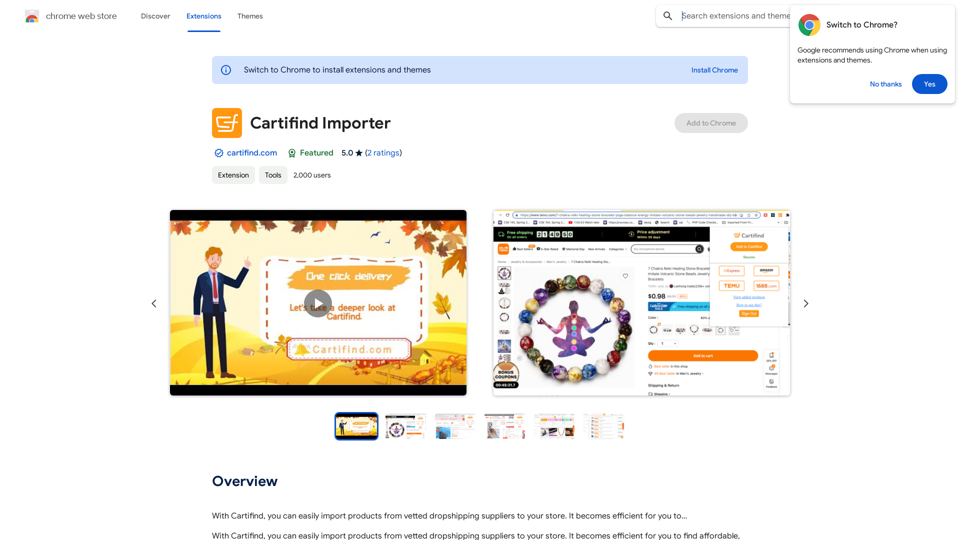
With Cartifind, you can easily import products from vetted dropshipping suppliers to your store. It becomes efficient for you to manage your product catalog, track inventory, and fulfill orders seamlessly.
Visit Website
Cartifind Importer
Visit Website

Introduction

Cartifind is an AI-driven platform offering access to a wide range of AI technologies, including ChatGPT, GPT-4o, and Dalle3. It provides tools for text generation, image understanding, and creation. The platform also features Cartifind Importer, an extension for efficient product importing and management in e-commerce.

Feature

Extensive AI Collection

  • Over 1000 AI tools across 200+ categories
  • Nearly 200,000 GPT models available
  • Free access to GPT-4o (20 times daily)
  • Dalle3 for image generation

User-Friendly Interface

  • Easy discovery of AI tools
  • Free AI tool submission
  • Seamless integration of GPT-4o and Dalle3

Cartifind Importer Extension

  • Product search from vetted suppliers
  • One-click import from popular e-commerce sites
  • AI-powered product description generation
  • Semi-automated order management and fulfillment

Privacy Protection

  • User data not used for training purposes
  • Option to delete account and remove all data

Subscription Options

  • Extended access beyond free usage limits
  • Affordable plans for heavy GPT-4o users

FAQ

What is Cartifind?

Cartifind is an AI-driven platform providing access to various AI technologies, including ChatGPT, GPT-4o for text generation and image understanding, and Dalle3 for image creation. It offers a vast array of AI tools for different needs.

How many AI tools does Cartifind offer?

Cartifind collects more than 1000 AI tools across 200+ categories, including nearly 200,000 GPT models for various applications in work, study, and everyday life.

How can I use Cartifind's services?

Every user can utilize GPT-4o for free up to 20 times a day on Cartifind. Subscribing to the platform grants additional benefits and extended access beyond the free usage limits.

What is Cartifind Importer?

Cartifind Importer is an extension that allows easy importing of products from vetted dropshipping suppliers to your store. It offers features like product search, one-click import, AI-generated product descriptions, and semi-automated order management.

How does Cartifind protect user privacy?

Cartifind highly values user privacy. Your data will not be used for any training purposes, and you can delete your account at any time, removing all your data.

Latest Traffic Insights

  • Monthly Visits

    193.90 M

  • Bounce Rate

    56.27%

  • Pages Per Visit

    2.71

  • Time on Site(s)

    115.91

  • Global Rank

    -

  • Country Rank

    -

Recent Visits

Traffic Sources

  • Social Media:
    0.48%
  • Paid Referrals:
    0.55%
  • Email:
    0.15%
  • Referrals:
    12.81%
  • Search Engines:
    16.21%
  • Direct:
    69.81%
More Data

Related Websites

DIDASKO BOT
View Detail

DIDASKO BOT

DIDASKO BOT

Instantaneous Responses to Modules 1-7, by Antonio Caprio [v5-6]

193.90 M
GPT-4 Vision Screenshot
View Detail

GPT-4 Vision Screenshot

GPT-4 Vision Screenshot

✨ Unleash the Power of Instant Knowledge with GPT-4 Vision Screenshot ✨ Dive into the future of on-screen search with GPT-4...

193.90 M
corrAI - Correct and Translate
View Detail

corrAI - Correct and Translate

corrAI - Correct and Translate

Allows you to correct or translate text without changing the meaning, style, and original ideas.

193.90 M
RightBlogger - AI for Bloggers
View Detail

RightBlogger - AI for Bloggers

RightBlogger - AI for Bloggers

AI-Powered Content Creation Tools for Bloggers

193.90 M
Fast translation
View Detail

Fast translation

Fast translation

Fast translation for full text and word highlighting.

193.90 M
RESIPT.AI
View Detail

RESIPT.AI

RESIPT.AI

Integrated solution for automated invoice management.

193.90 M
Aggregata: GPT to Earn
View Detail

Aggregata: GPT to Earn

Aggregata: GPT to Earn

Transform your conversations with Chat-GPT into valuable datasets for model training, and get rewarded with cryptocurrencies.

193.90 M
Claude to Notion

This is a guide on how to connect Claude, an AI assistant, with Notion, a note-taking and workspace app. 

Why connect Claude and Notion?

* Boost your productivity: Use Claude to generate content, summarize information, and automate tasks directly within Notion.
* Enhance your research: Ask Claude questions about your Notion notes and get insightful answers.
* Unlock new creative possibilities: Leverage Claude's generative capabilities to brainstorm ideas, write stories, or compose emails within your Notion workspace.

How to connect Claude and Notion:

1. API Keys: Obtain an API key for both Claude and Notion. 
2. Integration Tool: Explore integration tools like Zapier or Integromat to connect Claude and Notion. These platforms allow you to create workflows that trigger actions in one app based on events in the other.
3. Custom Development: For advanced users, you can develop your own custom integration using the Claude and Notion APIs. This gives you the most flexibility but requires coding knowledge.

Example Use Cases:

* Meeting Summarization: After a meeting, paste the transcript into Notion and use Claude to generate a concise summary.
* Content Creation:  Use Claude to write blog posts, articles, or social media captions directly within your Notion pages.
* Idea Generation: Brainstorm new ideas for projects or tasks by prompting Claude with specific questions within your Notion workspace.


Remember to review the documentation and terms of service for both Claude and Notion to ensure proper usage and security.
View Detail

Claude to Notion This is a guide on how to connect Claude, an AI assistant, with Notion, a note-taking and workspace app. Why connect Claude and Notion? * Boost your productivity: Use Claude to generate content, summarize information, and automate tasks directly within Notion. * Enhance your research: Ask Claude questions about your Notion notes and get insightful answers. * Unlock new creative possibilities: Leverage Claude's generative capabilities to brainstorm ideas, write stories, or compose emails within your Notion workspace. How to connect Claude and Notion: 1. API Keys: Obtain an API key for both Claude and Notion. 2. Integration Tool: Explore integration tools like Zapier or Integromat to connect Claude and Notion. These platforms allow you to create workflows that trigger actions in one app based on events in the other. 3. Custom Development: For advanced users, you can develop your own custom integration using the Claude and Notion APIs. This gives you the most flexibility but requires coding knowledge. Example Use Cases: * Meeting Summarization: After a meeting, paste the transcript into Notion and use Claude to generate a concise summary. * Content Creation: Use Claude to write blog posts, articles, or social media captions directly within your Notion pages. * Idea Generation: Brainstorm new ideas for projects or tasks by prompting Claude with specific questions within your Notion workspace. Remember to review the documentation and terms of service for both Claude and Notion to ensure proper usage and security.

Claude to Notion This is a guide on how to connect Claude, an AI assistant, with Notion, a note-taking and workspace app. Why connect Claude and Notion? * Boost your productivity: Use Claude to generate content, summarize information, and automate tasks directly within Notion. * Enhance your research: Ask Claude questions about your Notion notes and get insightful answers. * Unlock new creative possibilities: Leverage Claude's generative capabilities to brainstorm ideas, write stories, or compose emails within your Notion workspace. How to connect Claude and Notion: 1. API Keys: Obtain an API key for both Claude and Notion. 2. Integration Tool: Explore integration tools like Zapier or Integromat to connect Claude and Notion. These platforms allow you to create workflows that trigger actions in one app based on events in the other. 3. Custom Development: For advanced users, you can develop your own custom integration using the Claude and Notion APIs. This gives you the most flexibility but requires coding knowledge. Example Use Cases: * Meeting Summarization: After a meeting, paste the transcript into Notion and use Claude to generate a concise summary. * Content Creation: Use Claude to write blog posts, articles, or social media captions directly within your Notion pages. * Idea Generation: Brainstorm new ideas for projects or tasks by prompting Claude with specific questions within your Notion workspace. Remember to review the documentation and terms of service for both Claude and Notion to ensure proper usage and security.

Save Claude conversations to Notion with one click. Export Claude conversations.

193.90 M