Open-source RightAI Tools Directory
  • Discover AI
  • Submit
  • Startup
  • Blog
Open-source RightAI Tools Directory
Discover the best AI tools of 2025 with the RightAI Tools Directory!

Friend Links

AI Anime GeneratorToolsApp AI

Support

Tap4
Privacy policyTerms & ConditionsContact Us
Loading...
loading...

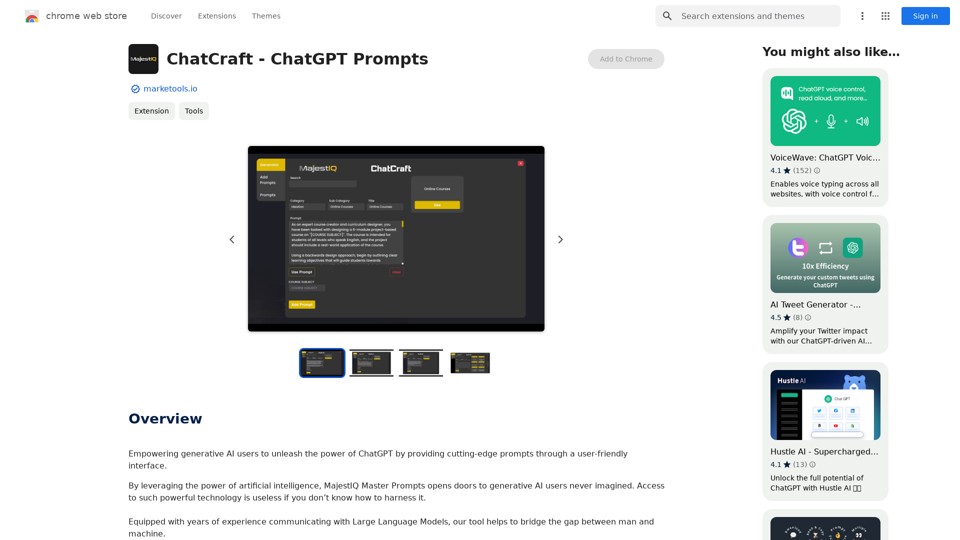
ChatCraft - ChatGPT Prompts What is ChatCraft? ChatCraft is a tool that helps you generate creative and effective prompts for ChatGPT. Why Use ChatCraft? * Unlock ChatGPT's Potential: Get more insightful, engaging, and surprising responses from ChatGPT. * Save Time and Effort: Quickly brainstorm and refine prompts without getting stuck. * Explore New Ideas: Discover unique angles and perspectives for your ChatGPT interactions. How to Use ChatCraft: 1. Choose a Category: Select from a range of categories like storytelling, code generation, dialogue writing, and more. 2. Provide Input: Give ChatCraft some context or keywords related to your desired outcome. 3. Generate Prompts: ChatCraft will generate a variety of tailored prompts for you to use with ChatGPT. 4. Experiment and Refine: Try out different prompts and see what works best for your needs. Let ChatCraft be your guide to unlocking the full potential of ChatGPT!

Helping users of generative AI get the most out of ChatGPT by giving them easy-to-use, advanced prompts.
Visit Website
ChatCraft - ChatGPT Prompts

What is ChatCraft?

ChatCraft is a tool that helps you generate creative and effective prompts for ChatGPT. 

Why Use ChatCraft?

* Unlock ChatGPT's Potential: Get more insightful, engaging, and surprising responses from ChatGPT.
* Save Time and Effort:  Quickly brainstorm and refine prompts without getting stuck.
* Explore New Ideas: Discover unique angles and perspectives for your ChatGPT interactions.

How to Use ChatCraft:

1. Choose a Category: Select from a range of categories like storytelling, code generation, dialogue writing, and more.
2. Provide Input:  Give ChatCraft some context or keywords related to your desired outcome.
3. Generate Prompts: ChatCraft will generate a variety of tailored prompts for you to use with ChatGPT.
4. Experiment and Refine:  Try out different prompts and see what works best for your needs.


Let ChatCraft be your guide to unlocking the full potential of ChatGPT!
Visit Website

Introduction

MajestIQ Master Prompts is a browser extension designed to enhance the capabilities of ChatGPT for generative AI users. It offers a user-friendly interface with advanced prompts across various domains, enabling users to maximize the potential of AI-powered conversations. The extension is free to install and use, making it accessible to a wide range of users looking to improve their productivity and creativity.

Feature

Diverse Prompt Categories

MajestIQ Master Prompts covers a wide range of categories, including:

  • DevOps
  • Ideation
  • Data Analysis
  • SEO
  • Writing
  • Productivity
  • Coding
  • Business Intelligence
  • Generative AI
  • And many more

Easy Installation and Usage

The extension can be quickly installed in your browser, providing seamless integration with OpenAI's ChatGPT page. Users can access powerful prompts with a simple click on the toolbar icon.

User-Friendly Interface

MajestIQ Master Prompts offers a straightforward interface, allowing users to choose the most suitable prompt for their needs and follow simple steps to generate desired outcomes.

Free Access

The extension is free to install and use, making it accessible to all ChatGPT users looking to enhance their AI-powered conversations.

FAQ

What is MajestIQ Master Prompts?

MajestIQ Master Prompts is a browser extension that provides cutting-edge prompts for ChatGPT, empowering users to unleash the full potential of generative AI through a user-friendly interface.

How do I use MajestIQ Master Prompts?

To use MajestIQ Master Prompts:

  1. Install the extension in your browser
  2. Navigate to OpenAI's ChatGPT page
  3. Click on the MajestIQ Master Prompts icon in the toolbar
  4. Choose a suitable prompt
  5. Follow the simple steps provided

Is MajestIQ Master Prompts free?

Yes, MajestIQ Master Prompts is free to install and use, making it accessible to all ChatGPT users looking to enhance their AI-powered conversations.

What types of prompts does MajestIQ Master Prompts offer?

MajestIQ Master Prompts offers a wide range of prompt categories, including DevOps, Ideation, Data Analysis, SEO, Writing, Productivity, Coding, Business Intelligence, Generative AI, and many more.

Related Websites
Welcome - LessonShip
View Detail

Welcome - LessonShip

Welcome - LessonShip

LessonShip is an AI-powered LMS that allows teachers to quickly generate classroom instructional materials with our easy-to-use forms.

0
resmate.io: Speed up your job hunt
View Detail

resmate.io: Speed up your job hunt

resmate.io: Speed up your job hunt

Job seekers use resmate.io to organize and optimize their applications with our AI tools.

193.90 M
Claude to Notion

This is a guide on how to connect Claude, an AI assistant, with Notion, a note-taking and workspace app. 

Why connect Claude and Notion?

* Boost your productivity: Use Claude to generate content, summarize information, and automate tasks directly within Notion.
* Enhance your research: Ask Claude questions about your Notion notes and get insightful answers.
* Unlock new creative possibilities: Leverage Claude's generative capabilities to brainstorm ideas, write stories, or compose emails within your Notion workspace.

How to connect Claude and Notion:

1. API Keys: Obtain an API key for both Claude and Notion. 
2. Integration Tool: Explore integration tools like Zapier or Integromat to connect Claude and Notion. These platforms allow you to create workflows that trigger actions in one app based on events in the other.
3. Custom Development: For advanced users, you can develop your own custom integration using the Claude and Notion APIs. This gives you the most flexibility but requires coding knowledge.

Example Use Cases:

* Meeting Summarization: After a meeting, paste the transcript into Notion and use Claude to generate a concise summary.
* Content Creation:  Use Claude to write blog posts, articles, or social media captions directly within your Notion pages.
* Idea Generation: Brainstorm new ideas for projects or tasks by prompting Claude with specific questions within your Notion workspace.


Remember to review the documentation and terms of service for both Claude and Notion to ensure proper usage and security.
View Detail

Claude to Notion This is a guide on how to connect Claude, an AI assistant, with Notion, a note-taking and workspace app. Why connect Claude and Notion? * Boost your productivity: Use Claude to generate content, summarize information, and automate tasks directly within Notion. * Enhance your research: Ask Claude questions about your Notion notes and get insightful answers. * Unlock new creative possibilities: Leverage Claude's generative capabilities to brainstorm ideas, write stories, or compose emails within your Notion workspace. How to connect Claude and Notion: 1. API Keys: Obtain an API key for both Claude and Notion. 2. Integration Tool: Explore integration tools like Zapier or Integromat to connect Claude and Notion. These platforms allow you to create workflows that trigger actions in one app based on events in the other. 3. Custom Development: For advanced users, you can develop your own custom integration using the Claude and Notion APIs. This gives you the most flexibility but requires coding knowledge. Example Use Cases: * Meeting Summarization: After a meeting, paste the transcript into Notion and use Claude to generate a concise summary. * Content Creation: Use Claude to write blog posts, articles, or social media captions directly within your Notion pages. * Idea Generation: Brainstorm new ideas for projects or tasks by prompting Claude with specific questions within your Notion workspace. Remember to review the documentation and terms of service for both Claude and Notion to ensure proper usage and security.

Claude to Notion This is a guide on how to connect Claude, an AI assistant, with Notion, a note-taking and workspace app. Why connect Claude and Notion? * Boost your productivity: Use Claude to generate content, summarize information, and automate tasks directly within Notion. * Enhance your research: Ask Claude questions about your Notion notes and get insightful answers. * Unlock new creative possibilities: Leverage Claude's generative capabilities to brainstorm ideas, write stories, or compose emails within your Notion workspace. How to connect Claude and Notion: 1. API Keys: Obtain an API key for both Claude and Notion. 2. Integration Tool: Explore integration tools like Zapier or Integromat to connect Claude and Notion. These platforms allow you to create workflows that trigger actions in one app based on events in the other. 3. Custom Development: For advanced users, you can develop your own custom integration using the Claude and Notion APIs. This gives you the most flexibility but requires coding knowledge. Example Use Cases: * Meeting Summarization: After a meeting, paste the transcript into Notion and use Claude to generate a concise summary. * Content Creation: Use Claude to write blog posts, articles, or social media captions directly within your Notion pages. * Idea Generation: Brainstorm new ideas for projects or tasks by prompting Claude with specific questions within your Notion workspace. Remember to review the documentation and terms of service for both Claude and Notion to ensure proper usage and security.

Save Claude conversations to Notion with one click. Export Claude conversations.

193.90 M
AMISSU
View Detail

AMISSU

AMISSU

AMIS Schedule Unitizer: Automatic Schedule Planner for University Class Enrollment

193.90 M
SpeechGeneratorAI - Write Speeches in Seconds with AI
View Detail

SpeechGeneratorAI - Write Speeches in Seconds with AI

SpeechGeneratorAI - Write Speeches in Seconds with AI

Need to write a speech instantly? Use our free AI speech writer to create a speech for any occasion in seconds!

63.54 K
LocalhostAI - Your AI Assistant for Chrome and Gemini Nano
View Detail

LocalhostAI - Your AI Assistant for Chrome and Gemini Nano

LocalhostAI - Your AI Assistant for Chrome and Gemini Nano

LocalhostAI: Your AI assistant designed to work seamlessly with Chrome and Gemini Nano. Enhance your productivity with advanced AI models.

0
Fusion Analyzer: Smart Buying Made Simple
View Detail

Fusion Analyzer: Smart Buying Made Simple

Fusion Analyzer: Smart Buying Made Simple

Fusion Analyzer: Smart Buying Made Easy

193.90 M
Octopuses VAX (Virtual Assistant Experience)
View Detail

Octopuses VAX (Virtual Assistant Experience)

Octopuses VAX (Virtual Assistant Experience)

Octopi.health: Revolutionizing healthcare with computer vision, language processing, and Motion Assessment.

193.90 M