Open-source RightAI Tools Directory
  • Discover AI
  • Submit
  • Startup
  • Blog
Open-source RightAI Tools Directory
Discover the best AI tools of 2025 with the RightAI Tools Directory!

Friend Links

AI Anime GeneratorToolsApp AI

Support

Tap4
Privacy policyTerms & ConditionsContact Us
Loading...
loading...

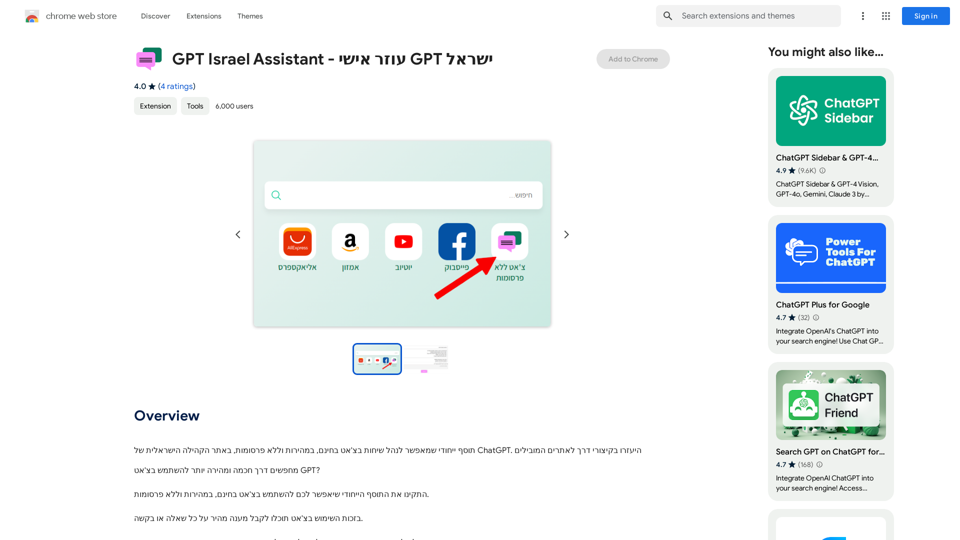
GPT Israel Assistant - Personal GPT Assistant Israel

Unique add-on that enables managing conversations in chat for free, quickly, and without ads, on the Israeli community website of ChatGPT. Take advantage of shortcuts to leading websites.
Visit Website
GPT Israel Assistant - Personal GPT Assistant Israel
Visit Website

Introduction

GPT Israel Assistant is an AI-driven platform offering access to a wide range of AI technologies. It provides users with tools like ChatGPT, GPT-4o for text generation and image understanding, and Dalle3 for image creation. The platform boasts a collection of over 1000 AI tools across 200+ categories, making it easy for users to discover and utilize AI capabilities for various needs.

Feature

Extensive AI Tool Collection

  • Over 1000 AI tools available
  • More than 200 categories to choose from
  • Nearly 200,000 GPT models for diverse applications

User-Friendly Discovery

  • Easy-to-use interface for finding AI tools
  • Free AI tools submission feature

Free Daily Usage

  • 20 free GPT-4o conversations per day
  • Access to Dalle3's text-to-image generation

Subscription Benefits

  • Extended access beyond free usage limits
  • Affordable subscription options for heavy users

Privacy Protection

  • User data not used for training purposes
  • Option to delete account and remove all data

Versatile Applications

  • Support for work, study, and everyday life tasks
  • Wide variety of AI-powered tools available

FAQ

How do I use GPT Israel Assistant?

Every user can utilize GPT-4o for free up to 20 times a day. Subscribing to the platform grants additional benefits and extended access beyond the free usage limits.

Can I generate images using GPT Israel Assistant?

Yes, users can create images using Dalle3's text-to-image generation capability, sharing credits with GPT-4o for a seamless creative experience.

How many GPTs are available on GPT Israel Assistant?

GPT Israel Assistant offers nearly 200,000 GPT models for a wide variety of applications in work, study, and everyday life.

Will my information be used for training data?

No, user privacy is highly valued. Your data will not be used for any training purposes, and you can delete your account and all associated data at any time.

When would I need a GPT Israel Assistant subscription?

If the 20 free GPT-4o conversations per day do not meet your needs and you heavily rely on GPT-4o, subscribing to the affordable products is recommended.

What are some helpful tips for using GPT Israel Assistant?

  • Utilize the free AI tools submission feature to discover new AI tools easily
  • Leverage the daily free uses of GPT-4o and Dalle's image generation
  • Explore the vast range of AI-powered tools to support various tasks in work, study, and everyday life

Related Websites
Youdao Smart Translation
View Detail

Youdao Smart Translation

Youdao Smart Translation

【Youdao Lingdong Translation】Using Youdao's large translation model, the top choice for immersive web translation tools! Real-time contrast translation: Turn any web page into a contrast. Image translation: Easily extract text from images. Instant translation input box: Enter Chinese and easily convert to English.

193.90 M
AI Christmas Photo Generator | The Best Christmas AI Generator
View Detail

AI Christmas Photo Generator | The Best Christmas AI Generator

AI Christmas Photo Generator | The Best Christmas AI Generator

Don't wait in line for your Christmas photos this holiday season. Just upload a couple of selfies and let the holiday magic begin 💫

295
PhotoRater - AI-powered photo rating app for any occasion.
View Detail

PhotoRater - AI-powered photo rating app for any occasion.

PhotoRater - AI-powered photo rating app for any occasion.

Discover the secret to looking your best on any occasion with PhotoRater, the ultimate AI photo rater. Whether you need an image rater for fashion advice or a photo rating AI to boost your social media presence, PhotoRater has you covered.

15.79 K
Midjourney API - Automate Midjourney AI Image Generation 

This document outlines how to use the Midjourney API to automate the generation of AI images. 

What is the Midjourney API?

The Midjourney API allows developers to programmatically interact with the powerful Midjourney AI model. This means you can generate images, control various parameters, and integrate Midjourney into your own applications and workflows.

Why Use the Midjourney API?

* Automation: Automate the creation of images for various purposes, such as marketing materials, website content, or research projects.
* Customization: Fine-tune image generation by controlling parameters like aspect ratio, style, and seed values.
* Integration: Seamlessly integrate Midjourney's capabilities into your existing tools and platforms.

Getting Started

1. Sign Up for a Midjourney Account: You'll need a Midjourney account to access the API.

2. Obtain an API Key: Once you have an account, you can generate an API key from your account settings.

3. Choose a Programming Language: The Midjourney API supports various programming languages, including Python, JavaScript, and Go.

4. Install the API Client: Install the appropriate API client library for your chosen language.

5. Start Generating Images: Use the API client to send image generation requests to the Midjourney server.

Example (Python):

```python
import midjourney

Replace with your actual API key
api_key = "YOUR_API_KEY"

Create a Midjourney client
client = midjourney.Client(api_key=api_key)

Generate an image
response = client.create_image(prompt="A cat wearing a hat", num_images=1)

Print the image URL
print(response.images[0].url)
```

Documentation and Resources

For detailed information about the Midjourney API, including available endpoints, parameters, and examples, please refer to the official documentation: [https://docs.midjourney.com/](https://docs.midjourney.com/)
View Detail

Midjourney API - Automate Midjourney AI Image Generation This document outlines how to use the Midjourney API to automate the generation of AI images. What is the Midjourney API? The Midjourney API allows developers to programmatically interact with the powerful Midjourney AI model. This means you can generate images, control various parameters, and integrate Midjourney into your own applications and workflows. Why Use the Midjourney API? * Automation: Automate the creation of images for various purposes, such as marketing materials, website content, or research projects. * Customization: Fine-tune image generation by controlling parameters like aspect ratio, style, and seed values. * Integration: Seamlessly integrate Midjourney's capabilities into your existing tools and platforms. Getting Started 1. Sign Up for a Midjourney Account: You'll need a Midjourney account to access the API. 2. Obtain an API Key: Once you have an account, you can generate an API key from your account settings. 3. Choose a Programming Language: The Midjourney API supports various programming languages, including Python, JavaScript, and Go. 4. Install the API Client: Install the appropriate API client library for your chosen language. 5. Start Generating Images: Use the API client to send image generation requests to the Midjourney server. Example (Python): ```python import midjourney Replace with your actual API key api_key = "YOUR_API_KEY" Create a Midjourney client client = midjourney.Client(api_key=api_key) Generate an image response = client.create_image(prompt="A cat wearing a hat", num_images=1) Print the image URL print(response.images[0].url) ``` Documentation and Resources For detailed information about the Midjourney API, including available endpoints, parameters, and examples, please refer to the official documentation: [https://docs.midjourney.com/](https://docs.midjourney.com/)

Midjourney API - Automate Midjourney AI Image Generation This document outlines how to use the Midjourney API to automate the generation of AI images. What is the Midjourney API? The Midjourney API allows developers to programmatically interact with the powerful Midjourney AI model. This means you can generate images, control various parameters, and integrate Midjourney into your own applications and workflows. Why Use the Midjourney API? * Automation: Automate the creation of images for various purposes, such as marketing materials, website content, or research projects. * Customization: Fine-tune image generation by controlling parameters like aspect ratio, style, and seed values. * Integration: Seamlessly integrate Midjourney's capabilities into your existing tools and platforms. Getting Started 1. Sign Up for a Midjourney Account: You'll need a Midjourney account to access the API. 2. Obtain an API Key: Once you have an account, you can generate an API key from your account settings. 3. Choose a Programming Language: The Midjourney API supports various programming languages, including Python, JavaScript, and Go. 4. Install the API Client: Install the appropriate API client library for your chosen language. 5. Start Generating Images: Use the API client to send image generation requests to the Midjourney server. Example (Python): ```python import midjourney Replace with your actual API key api_key = "YOUR_API_KEY" Create a Midjourney client client = midjourney.Client(api_key=api_key) Generate an image response = client.create_image(prompt="A cat wearing a hat", num_images=1) Print the image URL print(response.images[0].url) ``` Documentation and Resources For detailed information about the Midjourney API, including available endpoints, parameters, and examples, please refer to the official documentation: [https://docs.midjourney.com/](https://docs.midjourney.com/)

Easily integrate Midjourney AI into your apps using the Midjourney API. Start creating AI images automatically today!

0
Red Panda AI | A New Future of AI Image Generation
View Detail

Red Panda AI | A New Future of AI Image Generation

Red Panda AI | A New Future of AI Image Generation

Transform your designs with our professional AI red panda image generator. Create stunning artwork with perfect text placement, vector support, and consistent style. Start creating for free.

688
Supportbot Pro - AI-powered customer support
View Detail

Supportbot Pro - AI-powered customer support

Supportbot Pro - AI-powered customer support

The AI-powered chatbot which leverages your company data to answer customer questions and generate leads.

0
AI Professional Headshot Pro on the App Store
View Detail

AI Professional Headshot Pro on the App Store

AI Professional Headshot Pro on the App Store

Introducing AI Professional Headshot Pro, the ultimate AI headshot generator designed to create stunning AI headshots and business photos effortlessly.

124.77 M
ChatGPT-Powered Google Search
View Detail

ChatGPT-Powered Google Search

ChatGPT-Powered Google Search

Improve your Google searches with ChatGPT. Receive AI-powered insights along with your search results.

193.90 M