Open-source RightAI Tools Directory
  • Discover AI
  • Submit
  • Startup
  • Blog
Open-source RightAI Tools Directory
Discover the best AI tools of 2025 with the RightAI Tools Directory!

Friend Links

AI Anime GeneratorToolsApp AI

Support

Tap4
Privacy policyTerms & ConditionsContact Us
Loading...
loading...

Reva - Review Management for Hotels & Rentals

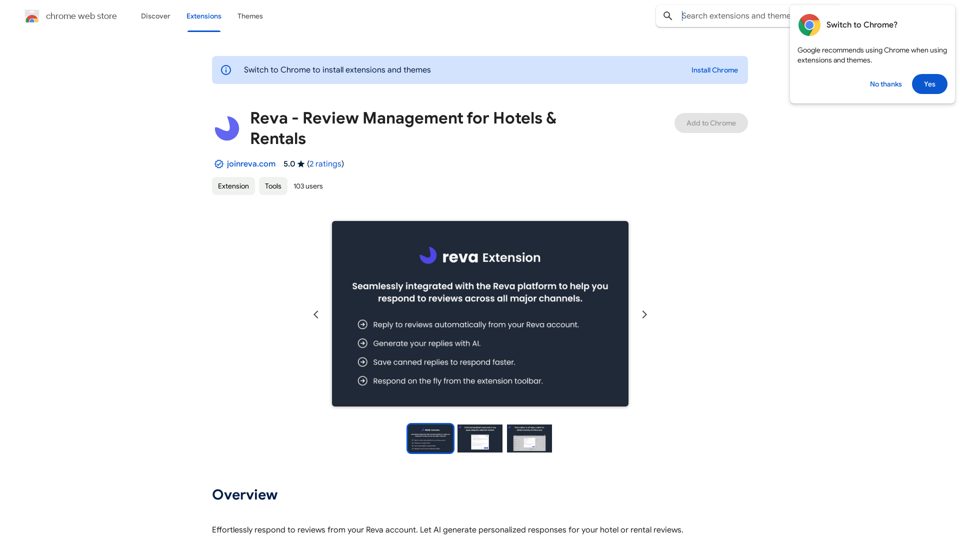
Easily reply to reviews from your Reva account. Let AI create custom responses for your hotel or rental reviews.
Visit Website
Reva - Review Management for Hotels & Rentals
Visit Website

Introduction

Reva is a comprehensive review management platform designed for hotel and rental owners. It leverages AI technology to generate personalized responses to guest reviews, streamlining the process of managing feedback across multiple online travel agencies (OTAs). The platform offers a centralized system for review management, coupled with a browser extension that enhances functionality and ease of use.

Feature

AI-Powered Review Responses

Reva utilizes artificial intelligence to craft personalized responses to hotel or rental reviews. This feature saves time for property owners while maintaining authenticity in their communications with guests.

Centralized Review Management

The platform aggregates reviews from various channels, providing a consolidated view of guest feedback. This centralization allows for more efficient management and response to reviews across different platforms.

One-Click Publishing

With the Reva Extension, users can reply to reviews within the Reva platform and automatically publish them to popular OTAs such as Airbnb, VRBO, and Booking.com.

Automatic Account Updates

Once a review is replied to, the Reva account is automatically updated, ensuring that all information is current and synchronized across platforms.

On-the-Fly Review Generation

For less common channels, the Reva Extension allows users to generate review replies instantly and copy them with ease, streamlining the review management process.

Multi-Channel Support

Reva supports multiple online travel agencies, making it a versatile tool for property owners who list their accommodations on various platforms.

FAQ

How does Reva's AI-powered review response work?

Reva's AI utilizes natural language processing to generate personalized responses for hotel or rental reviews. This technology analyzes the content of the review and creates a tailored response that maintains authenticity while saving time for property owners.

Can I use Reva's review management platform without the extension?

Yes, you can use Reva's review management platform without the extension. However, the extension provides additional features and functionality, such as one-click publishing to OTAs and on-the-fly review generation, which enhance the overall user experience.

How do I get started with Reva's review management platform?

To begin using Reva's review management platform, you need to sign up for a Reva account and follow the onboarding process. Once your account is set up, you can start managing your reviews and utilizing the AI-powered response generation features.

Related Websites
Welcome to enso
View Detail

Welcome to enso

Welcome to enso

At enso, you can get AI-powered digital services for most of your essential needs at a much lower price.

0
Face Swap - AI Face Swapper
View Detail

Face Swap - AI Face Swapper

Face Swap - AI Face Swapper

Upload photos or videos to swap the face. Switch any face on photo and video. Generate magic AI face swap photos and videos.

193.90 M
Profile to Resume - Rezi.ai
View Detail

Profile to Resume - Rezi.ai

Profile to Resume - Rezi.ai

Use your LinkedIn Profile to create an ATS-optimized resume in seconds.

193.90 M
PlutoAI - AI Bookmarks and Tabs Manager
View Detail

PlutoAI - AI Bookmarks and Tabs Manager

PlutoAI - AI Bookmarks and Tabs Manager

An AI-powered bookmarking assistant that lets you quickly save, highlight, add notes to, and find web pages.

193.90 M
Team Sync
View Detail

Team Sync

Team Sync

⭐ Your AI work assistant can answer any work questions you have. It integrates with collaborative work, work message notifications, to optimize your workflow and boost your productivity. ⭐ How to install Simply go to the Chrome Web Store, search for the extension, and click "Add to Chrome." Once installed, the extension will be available in your toolbar for easy access.

193.90 M
Speech to Text using cantonese.ai
View Detail

Speech to Text using cantonese.ai

Speech to Text using cantonese.ai

The extension lets you turn WhatsApp audio messages into text, saving you time and boosting your productivity!

193.90 M
Click
View Detail

Click

Click

Discover your core beliefs and put them into practice with your unique alignment score, powered by Google search data.

193.90 M
Open ChatGPT in a New Tab

You can open ChatGPT in a new tab by following these steps:

#Method 1: Using the Browser's Context Menu

1. Right-click on the ChatGPT link or button.
2. Select "Open in new tab" or "Open link in new tab" from the context menu.

#Method 2: Using the Keyboard Shortcut

1. Press `Ctrl + Click` (Windows/Linux) or `Cmd + Click` (Mac) on the ChatGPT link or button.

#Method 3: Using the Browser's Toolbar

1. Click on the ChatGPT link or button while holding down the `Ctrl` key (Windows/Linux) or `Cmd` key (Mac).
2. Release the key after the new tab is opened.

By following these methods, you can easily open ChatGPT in a new tab and start chatting without leaving your current page.
View Detail

Open ChatGPT in a New Tab You can open ChatGPT in a new tab by following these steps: #Method 1: Using the Browser's Context Menu 1. Right-click on the ChatGPT link or button. 2. Select "Open in new tab" or "Open link in new tab" from the context menu. #Method 2: Using the Keyboard Shortcut 1. Press `Ctrl + Click` (Windows/Linux) or `Cmd + Click` (Mac) on the ChatGPT link or button. #Method 3: Using the Browser's Toolbar 1. Click on the ChatGPT link or button while holding down the `Ctrl` key (Windows/Linux) or `Cmd` key (Mac). 2. Release the key after the new tab is opened. By following these methods, you can easily open ChatGPT in a new tab and start chatting without leaving your current page.

Open ChatGPT in a New Tab You can open ChatGPT in a new tab by following these steps: #Method 1: Using the Browser's Context Menu 1. Right-click on the ChatGPT link or button. 2. Select "Open in new tab" or "Open link in new tab" from the context menu. #Method 2: Using the Keyboard Shortcut 1. Press `Ctrl + Click` (Windows/Linux) or `Cmd + Click` (Mac) on the ChatGPT link or button. #Method 3: Using the Browser's Toolbar 1. Click on the ChatGPT link or button while holding down the `Ctrl` key (Windows/Linux) or `Cmd` key (Mac). 2. Release the key after the new tab is opened. By following these methods, you can easily open ChatGPT in a new tab and start chatting without leaving your current page.

New Tab with Quick ChatGPT Access

193.90 M