Open-source RightAI Tools Directory
  • Discover AI
  • Submit
  • Startup
  • Blog
Open-source RightAI Tools Directory
Discover the best AI tools of 2025 with the RightAI Tools Directory!

Friend Links

AI Anime GeneratorToolsApp AI

Support

Tap4
Privacy policyTerms & ConditionsContact Us
Loading...
loading...

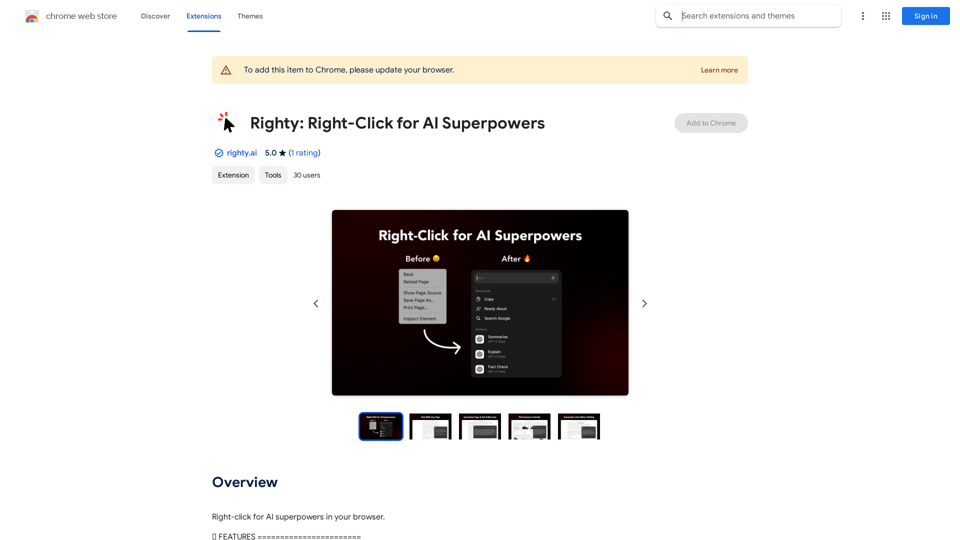
Righty: Right-Click for AI Superpowers

Right-click to unlock AI abilities in your web browser.
Visit Website
Righty: Right-Click for AI Superpowers
Visit Website

Introduction

Righty is a Chrome extension that enhances your browsing experience with AI-powered tools. It adds intelligent features to your right-click context menu, allowing for more efficient and insightful interactions with web content. Righty offers various functionalities such as chatting with webpages, explaining text, reverse image search, summarizing content, and providing link previews.

Feature

Chat with Page

Engage in dynamic conversations with any webpage for deeper understanding and insights.

Explain the Word or Text

Select any text to receive clear, concise explanations or definitions from the AI.

Reverse Image Search

Discover more about images with an easy right-click reverse search feature.

Summarize Text

Instantly condense long articles or documents into digestible summaries.

Link Summarization

Get brief overviews of link content without opening them by right-clicking on any link.

Privacy and Security

Righty prioritizes user privacy and security, ensuring confidentiality of online activities.

Browser Compatibility

Currently compatible with Google Chrome.

Pricing Options

Offers both a free version with limited features and a premium subscription with additional benefits.

FAQ

How do I use Righty's AI-powered tools?

Simply right-click on a webpage or image, and select the desired tool from the context menu.

Is my data safe with Righty?

Yes, Righty prioritizes your privacy and security, ensuring your online activities remain confidential and protected.

What are some helpful tips for using Righty?

  • Use Righty's AI-powered tools to streamline your research and learning process
  • Take advantage of the extension's ability to summarize text and provide explanations for complex concepts
  • Experiment with the reverse image search feature to discover new and interesting content

Latest Traffic Insights

  • Monthly Visits

    193.90 M

  • Bounce Rate

    56.27%

  • Pages Per Visit

    2.71

  • Time on Site(s)

    115.91

  • Global Rank

    -

  • Country Rank

    -

Recent Visits

Traffic Sources

  • Social Media:
    0.48%
  • Paid Referrals:
    0.55%
  • Email:
    0.15%
  • Referrals:
    12.81%
  • Search Engines:
    16.21%
  • Direct:
    69.81%
More Data

Related Websites

Gening AI - Chat with AI Characters Online
View Detail

Gening AI - Chat with AI Characters Online

Gening AI - Chat with AI Characters Online

Gening AI - Chat with AI Characters Online

327.68 K
Calorielens: Calorie Counter in the App Store
View Detail

Calorielens: Calorie Counter in the App Store

Calorielens: Calorie Counter in the App Store

CalorieLens is your ultimate companion for calorie tracking. With just a simple snapshot, this AI-powered app accurately analyzes the calories in…

124.77 M
Magic Cal
View Detail

Magic Cal

Magic Cal

Make events with AI -- ChatGPT in Google Calendar This is a guide on how to use ChatGPT to create events in your Google Calendar. 1. Open ChatGPT and Google Calendar: * Start a new conversation in ChatGPT. * Open your Google Calendar in a separate tab or window. 2. Tell ChatGPT what you want to schedule: * Be specific about the event details, including: * Event name: (e.g., "Team Meeting") * Date and time: (e.g., "Next Tuesday at 2:00 PM") * Duration: (e.g., "1 hour") * Location: (e.g., "Conference Room") * Description: (optional, add any relevant details) 3. ChatGPT will generate a calendar event string: * ChatGPT will provide you with a text string that includes all the event details in a format suitable for Google Calendar. 4. Copy and paste the event string into Google Calendar: * Click on the "Create" button in Google Calendar. * Paste the event string generated by ChatGPT into the event details field. * Adjust any details if needed. 5. Save the event: * Click "Save" to add the event to your Google Calendar. Let me know if you have any other questions.

193.90 M
Fast AI
View Detail

Fast AI

Fast AI

Easy to choose AI tools for your everyday use.

193.90 M
Xmate: AI Girlfriend for Adults & Porn Chat & More
View Detail

Xmate: AI Girlfriend for Adults & Porn Chat & More

Xmate: AI Girlfriend for Adults & Porn Chat & More

Experience the ultimate thrill with NSFW Character AI Roleplay, where boundaries disappear. Engage in unrestricted AI conversations and uncensored NSFW AI interactions, and even request images from your virtual partner.

886
AI Blog Writer - Create Humanized, SEO-Optimized Blogs | QuickCreator
View Detail

AI Blog Writer - Create Humanized, SEO-Optimized Blogs | QuickCreator

AI Blog Writer - Create Humanized, SEO-Optimized Blogs | QuickCreator

Elevate your content with AI Blog Writer by QuickCreator. Generate engaging, human-like blog posts using real-time data and verified citations. Try it for Free.

97.34 K
Raycast Companion
View Detail

Raycast Companion

Raycast Companion

A browser extension to provide more context to Raycast

193.90 M
Pluto.AI on the App Store
View Detail

Pluto.AI on the App Store

Pluto.AI on the App Store

Pluto.AI is your ultimate AI teacher, offering a unique blend of knowledge and assistance. With its cutting-edge technology, Pluto.AI stands out as your go-to assistant for learning and growth.

124.77 M