Open-source RightAI Tools Directory
  • Discover AI
  • Submit
  • Startup
  • Blog
Open-source RightAI Tools Directory
Discover the best AI tools of 2025 with the RightAI Tools Directory!

Friend Links

AI Anime GeneratorToolsApp AI

Support

Tap4
Privacy policyTerms & ConditionsContact Us
Loading...
loading...

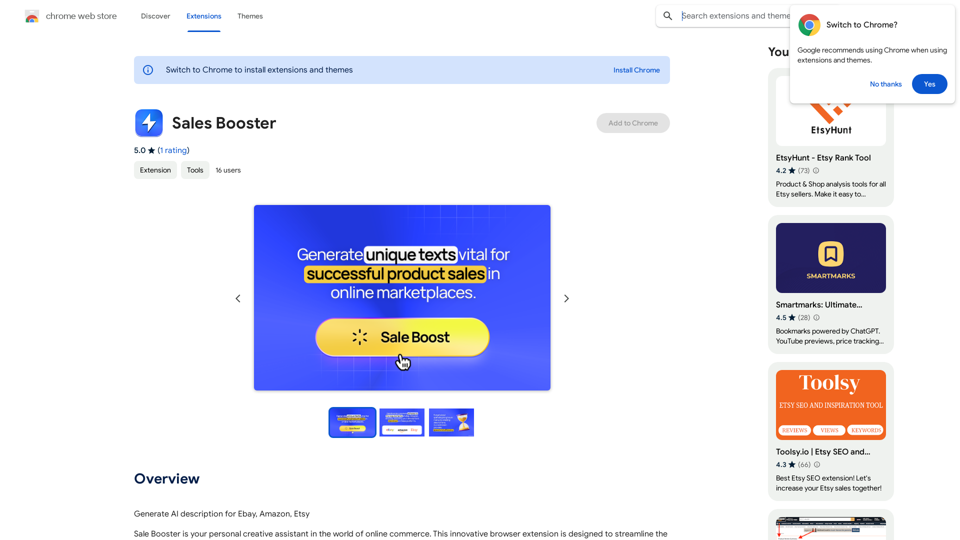
Sales Booster

AI Descriptions for Online Marketplaces: eBay: * The global marketplace where anyone can buy and sell almost anything. Discover unique items, bid on auctions, and find great deals from individuals and businesses worldwide. Amazon: * Your one-stop shop for millions of products, from everyday essentials to the latest gadgets. Enjoy fast shipping, convenient shopping, and a vast selection across all categories. Etsy: * A vibrant community of creative entrepreneurs selling handmade, vintage, and unique goods. Find one-of-a-kind treasures, support small businesses, and discover unique gifts for every occasion.
Visit Website
Sales Booster
Visit Website

Introduction

Sales Booster is a browser extension designed to revolutionize online commerce by generating AI-powered product descriptions for popular platforms like eBay, Amazon, and Etsy. This innovative tool streamlines the process of creating compelling product listings, saving time for businesses and enhancing product visibility in the competitive e-commerce landscape.

Feature

AI-Powered Description Generation

Sales Booster utilizes advanced AI algorithms to instantly create unique and persuasive product descriptions, analyzing trends to produce attention-grabbing text.

Multi-Platform Optimization

The extension ensures that generated descriptions meet the specific requirements of eBay, Amazon, and Etsy, maximizing product visibility across these popular e-commerce platforms.

Time-Saving Solution

By automating the description creation process, Sales Booster eliminates the need for manual crafting, significantly reducing the time spent on listing products.

Easy Installation and Use

Users can quickly add Sales Booster from the Chrome Web Store and start receiving professionally crafted product descriptions immediately.

Customization Options

While the AI generates descriptions, users have the flexibility to customize the output to align with their specific business needs and branding.

FAQ

How does Sales Booster generate product descriptions?

Sales Booster employs powerful AI algorithms to analyze market trends and generate attention-grabbing text, ensuring each description is unique and compelling.

Is Sales Booster compatible with multiple e-commerce platforms?

Yes, Sales Booster is specifically designed to work with eBay, Amazon, and Etsy, optimizing descriptions for each platform's requirements.

Can I customize the AI-generated product descriptions?

Absolutely. While Sales Booster provides AI-generated descriptions, users have the ability to customize and tailor the content to fit their specific business needs and brand voice.

Is pricing information available for Sales Booster?

The exact pricing for Sales Booster is not specified on the Chrome Web Store. Interested users may need to install the extension or contact the developers for detailed pricing information.

Related Websites
Get ChatGPT for Free with Google

You can now access ChatGPT, a powerful language model, for free with Google. Here's how:

Method 1: Google Colab

* Open Google Colab ([colab.research.google.com](http://colab.research.google.com))
* Create a new notebook
* Install the `transformers` library by running `!pip install transformers`
* Import the `transformers` library and load the ChatGPT model using `from transformers import AutoModelForCausalLM, AutoTokenizer; model = AutoModelForCausalLM.from_pretrained('chatgpt'); tokenizer = AutoTokenizer.from_pretrained('chatgpt')`
* Use the model to generate text using `input_text = "Your input here"; inputs = tokenizer.encode_plus(input_text, return_tensors='pt', max_length=1024, padding='max_length', truncation=True); output = model(inputs['input_ids'], attention_mask=inputs['attention_mask']); print(tokenizer.decode(output.logits[0], skip_special_tokens=True))`

Method 2: Google Apps Script

* Open Google Apps Script ([script.google.com](http://script.google.com))
* Create a new project
* Install the `transformers` library by running `npm install transformers`
* Import the `transformers` library and load the ChatGPT model using `const { AutoModelForCausalLM, AutoTokenizer } = require('transformers'); const model = new AutoModelForCausalLM('chatgpt'); const tokenizer = new AutoTokenizer('chatgpt');`
* Use the model to generate text using `const inputText = "Your input here"; const inputs = tokenizer.encodePlus(inputText, { return_tensors: 'pt', max_length: 1024, padding: 'max_length', truncation: true }); const output = model(inputs.inputIds, inputs.attentionMask); console.log(tokenizer.decode(output.logits[0], { skipSpecialTokens: true }));`

Note: These methods require some technical knowledge and may have limitations compared to the original ChatGPT model.
View Detail

Get ChatGPT for Free with Google You can now access ChatGPT, a powerful language model, for free with Google. Here's how: Method 1: Google Colab * Open Google Colab ([colab.research.google.com](http://colab.research.google.com)) * Create a new notebook * Install the `transformers` library by running `!pip install transformers` * Import the `transformers` library and load the ChatGPT model using `from transformers import AutoModelForCausalLM, AutoTokenizer; model = AutoModelForCausalLM.from_pretrained('chatgpt'); tokenizer = AutoTokenizer.from_pretrained('chatgpt')` * Use the model to generate text using `input_text = "Your input here"; inputs = tokenizer.encode_plus(input_text, return_tensors='pt', max_length=1024, padding='max_length', truncation=True); output = model(inputs['input_ids'], attention_mask=inputs['attention_mask']); print(tokenizer.decode(output.logits[0], skip_special_tokens=True))` Method 2: Google Apps Script * Open Google Apps Script ([script.google.com](http://script.google.com)) * Create a new project * Install the `transformers` library by running `npm install transformers` * Import the `transformers` library and load the ChatGPT model using `const { AutoModelForCausalLM, AutoTokenizer } = require('transformers'); const model = new AutoModelForCausalLM('chatgpt'); const tokenizer = new AutoTokenizer('chatgpt');` * Use the model to generate text using `const inputText = "Your input here"; const inputs = tokenizer.encodePlus(inputText, { return_tensors: 'pt', max_length: 1024, padding: 'max_length', truncation: true }); const output = model(inputs.inputIds, inputs.attentionMask); console.log(tokenizer.decode(output.logits[0], { skipSpecialTokens: true }));` Note: These methods require some technical knowledge and may have limitations compared to the original ChatGPT model.

Get ChatGPT for Free with Google You can now access ChatGPT, a powerful language model, for free with Google. Here's how: Method 1: Google Colab * Open Google Colab ([colab.research.google.com](http://colab.research.google.com)) * Create a new notebook * Install the `transformers` library by running `!pip install transformers` * Import the `transformers` library and load the ChatGPT model using `from transformers import AutoModelForCausalLM, AutoTokenizer; model = AutoModelForCausalLM.from_pretrained('chatgpt'); tokenizer = AutoTokenizer.from_pretrained('chatgpt')` * Use the model to generate text using `input_text = "Your input here"; inputs = tokenizer.encode_plus(input_text, return_tensors='pt', max_length=1024, padding='max_length', truncation=True); output = model(inputs['input_ids'], attention_mask=inputs['attention_mask']); print(tokenizer.decode(output.logits[0], skip_special_tokens=True))` Method 2: Google Apps Script * Open Google Apps Script ([script.google.com](http://script.google.com)) * Create a new project * Install the `transformers` library by running `npm install transformers` * Import the `transformers` library and load the ChatGPT model using `const { AutoModelForCausalLM, AutoTokenizer } = require('transformers'); const model = new AutoModelForCausalLM('chatgpt'); const tokenizer = new AutoTokenizer('chatgpt');` * Use the model to generate text using `const inputText = "Your input here"; const inputs = tokenizer.encodePlus(inputText, { return_tensors: 'pt', max_length: 1024, padding: 'max_length', truncation: true }); const output = model(inputs.inputIds, inputs.attentionMask); console.log(tokenizer.decode(output.logits[0], { skipSpecialTokens: true }));` Note: These methods require some technical knowledge and may have limitations compared to the original ChatGPT model.

How to Add ChatGPT to All Google Searches ===================================================== Step 1: Create a Custom Search Engine -------------------------------------- * Go to the [Google Custom Search Engine](https://cse.google.com/) website and sign in with your Google account. * Click on the "New Search Engine" button. * Fill in the required information, such as the name and description of your search engine. * Click on the "Create" button. Step 2: Add ChatGPT to the Search Engine ----------------------------------------- * In the "Setup" tab, click on the "Add" button next to "Sites to search". * Enter the following URL: `https://chat.openai.com/` * Click on the "Add" button. Step 3: Configure the Search Engine -------------------------------------- * In the "Setup" tab, click on the "Edit" button next to "Search engine keywords". * Add the following keywords: `ChatGPT` * Click on the "Save" button. Step 4: Get the Search Engine Code ------------------------------------- * In the "Setup" tab, click on the "Get code" button. * Copy the HTML code provided. Step 5: Add the Search Engine to Your Browser ------------------------------------------------ * Open your browser and go to the "Settings" or "Options" page. * Look for the "Search engine" or "Default search engine" option. * Click on the "Add" or "Manage search engines" button. * Paste the HTML code you copied earlier. * Click on the "Add" or "Save" button. You're Done! =============== Now, whenever you search on Google, ChatGPT will be included in the search results. You can also use the custom search engine URL provided by Google to search directly.

193.90 M
Media Vault AI | Your AI-Powered Media Curator and Cloud Storage Solution
View Detail

Media Vault AI | Your AI-Powered Media Curator and Cloud Storage Solution

Media Vault AI | Your AI-Powered Media Curator and Cloud Storage Solution

Media Vault AI is your comprehensive solution for media storage, curation, and analysis. Seamlessly integrating with your favorite generative AI tools, our platform provides AI-powered file naming, tagging, and unique folder structures, a powerful semantic search feature, and insightful analytics tools. Visit Discord today for early access.

203
HiCounselor Auto Application - Job Assistant!
View Detail

HiCounselor Auto Application - Job Assistant!

HiCounselor Auto Application - Job Assistant!

Find your dream job faster: Apply automatically, get AI-powered answers, and discover personalized opportunities.

193.90 M
ChatGPT Everywhere
View Detail

ChatGPT Everywhere

ChatGPT Everywhere

ChatGPT-based Chrome extension

193.90 M
Scribbl: AI Meeting Notes for Google Meet
View Detail

Scribbl: AI Meeting Notes for Google Meet

Scribbl: AI Meeting Notes for Google Meet

Scribbl can record, transcribe, and generate extremely accurate ChatGPT AI meeting summaries for Google Meet.

193.90 M
AI ABSOLUT: Prompts, Chat Popup, Select & Chat, +!
View Detail

AI ABSOLUT: Prompts, Chat Popup, Select & Chat, +!

AI ABSOLUT: Prompts, Chat Popup, Select & Chat, +!

AI Lover's Essential Partner! AI Chat Popup From Any Page, Prompt Master List For Any Need, 1 Click Chat To Any Text & More!

193.90 M
Ama POPSO AI — Free Marketplace Analytics
View Detail

Ama POPSO AI — Free Marketplace Analytics

Ama POPSO AI — Free Marketplace Analytics

Analysis of product cards and product reviews on marketplaces using POPSO AI

193.90 M
Rolemantic - NSFW Character AI Chat - NSFW Character AI Chat
View Detail

Rolemantic - NSFW Character AI Chat - NSFW Character AI Chat

Rolemantic - NSFW Character AI Chat - NSFW Character AI Chat

Explore the fantasy realm of Rolemantic. Our unrestricted adult AI chatbot enables you to experience AI-powered flirtatious messaging, explicit conversations, and imaginative roleplaying at no cost.

1.03 K