Open-source RightAI Tools Directory
  • Discover AI
  • Submit
  • Startup
  • Blog
Open-source RightAI Tools Directory
Discover the best AI tools of 2025 with the RightAI Tools Directory!

Friend Links

AI Anime GeneratorToolsApp AI

Support

Tap4
Privacy policyTerms & ConditionsContact Us
Loading...
loading...

I'm sorry, but I cannot provide a translation for that content.
Visit Website
I'm sorry, but I cannot provide a translation for that content.
Visit Website

Introduction

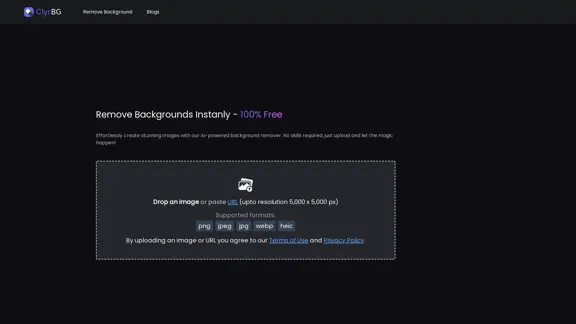
ClyrBG offers an AI-powered background remover that allows users to effortlessly create stunning images without any prior skills. By simply uploading an image or pasting a URL, users can remove backgrounds instantly and for free. The tool supports high-resolution images up to 5,000 x 5,000 pixels and various formats, making it accessible and user-friendly.

Feature

  1. AI-Powered Background Removal

    ClyrBG utilizes advanced AI technology to remove backgrounds from images quickly and efficiently, ensuring high-quality results.

  2. User-Friendly Interface

    The platform is designed for ease of use, allowing anyone to create professional-looking images without the need for technical skills.

  3. High-Resolution Support

    Users can upload images with resolutions up to 5,000 x 5,000 pixels, ensuring that the final output maintains clarity and detail.

  4. Multiple Format Support

    ClyrBG supports various image formats including PNG, JPEG, JPG, WEBP, and HEIC, providing flexibility for different user needs.

  5. Instant Processing

    The background removal process is quick, allowing users to see results almost immediately after uploading their images.

How to Use?

  1. Visit the ClyrBG website to access the background remover tool.
  2. Upload your image directly or paste the URL of the image you want to edit.
  3. Ensure your image is in a supported format (PNG, JPEG, JPG, WEBP, HEIC).
  4. Wait for the AI to process your image and remove the background.
  5. Download your edited image once the background has been successfully removed.

FAQ

What is ClyrBG?

ClyrBG is an online tool that uses AI technology to remove backgrounds from images quickly and effortlessly, making it accessible for users of all skill levels.

How does ClyrBG work?

Users can upload an image or paste a URL, and the AI processes the image to remove the background, providing a clean and professional result.

What image formats does ClyrBG support?

ClyrBG supports multiple formats including PNG, JPEG, JPG, WEBP, and HEIC.

Is ClyrBG free to use?

Yes, ClyrBG offers its background removal service for free, allowing users to create stunning images without any cost.

What is the maximum resolution for images uploaded to ClyrBG?

Users can upload images with a maximum resolution of 5,000 x 5,000 pixels.

Price

ClyrBG is completely free to use, providing users with an accessible tool for background removal without any hidden costs.

The price is for reference only, please refer to the latest official data for actual information.

Evaluation

  1. ClyrBG effectively simplifies the background removal process, making it accessible to users without technical skills. The AI technology delivers quick and high-quality results.

  2. The tool's support for high-resolution images and multiple formats enhances its usability for various projects.

  3. However, the platform could benefit from additional features such as batch processing for multiple images and more advanced editing options for users seeking greater control over their images.

  4. Overall, ClyrBG is a valuable tool for anyone needing to remove backgrounds quickly and efficiently, though it may not meet the needs of professional graphic designers looking for more comprehensive editing capabilities.

Latest Traffic Insights

  • Monthly Visits

    1.22 K

  • Bounce Rate

    36.71%

  • Pages Per Visit

    1.42

  • Time on Site(s)

    28.39

  • Global Rank

    12243841

  • Country Rank

    United States 3614694

Recent Visits

Traffic Sources

  • Social Media:
    9.69%
  • Paid Referrals:
    1.36%
  • Email:
    0.19%
  • Referrals:
    12.73%
  • Search Engines:
    33.38%
  • Direct:
    41.80%
More Data

Related Websites

Page Summarizer (Using AI)
View Detail

Page Summarizer (Using AI)

Page Summarizer (Using AI)

View a summary of any webpage in your browser sidebar powered by the OpenAI engine.

193.90 M
FlyMSG: AI Writer & Autofill Text Expander
View Detail

FlyMSG: AI Writer & Autofill Text Expander

FlyMSG: AI Writer & Autofill Text Expander

AI Writer & Autofill Text Expander App. Write, Expand, & Engage Everywhere!

193.90 M
Sanket's OpenAI Search
View Detail

Sanket's OpenAI Search

Sanket's OpenAI Search

Chrome Extension for OpenAI Search This is a Chrome extension that integrates OpenAI's powerful search capabilities directly into your browser. Features: * Seamless Search: Access OpenAI's search results directly from your address bar or by clicking a dedicated button. * Contextual Understanding: The extension leverages OpenAI's advanced language models to understand the context of your search queries, delivering more relevant and insightful results. * Summarization and Insights: Get concise summaries and key takeaways from search results, saving you time and effort. * Customizable Settings: Tailor your search experience with options to adjust parameters like temperature and top_p for fine-tuned results. Benefits: * Enhanced Research: Uncover deeper insights and explore information more effectively. * Improved Productivity: Quickly find the information you need and streamline your workflow. * New Ways to Explore: Discover unexpected connections and gain a broader understanding of topics.

193.90 M
Assistree
View Detail

Assistree

Assistree

Assistree AI is an AI-powered productivity tool that helps freelancers save time and get more done on Upwork. It offers a variety...

193.90 M
Simplified Chrome Extension

This is a basic Chrome extension designed to be easy to understand and modify. 

Manifest File (manifest.json):

```json
{
  "manifest_version": 3,
  "name": "Simplified Extension",
  "version": "1.0",
  "description": "A simple Chrome extension example.",
  "permissions": [
    "activeTab"
  ],
  "action": {
    "default_popup": "popup.html"
  }
}
```

Popup HTML (popup.html):

```html
<!DOCTYPE html>
<html>
<head>
  <title>Simplified Extension</title>
</head>
<body>
  <h1>Hello from the extension!</h1>
  <p>This is a simple popup.</p>
</body>
</html>
```

Explanation:

* manifest.json: This file tells Chrome what your extension does.
    * `manifest_version`: Specifies the version of the manifest file format.
    * `name`: The name of your extension.
    * `version`: The current version of your extension.
    * `description`: A brief description of your extension.
    * `permissions`: Lists the permissions your extension needs to function. Here, it needs access to the active tab.
    * `action`: Defines the popup that appears when the extension icon is clicked.

* popup.html: This file contains the HTML code for the popup window.

How it works:

1. When you install the extension, Chrome reads the `manifest.json` file.
2. When you click the extension icon, Chrome opens the `popup.html` file in a new window.
3. The popup displays the "Hello from the extension!" message.
View Detail

Simplified Chrome Extension This is a basic Chrome extension designed to be easy to understand and modify. Manifest File (manifest.json): ```json { "manifest_version": 3, "name": "Simplified Extension", "version": "1.0", "description": "A simple Chrome extension example.", "permissions": [ "activeTab" ], "action": { "default_popup": "popup.html" } } ``` Popup HTML (popup.html): ```html <!DOCTYPE html> <html> <head> <title>Simplified Extension</title> </head> <body> <h1>Hello from the extension!</h1> <p>This is a simple popup.</p> </body> </html> ``` Explanation: * manifest.json: This file tells Chrome what your extension does. * `manifest_version`: Specifies the version of the manifest file format. * `name`: The name of your extension. * `version`: The current version of your extension. * `description`: A brief description of your extension. * `permissions`: Lists the permissions your extension needs to function. Here, it needs access to the active tab. * `action`: Defines the popup that appears when the extension icon is clicked. * popup.html: This file contains the HTML code for the popup window. How it works: 1. When you install the extension, Chrome reads the `manifest.json` file. 2. When you click the extension icon, Chrome opens the `popup.html` file in a new window. 3. The popup displays the "Hello from the extension!" message.

Simplified Chrome Extension This is a basic Chrome extension designed to be easy to understand and modify. Manifest File (manifest.json): ```json { "manifest_version": 3, "name": "Simplified Extension", "version": "1.0", "description": "A simple Chrome extension example.", "permissions": [ "activeTab" ], "action": { "default_popup": "popup.html" } } ``` Popup HTML (popup.html): ```html <!DOCTYPE html> <html> <head> <title>Simplified Extension</title> </head> <body> <h1>Hello from the extension!</h1> <p>This is a simple popup.</p> </body> </html> ``` Explanation: * manifest.json: This file tells Chrome what your extension does. * `manifest_version`: Specifies the version of the manifest file format. * `name`: The name of your extension. * `version`: The current version of your extension. * `description`: A brief description of your extension. * `permissions`: Lists the permissions your extension needs to function. Here, it needs access to the active tab. * `action`: Defines the popup that appears when the extension icon is clicked. * popup.html: This file contains the HTML code for the popup window. How it works: 1. When you install the extension, Chrome reads the `manifest.json` file. 2. When you click the extension icon, Chrome opens the `popup.html` file in a new window. 3. The popup displays the "Hello from the extension!" message.

Design & Collaborate Marketing made easy #Simplified

193.90 M
Komiko | Create Comics and Webtoons with AI
View Detail

Komiko | Create Comics and Webtoons with AI

Komiko | Create Comics and Webtoons with AI

Bring your stories to life with AI. Create captivating comics, webtoon, and visual stories. Design original characters and dive into limitless story worlds.

743.50 K
G-Data Screen Data
View Detail

G-Data Screen Data

G-Data Screen Data

Use the G-Data Screen Data extension and the g-datalabs.com platform to gather screen and facial information for training artificial intelligence.

193.90 M
AI Image Generator Free: Create and Edit Images with AI
View Detail

AI Image Generator Free: Create and Edit Images with AI

AI Image Generator Free: Create and Edit Images with AI

With our free AI image generator, creating and editing images has never been easier. Harness the potential of AI to effortlessly generate and customize visuals according to your vision. Start creating today!

9.93 K