Open-source RightAI Tools Directory
  • Discover AI
  • Submit
  • Startup
  • Blog
Open-source RightAI Tools Directory
Discover the best AI tools of 2025 with the RightAI Tools Directory!

Friend Links

AI Anime GeneratorToolsApp AI

Support

Tap4
Privacy policyTerms & ConditionsContact Us
Loading...
loading...

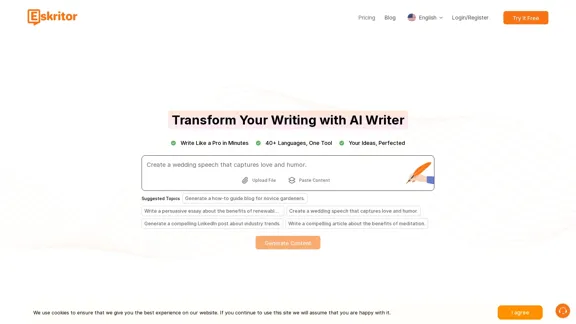
Eskritor AI Writer: Intelligent AI Content Creator

Write 5x faster with Eskritor AI Writer's 20+ content tools. Start creating perfectly tailored content today - from articles to social posts. Try it free!
Visit Website
Eskritor AI Writer: Intelligent AI Content Creator
Visit Website

Introduction

Eskritor AI Writer is an advanced AI content generator designed to assist users in creating high-quality written content across various formats. It offers features that cater to diverse writing needs, including blog posts, business proposals, and academic articles. With support for over 40 languages, Eskritor aims to enhance productivity and streamline the writing process for individuals and businesses alike.

Feature

  1. Multi-language Support

    Eskritor allows users to create, edit, and translate content in over 60 languages, making it accessible for a global audience.

  2. AI Content Generation

    Users can generate various types of content, including essays, articles, social media posts, and more, using advanced AI algorithms that ensure coherence and relevance.

  3. Interactive Follow-Up Questions

    The platform engages users with targeted follow-up questions to refine and optimize their content, ensuring tailored results.

  4. Selective AI Editing

    Eskritor provides tools for targeted enhancements, allowing users to adjust text length, rephrase content, and improve readability while maintaining their unique writing style.

  5. Enterprise-Grade Security

    The platform prioritizes user privacy and complies with SOC 2 and GDPR standards, ensuring that all information is protected.

  6. User-Friendly Interface

    Eskritor features an intuitive interface that simplifies the writing process, making it easy for users to navigate and utilize its tools effectively.

How to Use?

  1. Create an account on the Eskritor website to access its features.
  2. Upload existing content or start from scratch using the AI writing assistant.
  3. Utilize the editing tools to refine the generated content according to your needs.
  4. Save, download, or share your finalized content easily with a single click.

FAQ

What is Eskritor?

Eskritor is an AI-powered text generator designed to assist with various writing tasks, including creative writing, academic writing, and business communications.

Is Eskritor free to use?

Eskritor offers a free trial for users to explore its features, but a subscription is required for full access.

How does Eskritor work?

Eskritor uses advanced AI algorithms to generate, rewrite, and enhance text based on user input, producing high-quality content efficiently.

Can Eskritor create texts in multiple languages?

Yes, Eskritor supports content creation in over 60 languages, facilitating communication across different linguistic backgrounds.

What makes Eskritor different from other AI writing tools?

Eskritor features specialized AI writers for various industries and offers personalized content refinement through interactive follow-up questions.

Price

PlanPrice
Free Trial$0/month
Basic Plan$9.99/month
Standard Plan$19.99/month
Professional Plan$49.99/month
The price is for reference only, please refer to the latest official data for actual information.

Evaluation

  1. Eskritor excels in generating diverse content quickly and efficiently, making it a valuable tool for content creators and businesses.
  2. The interactive follow-up questions enhance user engagement and help produce tailored content.
  3. However, the reliance on AI may lead to occasional generic outputs that require further refinement.
  4. The platform could benefit from additional features for collaboration among team members, enhancing its utility for businesses.
  5. Overall, Eskritor is a strong choice for those looking to streamline their writing process, though users should be prepared to invest time in editing for optimal results.

Latest Traffic Insights

  • Monthly Visits

    100.32 K

  • Bounce Rate

    39.54%

  • Pages Per Visit

    2.32

  • Time on Site(s)

    31.65

  • Global Rank

    344423

  • Country Rank

    India 130198

Recent Visits

Traffic Sources

  • Social Media:
    2.84%
  • Paid Referrals:
    1.28%
  • Email:
    0.13%
  • Referrals:
    7.99%
  • Search Engines:
    61.63%
  • Direct:
    26.14%
More Data

Related Websites

1PX.AI
View Detail

1PX.AI

1PX.AI

Here is the translation: AI Photo, Photo AI, AI Photo Editing, AI Generated Photos, Free AI Photo Editor, AI Photo Generator, AI Avatar Generator

105
AutoVerify
View Detail

AutoVerify

AutoVerify

Fully automatic, high-precision CAPTCHA recognition and filling solution. Improve your work efficiency and free your hands.

193.90 M
KauGPT
View Detail

KauGPT

KauGPT

This extension gives you access to GPT-4, along with access to other GPT models and files.

193.90 M
Conveyor
View Detail

Conveyor

Conveyor

Precise and customized responses to each customer's security inquiries.

193.90 M
The Iliad
View Detail

The Iliad

The Iliad

Iliad makes learning and remembering information intuitive. Transform Pages into a Personal Library of Knowledge: Discover the...

193.90 M
ChatGPT Keyboard Shortcuts

#Navigation

* Ctrl + β†’: Move to the next message
* Ctrl + ←: Move to the previous message
* Home: Move to the beginning of the conversation
* End: Move to the end of the conversation

#Editing

* Ctrl + A: Select all text
* Ctrl + C: Copy selected text
* Ctrl + X: Cut selected text
* Ctrl + V: Paste copied or cut text
* Ctrl + Z: Undo
* Ctrl + Y: Redo
* Ctrl + Shift + F: Format text as code

#Actions

* Enter: Send the message
* Shift + Enter: Insert a new line
* Ctrl + Shift + Enter: Send the message and insert a new line
* Esc: Cancel editing and close the message input field
* Ctrl + Shift + Space: Open the emoji picker
* Ctrl + Shift + /: Open the help menu

#Accessibility

* Ctrl + +: Increase font size
* Ctrl + -: Decrease font size
* Ctrl + 0: Reset font size to default
View Detail

ChatGPT Keyboard Shortcuts #Navigation * Ctrl + β†’: Move to the next message * Ctrl + ←: Move to the previous message * Home: Move to the beginning of the conversation * End: Move to the end of the conversation #Editing * Ctrl + A: Select all text * Ctrl + C: Copy selected text * Ctrl + X: Cut selected text * Ctrl + V: Paste copied or cut text * Ctrl + Z: Undo * Ctrl + Y: Redo * Ctrl + Shift + F: Format text as code #Actions * Enter: Send the message * Shift + Enter: Insert a new line * Ctrl + Shift + Enter: Send the message and insert a new line * Esc: Cancel editing and close the message input field * Ctrl + Shift + Space: Open the emoji picker * Ctrl + Shift + /: Open the help menu #Accessibility * Ctrl + +: Increase font size * Ctrl + -: Decrease font size * Ctrl + 0: Reset font size to default

ChatGPT Keyboard Shortcuts #Navigation * Ctrl + β†’: Move to the next message * Ctrl + ←: Move to the previous message * Home: Move to the beginning of the conversation * End: Move to the end of the conversation #Editing * Ctrl + A: Select all text * Ctrl + C: Copy selected text * Ctrl + X: Cut selected text * Ctrl + V: Paste copied or cut text * Ctrl + Z: Undo * Ctrl + Y: Redo * Ctrl + Shift + F: Format text as code #Actions * Enter: Send the message * Shift + Enter: Insert a new line * Ctrl + Shift + Enter: Send the message and insert a new line * Esc: Cancel editing and close the message input field * Ctrl + Shift + Space: Open the emoji picker * Ctrl + Shift + /: Open the help menu #Accessibility * Ctrl + +: Increase font size * Ctrl + -: Decrease font size * Ctrl + 0: Reset font size to default

Enhance your ChatGPT experience with easy-to-use keyboard shortcuts.

193.90 M
GPTBLOX - Save ChatGPT Conversations & Hunt GPTs
View Detail

GPTBLOX - Save ChatGPT Conversations & Hunt GPTs

GPTBLOX - Save ChatGPT Conversations & Hunt GPTs

Discover the Power of GPT Store: Explore, Save, and Organize Conversations and Articles Explore the vast collection of GPTs released by the GPT Store, featuring conversations and articles from popular AI models like ChatGPT, Bard, Claude, and HuggingChat. This innovative platform allows you to: * Save conversations: Preserve valuable interactions with AI models for future reference or sharing. * Organize content: Categorize and group conversations and articles by topic, theme, or project, making it easy to access and review relevant information. Unlock the full potential of the GPT Store and streamline your workflow with its intuitive conversation and article management system.

193.90 M
Text to Calendar

Convert text into a calendar format, making it easy to organize and schedule events.
View Detail

Text to Calendar Convert text into a calendar format, making it easy to organize and schedule events.

Text to Calendar Convert text into a calendar format, making it easy to organize and schedule events.

Easily create calendar events from any piece of highlighted text

4.65 K