Open-source RightAI Tools Directory
  • Discover AI
  • Submit
  • Startup
  • Blog
Open-source RightAI Tools Directory
Discover the best AI tools of 2025 with the RightAI Tools Directory!

Friend Links

AI Anime GeneratorToolsApp AI

Support

Tap4
Privacy policyTerms & ConditionsContact Us
Loading...
loading...

Flux.1

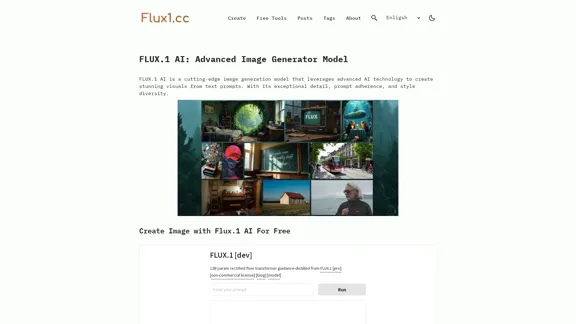
Flux1.cc - Free Flux.1 AI Image Generator
Visit Website
Flux.1
Visit Website

Introduction

FLUX.1 AI is a cutting-edge image generation model that utilizes advanced AI technology to create stunning visuals from text prompts. It is known for its exceptional detail, prompt adherence, and diverse styles, making it a powerful tool for both personal and professional image creation.

Feature

  1. Advanced Image Generation

    FLUX.1 AI generates high-quality images from text prompts, leveraging state-of-the-art AI technology for superior detail and adherence to user inputs.

  2. Diverse Style Options

    The model supports a wide range of styles, allowing users to create images that fit various aesthetic preferences and project requirements.

  3. Multiple Model Variants

    FLUX.1 AI offers different versions tailored for specific uses, including FLUX.1 [pro] for professional applications, FLUX.1 [dev] for non-commercial use, and FLUX.1 [schnell] optimized for local development.

  4. High-Resolution Output

    Users can generate high-resolution images suitable for commercial projects, enhancing the model's utility for professional designers and artists.

  5. User-Friendly Interface

    The platform is designed to be straightforward and user-friendly, enabling easy navigation for users of all skill levels.

  6. Comprehensive Support

    FLUX.1 AI users have access to extensive support resources, including documentation, tutorials, and customer service.

How to Use?

  1. Visit the Flux1.cc AI website to get started.
  2. Enter your text prompt in the designated area.
  3. Choose the desired style and settings for your image.
  4. Click on the generate button to create your image.
  5. Review the generated image and make adjustments if necessary.
  6. Download or share your image as needed.

FAQ

What is FLUX.1 AI?

FLUX.1 AI is an advanced image generation model that creates high-quality images from text prompts using state-of-the-art AI technology.

How does FLUX.1 AI differ from other image generation models?

FLUX.1 AI is distinguished by its superior detail, prompt adherence, and style diversity, supporting high-resolution image generation.

What are the different versions of FLUX.1 AI?

FLUX.1 AI is available in several versions: FLUX.1 [pro] for professional applications, FLUX.1 [dev] for non-commercial use, and FLUX.1 [schnell] for local development.

Can I use FLUX.1 AI for commercial projects?

Yes, the FLUX.1 [pro] version is specifically designed for commercial use.

How can I get started with FLUX.1 AI?

Simply visit the Flux1.cc AI website, enter your text prompt, and follow the user-friendly process to generate images.

What kind of support does Flux1.cc offer for FLUX.1 AI users?

Flux1.cc provides comprehensive support, including documentation, tutorials, and customer service.

Price

  • FLUX.1 [pro]: Commercial use

  • FLUX.1 [dev]: Non-commercial use

  • FLUX.1 [schnell]: Optimized for local development and personal projects

The price is for reference only, please refer to the latest official data for actual information.

Evaluation

  1. FLUX.1 AI excels in generating high-quality images with impressive detail and adherence to prompts, making it suitable for both casual users and professionals.
  2. The diversity of styles and multiple model variants provide flexibility for various projects.
  3. However, the learning curve may be steep for users unfamiliar with AI image generation, requiring time to fully leverage its capabilities.
  4. While the user interface is generally user-friendly, additional tutorials or guided walkthroughs could enhance the onboarding experience for new users.

Related Websites
CodeMoss
View Detail

CodeMoss

CodeMoss

CodeMoss - AI-Powered Code Search

193.90 M
AI Image Tools for Free Online | PicPicAI
View Detail

AI Image Tools for Free Online | PicPicAI

AI Image Tools for Free Online | PicPicAI

- Remove Background - Photo Enhancer - Photo Upscaler - Change Background Color - Restore Old Photos - Colorize Photos - Compress Photos - Photo Retouch

15.66 K
AI & AR Business Solutions for Skin, Beauty & Fashion
View Detail

AI & AR Business Solutions for Skin, Beauty & Fashion

AI & AR Business Solutions for Skin, Beauty & Fashion

Reimagine AI with YouCam: Elevate Your Brand by Cropping Complete Beauty Tech & Fashion Tech Solutions. Digitally transform your business with AI & AR ecommerce experiences.

7.10 M
Alt Text Generator for Webflow 

This tool helps you generate descriptive alt text for your Webflow images. 

Why is Alt Text Important?

* Accessibility: Alt text allows screen readers to describe images to visually impaired users.
* SEO: Search engines use alt text to understand the content of your images, improving your website's ranking.

How to Use:

1. Paste your image URL: Enter the URL of the image you want to generate alt text for.
2. Click "Generate Alt Text": The tool will analyze the image and suggest relevant alt text.
3. Review and Edit:  Read the generated alt text and make any necessary changes to ensure it accurately describes the image.

Example:

Image URL: https://www.example.com/image.jpg

Generated Alt Text: A photo of a smiling woman holding a cup of coffee.

Remember:

* Keep alt text concise and descriptive.
* Use keywords that accurately reflect the image content.
* Avoid using generic phrases like "image" or "picture."
View Detail

Alt Text Generator for Webflow This tool helps you generate descriptive alt text for your Webflow images. Why is Alt Text Important? * Accessibility: Alt text allows screen readers to describe images to visually impaired users. * SEO: Search engines use alt text to understand the content of your images, improving your website's ranking. How to Use: 1. Paste your image URL: Enter the URL of the image you want to generate alt text for. 2. Click "Generate Alt Text": The tool will analyze the image and suggest relevant alt text. 3. Review and Edit: Read the generated alt text and make any necessary changes to ensure it accurately describes the image. Example: Image URL: https://www.example.com/image.jpg Generated Alt Text: A photo of a smiling woman holding a cup of coffee. Remember: * Keep alt text concise and descriptive. * Use keywords that accurately reflect the image content. * Avoid using generic phrases like "image" or "picture."

Alt Text Generator for Webflow This tool helps you generate descriptive alt text for your Webflow images. Why is Alt Text Important? * Accessibility: Alt text allows screen readers to describe images to visually impaired users. * SEO: Search engines use alt text to understand the content of your images, improving your website's ranking. How to Use: 1. Paste your image URL: Enter the URL of the image you want to generate alt text for. 2. Click "Generate Alt Text": The tool will analyze the image and suggest relevant alt text. 3. Review and Edit: Read the generated alt text and make any necessary changes to ensure it accurately describes the image. Example: Image URL: https://www.example.com/image.jpg Generated Alt Text: A photo of a smiling woman holding a cup of coffee. Remember: * Keep alt text concise and descriptive. * Use keywords that accurately reflect the image content. * Avoid using generic phrases like "image" or "picture."

Big update! Reconfigured the API to get rid of cold starts. What does this mean? Faster alt text generation! Completely redesigned...

193.90 M
Mp3Converter AI
View Detail

Mp3Converter AI

Mp3Converter AI

Experience high-quality, efficient audio conversions with our AI-powered MP3 Converter. Convert any format to MP3 with unmatched speed and precision. Transform your audio effortlessly!

0
Midjourney API - Automate Midjourney AI Image Generation 

This document outlines how to use the Midjourney API to automate the generation of AI images. 

What is the Midjourney API?

The Midjourney API allows developers to programmatically interact with the powerful Midjourney AI model. This means you can generate images, control various parameters, and integrate Midjourney into your own applications and workflows.

Why Use the Midjourney API?

* Automation: Automate the creation of images for various purposes, such as marketing materials, website content, or research projects.
* Customization: Fine-tune image generation by controlling parameters like aspect ratio, style, and seed values.
* Integration: Seamlessly integrate Midjourney's capabilities into your existing tools and platforms.

Getting Started

1. Sign Up for a Midjourney Account: You'll need a Midjourney account to access the API.

2. Obtain an API Key: Once you have an account, you can generate an API key from your account settings.

3. Choose a Programming Language: The Midjourney API supports various programming languages, including Python, JavaScript, and Go.

4. Install the API Client: Install the appropriate API client library for your chosen language.

5. Start Generating Images: Use the API client to send image generation requests to the Midjourney server.

Example (Python):

```python
import midjourney

Replace with your actual API key
api_key = "YOUR_API_KEY"

Create a Midjourney client
client = midjourney.Client(api_key=api_key)

Generate an image
response = client.create_image(prompt="A cat wearing a hat", num_images=1)

Print the image URL
print(response.images[0].url)
```

Documentation and Resources

For detailed information about the Midjourney API, including available endpoints, parameters, and examples, please refer to the official documentation: [https://docs.midjourney.com/](https://docs.midjourney.com/)
View Detail

Midjourney API - Automate Midjourney AI Image Generation This document outlines how to use the Midjourney API to automate the generation of AI images. What is the Midjourney API? The Midjourney API allows developers to programmatically interact with the powerful Midjourney AI model. This means you can generate images, control various parameters, and integrate Midjourney into your own applications and workflows. Why Use the Midjourney API? * Automation: Automate the creation of images for various purposes, such as marketing materials, website content, or research projects. * Customization: Fine-tune image generation by controlling parameters like aspect ratio, style, and seed values. * Integration: Seamlessly integrate Midjourney's capabilities into your existing tools and platforms. Getting Started 1. Sign Up for a Midjourney Account: You'll need a Midjourney account to access the API. 2. Obtain an API Key: Once you have an account, you can generate an API key from your account settings. 3. Choose a Programming Language: The Midjourney API supports various programming languages, including Python, JavaScript, and Go. 4. Install the API Client: Install the appropriate API client library for your chosen language. 5. Start Generating Images: Use the API client to send image generation requests to the Midjourney server. Example (Python): ```python import midjourney Replace with your actual API key api_key = "YOUR_API_KEY" Create a Midjourney client client = midjourney.Client(api_key=api_key) Generate an image response = client.create_image(prompt="A cat wearing a hat", num_images=1) Print the image URL print(response.images[0].url) ``` Documentation and Resources For detailed information about the Midjourney API, including available endpoints, parameters, and examples, please refer to the official documentation: [https://docs.midjourney.com/](https://docs.midjourney.com/)

Midjourney API - Automate Midjourney AI Image Generation This document outlines how to use the Midjourney API to automate the generation of AI images. What is the Midjourney API? The Midjourney API allows developers to programmatically interact with the powerful Midjourney AI model. This means you can generate images, control various parameters, and integrate Midjourney into your own applications and workflows. Why Use the Midjourney API? * Automation: Automate the creation of images for various purposes, such as marketing materials, website content, or research projects. * Customization: Fine-tune image generation by controlling parameters like aspect ratio, style, and seed values. * Integration: Seamlessly integrate Midjourney's capabilities into your existing tools and platforms. Getting Started 1. Sign Up for a Midjourney Account: You'll need a Midjourney account to access the API. 2. Obtain an API Key: Once you have an account, you can generate an API key from your account settings. 3. Choose a Programming Language: The Midjourney API supports various programming languages, including Python, JavaScript, and Go. 4. Install the API Client: Install the appropriate API client library for your chosen language. 5. Start Generating Images: Use the API client to send image generation requests to the Midjourney server. Example (Python): ```python import midjourney Replace with your actual API key api_key = "YOUR_API_KEY" Create a Midjourney client client = midjourney.Client(api_key=api_key) Generate an image response = client.create_image(prompt="A cat wearing a hat", num_images=1) Print the image URL print(response.images[0].url) ``` Documentation and Resources For detailed information about the Midjourney API, including available endpoints, parameters, and examples, please refer to the official documentation: [https://docs.midjourney.com/](https://docs.midjourney.com/)

Easily integrate Midjourney AI into your apps using the Midjourney API. Start creating AI images automatically today!

0
Iconopedia
View Detail

Iconopedia

Iconopedia

Generate Stunning Images with AI Let's explore the world of AI-powered image generation and unleash your creativity! What is AI Image Generation? AI image generation uses artificial intelligence algorithms to create images from text descriptions, known as "prompts." How Does it Work? These powerful models, trained on massive datasets of images and text, learn the relationships between words and visual concepts. When you provide a prompt, the AI interprets it and generates a corresponding image. Benefits of AI Image Generation: * Effortless Creativity: Bring your ideas to life without needing artistic skills. * Endless Possibilities: Explore unique concepts and styles with ease. * Rapid Prototyping: Quickly visualize designs and concepts. * Personalized Content: Create custom images tailored to your needs. Popular AI Image Generators: * DALL-E 2: Known for its photorealistic and imaginative results. * Midjourney: Creates artistic and dreamlike images. * Stable Diffusion: Open-source and highly customizable. * Craiyon (formerly DALL-E mini): A free and accessible option. Tips for Generating Stunning Images: * Be Specific: Provide clear and detailed prompts. * Use Descriptive Language: Include adjectives, nouns, and verbs to guide the AI. * Experiment with Styles: Explore different artistic styles and aesthetics. * Iterate and Refine: Adjust your prompts and settings to achieve your desired outcome. Let your imagination run wild and discover the incredible potential of AI image generation!

0
AI Girlfriend Builder - Chat and Generate Images
View Detail

AI Girlfriend Builder - Chat and Generate Images

AI Girlfriend Builder - Chat and Generate Images

Create Your Dream AI Girlfriend! Customize her look and personality, and bring her to life in one click. 100% powered by Artificial Intelligence.

868.33 K