Open-source RightAI Tools Directory
  • Discover AI
  • Submit
  • Startup
  • Blog
Open-source RightAI Tools Directory
Discover the best AI tools of 2025 with the RightAI Tools Directory!

Friend Links

AI Anime GeneratorToolsApp AI

Support

Tap4
Privacy policyTerms & ConditionsContact Us
Loading...
loading...

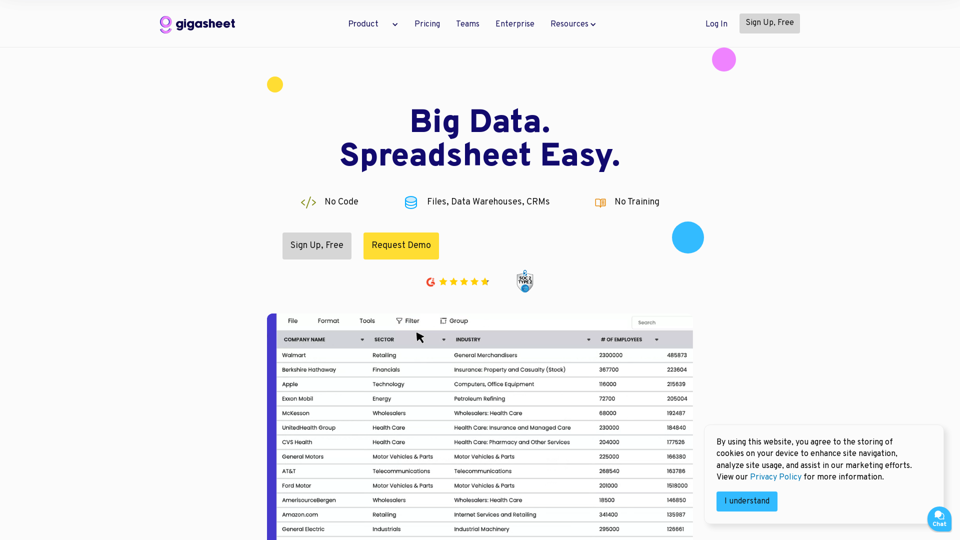
Gigasheet - Big Data Analytics That's Spreadsheet Easy.

Our powerful, no-code platform is designed for big data analysis, enabling anyone to effortlessly explore and analyze vast datasets via a user-friendly, spreadsheet-like interface. Gigasheet supports a wide variety of data sources from CSV, XLSX, and JSON to popular CRMs, data warehouses, and cloud data stores.
Visit Website
Gigasheet - Big Data Analytics That's Spreadsheet Easy.
Visit Website

Introduction

Gigasheet is a powerful big data analytics platform that simplifies working with large datasets. It offers a user-friendly spreadsheet-like interface, allowing users to analyze, automate, and collaborate on massive amounts of data without coding skills or extensive technical knowledge. Gigasheet caters to various industries and use cases, providing scalability, ease of use, and versatility in data analysis.

Feature

No-Code Analytics

Analyze big data using a familiar spreadsheet-like interface without needing to write code or SQL queries.

Data Transparency

Process entire datasets without splitting or sampling, ensuring complete data visibility.

Automation

Utilize Gigasheet's API to automate repetitive tasks and streamline data processes.

Collaboration

Easily share and collaborate on data projects across teams.

Data Enrichment

Enhance datasets with additional information for more comprehensive analysis.

Spreadsheet A.I.

Leverage artificial intelligence to gain insights from your data.

Enterprise Integration

Connect with popular CRMs, data warehouses, and cloud applications.

Scalability

Process trillions of cells of data without compromising performance.

Data Governance

Enterprise-grade security and governance features for sensitive data.

FAQ

Is coding required to use Gigasheet?

No, Gigasheet is designed to be used without coding or SQL knowledge.

Can Gigasheet handle very large datasets?

Yes, Gigasheet can process trillions of cells of data without compromising performance.

Is it possible to automate tasks in Gigasheet?

Yes, Gigasheet offers API access for automating repetitive tasks and workflows.

Does Gigasheet offer data enrichment capabilities?

Yes, Gigasheet provides data enrichment features to enhance your datasets.

Can I collaborate with my team on Gigasheet?

Absolutely, Gigasheet offers collaboration features that make it easy to share and work on data projects together.

Is Gigasheet suitable for enterprise use?

Yes, Gigasheet offers an Enterprise tier with advanced security, governance, and integration features tailored for large organizations.

Latest Traffic Insights

  • Monthly Visits

    127.47 K

  • Bounce Rate

    43.53%

  • Pages Per Visit

    2.44

  • Time on Site(s)

    47.65

  • Global Rank

    284116

  • Country Rank

    United States 194508

Recent Visits

Traffic Sources

  • Social Media:
    2.63%
  • Paid Referrals:
    0.75%
  • Email:
    0.09%
  • Referrals:
    7.52%
  • Search Engines:
    55.05%
  • Direct:
    33.92%
More Data

Related Websites

Pineapple Builder - AI Website Builder for Businesses
View Detail

Pineapple Builder - AI Website Builder for Businesses

Pineapple Builder - AI Website Builder for Businesses

Don't have the time or resources to build a website? With AI-driven tools, you can create a stunning website for your business with just one click! Our AI-Powered solutions include blog platforms, newsletter forms, payment processing and more - everything you need to take your business from idea to reality.

47.27 K
AI assistant and enterprise search for teams | Findr
View Detail

AI assistant and enterprise search for teams | Findr

AI assistant and enterprise search for teams | Findr

AI assistant to search and chat with information, documents, and insights from multiple apps. Get answers to all your questions with AI search.

12.47 K
Hostinger - Bring Your Idea to Life Online With a Website
View Detail

Hostinger - Bring Your Idea to Life Online With a Website

Hostinger - Bring Your Idea to Life Online With a Website

Choose Hostinger and create the ideal website. From Shared Hosting and Domains to VPS and Cloud plans. We offer everything you need for online success.

37.72 M
Zenpai Assistant: AI assistant that handles your tedious tasks
View Detail

Zenpai Assistant: AI assistant that handles your tedious tasks

Zenpai Assistant: AI assistant that handles your tedious tasks

An AI assistant that handles your tedious tasks. Download our AI-powered desktop software that performs routine jobs such as file conversion, image resizing, and more.

0
AI for Email Security & Sustainability | mxHERO Inc.
View Detail

AI for Email Security & Sustainability | mxHERO Inc.

AI for Email Security & Sustainability | mxHERO Inc.

mxHERO AI combines the power of LLM AI with your email in a single dashboard. It offers robust email security, governance, and environmental sustainability features.

20.76 K
Snapdeck
View Detail

Snapdeck

Snapdeck

Build a winning deck in a snap. Create professional presentations effortlessly with AI-powered slide generation.

7.96 K
Pygma – Personal AI social media manager
View Detail

Pygma – Personal AI social media manager

Pygma – Personal AI social media manager

Smart Instagram assistant – create, schedule, engage – all you need to grow on social media

5.70 K
Copilot for Microsoft 365 – Microsoft Adoption

Copilot for Microsoft 365 is a powerful AI assistant that helps you work smarter and faster across Microsoft 365 apps and services. It combines the power of large language models (LLMs) with your organization's data in the Microsoft Graph and Microsoft 365 apps to turn your words into the most powerful productivity tool on the planet.

Copilot is designed to help you:

β€’ Unleash creativity
β€’ Unlock productivity
β€’ Uplevel skills

Copilot is built on Microsoft's comprehensive approach to security, compliance, and privacy. Copilot in Microsoft 365 apps and services:

β€’ Does not use your data to train the underlying LLM
β€’ Does not replace human ingenuity and judgment
β€’ Is designed to keep humans in the loop

Copilot is currently available in Word, Excel, PowerPoint, Outlook, Teams, and more.

Getting Started with Copilot

To get started with Copilot, follow these steps:

1. Check availability: Ensure your organization has access to Copilot.
2. Learn the basics: Familiarize yourself with Copilot's capabilities and how to use it effectively.
3. Explore use cases: Discover how Copilot can help you in your specific role and tasks.
4. Practice and refine: Use Copilot regularly and refine your prompts for better results.
5. Share and collaborate: Collaborate with colleagues using Copilot and share best practices.

Best Practices for Using Copilot

1. Be specific in your prompts
2. Provide context for better results
3. Review and edit Copilot's output
4. Use Copilot as a starting point, not a final product
5. Experiment with different approaches
6. Stay informed about new features and updates

Copilot in Different Microsoft 365 Apps

β€’ Word: Draft, edit, summarize, and rewrite content
β€’ Excel: Analyze data, create formulas, and generate insights
β€’ PowerPoint: Create presentations, design slides, and generate content
β€’ Outlook: Compose emails, summarize threads, and manage your inbox
β€’ Teams: Summarize meetings, generate action items, and create meeting notes

Responsible AI and Copilot

Microsoft is committed to developing AI systems responsibly. When using Copilot, keep in mind:

β€’ AI-generated content may contain biases or inaccuracies
β€’ Always review and verify Copilot's output
β€’ Use your judgment and expertise alongside Copilot's suggestions
β€’ Be aware of your organization's policies regarding AI use

Conclusion

Copilot for Microsoft 365 is a powerful tool that can significantly enhance your productivity and creativity. By understanding its capabilities, following best practices, and using it responsibly, you can make the most of this AI assistant in your daily work.
View Detail

Copilot for Microsoft 365 – Microsoft Adoption Copilot for Microsoft 365 is a powerful AI assistant that helps you work smarter and faster across Microsoft 365 apps and services. It combines the power of large language models (LLMs) with your organization's data in the Microsoft Graph and Microsoft 365 apps to turn your words into the most powerful productivity tool on the planet. Copilot is designed to help you: β€’ Unleash creativity β€’ Unlock productivity β€’ Uplevel skills Copilot is built on Microsoft's comprehensive approach to security, compliance, and privacy. Copilot in Microsoft 365 apps and services: β€’ Does not use your data to train the underlying LLM β€’ Does not replace human ingenuity and judgment β€’ Is designed to keep humans in the loop Copilot is currently available in Word, Excel, PowerPoint, Outlook, Teams, and more. Getting Started with Copilot To get started with Copilot, follow these steps: 1. Check availability: Ensure your organization has access to Copilot. 2. Learn the basics: Familiarize yourself with Copilot's capabilities and how to use it effectively. 3. Explore use cases: Discover how Copilot can help you in your specific role and tasks. 4. Practice and refine: Use Copilot regularly and refine your prompts for better results. 5. Share and collaborate: Collaborate with colleagues using Copilot and share best practices. Best Practices for Using Copilot 1. Be specific in your prompts 2. Provide context for better results 3. Review and edit Copilot's output 4. Use Copilot as a starting point, not a final product 5. Experiment with different approaches 6. Stay informed about new features and updates Copilot in Different Microsoft 365 Apps β€’ Word: Draft, edit, summarize, and rewrite content β€’ Excel: Analyze data, create formulas, and generate insights β€’ PowerPoint: Create presentations, design slides, and generate content β€’ Outlook: Compose emails, summarize threads, and manage your inbox β€’ Teams: Summarize meetings, generate action items, and create meeting notes Responsible AI and Copilot Microsoft is committed to developing AI systems responsibly. When using Copilot, keep in mind: β€’ AI-generated content may contain biases or inaccuracies β€’ Always review and verify Copilot's output β€’ Use your judgment and expertise alongside Copilot's suggestions β€’ Be aware of your organization's policies regarding AI use Conclusion Copilot for Microsoft 365 is a powerful tool that can significantly enhance your productivity and creativity. By understanding its capabilities, following best practices, and using it responsibly, you can make the most of this AI assistant in your daily work.

Copilot for Microsoft 365 – Microsoft Adoption Copilot for Microsoft 365 is a powerful AI assistant that helps you work smarter and faster across Microsoft 365 apps and services. It combines the power of large language models (LLMs) with your organization's data in the Microsoft Graph and Microsoft 365 apps to turn your words into the most powerful productivity tool on the planet. Copilot is designed to help you: β€’ Unleash creativity β€’ Unlock productivity β€’ Uplevel skills Copilot is built on Microsoft's comprehensive approach to security, compliance, and privacy. Copilot in Microsoft 365 apps and services: β€’ Does not use your data to train the underlying LLM β€’ Does not replace human ingenuity and judgment β€’ Is designed to keep humans in the loop Copilot is currently available in Word, Excel, PowerPoint, Outlook, Teams, and more. Getting Started with Copilot To get started with Copilot, follow these steps: 1. Check availability: Ensure your organization has access to Copilot. 2. Learn the basics: Familiarize yourself with Copilot's capabilities and how to use it effectively. 3. Explore use cases: Discover how Copilot can help you in your specific role and tasks. 4. Practice and refine: Use Copilot regularly and refine your prompts for better results. 5. Share and collaborate: Collaborate with colleagues using Copilot and share best practices. Best Practices for Using Copilot 1. Be specific in your prompts 2. Provide context for better results 3. Review and edit Copilot's output 4. Use Copilot as a starting point, not a final product 5. Experiment with different approaches 6. Stay informed about new features and updates Copilot in Different Microsoft 365 Apps β€’ Word: Draft, edit, summarize, and rewrite content β€’ Excel: Analyze data, create formulas, and generate insights β€’ PowerPoint: Create presentations, design slides, and generate content β€’ Outlook: Compose emails, summarize threads, and manage your inbox β€’ Teams: Summarize meetings, generate action items, and create meeting notes Responsible AI and Copilot Microsoft is committed to developing AI systems responsibly. When using Copilot, keep in mind: β€’ AI-generated content may contain biases or inaccuracies β€’ Always review and verify Copilot's output β€’ Use your judgment and expertise alongside Copilot's suggestions β€’ Be aware of your organization's policies regarding AI use Conclusion Copilot for Microsoft 365 is a powerful tool that can significantly enhance your productivity and creativity. By understanding its capabilities, following best practices, and using it responsibly, you can make the most of this AI assistant in your daily work.

Microsoft Copilot combines the power of large language models (LLMs) with your organization's data to turn your words into one of the most powerful productivity tools on the planet.

608.60 K