Open-source RightAI Tools Directory
  • Discover AI
  • Submit
  • Startup
  • Blog
Open-source RightAI Tools Directory
Discover the best AI tools of 2025 with the RightAI Tools Directory!

Friend Links

AI Anime GeneratorToolsApp AI

Support

Tap4
Privacy policyTerms & ConditionsContact Us
Loading...
loading...

HeroUI Chat

Generate beautiful apps regardless of your design experience; AI turns your ideas into reality.
Visit Website
HeroUI Chat
Visit Website

Introduction

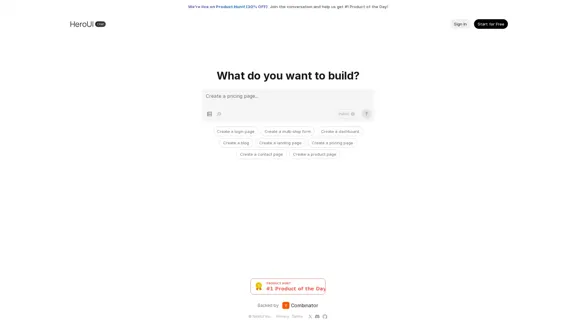
HeroUI Chat is a versatile tool designed to assist users in building various web applications and interfaces. It offers a range of templates and features that simplify the development process, making it accessible for both beginners and experienced developers. The platform is currently promoting a special offer on Product Hunt, encouraging users to join the conversation and contribute to its success.

Feature

  1. Template Variety

    HeroUI Chat provides a wide selection of templates for different types of web pages, including login pages, multi-step forms, dashboards, blogs, landing pages, pricing pages, contact pages, and product pages.

  2. User-Friendly Interface

    The platform is designed with a user-friendly interface that allows users to easily navigate and select the templates they need for their projects.

  3. Customization Options

    Users can customize templates to fit their specific requirements, ensuring that the final product aligns with their vision and branding.

  4. Pro Upgrade

    For users looking to enhance their experience, HeroUI Chat offers a Pro upgrade that provides higher limits and additional features.

  5. Community Support

    The platform encourages community engagement through its presence on social media and platforms like Discord and GitHub, allowing users to share ideas and seek assistance.

How to Use?

  1. Sign up for a free account to explore the available templates and features.
  2. Start by selecting a template that best fits your project needs.
  3. Customize the chosen template by adjusting elements such as text, colors, and layout.
  4. Utilize the community resources available on Discord and GitHub for additional support and inspiration.
  5. Consider upgrading to the Pro plan for enhanced features and higher limits.

FAQ

What is HeroUI Chat?

HeroUI Chat is a web application development tool that provides templates and features to help users create various types of web pages and applications.

How does HeroUI Chat work?

Users can select from a variety of templates, customize them according to their needs, and deploy their web applications easily.

Can I use HeroUI Chat for commercial projects?

Yes, the templates and features provided by HeroUI Chat can be used for commercial projects, allowing users to build professional-grade applications.

What are the benefits of upgrading to Pro?

Upgrading to Pro offers higher limits on usage and access to additional features that enhance the development experience.

Price

  • Free plan: $0/month
  • Pro plan: Pricing details not specified
The price is for reference only, please refer to the latest official data for actual information.

Evaluation

  1. HeroUI Chat offers a robust selection of templates that cater to various web development needs, making it a valuable resource for users at different skill levels.

  2. The user-friendly interface simplifies the process of selecting and customizing templates, which is beneficial for those who may not have extensive coding experience.

  3. However, the platform could improve by providing more detailed documentation or tutorials to assist users in maximizing the potential of the templates.

  4. The pricing structure could also be clarified further, especially regarding the Pro plan, to help users make informed decisions about upgrading.

  5. Overall, HeroUI Chat is a promising tool for web development, but enhancing user support and transparency in pricing would further elevate its appeal.

Latest Traffic Insights

  • Monthly Visits

    58.75 K

  • Bounce Rate

    42.65%

  • Pages Per Visit

    1.81

  • Time on Site(s)

    25.62

  • Global Rank

    578061

  • Country Rank

    United States 897729

Recent Visits

Traffic Sources

  • Social Media:
    4.16%
  • Paid Referrals:
    1.16%
  • Email:
    0.12%
  • Referrals:
    17.52%
  • Search Engines:
    31.12%
  • Direct:
    45.76%
More Data

Related Websites

Copilot for Microsoft 365 – Microsoft Adoption

Copilot for Microsoft 365 is a powerful AI assistant that helps you work smarter and faster across Microsoft 365 apps and services. It combines the power of large language models (LLMs) with your organization's data in the Microsoft Graph and Microsoft 365 apps to turn your words into the most powerful productivity tool on the planet.

Copilot is designed to help you:

• Unleash creativity
• Unlock productivity
• Uplevel skills

Copilot is built on Microsoft's comprehensive approach to security, compliance, and privacy. Copilot in Microsoft 365 apps and services:

• Does not use your data to train the underlying LLM
• Does not replace human ingenuity and judgment
• Is designed to keep humans in the loop

Copilot is currently available in Word, Excel, PowerPoint, Outlook, Teams, and more.

Getting Started with Copilot

To get started with Copilot, follow these steps:

1. Check availability: Ensure your organization has access to Copilot.
2. Learn the basics: Familiarize yourself with Copilot's capabilities and how to use it effectively.
3. Explore use cases: Discover how Copilot can help you in your specific role and tasks.
4. Practice and refine: Use Copilot regularly and refine your prompts for better results.
5. Share and collaborate: Collaborate with colleagues using Copilot and share best practices.

Best Practices for Using Copilot

1. Be specific in your prompts
2. Provide context for better results
3. Review and edit Copilot's output
4. Use Copilot as a starting point, not a final product
5. Experiment with different approaches
6. Stay informed about new features and updates

Copilot in Different Microsoft 365 Apps

• Word: Draft, edit, summarize, and rewrite content
• Excel: Analyze data, create formulas, and generate insights
• PowerPoint: Create presentations, design slides, and generate content
• Outlook: Compose emails, summarize threads, and manage your inbox
• Teams: Summarize meetings, generate action items, and create meeting notes

Responsible AI and Copilot

Microsoft is committed to developing AI systems responsibly. When using Copilot, keep in mind:

• AI-generated content may contain biases or inaccuracies
• Always review and verify Copilot's output
• Use your judgment and expertise alongside Copilot's suggestions
• Be aware of your organization's policies regarding AI use

Conclusion

Copilot for Microsoft 365 is a powerful tool that can significantly enhance your productivity and creativity. By understanding its capabilities, following best practices, and using it responsibly, you can make the most of this AI assistant in your daily work.
View Detail

Copilot for Microsoft 365 – Microsoft Adoption Copilot for Microsoft 365 is a powerful AI assistant that helps you work smarter and faster across Microsoft 365 apps and services. It combines the power of large language models (LLMs) with your organization's data in the Microsoft Graph and Microsoft 365 apps to turn your words into the most powerful productivity tool on the planet. Copilot is designed to help you: • Unleash creativity • Unlock productivity • Uplevel skills Copilot is built on Microsoft's comprehensive approach to security, compliance, and privacy. Copilot in Microsoft 365 apps and services: • Does not use your data to train the underlying LLM • Does not replace human ingenuity and judgment • Is designed to keep humans in the loop Copilot is currently available in Word, Excel, PowerPoint, Outlook, Teams, and more. Getting Started with Copilot To get started with Copilot, follow these steps: 1. Check availability: Ensure your organization has access to Copilot. 2. Learn the basics: Familiarize yourself with Copilot's capabilities and how to use it effectively. 3. Explore use cases: Discover how Copilot can help you in your specific role and tasks. 4. Practice and refine: Use Copilot regularly and refine your prompts for better results. 5. Share and collaborate: Collaborate with colleagues using Copilot and share best practices. Best Practices for Using Copilot 1. Be specific in your prompts 2. Provide context for better results 3. Review and edit Copilot's output 4. Use Copilot as a starting point, not a final product 5. Experiment with different approaches 6. Stay informed about new features and updates Copilot in Different Microsoft 365 Apps • Word: Draft, edit, summarize, and rewrite content • Excel: Analyze data, create formulas, and generate insights • PowerPoint: Create presentations, design slides, and generate content • Outlook: Compose emails, summarize threads, and manage your inbox • Teams: Summarize meetings, generate action items, and create meeting notes Responsible AI and Copilot Microsoft is committed to developing AI systems responsibly. When using Copilot, keep in mind: • AI-generated content may contain biases or inaccuracies • Always review and verify Copilot's output • Use your judgment and expertise alongside Copilot's suggestions • Be aware of your organization's policies regarding AI use Conclusion Copilot for Microsoft 365 is a powerful tool that can significantly enhance your productivity and creativity. By understanding its capabilities, following best practices, and using it responsibly, you can make the most of this AI assistant in your daily work.

Copilot for Microsoft 365 – Microsoft Adoption Copilot for Microsoft 365 is a powerful AI assistant that helps you work smarter and faster across Microsoft 365 apps and services. It combines the power of large language models (LLMs) with your organization's data in the Microsoft Graph and Microsoft 365 apps to turn your words into the most powerful productivity tool on the planet. Copilot is designed to help you: • Unleash creativity • Unlock productivity • Uplevel skills Copilot is built on Microsoft's comprehensive approach to security, compliance, and privacy. Copilot in Microsoft 365 apps and services: • Does not use your data to train the underlying LLM • Does not replace human ingenuity and judgment • Is designed to keep humans in the loop Copilot is currently available in Word, Excel, PowerPoint, Outlook, Teams, and more. Getting Started with Copilot To get started with Copilot, follow these steps: 1. Check availability: Ensure your organization has access to Copilot. 2. Learn the basics: Familiarize yourself with Copilot's capabilities and how to use it effectively. 3. Explore use cases: Discover how Copilot can help you in your specific role and tasks. 4. Practice and refine: Use Copilot regularly and refine your prompts for better results. 5. Share and collaborate: Collaborate with colleagues using Copilot and share best practices. Best Practices for Using Copilot 1. Be specific in your prompts 2. Provide context for better results 3. Review and edit Copilot's output 4. Use Copilot as a starting point, not a final product 5. Experiment with different approaches 6. Stay informed about new features and updates Copilot in Different Microsoft 365 Apps • Word: Draft, edit, summarize, and rewrite content • Excel: Analyze data, create formulas, and generate insights • PowerPoint: Create presentations, design slides, and generate content • Outlook: Compose emails, summarize threads, and manage your inbox • Teams: Summarize meetings, generate action items, and create meeting notes Responsible AI and Copilot Microsoft is committed to developing AI systems responsibly. When using Copilot, keep in mind: • AI-generated content may contain biases or inaccuracies • Always review and verify Copilot's output • Use your judgment and expertise alongside Copilot's suggestions • Be aware of your organization's policies regarding AI use Conclusion Copilot for Microsoft 365 is a powerful tool that can significantly enhance your productivity and creativity. By understanding its capabilities, following best practices, and using it responsibly, you can make the most of this AI assistant in your daily work.

Microsoft Copilot combines the power of large language models (LLMs) with your organization's data to turn your words into one of the most powerful productivity tools on the planet.

608.60 K
ChatPDFGPT: Free AI Chat for Any PDF Document
View Detail

ChatPDFGPT: Free AI Chat for Any PDF Document

ChatPDFGPT: Free AI Chat for Any PDF Document

Here is the English translation: Engage PDFs. Read, analyze, summarize, translate. Chat to PDF, ask. Chat with PDF, gain insights. For students, professionals, researchers - on any device.

341
Free Online Tool to Extract Domains
View Detail

Free Online Tool to Extract Domains

Free Online Tool to Extract Domains

Free online Domain Extractor tool to easily extract domain names from text or URLs. Extract domains quickly and efficiently.

0
Relay.app: AI-powered automations with a human in the loop
View Detail

Relay.app: AI-powered automations with a human in the loop

Relay.app: AI-powered automations with a human in the loop

An automation platform you'll love. Relay.app provides deep integrations, AI-powered automations, and human-in-the-loop control.

257.86 K
Create a Stack on Splice: AI-Powered Songwriting Inspiration | Splice
View Detail

Create a Stack on Splice: AI-Powered Songwriting Inspiration | Splice

Create a Stack on Splice: AI-Powered Songwriting Inspiration | Splice

Choose a style. Splice AI will present you with millions of unique musical combinations never heard before, showcasing sounds created by the industry's leading producers.

3.79 M
Digital All-in-One Planner for Productivity & Time Management | Elisi
View Detail

Digital All-in-One Planner for Productivity & Time Management | Elisi

Digital All-in-One Planner for Productivity & Time Management | Elisi

Elisi is a user-friendly, cross-device All-in-one Planner to help you improve personal productivity and manage your time effectively. Features include pre-templated modules in a bullet journal along with task planning, habit tracking, project management and note taking. Try Elisi on your iPhone or Android device today!

8.90 K
Clean Inbox for Gmail™ | A Gmail addon with GPT powered filters to avoid unwanted email, spam and marketing email
View Detail

Clean Inbox for Gmail™ | A Gmail addon with GPT powered filters to avoid unwanted email, spam and marketing email

Clean Inbox for Gmail™ | A Gmail addon with GPT powered filters to avoid unwanted email, spam and marketing email

Clean Inbox for Gmail™ | A Gmail addon with GPT powered filters to avoid unwanted email, spam and marketing email.

2.73 K
Gong - Revenue Intelligence Platform
View Detail

Gong - Revenue Intelligence Platform

Gong - Revenue Intelligence Platform

Gong captures customer interactions and then delivers insights at scale, enabling teams to make decisions based on data rather than opinions.

1.95 M