Open-source RightAI Tools Directory
  • Discover AI
  • Submit
  • Startup
  • Blog
Open-source RightAI Tools Directory
Discover the best AI tools of 2025 with the RightAI Tools Directory!

Friend Links

AI Anime GeneratorToolsApp AI

Support

Tap4
Privacy policyTerms & ConditionsContact Us
Loading...
loading...

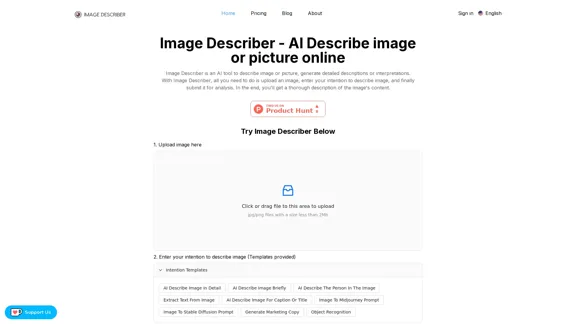
Image Describer - AI Describe Image or Picture Online With the advancement of Artificial Intelligence (AI), it is now possible to describe images or pictures online using an Image Describer. This innovative tool uses computer vision and machine learning algorithms to analyze and identify the contents of an image, generating a descriptive text of what it sees. How it Works The process is quite simple: 1. Upload an Image: You can upload an image or enter the URL of an online image to the Image Describer tool. 2. AI Analysis: The AI algorithm analyzes the image, detecting objects, people, animals, and other elements within the picture. 3. Generate Description: The AI generates a descriptive text based on the analysis, providing a clear and concise description of the image. Applications of Image Describer The Image Describer has numerous applications, including: * Accessibility: Helping visually impaired individuals to understand the content of an image. * E-commerce: Providing product descriptions for online shopping platforms. * Search Engine Optimization (SEO): Generating alt tags and descriptions for images to improve search engine rankings. * Content Creation: Assisting writers and content creators with image descriptions. Benefits of Image Describer The Image Describer offers several benefits, including: * Time-Saving: Automating the process of image description, saving time and effort. * Accuracy: Providing accurate and objective descriptions of images. * Efficiency: Enabling individuals to focus on other tasks while the AI handles image description. Try it Out Experience the power of AI-driven image description today! Upload an image or enter a URL to see the Image Describer in action.

AI Image Describer is a tool to describe images or pictures online. It can be used as an image description and caption generator. Additionally, it supports image-to-prompt and text extraction from photos.
Visit Website
Image Describer - AI Describe Image or Picture Online

With the advancement of Artificial Intelligence (AI), it is now possible to describe images or pictures online using an Image Describer. This innovative tool uses computer vision and machine learning algorithms to analyze and identify the contents of an image, generating a descriptive text of what it sees.

How it Works

The process is quite simple:

1. Upload an Image: You can upload an image or enter the URL of an online image to the Image Describer tool.
2. AI Analysis: The AI algorithm analyzes the image, detecting objects, people, animals, and other elements within the picture.
3. Generate Description: The AI generates a descriptive text based on the analysis, providing a clear and concise description of the image.

Applications of Image Describer

The Image Describer has numerous applications, including:

* Accessibility: Helping visually impaired individuals to understand the content of an image.
* E-commerce: Providing product descriptions for online shopping platforms.
* Search Engine Optimization (SEO): Generating alt tags and descriptions for images to improve search engine rankings.
* Content Creation: Assisting writers and content creators with image descriptions.

Benefits of Image Describer

The Image Describer offers several benefits, including:

* Time-Saving: Automating the process of image description, saving time and effort.
* Accuracy: Providing accurate and objective descriptions of images.
* Efficiency: Enabling individuals to focus on other tasks while the AI handles image description.

Try it Out

Experience the power of AI-driven image description today! Upload an image or enter a URL to see the Image Describer in action.
Visit Website

Introduction

Image Describer is an AI-powered tool designed to generate detailed descriptions and interpretations of images. Users can upload pictures, specify their descriptive intent, and receive comprehensive analyses of the image content. This versatile tool caters to various needs, from summarizing image content to extracting text and generating marketing copy.

Feature

AI-Powered Image Analysis

Image Describer utilizes advanced AI technology to provide detailed descriptions of uploaded images, including physical objects, emotions, and atmosphere.

Multiple Description Modes

Summary and Overview

Generates a comprehensive summary of the image content, detailing physical objects, emotions, and atmosphere.

Text Extraction

Extracts text from images with higher accuracy and speed than traditional OCR, maintaining original formatting where possible.

Caption Generation

Creates catchy captions for social media sharing, including relevant hashtags for increased exposure.

Midjourney Prompt Creation

Analyzes images to generate Midjourney prompts, allowing users to create similar themed images.

Marketing Copy Generation

Produces marketing copy for product images, highlighting appearance and features to boost sales potential.

Customized Description

Allows users to specify their descriptive intent, generating tailored image descriptions.

User-Friendly Interface

  1. Simple image upload process
  2. Customizable description templates
  3. Easy submission for analysis

Privacy and Ethical Use

  • Ensures responsible and ethical use of generated descriptions
  • Prohibits generation of inappropriate or violating content

FAQ

What is Image Describer?

Image Describer is an AI tool that analyzes and describes images based on user-specified intentions, providing detailed content descriptions.

How is Image Describer technically implemented?

The tool uses multimodal big models capable of understanding both images and text, ensuring output matches the expected image description.

How does Image Describer protect privacy?

Image Describer does not record images or descriptions without user consent. Shared submissions may be recorded and displayed on the site.

How can I provide feedback on Image Describer?

Users can provide feedback directly through the tool's built-in capabilities or contact the team via email for prompt responses.

Related Websites
Recally - The Best Screenshot Management App for macOS
View Detail

Recally - The Best Screenshot Management App for macOS

Recally - The Best Screenshot Management App for macOS

Recally is the best app to manage your screenshots on macOS. Organize, browse, and search your screenshots with ease. Available on macOS.

0
Kie.ai's 4o Image API: Cost-effective, Reliable, and Very Accurate AI Image Creation
View Detail

Kie.ai's 4o Image API: Cost-effective, Reliable, and Very Accurate AI Image Creation

Kie.ai's 4o Image API: Cost-effective, Reliable, and Very Accurate AI Image Creation

Kie.ai’s 4o Image API offers affordable, stable, and highly accurate AI image generation, enabling creators to easily produce high-quality visuals. It provides reliable and efficient solutions for various creative projects, including text-to-image and image-to-image transformations, as well as a range of visual styles.

356.51 K
Text to Voice Generator
==========================

A text-to-voice generator, also known as a text-to-speech (TTS) system, is a software that converts written text into a spoken voice output. This technology has been widely used in various applications, including virtual assistants, audiobooks, and language learning platforms.

How it Works
---------------

The process of generating voice from text involves several steps:

1. Text Analysis: The input text is analyzed to identify the language, syntax, and semantics.
2. Phonetic Transcription: The text is converted into a phonetic transcription, which represents the sounds of the spoken language.
3. Prosody Generation: The phonetic transcription is then used to generate the prosody, or rhythm and intonation, of the spoken voice.
4. Waveform Generation: The prosody and phonetic transcription are combined to generate the audio waveform, which is the final spoken voice output.

Types of Text-to-Voice Generators
-----------------------------------

There are two main types of text-to-voice generators:

Rule-Based Systems

These systems use a set of predefined rules to generate the spoken voice output. They are often limited in their ability to produce natural-sounding voices and may sound robotic.

Machine Learning-Based Systems

These systems use machine learning algorithms to learn from large datasets of spoken voices and generate more natural-sounding voices. They are often more advanced and can produce high-quality voice outputs.

Applications of Text-to-Voice Generators
-----------------------------------------

Text-to-voice generators have a wide range of applications, including:

Virtual Assistants

Virtual assistants, such as Siri and Alexa, use text-to-voice generators to respond to user queries.

Audiobooks

Text-to-voice generators can be used to create audiobooks from written texts, making it easier for people to access written content.

Language Learning

Language learning platforms use text-to-voice generators to provide pronunciation guidance and practice exercises for learners.

Accessibility

Text-to-voice generators can be used to assist people with disabilities, such as visual impairments, by providing an auditory interface to written content.
View Detail

Text to Voice Generator ========================== A text-to-voice generator, also known as a text-to-speech (TTS) system, is a software that converts written text into a spoken voice output. This technology has been widely used in various applications, including virtual assistants, audiobooks, and language learning platforms. How it Works --------------- The process of generating voice from text involves several steps: 1. Text Analysis: The input text is analyzed to identify the language, syntax, and semantics. 2. Phonetic Transcription: The text is converted into a phonetic transcription, which represents the sounds of the spoken language. 3. Prosody Generation: The phonetic transcription is then used to generate the prosody, or rhythm and intonation, of the spoken voice. 4. Waveform Generation: The prosody and phonetic transcription are combined to generate the audio waveform, which is the final spoken voice output. Types of Text-to-Voice Generators ----------------------------------- There are two main types of text-to-voice generators: Rule-Based Systems These systems use a set of predefined rules to generate the spoken voice output. They are often limited in their ability to produce natural-sounding voices and may sound robotic. Machine Learning-Based Systems These systems use machine learning algorithms to learn from large datasets of spoken voices and generate more natural-sounding voices. They are often more advanced and can produce high-quality voice outputs. Applications of Text-to-Voice Generators ----------------------------------------- Text-to-voice generators have a wide range of applications, including: Virtual Assistants Virtual assistants, such as Siri and Alexa, use text-to-voice generators to respond to user queries. Audiobooks Text-to-voice generators can be used to create audiobooks from written texts, making it easier for people to access written content. Language Learning Language learning platforms use text-to-voice generators to provide pronunciation guidance and practice exercises for learners. Accessibility Text-to-voice generators can be used to assist people with disabilities, such as visual impairments, by providing an auditory interface to written content.

Text to Voice Generator ========================== A text-to-voice generator, also known as a text-to-speech (TTS) system, is a software that converts written text into a spoken voice output. This technology has been widely used in various applications, including virtual assistants, audiobooks, and language learning platforms. How it Works --------------- The process of generating voice from text involves several steps: 1. Text Analysis: The input text is analyzed to identify the language, syntax, and semantics. 2. Phonetic Transcription: The text is converted into a phonetic transcription, which represents the sounds of the spoken language. 3. Prosody Generation: The phonetic transcription is then used to generate the prosody, or rhythm and intonation, of the spoken voice. 4. Waveform Generation: The prosody and phonetic transcription are combined to generate the audio waveform, which is the final spoken voice output. Types of Text-to-Voice Generators ----------------------------------- There are two main types of text-to-voice generators: Rule-Based Systems These systems use a set of predefined rules to generate the spoken voice output. They are often limited in their ability to produce natural-sounding voices and may sound robotic. Machine Learning-Based Systems These systems use machine learning algorithms to learn from large datasets of spoken voices and generate more natural-sounding voices. They are often more advanced and can produce high-quality voice outputs. Applications of Text-to-Voice Generators ----------------------------------------- Text-to-voice generators have a wide range of applications, including: Virtual Assistants Virtual assistants, such as Siri and Alexa, use text-to-voice generators to respond to user queries. Audiobooks Text-to-voice generators can be used to create audiobooks from written texts, making it easier for people to access written content. Language Learning Language learning platforms use text-to-voice generators to provide pronunciation guidance and practice exercises for learners. Accessibility Text-to-voice generators can be used to assist people with disabilities, such as visual impairments, by providing an auditory interface to written content.

Generate Voice from Text on Any Web Page With the advancement of technology, it is now possible to generate voice from text on any web page. This feature is particularly useful for people who prefer listening to content rather than reading it. Here's how you can do it: #Method 1: Using Browser Extension You can use a browser extension like Read Aloud or SpeakIt! to generate voice from text on any web page. These extensions are available for both Google Chrome and Mozilla Firefox browsers. #Method 2: Using Online Tools There are several online tools available that can convert text to speech. Some popular tools include NaturalReader, Voice Dream Reader, and Google Text-to-Speech. You can copy and paste the text from any web page into these tools to generate voice. #Method 3: Using Screen Reader If you are using a Windows operating system, you can use the built-in Narrator screen reader to generate voice from text on any web page. For Mac users, you can use VoiceOver. By using any of these methods, you can easily generate voice from text on any web page and enjoy a more convenient and accessible reading experience.

193.90 M
Youdao Smart Translation
View Detail

Youdao Smart Translation

Youdao Smart Translation

【Youdao Lingdong Translation】Using Youdao's large translation model, the top choice for immersive web translation tools! Real-time contrast translation: Turn any web page into a contrast. Image translation: Easily extract text from images. Instant translation input box: Enter Chinese and easily convert to English.

193.90 M
NovelAI Auto Button Clicker 

This is a tool designed to automate button clicks within the NovelAI web application. 

It can be used to:

* Speed up repetitive tasks:  Such as generating multiple story continuations or iterating through different story options.
* Free up your time:  Allow you to focus on other aspects of your writing process while the tool handles the clicking.
* Improve efficiency:  Reduce the amount of time and effort required to complete certain tasks in NovelAI.


Disclaimer:

This tool is intended for personal use only and should not be used to violate NovelAI's terms of service.
View Detail

NovelAI Auto Button Clicker This is a tool designed to automate button clicks within the NovelAI web application. It can be used to: * Speed up repetitive tasks: Such as generating multiple story continuations or iterating through different story options. * Free up your time: Allow you to focus on other aspects of your writing process while the tool handles the clicking. * Improve efficiency: Reduce the amount of time and effort required to complete certain tasks in NovelAI. Disclaimer: This tool is intended for personal use only and should not be used to violate NovelAI's terms of service.

NovelAI Auto Button Clicker This is a tool designed to automate button clicks within the NovelAI web application. It can be used to: * Speed up repetitive tasks: Such as generating multiple story continuations or iterating through different story options. * Free up your time: Allow you to focus on other aspects of your writing process while the tool handles the clicking. * Improve efficiency: Reduce the amount of time and effort required to complete certain tasks in NovelAI. Disclaimer: This tool is intended for personal use only and should not be used to violate NovelAI's terms of service.

This is an extension that automatically clicks the generate button when creating images in NovelAI. This feature allows you to generate a specified number of images in the background, allowing you to work on other tasks while the images are being created. 【Target Users】 ・NovelAI…

193.90 M
Image to SVG Converter
View Detail

Image to SVG Converter

Image to SVG Converter

Help me convert images to vector graphics (SVG).

193.90 M
My AI
View Detail

My AI

My AI

AI enables all social media platforms, e-commerce platforms, and websites that you visit.

193.90 M
SubEasy: AI Powered Audio Transcription & Video Subtitles
View Detail

SubEasy: AI Powered Audio Transcription & Video Subtitles

SubEasy: AI Powered Audio Transcription & Video Subtitles

SubEasy.ai提供具有无与伦比的准确性的人工智能自动转录和翻译服务,跨越100种语言的上下文感知AI翻译。现在注册!

422.02 K