Open-source RightAI Tools Directory
  • Discover AI
  • Submit
  • Startup
  • Blog
Open-source RightAI Tools Directory
Discover the best AI tools of 2025 with the RightAI Tools Directory!

Friend Links

AI Anime GeneratorToolsApp AI

Support

Tap4
Privacy policyTerms & ConditionsContact Us
Loading...
loading...

Get MailMaestro

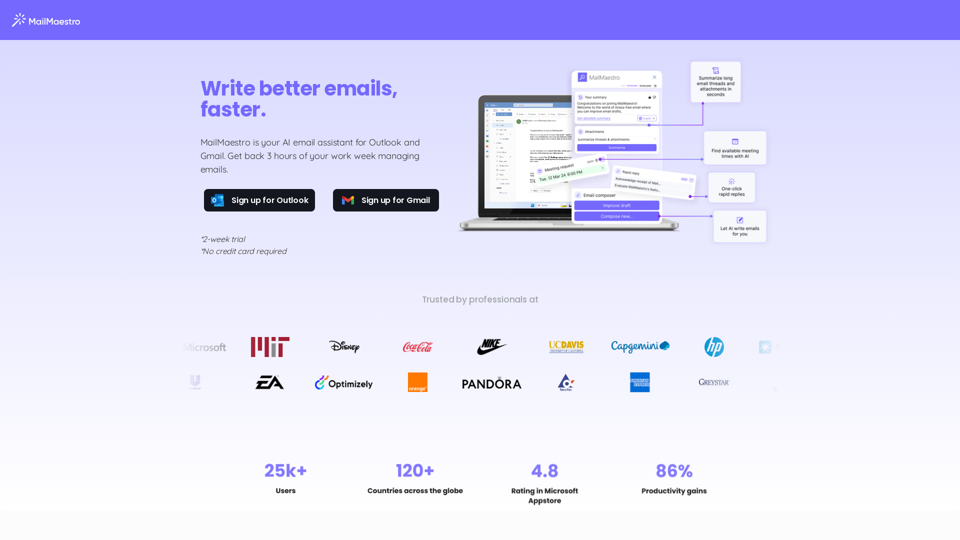
Enhance your email productivity with MailMaestro. Enjoy AI-assisted email summaries, unique style personalization, and top-quality drafts. Check our features today!
Visit Website
Get MailMaestro
Visit Website

Introduction

MailMaestro is an innovative AI email assistant designed for Outlook and Gmail users. It aims to help users write better emails faster, potentially saving up to 3 hours of work time per week. This tool transforms simple points into high-quality prose, offering personalized email drafting assistance while maintaining enterprise-grade security.

Feature

AI-Powered Email Writing

  • Quickly transforms simple points into high-quality prose
  • Generates three curated email drafts for user selection
  • Offers Magic Templates for various scenarios, streamlining the drafting process

Personalization and Customization

  • Learns user's writing style over time
  • Allows selection of preferred tone and language
  • Customizable email length to match recipient expectations

Time-Saving Features

  • Summarizes lengthy email threads
  • Improves existing drafts with AI capabilities
  • Creates new emails from scratch using an intuitive platform

User-Friendly Interface

  • Easy-to-use interface for selecting preferences
  • Option to pin MailMaestro to the sidebar for easy access
  • Provides a final review before sending emails

Enterprise-Grade Security

  • Adheres to strict security protocols
  • Uses obfuscation and encryption to protect sensitive data

FAQ

What is MailMaestro?

MailMaestro is an AI email assistant for Outlook and Gmail users that helps write better emails faster, potentially saving up to 3 hours of work time per week.

How does MailMaestro work?

MailMaestro uses AI to transform simple points into high-quality prose, summarize email threads, improve existing drafts, and create new emails from scratch. It offers personalized templates and learns the user's writing style over time.

Is MailMaestro secure?

Yes, MailMaestro prioritizes security by adhering to strict protocols and using obfuscation and encryption to protect sensitive data.

Can I try MailMaestro before committing?

Yes, MailMaestro offers a 2-week trial with no credit card required, allowing users to experience its features firsthand.

How does MailMaestro save time?

MailMaestro saves time by quickly summarizing email threads, improving existing drafts, offering ready-to-use templates, and generating high-quality email drafts in seconds.

Related Websites

Claude to Notion

This is a guide on how to connect Claude, an AI assistant, with Notion, a note-taking and workspace app. 

Why connect Claude and Notion?

* Boost your productivity: Use Claude to generate content, summarize information, and automate tasks directly within Notion.
* Enhance your research: Ask Claude questions about your Notion notes and get insightful answers.
* Unlock new creative possibilities: Leverage Claude's generative capabilities to brainstorm ideas, write stories, or compose emails within your Notion workspace.

How to connect Claude and Notion:

1. API Keys: Obtain an API key for both Claude and Notion. 
2. Integration Tool: Explore integration tools like Zapier or Integromat to connect Claude and Notion. These platforms allow you to create workflows that trigger actions in one app based on events in the other.
3. Custom Development: For advanced users, you can develop your own custom integration using the Claude and Notion APIs. This gives you the most flexibility but requires coding knowledge.

Example Use Cases:

* Meeting Summarization: After a meeting, paste the transcript into Notion and use Claude to generate a concise summary.
* Content Creation:  Use Claude to write blog posts, articles, or social media captions directly within your Notion pages.
* Idea Generation: Brainstorm new ideas for projects or tasks by prompting Claude with specific questions within your Notion workspace.


Remember to review the documentation and terms of service for both Claude and Notion to ensure proper usage and security.
View Detail

Claude to Notion This is a guide on how to connect Claude, an AI assistant, with Notion, a note-taking and workspace app. Why connect Claude and Notion? * Boost your productivity: Use Claude to generate content, summarize information, and automate tasks directly within Notion. * Enhance your research: Ask Claude questions about your Notion notes and get insightful answers. * Unlock new creative possibilities: Leverage Claude's generative capabilities to brainstorm ideas, write stories, or compose emails within your Notion workspace. How to connect Claude and Notion: 1. API Keys: Obtain an API key for both Claude and Notion. 2. Integration Tool: Explore integration tools like Zapier or Integromat to connect Claude and Notion. These platforms allow you to create workflows that trigger actions in one app based on events in the other. 3. Custom Development: For advanced users, you can develop your own custom integration using the Claude and Notion APIs. This gives you the most flexibility but requires coding knowledge. Example Use Cases: * Meeting Summarization: After a meeting, paste the transcript into Notion and use Claude to generate a concise summary. * Content Creation: Use Claude to write blog posts, articles, or social media captions directly within your Notion pages. * Idea Generation: Brainstorm new ideas for projects or tasks by prompting Claude with specific questions within your Notion workspace. Remember to review the documentation and terms of service for both Claude and Notion to ensure proper usage and security.

Claude to Notion This is a guide on how to connect Claude, an AI assistant, with Notion, a note-taking and workspace app. Why connect Claude and Notion? * Boost your productivity: Use Claude to generate content, summarize information, and automate tasks directly within Notion. * Enhance your research: Ask Claude questions about your Notion notes and get insightful answers. * Unlock new creative possibilities: Leverage Claude's generative capabilities to brainstorm ideas, write stories, or compose emails within your Notion workspace. How to connect Claude and Notion: 1. API Keys: Obtain an API key for both Claude and Notion. 2. Integration Tool: Explore integration tools like Zapier or Integromat to connect Claude and Notion. These platforms allow you to create workflows that trigger actions in one app based on events in the other. 3. Custom Development: For advanced users, you can develop your own custom integration using the Claude and Notion APIs. This gives you the most flexibility but requires coding knowledge. Example Use Cases: * Meeting Summarization: After a meeting, paste the transcript into Notion and use Claude to generate a concise summary. * Content Creation: Use Claude to write blog posts, articles, or social media captions directly within your Notion pages. * Idea Generation: Brainstorm new ideas for projects or tasks by prompting Claude with specific questions within your Notion workspace. Remember to review the documentation and terms of service for both Claude and Notion to ensure proper usage and security.

Save Claude conversations to Notion with one click. Export Claude conversations.

193.90 M
Youtube VideoSynth: Summarize Youtube Videos

This tool uses artificial intelligence to create short summaries of YouTube videos. 

Simply paste the YouTube video URL into the input field, and VideoSynth will generate a concise summary of the video's content.
View Detail

Youtube VideoSynth: Summarize Youtube Videos This tool uses artificial intelligence to create short summaries of YouTube videos. Simply paste the YouTube video URL into the input field, and VideoSynth will generate a concise summary of the video's content.

Youtube VideoSynth: Summarize Youtube Videos This tool uses artificial intelligence to create short summaries of YouTube videos. Simply paste the YouTube video URL into the input field, and VideoSynth will generate a concise summary of the video's content.

Summarize YouTube Video Transcripts Using AI This is a powerful tool for quickly understanding the main points of long videos. Here's how it works: 1. Get the Transcript: You'll need a text transcript of the YouTube video. Many videos have automatic captions, or you can use a transcription service. 2. Choose an AI Summarizer: There are many free and paid AI summarization tools available online. Some popular options include: * OpenAI's GPT-3: A powerful language model that can generate high-quality summaries. * Google Cloud AI Platform: Offers a variety of AI services, including text summarization. * Hugging Face Transformers: An open-source library with pre-trained summarization models. 3. Input the Transcript: Paste the transcript into the AI summarizer. 4. Generate the Summary: The AI will analyze the text and generate a concise summary of the video's main points. 5. Review and Edit: Read through the AI-generated summary and make any necessary edits to ensure accuracy and clarity. Let me know if you'd like more details on any of these steps!

193.90 M
Latercut - Ship Shorts 10x Faster
View Detail

Latercut - Ship Shorts 10x Faster

Latercut - Ship Shorts 10x Faster

Faceless Video Tool for Social Media

0
WiseGPT
View Detail

WiseGPT

WiseGPT

Autocomplete and personal prompts for ChatGPT.

193.90 M
Chrome Web Store
View Detail

Chrome Web Store

Chrome Web Store

Enhance your browser with new features and tailor your browsing experience to your preferences.

193.90 M
ReplyGO - AI for Customer Service
View Detail

ReplyGO - AI for Customer Service

ReplyGO - AI for Customer Service

AI Agent for e-commerce and ticketing platforms powered by ChatGPT

193.90 M
AISPEED for ChatGPT

What is AISPEED?

AISPEED is a powerful AI assistant designed to enhance your ChatGPT experience.

Key Features:

* Faster Response Times: Experience significantly reduced wait times for ChatGPT responses.
* Improved Accuracy: Benefit from enhanced accuracy and fluency in ChatGPT's generated text.
* Personalized Settings: Customize your ChatGPT experience with tailored settings to suit your needs.
* Multi-Modal Support: Interact with ChatGPT using text, voice, and even images.
* Seamless Integration: AISPEED integrates seamlessly with various platforms and applications.

How AISPEED Works:

AISPEED leverages advanced AI algorithms and techniques to optimize ChatGPT's performance. It accelerates response generation, refines text quality, and enables new interaction modes.

Benefits:

* Increased Productivity: Get faster answers and complete tasks more efficiently.
* Enhanced Creativity: Explore new ideas and generate more creative content.
* Improved Communication: Engage in more natural and meaningful conversations.
* Expanded Capabilities: Unlock the full potential of ChatGPT with advanced features.
View Detail

AISPEED for ChatGPT What is AISPEED? AISPEED is a powerful AI assistant designed to enhance your ChatGPT experience. Key Features: * Faster Response Times: Experience significantly reduced wait times for ChatGPT responses. * Improved Accuracy: Benefit from enhanced accuracy and fluency in ChatGPT's generated text. * Personalized Settings: Customize your ChatGPT experience with tailored settings to suit your needs. * Multi-Modal Support: Interact with ChatGPT using text, voice, and even images. * Seamless Integration: AISPEED integrates seamlessly with various platforms and applications. How AISPEED Works: AISPEED leverages advanced AI algorithms and techniques to optimize ChatGPT's performance. It accelerates response generation, refines text quality, and enables new interaction modes. Benefits: * Increased Productivity: Get faster answers and complete tasks more efficiently. * Enhanced Creativity: Explore new ideas and generate more creative content. * Improved Communication: Engage in more natural and meaningful conversations. * Expanded Capabilities: Unlock the full potential of ChatGPT with advanced features.

AISPEED for ChatGPT What is AISPEED? AISPEED is a powerful AI assistant designed to enhance your ChatGPT experience. Key Features: * Faster Response Times: Experience significantly reduced wait times for ChatGPT responses. * Improved Accuracy: Benefit from enhanced accuracy and fluency in ChatGPT's generated text. * Personalized Settings: Customize your ChatGPT experience with tailored settings to suit your needs. * Multi-Modal Support: Interact with ChatGPT using text, voice, and even images. * Seamless Integration: AISPEED integrates seamlessly with various platforms and applications. How AISPEED Works: AISPEED leverages advanced AI algorithms and techniques to optimize ChatGPT's performance. It accelerates response generation, refines text quality, and enables new interaction modes. Benefits: * Increased Productivity: Get faster answers and complete tasks more efficiently. * Enhanced Creativity: Explore new ideas and generate more creative content. * Improved Communication: Engage in more natural and meaningful conversations. * Expanded Capabilities: Unlock the full potential of ChatGPT with advanced features.

Provides a number of custom prompts to help you use ChatGPT effectively and efficiently.

193.90 M
inai Webhooks & Reports Integrator
View Detail

inai Webhooks & Reports Integrator

inai Webhooks & Reports Integrator

Helps you quickly set up Adyen Webhooks and Reports so they work with inai Optimize and inai Recon.

193.90 M