Open-source RightAI Tools Directory
  • Discover AI
  • Submit
  • Startup
  • Blog
Open-source RightAI Tools Directory
Discover the best AI tools of 2025 with the RightAI Tools Directory!

Friend Links

AI Anime GeneratorToolsApp AI

Support

Tap4
Privacy policyTerms & ConditionsContact Us
Loading...
loading...

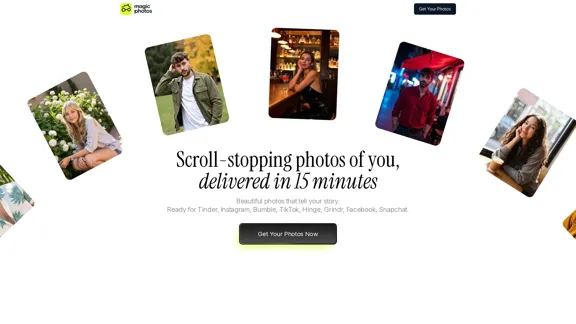
MagicPhotos

Beautiful photos that tell your story. Ready for Tinder, Instagram, Bumble, TikTok, Hinge, Grindr, Facebook, Snapchat.
Visit Website
MagicPhotos
Visit Website

Introduction

MagicPhotos offers a unique service that delivers high-quality, personalized photos in just 15 minutes. Users can upload their images and select styles that reflect their personality, allowing for stunning results that are perfect for social media, dating profiles, and personal branding. The platform emphasizes user privacy and provides a money-back guarantee if expectations are not met.

Feature

  1. Upload Images and Select Styles

    Users can upload 10 everyday images and choose from a variety of styles that best express their personality.

  2. AI Learning Process

    The AI analyzes the uploaded images to understand the user's features and style, ensuring personalized results.

  3. Quick Delivery

    Depending on the selected package, users can receive their edited photos in as little as 15 minutes.

  4. Variety of Styles

    MagicPhotos offers an extensive library of styles, catering to different moods and occasions, from casual to professional.

  5. High-Quality Output

    The platform guarantees high-resolution, hyper-realistic photos that capture the user's likeness accurately.

  6. Privacy Assurance

    User data is kept secure, with strict policies against sharing or selling images without consent.

  7. Money-Back Guarantee

    If users are not satisfied with the results, they can request a refund, ensuring a risk-free experience.

How to Use?

  1. Upload at least 10 high-quality images of yourself.
  2. Ensure consistency in your look across the images (hairstyle, facial hair).
  3. Choose a mix of angles, lighting, and expressions for the best results.
  4. Select a photo pack that fits your needs and budget.
  5. Review the styles available and pick those that resonate with your personality.

FAQ

How does this work?

Users start by uploading everyday images, then choose a photo pack and styles. The AI learns from the images and generates high-quality portraits within minutes.

What kind of images do I need to upload?

Upload high-quality images with a consistent look. A variety of angles and expressions will help the AI create better results.

What kind of photos can I create here?

Users can select from a wide range of curated styles, with each style generating around 20 unique portraits.

Will my AI-generated photos look real?

Yes, the AI is designed to produce hyper-realistic images that accurately capture the user's likeness.

Is my privacy protected?

Absolutely. User images are never shared or sold, and users have control over their data.

Price

PackagePrice (USD)Number of PhotosStyles AvailableDelivery Time
The Spark$4940 HD photos2 styles90 minutes
The Flame$59100 HD photos5 styles60 minutes
The Fire$69200 HD photos10 styles15 minutes
The price is for reference only, please refer to the latest official data for actual information.

Evaluation

MagicPhotos excels in delivering quick, high-quality photo results that cater to various needs, from social media to personal branding. The AI's ability to learn from user-uploaded images ensures a personalized experience. However, the service could improve by offering more detailed guidance on selecting the best images for upload, as well as expanding the range of styles available. Additionally, while the privacy measures are robust, further transparency about data handling could enhance user trust. Overall, it provides a valuable service for those seeking professional-looking photos without the hassle of traditional photography.

Latest Traffic Insights

  • Monthly Visits

    38.27 K

  • Bounce Rate

    48.77%

  • Pages Per Visit

    1.75

  • Time on Site(s)

    76.61

  • Global Rank

    854305

  • Country Rank

    United States 397239

Recent Visits

Traffic Sources

  • Social Media:
    2.75%
  • Paid Referrals:
    0.43%
  • Email:
    0.07%
  • Referrals:
    4.83%
  • Search Engines:
    40.06%
  • Direct:
    51.59%
More Data

Related Websites

Midjourney API - Automate Midjourney AI Image Generation 

This document outlines how to use the Midjourney API to automate the generation of AI images. 

What is the Midjourney API?

The Midjourney API allows developers to programmatically interact with the powerful Midjourney AI model. This means you can generate images, control various parameters, and integrate Midjourney into your own applications and workflows.

Why Use the Midjourney API?

* Automation: Automate the creation of images for various purposes, such as marketing materials, website content, or research projects.
* Customization: Fine-tune image generation by controlling parameters like aspect ratio, style, and seed values.
* Integration: Seamlessly integrate Midjourney's capabilities into your existing tools and platforms.

Getting Started

1. Sign Up for a Midjourney Account: You'll need a Midjourney account to access the API.

2. Obtain an API Key: Once you have an account, you can generate an API key from your account settings.

3. Choose a Programming Language: The Midjourney API supports various programming languages, including Python, JavaScript, and Go.

4. Install the API Client: Install the appropriate API client library for your chosen language.

5. Start Generating Images: Use the API client to send image generation requests to the Midjourney server.

Example (Python):

```python
import midjourney

Replace with your actual API key
api_key = "YOUR_API_KEY"

Create a Midjourney client
client = midjourney.Client(api_key=api_key)

Generate an image
response = client.create_image(prompt="A cat wearing a hat", num_images=1)

Print the image URL
print(response.images[0].url)
```

Documentation and Resources

For detailed information about the Midjourney API, including available endpoints, parameters, and examples, please refer to the official documentation: [https://docs.midjourney.com/](https://docs.midjourney.com/)
View Detail

Midjourney API - Automate Midjourney AI Image Generation This document outlines how to use the Midjourney API to automate the generation of AI images. What is the Midjourney API? The Midjourney API allows developers to programmatically interact with the powerful Midjourney AI model. This means you can generate images, control various parameters, and integrate Midjourney into your own applications and workflows. Why Use the Midjourney API? * Automation: Automate the creation of images for various purposes, such as marketing materials, website content, or research projects. * Customization: Fine-tune image generation by controlling parameters like aspect ratio, style, and seed values. * Integration: Seamlessly integrate Midjourney's capabilities into your existing tools and platforms. Getting Started 1. Sign Up for a Midjourney Account: You'll need a Midjourney account to access the API. 2. Obtain an API Key: Once you have an account, you can generate an API key from your account settings. 3. Choose a Programming Language: The Midjourney API supports various programming languages, including Python, JavaScript, and Go. 4. Install the API Client: Install the appropriate API client library for your chosen language. 5. Start Generating Images: Use the API client to send image generation requests to the Midjourney server. Example (Python): ```python import midjourney Replace with your actual API key api_key = "YOUR_API_KEY" Create a Midjourney client client = midjourney.Client(api_key=api_key) Generate an image response = client.create_image(prompt="A cat wearing a hat", num_images=1) Print the image URL print(response.images[0].url) ``` Documentation and Resources For detailed information about the Midjourney API, including available endpoints, parameters, and examples, please refer to the official documentation: [https://docs.midjourney.com/](https://docs.midjourney.com/)

Midjourney API - Automate Midjourney AI Image Generation This document outlines how to use the Midjourney API to automate the generation of AI images. What is the Midjourney API? The Midjourney API allows developers to programmatically interact with the powerful Midjourney AI model. This means you can generate images, control various parameters, and integrate Midjourney into your own applications and workflows. Why Use the Midjourney API? * Automation: Automate the creation of images for various purposes, such as marketing materials, website content, or research projects. * Customization: Fine-tune image generation by controlling parameters like aspect ratio, style, and seed values. * Integration: Seamlessly integrate Midjourney's capabilities into your existing tools and platforms. Getting Started 1. Sign Up for a Midjourney Account: You'll need a Midjourney account to access the API. 2. Obtain an API Key: Once you have an account, you can generate an API key from your account settings. 3. Choose a Programming Language: The Midjourney API supports various programming languages, including Python, JavaScript, and Go. 4. Install the API Client: Install the appropriate API client library for your chosen language. 5. Start Generating Images: Use the API client to send image generation requests to the Midjourney server. Example (Python): ```python import midjourney Replace with your actual API key api_key = "YOUR_API_KEY" Create a Midjourney client client = midjourney.Client(api_key=api_key) Generate an image response = client.create_image(prompt="A cat wearing a hat", num_images=1) Print the image URL print(response.images[0].url) ``` Documentation and Resources For detailed information about the Midjourney API, including available endpoints, parameters, and examples, please refer to the official documentation: [https://docs.midjourney.com/](https://docs.midjourney.com/)

Easily integrate Midjourney AI into your apps using the Midjourney API. Start creating AI images automatically today!

0
Odyssey: Imagine. Create. Automate.
View Detail

Odyssey: Imagine. Create. Automate.

Odyssey: Imagine. Create. Automate.

Odyssey is a native Mac app for creating remarkable art, getting work done, and automating repetitive tasks with the power of AI.

12.13 K
Ziko.ai Extension
View Detail

Ziko.ai Extension

Ziko.ai Extension

Here are some examples of auto-replies you can use for Google Business reviews: For Positive Reviews: * "Thank you so much for the wonderful review! We're thrilled you had a positive experience. We appreciate your business and look forward to seeing you again soon." * "We're so happy to hear you enjoyed your time with us! Your feedback means a lot to us. Thanks for taking the time to leave a review." * "Wow, thank you for the kind words! We strive to provide excellent service and we're glad we met your expectations. We appreciate your support!" For Negative Reviews: * "We're sorry to hear that you had a negative experience. We value your feedback and would like to learn more about what happened. Please contact us directly at [phone number] or [email address] so we can address your concerns." * "Thank you for your honest feedback. We apologize that we didn't meet your expectations. We're always working to improve our services and we appreciate you bringing this to our attention." * "We understand your frustration and sincerely apologize for any inconvenience caused. We'd like to make things right. Please contact us at [phone number] or [email address] so we can discuss this further." Tips: * Be prompt: Respond to reviews as quickly as possible. * Be genuine: Your responses should sound sincere and authentic. * Be professional: Avoid getting defensive or argumentative. * Keep it concise: Get to the point and avoid writing lengthy responses. * Offer solutions: If possible, offer a way to resolve the issue.

193.90 M
PS2 Filter AI - PS2 Video Game Style Generator
View Detail

PS2 Filter AI - PS2 Video Game Style Generator

PS2 Filter AI - PS2 Video Game Style Generator

Discover the magic of AI with our PS2 filter and instantly transform your photos into classic PS2 video game characters. Experience this retro style with a modern twist—just upload your photo and see the transformation in one click! Try it for free at ps2filterai.net.

0
Free AI Image Generator | Prompt Generator and AI Image Creator
View Detail

Free AI Image Generator | Prompt Generator and AI Image Creator

Free AI Image Generator | Prompt Generator and AI Image Creator

Picture AI is an amazing AI image generator and image editor. It generates prompts for you and then creates images that meet your needs with AI.

100
SaberTrade Browser Extension
View Detail

SaberTrade Browser Extension

SaberTrade Browser Extension

Your AI-Enabled Trading Companion Let's explore how AI can revolutionize your trading experience. Harness the Power of AI * Automated Trading: Execute trades with precision and speed, powered by AI algorithms that analyze market data in real-time. * Smart Order Routing: Optimize your order execution by intelligently routing trades to the best available market for maximum efficiency. * Risk Management: Minimize potential losses with AI-driven risk assessment and management tools that adapt to changing market conditions. * Personalized Insights: Receive tailored market analysis and trading recommendations based on your individual investment goals and risk tolerance. Stay Ahead of the Curve * Predictive Analytics: Gain an edge with AI-powered predictions on market trends and price movements. * Sentiment Analysis: Understand market sentiment and investor psychology through AI-driven analysis of news, social media, and other data sources. * Backtesting and Optimization: Test and refine your trading strategies using historical data and AI algorithms for improved performance. Empower Your Trading Journey * User-Friendly Interface: Navigate the world of AI trading with ease through our intuitive and accessible platform. * 24/7 Support: Get assistance whenever you need it with our dedicated team of experts available around the clock. * Continuous Learning: Benefit from ongoing AI advancements and algorithm improvements that enhance your trading capabilities. Let AI be your trusted partner in navigating the dynamic world of trading.

193.90 M
Holara - Anime Image Generation - Holara
View Detail

Holara - Anime Image Generation - Holara

Holara - Anime Image Generation - Holara

Holara: AI-generated anime artwork!

42.69 K
Two-Way Voice for ChatGPT
View Detail

Two-Way Voice for ChatGPT

Two-Way Voice for ChatGPT

This extension for ChatGPT allows you to ask using voice and listen to response.

193.90 M