Open-source RightAI Tools Directory
  • Discover AI
  • Submit
  • Startup
  • Blog
Open-source RightAI Tools Directory
Discover the best AI tools of 2025 with the RightAI Tools Directory!

Friend Links

AI Anime GeneratorToolsApp AI

Support

Tap4
Privacy policyTerms & ConditionsContact Us
Loading...
loading...

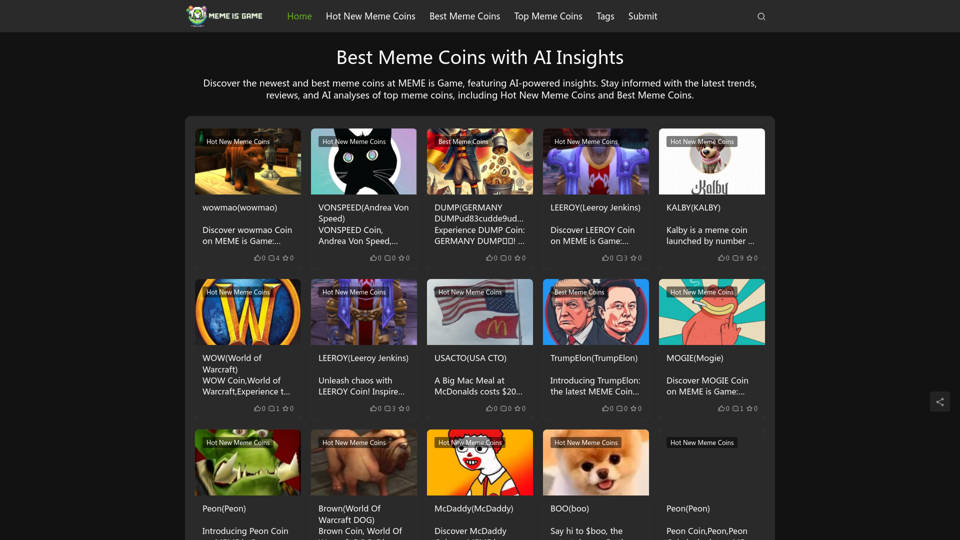
Best Meme Coins with AI Insights at MEME is Game Let's explore the top meme coins gaining traction in the crypto space, enhanced by the power of AI insights at MEME is Game.

Discover the newest and best meme coins at MEME is Game, featuring AI-powered insights. Stay informed with the latest trends, reviews, and AI analyses of top meme coins, including Hot New Meme Coins and Best Meme Coins.
Visit Website
Best Meme Coins with AI Insights at MEME is Game 

Let's explore the top meme coins gaining traction in the crypto space, enhanced by the power of AI insights at MEME is Game.
Visit Website

Introduction

MEME is Game is a platform that provides AI-powered insights into the newest and best meme coins. It offers users the latest trends, reviews, and AI analyses of top meme coins, including Hot New Meme Coins and Best Meme Coins. The platform aims to keep investors informed about this unique and exciting aspect of the cryptocurrency world.

Feature

AI-Powered Insights

MEME is Game leverages artificial intelligence to provide in-depth analyses and insights into various meme coins, helping users make informed decisions.

Latest Trends and Reviews

The platform offers up-to-date information on meme coin trends and provides comprehensive reviews of different coins.

Hot New Meme Coins

Users can discover the latest and most promising meme coins entering the market, staying ahead of potential investment opportunities.

Best Meme Coins

MEME is Game curates a list of the top-performing meme coins, helping users identify strong contenders in the market.

Educational Resources

The platform provides valuable information about meme coins, including their definition, working mechanism, benefits, and selection criteria.

Comprehensive Coin Information

Users can access detailed information about each meme coin, including its blockchain platform, community engagement, and market trends.

FAQ

What are meme coins?

Meme coins are a type of cryptocurrency often created as a joke or based on internet memes. Despite their humorous origins, they have become serious investment opportunities for many. These coins are typically created on blockchain platforms like Solana, Ethereum, and Binance Smart Chain.

What are the benefits of meme coins?

Meme coins offer several advantages:

  • Low transaction fees compared to other cryptocurrencies
  • High liquidity, making them easy to buy and sell
  • Strong community support and engagement
  • Potential for rapid value fluctuations based on market sentiment

How can I choose the best meme coins?

To select the best meme coins, consider the following factors:

  1. Research the coin's whitepaper, team, and community
  2. Analyze market trends and price movements
  3. Look for coins with active and engaged communities
  4. Ensure the coin's blockchain is secure and has a strong track record

How do I buy meme coins?

You can purchase meme coins on various cryptocurrency exchanges, such as Binance, Coinbase, and Kraken. It's important to research and choose a reputable exchange before making any transactions.

Related Websites
Chart GPT
View Detail

Chart GPT

Chart GPT

AI-Powered Trading Companion

193.90 M
Writeseed - AI Assistant
View Detail

Writeseed - AI Assistant

Writeseed - AI Assistant

Using AI on Every Website With the rapid advancement of technology, Artificial Intelligence (AI) has become an integral part of our daily lives. From virtual assistants to self-driving cars, AI is revolutionizing the way we live and work. One area where AI can have a significant impact is on websites. Imagine a website that can learn from your behavior, adapt to your needs, and provide personalized experiences. In this article, we'll explore the possibilities of using AI on every website. Enhanced User Experience AI can analyze user behavior, preferences, and interests to provide a tailored experience. For instance, an e-commerce website can use AI to recommend products based on a user's browsing history and purchase behavior. This can lead to increased customer satisfaction, loyalty, and ultimately, revenue. Improved Website Performance AI can help optimize website performance by analyzing user traffic patterns, identifying bottlenecks, and providing insights to improve loading times. This can result in higher search engine rankings, increased conversions, and a better overall user experience. Personalized Content AI-powered content generation can help create personalized content for users based on their interests, preferences, and behavior. This can include customized product recommendations, tailored blog posts, and even personalized email marketing campaigns. Enhanced Security AI-powered security systems can detect and prevent cyber threats in real-time, providing an additional layer of protection for websites and their users. This can include identifying and blocking malicious traffic, detecting phishing attempts, and preventing data breaches. Chatbots and Virtual Assistants AI-powered chatbots and virtual assistants can provide 24/7 customer support, helping users navigate websites, answer questions, and resolve issues. This can lead to increased customer satisfaction, reduced support queries, and improved overall user experience. The Future of Web Development As AI technology continues to evolve, we can expect to see even more innovative applications on websites. From AI-powered design tools to AI-driven website analytics, the possibilities are endless. The future of web development is exciting, and AI is at the forefront of this revolution. Conclusion Using AI on every website can have a transformative impact on the way we interact with the internet. From enhanced user experiences to improved website performance, personalized content, enhanced security, and chatbots, the benefits of AI are undeniable. As technology continues to advance, we can expect to see even more innovative applications of AI on websites. The future is exciting, and AI is leading the way.

193.90 M
Midjourney SREF Codes Library for Style Reference

What are SREF Codes?

SREF codes are special text strings used in Midjourney to quickly and easily apply specific artistic styles to your image generations. 

How to Use SREF Codes:

Simply add an SREF code to your Midjourney prompt. For example:

`/imagine a majestic dragon, SREF:cyberpunk`

SREF Code Library:

This library contains a collection of SREF codes categorized by style. 

* Art Styles:
    * `photorealistic`: Creates images with high levels of realism.
    * `impressionistic`:  Captures the essence of a scene with loose brushstrokes and vibrant colors.
    * `cubist`:  Breaks down objects into geometric shapes.
    * `surrealist`:  Creates dreamlike and fantastical images.
    * `abstract`:  Focuses on form, color, and composition rather than representational imagery.

* Visual Effects:
    * `cinematic`:  Gives images a cinematic look and feel.
    * `HDR`:  Creates images with high dynamic range, resulting in greater detail and contrast.
    * `neon`:  Adds vibrant neon lights to the image.
    * `pixel art`:  Generates images in a retro pixel art style.

* Other Styles:
    * `anime`:  Creates images in the style of Japanese animation.
    * `manga`:  Similar to anime, but with a more comic book aesthetic.
    * `sketch`:  Generates images that resemble pencil sketches.
    * `watercolor`:  Creates images with the look and feel of watercolor paintings.

Note: This is just a small sample of the many SREF codes available. 

Explore and Experiment:

The best way to learn about SREF codes is to experiment with them! Try combining different codes to create unique and interesting styles.
View Detail

Midjourney SREF Codes Library for Style Reference What are SREF Codes? SREF codes are special text strings used in Midjourney to quickly and easily apply specific artistic styles to your image generations. How to Use SREF Codes: Simply add an SREF code to your Midjourney prompt. For example: `/imagine a majestic dragon, SREF:cyberpunk` SREF Code Library: This library contains a collection of SREF codes categorized by style. * Art Styles: * `photorealistic`: Creates images with high levels of realism. * `impressionistic`: Captures the essence of a scene with loose brushstrokes and vibrant colors. * `cubist`: Breaks down objects into geometric shapes. * `surrealist`: Creates dreamlike and fantastical images. * `abstract`: Focuses on form, color, and composition rather than representational imagery. * Visual Effects: * `cinematic`: Gives images a cinematic look and feel. * `HDR`: Creates images with high dynamic range, resulting in greater detail and contrast. * `neon`: Adds vibrant neon lights to the image. * `pixel art`: Generates images in a retro pixel art style. * Other Styles: * `anime`: Creates images in the style of Japanese animation. * `manga`: Similar to anime, but with a more comic book aesthetic. * `sketch`: Generates images that resemble pencil sketches. * `watercolor`: Creates images with the look and feel of watercolor paintings. Note: This is just a small sample of the many SREF codes available. Explore and Experiment: The best way to learn about SREF codes is to experiment with them! Try combining different codes to create unique and interesting styles.

Midjourney SREF Codes Library for Style Reference What are SREF Codes? SREF codes are special text strings used in Midjourney to quickly and easily apply specific artistic styles to your image generations. How to Use SREF Codes: Simply add an SREF code to your Midjourney prompt. For example: `/imagine a majestic dragon, SREF:cyberpunk` SREF Code Library: This library contains a collection of SREF codes categorized by style. * Art Styles: * `photorealistic`: Creates images with high levels of realism. * `impressionistic`: Captures the essence of a scene with loose brushstrokes and vibrant colors. * `cubist`: Breaks down objects into geometric shapes. * `surrealist`: Creates dreamlike and fantastical images. * `abstract`: Focuses on form, color, and composition rather than representational imagery. * Visual Effects: * `cinematic`: Gives images a cinematic look and feel. * `HDR`: Creates images with high dynamic range, resulting in greater detail and contrast. * `neon`: Adds vibrant neon lights to the image. * `pixel art`: Generates images in a retro pixel art style. * Other Styles: * `anime`: Creates images in the style of Japanese animation. * `manga`: Similar to anime, but with a more comic book aesthetic. * `sketch`: Generates images that resemble pencil sketches. * `watercolor`: Creates images with the look and feel of watercolor paintings. Note: This is just a small sample of the many SREF codes available. Explore and Experiment: The best way to learn about SREF codes is to experiment with them! Try combining different codes to create unique and interesting styles.

Explore a list of 177 unique Midjourney sref codes and style references to find your perfect Midjourney sref code effect.

149.96 K
RightBlogger - AI for Bloggers
View Detail

RightBlogger - AI for Bloggers

RightBlogger - AI for Bloggers

AI-Powered Content Creation Tools for Bloggers

193.90 M
Job Tracker
View Detail

Job Tracker

Job Tracker

Save, track, and manage all your job applications in one place. Build your professional network and get hired.

193.90 M
Article Summary with ChatGPT and Take Notes

This is a guide on how to use ChatGPT to summarize articles and take notes effectively. 

Step 1:  Provide ChatGPT with the Article

Copy and paste the full text of the article into the ChatGPT interface. 

Step 2:  Craft Your Prompt

Tell ChatGPT what you want it to do. Here are some examples:

* Summarize: "Please summarize this article in 200 words."
* Key Points: "What are the main points of this article?"
* Bullet Points: "Summarize the key findings of this article in bullet points."
* Notes: "Take notes on this article, focusing on the author's arguments and supporting evidence."

Step 3:  Review and Refine

ChatGPT will generate a summary, key points, bullet points, or notes based on your prompt. 

* Read carefully: Make sure the output accurately reflects the article's content.
* Edit as needed:  You can ask ChatGPT to rephrase sections or provide more detail.
* Add your own insights:  Don't just copy ChatGPT's output. Use it as a starting point and add your own thoughts, questions, and connections.

Tips for Effective Use:

* Be specific: The more specific your prompt, the better the output will be.
* Experiment with different prompts: Try various phrasing to see what works best.
* Use ChatGPT as a tool:  It's a powerful aid, but it's not a replacement for critical reading and thinking.
View Detail

Article Summary with ChatGPT and Take Notes This is a guide on how to use ChatGPT to summarize articles and take notes effectively. Step 1: Provide ChatGPT with the Article Copy and paste the full text of the article into the ChatGPT interface. Step 2: Craft Your Prompt Tell ChatGPT what you want it to do. Here are some examples: * Summarize: "Please summarize this article in 200 words." * Key Points: "What are the main points of this article?" * Bullet Points: "Summarize the key findings of this article in bullet points." * Notes: "Take notes on this article, focusing on the author's arguments and supporting evidence." Step 3: Review and Refine ChatGPT will generate a summary, key points, bullet points, or notes based on your prompt. * Read carefully: Make sure the output accurately reflects the article's content. * Edit as needed: You can ask ChatGPT to rephrase sections or provide more detail. * Add your own insights: Don't just copy ChatGPT's output. Use it as a starting point and add your own thoughts, questions, and connections. Tips for Effective Use: * Be specific: The more specific your prompt, the better the output will be. * Experiment with different prompts: Try various phrasing to see what works best. * Use ChatGPT as a tool: It's a powerful aid, but it's not a replacement for critical reading and thinking.

Article Summary with ChatGPT and Take Notes This is a guide on how to use ChatGPT to summarize articles and take notes effectively. Step 1: Provide ChatGPT with the Article Copy and paste the full text of the article into the ChatGPT interface. Step 2: Craft Your Prompt Tell ChatGPT what you want it to do. Here are some examples: * Summarize: "Please summarize this article in 200 words." * Key Points: "What are the main points of this article?" * Bullet Points: "Summarize the key findings of this article in bullet points." * Notes: "Take notes on this article, focusing on the author's arguments and supporting evidence." Step 3: Review and Refine ChatGPT will generate a summary, key points, bullet points, or notes based on your prompt. * Read carefully: Make sure the output accurately reflects the article's content. * Edit as needed: You can ask ChatGPT to rephrase sections or provide more detail. * Add your own insights: Don't just copy ChatGPT's output. Use it as a starting point and add your own thoughts, questions, and connections. Tips for Effective Use: * Be specific: The more specific your prompt, the better the output will be. * Experiment with different prompts: Try various phrasing to see what works best. * Use ChatGPT as a tool: It's a powerful aid, but it's not a replacement for critical reading and thinking.

I can do that! Please provide me with the URL of the webpage or article you'd like me to summarize. I'll do my best to create a concise and easy-to-understand summary for you.

193.90 M
ChatCraft - ChatGPT Prompts

What is ChatCraft?

ChatCraft is a tool that helps you generate creative and effective prompts for ChatGPT. 

Why Use ChatCraft?

* Unlock ChatGPT's Potential: Get more insightful, engaging, and surprising responses from ChatGPT.
* Save Time and Effort:  Quickly brainstorm and refine prompts without getting stuck.
* Explore New Ideas: Discover unique angles and perspectives for your ChatGPT interactions.

How to Use ChatCraft:

1. Choose a Category: Select from a range of categories like storytelling, code generation, dialogue writing, and more.
2. Provide Input:  Give ChatCraft some context or keywords related to your desired outcome.
3. Generate Prompts: ChatCraft will generate a variety of tailored prompts for you to use with ChatGPT.
4. Experiment and Refine:  Try out different prompts and see what works best for your needs.


Let ChatCraft be your guide to unlocking the full potential of ChatGPT!
View Detail

ChatCraft - ChatGPT Prompts What is ChatCraft? ChatCraft is a tool that helps you generate creative and effective prompts for ChatGPT. Why Use ChatCraft? * Unlock ChatGPT's Potential: Get more insightful, engaging, and surprising responses from ChatGPT. * Save Time and Effort: Quickly brainstorm and refine prompts without getting stuck. * Explore New Ideas: Discover unique angles and perspectives for your ChatGPT interactions. How to Use ChatCraft: 1. Choose a Category: Select from a range of categories like storytelling, code generation, dialogue writing, and more. 2. Provide Input: Give ChatCraft some context or keywords related to your desired outcome. 3. Generate Prompts: ChatCraft will generate a variety of tailored prompts for you to use with ChatGPT. 4. Experiment and Refine: Try out different prompts and see what works best for your needs. Let ChatCraft be your guide to unlocking the full potential of ChatGPT!

ChatCraft - ChatGPT Prompts What is ChatCraft? ChatCraft is a tool that helps you generate creative and effective prompts for ChatGPT. Why Use ChatCraft? * Unlock ChatGPT's Potential: Get more insightful, engaging, and surprising responses from ChatGPT. * Save Time and Effort: Quickly brainstorm and refine prompts without getting stuck. * Explore New Ideas: Discover unique angles and perspectives for your ChatGPT interactions. How to Use ChatCraft: 1. Choose a Category: Select from a range of categories like storytelling, code generation, dialogue writing, and more. 2. Provide Input: Give ChatCraft some context or keywords related to your desired outcome. 3. Generate Prompts: ChatCraft will generate a variety of tailored prompts for you to use with ChatGPT. 4. Experiment and Refine: Try out different prompts and see what works best for your needs. Let ChatCraft be your guide to unlocking the full potential of ChatGPT!

Helping users of generative AI get the most out of ChatGPT by giving them easy-to-use, advanced prompts.

193.90 M
Essence - Read Smarter
View Detail

Essence - Read Smarter

Essence - Read Smarter

Brilliant summaries in a single click. Well written AI summaries in both text and audio. Summarize articles in any language.

193.90 M