Open-source RightAI Tools Directory
  • Discover AI
  • Submit
  • Startup
  • Blog
Open-source RightAI Tools Directory
Discover the best AI tools of 2025 with the RightAI Tools Directory!

Friend Links

AI Anime GeneratorToolsApp AI

Support

Tap4
Privacy policyTerms & ConditionsContact Us
Loading...
loading...

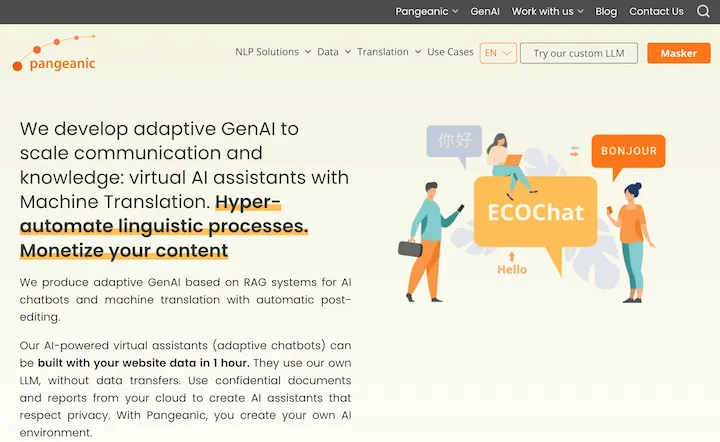
Pangeanic

Hyper-automate linguistic services: AI assistants with your data, privacy, automatic translation with automatic post-editing, no hallucinations, human fluency
Visit Website
Pangeanic
Visit Website

Introduction

Pangeanic is a leading AI-driven platform specializing in Natural Language Processing (NLP) and machine translation. It offers advanced solutions for text and data classification, machine translation, data anonymization, and more. The platform is designed to meet the specific needs of businesses and organizations, providing scalable and privacy-focused AI solutions that ensure data security while delivering high-quality language processing services.

Feature

Advanced Machine Translation

Pangeanic offers state-of-the-art machine translation services with automatic post-editing capabilities. This feature supports multiple languages and can be integrated seamlessly into existing workflows, enhancing translation efficiency and quality.

Data Anonymization and Masking

The platform provides robust tools for data anonymization and masking, helping organizations protect sensitive information and ensure compliance with privacy regulations. This feature is crucial for businesses handling confidential data.

Text and Data Classification

Pangeanic's AI-powered text and data classification services help streamline workflows by automatically categorizing and organizing information. This feature enhances data management and improves decision-making processes.

Professional Translation Services

In addition to machine translation, Pangeanic offers professional human translation services, combining AI efficiency with human expertise for optimal results.

Customizable AI Solutions

Users can tailor Pangeanic's services to fit their specific business needs, ensuring maximum efficiency and relevance across various industries and use cases.

Secure and Privacy-Focused

Pangeanic prioritizes user privacy and data security, offering a safe environment for processing sensitive information. Users have control over their data and can delete their accounts and information at any time.

Flexible Pricing Plans

Pangeanic offers a range of subscription plans to suit different needs and budgets:

PlanPrice/Month
Free$0
Basic$9.99
Standard$19.99
Pro$49.99

FAQ

How do I get started with Pangeanic?

To begin using Pangeanic, follow these steps:

  1. Upload documents or data for processing
  2. Utilize the platform's AI tools for translation and data analysis
  3. Customize services to fit your specific business needs

What types of documents can I process with Pangeanic?

Pangeanic can handle a wide range of document types for translation, classification, and data anonymization. Specific format support may vary, so it's best to check their documentation for the most up-to-date information.

Is my data safe with Pangeanic?

Yes, Pangeanic prioritizes data security and user privacy. They offer robust data anonymization tools and ensure that user information is not used for training purposes without consent. Users also have the option to delete their accounts and data at any time.

Can I integrate Pangeanic with my existing systems?

Pangeanic's services are designed to be flexible and can often be integrated with existing workflows and systems. For specific integration requirements, it's recommended to contact their support team for guidance.

Related Websites
Free AI Face Swap Online Tool for Videos, GIFs and Photos | Faceswap.tech
View Detail

Free AI Face Swap Online Tool for Videos, GIFs and Photos | Faceswap.tech

Free AI Face Swap Online Tool for Videos, GIFs and Photos | Faceswap.tech

Try our free online face swap tool to swap faces in photos, videos, and GIFs. Easy, fast, and powered by AI for amazing results. Swap faces now!

1.81 K
All-in-One AI Chat Social Media Search Engine
View Detail

All-in-One AI Chat Social Media Search Engine

All-in-One AI Chat Social Media Search Engine

Search Google SGE AI, best free AI generative search engines, Gemini AI chatbots, video, image, and social media search engine all in one.

193.90 M
Converting JPG Images to Text

Converting a JPG image to text is a process known as Optical Character Recognition (OCR). This technology enables you to extract text from images, scanned documents, and photos. Here's how to do it:

Method 1: Online OCR Tools

You can use online OCR tools to convert JPG images to text. Here are the steps:

1. Upload your JPG image: Go to an online OCR tool website, such as Online OCR Tools or OCR.space, and upload your JPG image.
2. Select the language: Choose the language of the text in your image.
3. Click on "Convert": The tool will convert the image to text.
4. Download the text: You can download the extracted text as a Word document, PDF, or plain text file.

Method 2: Google Drive

You can also use Google Drive to convert JPG images to text. Here's how:

1. Upload your JPG image: Upload your JPG image to Google Drive.
2. Right-click on the image: Right-click on the uploaded image and select "Open with" > "Google Docs".
3. The image will be converted: Google Docs will automatically convert the image to text.
4. Edit and download: You can edit the extracted text and download it as a Word document or PDF.

Method 3: Adobe Acrobat

If you have Adobe Acrobat installed on your computer, you can use it to convert JPG images to text. Here's how:

1. Open Adobe Acrobat: Open Adobe Acrobat on your computer.
2. Create a new document: Create a new document and click on "Tools" > "Recognize Text".
3. Select the image: Select the JPG image you want to convert.
4. Click on "Recognize": Adobe Acrobat will convert the image to text.
5. Edit and save: You can edit the extracted text and save it as a Word document or PDF.

These are the three methods to convert JPG images to text. Choose the method that works best for you!
View Detail

Converting JPG Images to Text Converting a JPG image to text is a process known as Optical Character Recognition (OCR). This technology enables you to extract text from images, scanned documents, and photos. Here's how to do it: Method 1: Online OCR Tools You can use online OCR tools to convert JPG images to text. Here are the steps: 1. Upload your JPG image: Go to an online OCR tool website, such as Online OCR Tools or OCR.space, and upload your JPG image. 2. Select the language: Choose the language of the text in your image. 3. Click on "Convert": The tool will convert the image to text. 4. Download the text: You can download the extracted text as a Word document, PDF, or plain text file. Method 2: Google Drive You can also use Google Drive to convert JPG images to text. Here's how: 1. Upload your JPG image: Upload your JPG image to Google Drive. 2. Right-click on the image: Right-click on the uploaded image and select "Open with" > "Google Docs". 3. The image will be converted: Google Docs will automatically convert the image to text. 4. Edit and download: You can edit the extracted text and download it as a Word document or PDF. Method 3: Adobe Acrobat If you have Adobe Acrobat installed on your computer, you can use it to convert JPG images to text. Here's how: 1. Open Adobe Acrobat: Open Adobe Acrobat on your computer. 2. Create a new document: Create a new document and click on "Tools" > "Recognize Text". 3. Select the image: Select the JPG image you want to convert. 4. Click on "Recognize": Adobe Acrobat will convert the image to text. 5. Edit and save: You can edit the extracted text and save it as a Word document or PDF. These are the three methods to convert JPG images to text. Choose the method that works best for you!

Converting JPG Images to Text Converting a JPG image to text is a process known as Optical Character Recognition (OCR). This technology enables you to extract text from images, scanned documents, and photos. Here's how to do it: Method 1: Online OCR Tools You can use online OCR tools to convert JPG images to text. Here are the steps: 1. Upload your JPG image: Go to an online OCR tool website, such as Online OCR Tools or OCR.space, and upload your JPG image. 2. Select the language: Choose the language of the text in your image. 3. Click on "Convert": The tool will convert the image to text. 4. Download the text: You can download the extracted text as a Word document, PDF, or plain text file. Method 2: Google Drive You can also use Google Drive to convert JPG images to text. Here's how: 1. Upload your JPG image: Upload your JPG image to Google Drive. 2. Right-click on the image: Right-click on the uploaded image and select "Open with" > "Google Docs". 3. The image will be converted: Google Docs will automatically convert the image to text. 4. Edit and download: You can edit the extracted text and download it as a Word document or PDF. Method 3: Adobe Acrobat If you have Adobe Acrobat installed on your computer, you can use it to convert JPG images to text. Here's how: 1. Open Adobe Acrobat: Open Adobe Acrobat on your computer. 2. Create a new document: Create a new document and click on "Tools" > "Recognize Text". 3. Select the image: Select the JPG image you want to convert. 4. Click on "Recognize": Adobe Acrobat will convert the image to text. 5. Edit and save: You can edit the extracted text and save it as a Word document or PDF. These are the three methods to convert JPG images to text. Choose the method that works best for you!

It is an online tool that uses Optical Character Recognition (OCR) to make it possible to extract text from images in JPG format.

193.90 M
PromptsGenii - AI Image Prompt Generator
View Detail

PromptsGenii - AI Image Prompt Generator

PromptsGenii - AI Image Prompt Generator

Let's Get Creative! πŸŽ¨πŸ§ πŸ’¬ Imagine this: * A bustling cityscape at night, bathed in neon lights. πŸŒƒβœ¨ * A majestic dragon soaring through a storm-ridden sky. πŸ‰β›ˆοΈ * A whimsical forest filled with talking animals and glowing mushrooms. πŸ„πŸΏοΈ Now, let's bring these visions to life using: * Powerful AI image generation models like DALL-E 2 or Midjourney. πŸ€–πŸ–ΌοΈ * Community-generated prompts from platforms like Reddit or GitHub. πŸ—£οΈπŸ’‘ Here are some examples to spark your imagination: * "A cyberpunk cityscape with flying cars and holographic advertisements, rendered in the style of Blade Runner." πŸŒƒπŸš— * "A majestic dragon with emerald scales and sapphire eyes, perched atop a mountain peak, surrounded by swirling clouds." πŸ‰β›°οΈ * "A whimsical forest clearing with glowing mushrooms, a babbling brook, and a friendly talking squirrel." πŸ„πŸΏοΈ Let's collaborate and explore the endless possibilities of AI-powered creativity! πŸš€βœ¨

193.90 M
Humanize.im: Humanize AI Text for Free Online
View Detail

Humanize.im: Humanize AI Text for Free Online

Humanize.im: Humanize AI Text for Free Online

Experience the power of our AI text humanizer to convert AI text into human-like text effortlessly. Humanize AI text for free online to create engaging and undetectable content. Perfect for humanizing AI text from ChatGPT.

337.20 K
Please provide me with the text you would like me to rewrite in English.
View Detail

Please provide me with the text you would like me to rewrite in English.

Please provide me with the text you would like me to rewrite in English.

An AI-powered rephraser that can help you express your ideas more clearly and powerfully.

193.90 M
ChatYY
View Detail

ChatYY

ChatYY

Driven by GPT-4 and Claude2, this AI assistant is capable of professionally answering questions, composing emails, reading articles, conducting intelligent searches, creating AI-generated graphics, and assisting with academic research. It is applicable to various fields.

193.90 M
Ponyrun
View Detail

Ponyrun

Ponyrun

Give our bots instructions, and they will explore and engage with websites to collect and arrange useful information for you.

193.90 M