Open-source RightAI Tools Directory
  • Discover AI
  • Submit
  • Startup
  • Blog
Open-source RightAI Tools Directory
Discover the best AI tools of 2025 with the RightAI Tools Directory!

Friend Links

AI Anime GeneratorToolsApp AI

Support

Tap4
Privacy policyTerms & ConditionsContact Us
Loading...
loading...

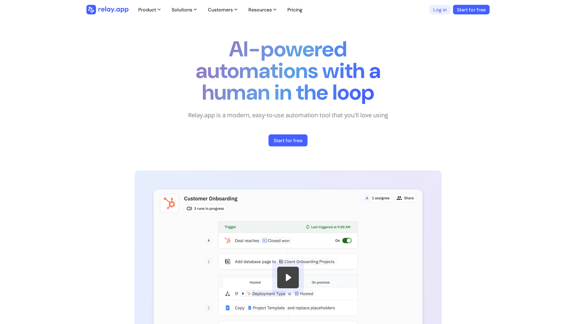
Relay.app: AI-powered automations with a human in the loop

An automation platform you'll love. Relay.app provides deep integrations, AI-powered automations, and human-in-the-loop control.
Visit Website
Relay.app: AI-powered automations with a human in the loop
Visit Website

Introduction

Relay.app is a modern automation tool that combines AI power with human oversight. It offers a unique approach to workflow automation, allowing teams to integrate manual steps for added judgment and context. This platform stands out by balancing AI capabilities with human input, making it an attractive solution for businesses aiming to streamline workflows and boost efficiency.

Feature

AI-Powered Automation

  • Built-in AI Actions for content summarization, text translation, and data extraction
  • Custom prompts for any AI model, with responses usable as structured data
  • Mini AI Agents for autonomous custom actions

Human-in-the-Loop Functionality

  • Approval and data input checkpoints
  • Combines AI automation with human oversight
  • Enhances confidence in AI-driven processes

Powerful Workflow Essentials

  • Mergeable paths to eliminate duplication
  • List iteration capabilities
  • Flexible wait conditions

Deep, Crafted Integrations

  • Connects with popular apps and services
  • Intuitive App Objects for easy data access
  • No API expertise required

FAQ

What sets Relay.app apart from other automation tools?

Relay.app distinguishes itself by combining AI-powered automation with human-in-the-loop functionality. This unique approach allows for both efficient automation and human oversight, providing a balance that many competitors lack. Users have noted its improved user interface and functionality compared to alternatives like Zapier, Make, n8n, Workato, and Pipedream.

How does Relay.app incorporate human oversight into its automation processes?

Relay.app integrates human oversight through approval and data input checkpoints within automated workflows. This feature allows teams to add manual steps for judgment and context, improving confidence in AI-driven processes while maintaining efficiency.

What kind of AI capabilities does Relay.app offer?

Relay.app provides various AI-powered features, including:

  • Built-in AI Actions for summarizing content, translating text, and extracting data
  • Custom prompts for any AI model, with responses usable as structured data
  • Mini AI Agents for autonomous custom actions

Is Relay.app suitable for businesses of all sizes?

While specific information about target business sizes isn't provided, Relay.app's flexible features and integrations make it suitable for various business needs. The platform offers a "Start for free" option, allowing users to try it out and create their first workflow without initial cost, which can be appealing to businesses of different sizes.

What do users say about Relay.app?

Users have praised Relay.app for its transformative impact on various business processes. For example:

  • Aaron Perlstein from Ramp noted its effectiveness in employee onboarding
  • Hassaan Raza from Tavus appreciated its adaptability to their processes
  • Henry Qi from Motion highlighted its efficiency in managing App Store reviews and feedback

Latest Traffic Insights

  • Monthly Visits

    257.86 K

  • Bounce Rate

    38.47%

  • Pages Per Visit

    5.19

  • Time on Site(s)

    178.95

  • Global Rank

    128596

  • Country Rank

    United Kingdom 29698

Recent Visits

Traffic Sources

  • Social Media:
    2.86%
  • Paid Referrals:
    0.74%
  • Email:
    0.13%
  • Referrals:
    8.09%
  • Search Engines:
    40.31%
  • Direct:
    47.85%
More Data

Related Websites

Copilot for Microsoft 365 – Microsoft Adoption

Copilot for Microsoft 365 is a powerful AI assistant that helps you work smarter and faster across Microsoft 365 apps and services. It combines the power of large language models (LLMs) with your organization's data in the Microsoft Graph and Microsoft 365 apps to turn your words into the most powerful productivity tool on the planet.

Copilot is designed to help you:

• Unleash creativity
• Unlock productivity
• Uplevel skills

Copilot is built on Microsoft's comprehensive approach to security, compliance, and privacy. Copilot in Microsoft 365 apps and services:

• Does not use your data to train the underlying LLM
• Does not replace human ingenuity and judgment
• Is designed to keep humans in the loop

Copilot is currently available in Word, Excel, PowerPoint, Outlook, Teams, and more.

Getting Started with Copilot

To get started with Copilot, follow these steps:

1. Check availability: Ensure your organization has access to Copilot.
2. Learn the basics: Familiarize yourself with Copilot's capabilities and how to use it effectively.
3. Explore use cases: Discover how Copilot can help you in your specific role and tasks.
4. Practice and refine: Use Copilot regularly and refine your prompts for better results.
5. Share and collaborate: Collaborate with colleagues using Copilot and share best practices.

Best Practices for Using Copilot

1. Be specific in your prompts
2. Provide context for better results
3. Review and edit Copilot's output
4. Use Copilot as a starting point, not a final product
5. Experiment with different approaches
6. Stay informed about new features and updates

Copilot in Different Microsoft 365 Apps

• Word: Draft, edit, summarize, and rewrite content
• Excel: Analyze data, create formulas, and generate insights
• PowerPoint: Create presentations, design slides, and generate content
• Outlook: Compose emails, summarize threads, and manage your inbox
• Teams: Summarize meetings, generate action items, and create meeting notes

Responsible AI and Copilot

Microsoft is committed to developing AI systems responsibly. When using Copilot, keep in mind:

• AI-generated content may contain biases or inaccuracies
• Always review and verify Copilot's output
• Use your judgment and expertise alongside Copilot's suggestions
• Be aware of your organization's policies regarding AI use

Conclusion

Copilot for Microsoft 365 is a powerful tool that can significantly enhance your productivity and creativity. By understanding its capabilities, following best practices, and using it responsibly, you can make the most of this AI assistant in your daily work.
View Detail

Copilot for Microsoft 365 – Microsoft Adoption Copilot for Microsoft 365 is a powerful AI assistant that helps you work smarter and faster across Microsoft 365 apps and services. It combines the power of large language models (LLMs) with your organization's data in the Microsoft Graph and Microsoft 365 apps to turn your words into the most powerful productivity tool on the planet. Copilot is designed to help you: • Unleash creativity • Unlock productivity • Uplevel skills Copilot is built on Microsoft's comprehensive approach to security, compliance, and privacy. Copilot in Microsoft 365 apps and services: • Does not use your data to train the underlying LLM • Does not replace human ingenuity and judgment • Is designed to keep humans in the loop Copilot is currently available in Word, Excel, PowerPoint, Outlook, Teams, and more. Getting Started with Copilot To get started with Copilot, follow these steps: 1. Check availability: Ensure your organization has access to Copilot. 2. Learn the basics: Familiarize yourself with Copilot's capabilities and how to use it effectively. 3. Explore use cases: Discover how Copilot can help you in your specific role and tasks. 4. Practice and refine: Use Copilot regularly and refine your prompts for better results. 5. Share and collaborate: Collaborate with colleagues using Copilot and share best practices. Best Practices for Using Copilot 1. Be specific in your prompts 2. Provide context for better results 3. Review and edit Copilot's output 4. Use Copilot as a starting point, not a final product 5. Experiment with different approaches 6. Stay informed about new features and updates Copilot in Different Microsoft 365 Apps • Word: Draft, edit, summarize, and rewrite content • Excel: Analyze data, create formulas, and generate insights • PowerPoint: Create presentations, design slides, and generate content • Outlook: Compose emails, summarize threads, and manage your inbox • Teams: Summarize meetings, generate action items, and create meeting notes Responsible AI and Copilot Microsoft is committed to developing AI systems responsibly. When using Copilot, keep in mind: • AI-generated content may contain biases or inaccuracies • Always review and verify Copilot's output • Use your judgment and expertise alongside Copilot's suggestions • Be aware of your organization's policies regarding AI use Conclusion Copilot for Microsoft 365 is a powerful tool that can significantly enhance your productivity and creativity. By understanding its capabilities, following best practices, and using it responsibly, you can make the most of this AI assistant in your daily work.

Copilot for Microsoft 365 – Microsoft Adoption Copilot for Microsoft 365 is a powerful AI assistant that helps you work smarter and faster across Microsoft 365 apps and services. It combines the power of large language models (LLMs) with your organization's data in the Microsoft Graph and Microsoft 365 apps to turn your words into the most powerful productivity tool on the planet. Copilot is designed to help you: • Unleash creativity • Unlock productivity • Uplevel skills Copilot is built on Microsoft's comprehensive approach to security, compliance, and privacy. Copilot in Microsoft 365 apps and services: • Does not use your data to train the underlying LLM • Does not replace human ingenuity and judgment • Is designed to keep humans in the loop Copilot is currently available in Word, Excel, PowerPoint, Outlook, Teams, and more. Getting Started with Copilot To get started with Copilot, follow these steps: 1. Check availability: Ensure your organization has access to Copilot. 2. Learn the basics: Familiarize yourself with Copilot's capabilities and how to use it effectively. 3. Explore use cases: Discover how Copilot can help you in your specific role and tasks. 4. Practice and refine: Use Copilot regularly and refine your prompts for better results. 5. Share and collaborate: Collaborate with colleagues using Copilot and share best practices. Best Practices for Using Copilot 1. Be specific in your prompts 2. Provide context for better results 3. Review and edit Copilot's output 4. Use Copilot as a starting point, not a final product 5. Experiment with different approaches 6. Stay informed about new features and updates Copilot in Different Microsoft 365 Apps • Word: Draft, edit, summarize, and rewrite content • Excel: Analyze data, create formulas, and generate insights • PowerPoint: Create presentations, design slides, and generate content • Outlook: Compose emails, summarize threads, and manage your inbox • Teams: Summarize meetings, generate action items, and create meeting notes Responsible AI and Copilot Microsoft is committed to developing AI systems responsibly. When using Copilot, keep in mind: • AI-generated content may contain biases or inaccuracies • Always review and verify Copilot's output • Use your judgment and expertise alongside Copilot's suggestions • Be aware of your organization's policies regarding AI use Conclusion Copilot for Microsoft 365 is a powerful tool that can significantly enhance your productivity and creativity. By understanding its capabilities, following best practices, and using it responsibly, you can make the most of this AI assistant in your daily work.

Microsoft Copilot combines the power of large language models (LLMs) with your organization's data to turn your words into one of the most powerful productivity tools on the planet.

608.60 K
Create AI Tools without coding in minutes | TypeflowAI
View Detail

Create AI Tools without coding in minutes | TypeflowAI

Create AI Tools without coding in minutes | TypeflowAI

TypeflowAI enables users to create AI tools using dynamic forms and advanced prompts. Improve your SEO, boost traffic, and generate more leads by incorporating these tools into your website.

593
Merlin AI | Ask AI to Research, Write, Summarize in 1-click
View Detail

Merlin AI | Ask AI to Research, Write, Summarize in 1-click

Merlin AI | Ask AI to Research, Write, Summarize in 1-click

Free AI Chat to answer all your questions. Ask Merlin to summarize videos, articles, PDFs, and websites, write emails and content for social media, and review content using an AI detector.

1.84 M
Lookie: YouTube AI - Make YouTube your brain 🧠
View Detail

Lookie: YouTube AI - Make YouTube your brain 🧠

Lookie: YouTube AI - Make YouTube your brain 🧠

Lookie is the Global standard YouTube AI. Boost your learning with Lookie, the ultimate YouTube summarizer! Instantly transform long videos into concise, easy-to-digest summaries. Make YouTube your personal knowledge space with Lookie's AI-driven insights, available in 200 languages.

0
Pineapple Builder - AI Website Builder for Businesses
View Detail

Pineapple Builder - AI Website Builder for Businesses

Pineapple Builder - AI Website Builder for Businesses

Don't have the time or resources to build a website? With AI-driven tools, you can create a stunning website for your business with just one click! Our AI-Powered solutions include blog platforms, newsletter forms, payment processing and more - everything you need to take your business from idea to reality.

47.27 K
QuickSearchPlus
View Detail

QuickSearchPlus

QuickSearchPlus

Browse effortlessly

287
AI-Powered Contract Management for Legal Teams | LinkSquares
View Detail

AI-Powered Contract Management for Legal Teams | LinkSquares

AI-Powered Contract Management for Legal Teams | LinkSquares

Legal teams depend on LinkSquares for effortless agreement drafting, reviewing, and execution using AI-powered contract lifecycle management and project management software.

81.95 K
Gigasheet - Big Data Analytics That's Spreadsheet Easy.
View Detail

Gigasheet - Big Data Analytics That's Spreadsheet Easy.

Gigasheet - Big Data Analytics That's Spreadsheet Easy.

Our powerful, no-code platform is designed for big data analysis, enabling anyone to effortlessly explore and analyze vast datasets via a user-friendly, spreadsheet-like interface. Gigasheet supports a wide variety of data sources from CSV, XLSX, and JSON to popular CRMs, data warehouses, and cloud data stores.

127.47 K