RightAI工具目錄
  • 發現AI
  • 提交
  • 启动项目
  • 博客
RightAI工具目錄
發現2025年最佳AI工具,盡在RightAI工具目錄!

友情鏈接

AI Anime GeneratorToolsApp AI

支持

Tap4
隱私政策條款和條件聯繫我們
Loading...
加載中...

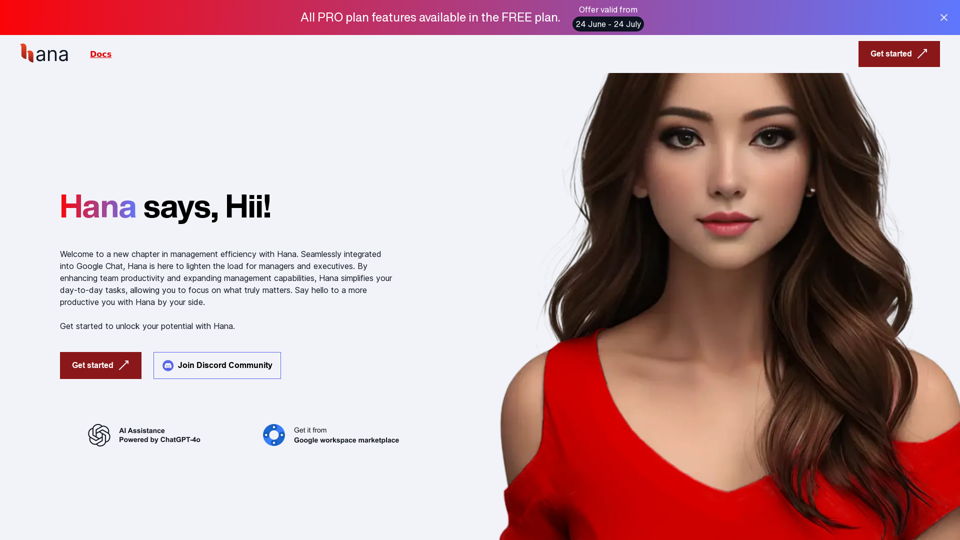
Hana:您的 AI 助手谷歌聊天助理

CreatedBy Hanabi
訪問網站
Hana:您的 AI 助手谷歌聊天助理
訪問網站

介紹

Hana 是一個由 AI 驅動的虛擬助理,旨在提高生產力並簡化工作流程。它與 Google Chat 和其他 Google 生態系統產品無縫集成,基於龐大的知識庫提供實時 AI 自然語言解釋。Hana 作為不可或缺的團隊成員發揮作用,提供圖像理解、自定義記憶回溯和個性化控制儀表板等高級功能。

功能

無縫 Google Chat 集成

Hana 與 Google Chat 群組集成,作為智能團隊成員:

  • 提及並與團隊成員互動
  • 參與對話
  • 推動項目進展

高級圖像理解

Hana 提供多種圖像理解功能:

  • 從截圖診斷錯誤
  • 從視覺數據提供洞察
  • 提高問題解決效率

全面的 Google 生態系統集成

Hana 與 Google 產品無縫協作:

  • 現有的 Google Docs 和 Google Calendar 集成
  • 計劃在 v2 版本中增加更多集成
  • 作為 Google 生態系統內生產力的中心樞紐

自定義記憶回溯

Hana 記住重要信息:

  • 按需回溯自定義信息
  • 確保團隊在正確的時間獲取正確的信息
  • 根據特定需求定制

個性化控制儀表板

用戶可以通過自定義儀表板管理他們的 Hana 體驗:

  • 調整設置
  • 查看報告消息
  • 管理與 Hana 的互動

定價方案

方案價格功能
免費$0最多 3 名用戶,2 個群組,每用戶每月 50 次互動,10 分鐘聊天歷史
基礎$7/月/用戶最多 50 名用戶,10 個群組,每用戶每月 100 次互動,15 分鐘聊天歷史
專業$15/月/用戶無限用戶、群組和互動,20 分鐘聊天歷史

常見問題

Hanabi Technologies 如何處理數據隱私?

Hanabi Technologies 優先考慮數據隱私,特別是關於使用 OpenAI API。給定內容中沒有提供有關其隱私措施的具體細節。

Hana 能否閱讀和分析文檔或 URL?

內容沒有明確提到這種能力,但考慮到 Hana 的高級功能,這是可能的。您可能需要向 Hanabi Technologies 確認。

使用 Hana 有試用期嗎?

內容沒有提到試用期。最好直接聯繫 Hanabi Technologies 獲取這個信息。

Hana 使用什麼 AI 模型?

如定價方案中所述,Hana 由 OpenAI GPT-4o 驅動。

Hana 能否協助特定任務,如編碼或創建內容?

雖然沒有明確說明,但 Hana 的高級 AI 功能表明它可能有潛力協助各種任務。具體能力應向 Hanabi Technologies 確認。

Hana 能否在 Google Chat 群組中高效交談?

是的,Hana 設計為與 Google Chat 群組無縫集成,在對話中充當智能團隊成員。

Hana 能否集成到現有工作流程中?

是的,Hana 設計為與 Google 生態系統產品協同工作,可以集成到現有工作流程中,特別是使用 Google 工具的工作流程。
相關網站

AI-招聘專家 by WorkInBiotech.com
查看詳情

AI-招聘專家 by WorkInBiotech.com

AI-招聘專家 by WorkInBiotech.com

免費、快速、AI 驅動的求職者評審工具,專為招聘人員設計。

193.90 M
HireJoy -  人工智慧履歷審核助理
查看詳情

HireJoy - 人工智慧履歷審核助理

HireJoy - 人工智慧履歷審核助理

HireJoy 是一個由 GPT-4 驅動的人工智慧工具,能夠比人類更全面地審查候選人,而且只需用很短的時間。

193.90 M
ChatGPT 至 Markdown 加
查看詳情

ChatGPT 至 Markdown 加

ChatGPT 至 Markdown 加

```markdown ChatGPT Chat History You: Export chat history from ChatGPT website to normal format as Markdown, which can be opened via typora exactly. ChatGPT: ```markdown ChatGPT Chat History You: Export chat history from ChatGPT website to normal format as Markdown, which can be opened via typora exactly. ChatGPT: I can help you with that! Unfortunately, there's no direct way to export your chat history from the ChatGPT website in a format that's perfectly compatible with Typora. The website doesn't offer a dedicated download feature for chat logs. However, you can manually copy and paste your conversation into a Markdown file. Here's how: 1. Go to the ChatGPT website and log in to your account. 2. Navigate to the conversation you want to export. 3. Select all the text in the conversation window. 4. Copy the selected text (Ctrl+C or Cmd+C). 5. Open a new Markdown file in Typora. 6. Paste the copied text into the Typora file (Ctrl+V or Cmd+V). Keep in mind that this method might not preserve all formatting elements perfectly, especially if your conversation includes special characters or code blocks. ```

193.90 M
超級助理
查看詳情

超級助理

超級助理

基於文心一言的超級助理,提供隨身攜帶式大模型服務,可解析複雜問題、執行快捷指令、輔助知識應用,无所不知、无所不能、无所不在。

193.90 M
談判GPT
查看詳情

談判GPT

談判GPT

使用其他方式與 ChatGPT 對話。

193.90 M
阿波羅AI
查看詳情

阿波羅AI

阿波羅AI

輔助程式 ApolloAI 瀏覽器

193.90 M
免費轉錄工具 | Deepgram
查看詳情

免費轉錄工具 | Deepgram

免費轉錄工具 | Deepgram

使用我們先進的轉錄工具,輕鬆地將您的對話、音頻文件或 YouTube 影片轉換為文字,完全免費。

835.16 K
概要
查看詳情

概要

概要

使用我們的 AI 網路助理對任何網頁及其背後的公司進行簡明摘要和細分

193.90 M