Open-source RightAI Tools Directory
  • Discover AI
  • Submit
  • Startup
  • Blog
Open-source RightAI Tools Directory
Discover the best AI tools of 2025 with the RightAI Tools Directory!

Friend Links

AI Anime GeneratorToolsApp AI

Support

Tap4
Privacy policyTerms & ConditionsContact Us
Loading...
loading...

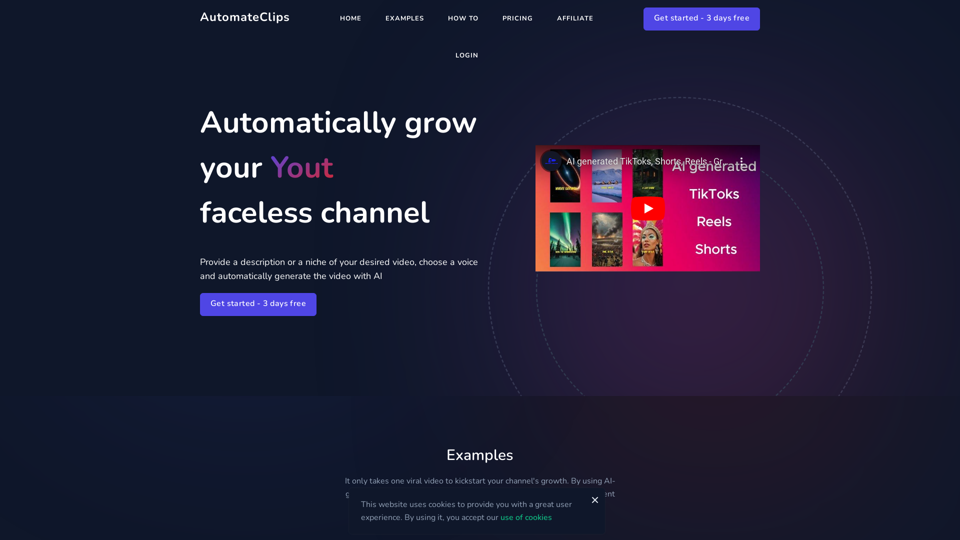
AI video generator - TikTok Instagram Youtube

AI video generator
Visit Website
AI video generator - TikTok Instagram Youtube
Visit Website

Introduction

AutomateClips is an AI-powered video generator designed for creating high-quality content for popular social media platforms like TikTok, YouTube Shorts, and Instagram Reels. It simplifies the video creation process by utilizing advanced AI technology to handle everything from scripting to production, based on user-selected niches or provided titles.

Feature

Automatic Video Generation

AutomateClips employs AI to generate videos, saving users time and effort. Users can select from various niches or provide a title, and the AI creates a video script and produces a high-quality video.

Customizable Video Scripts

The AI-generated scripts are fully editable, allowing users to refine the content to match their brand and style preferences.

Natural-Sounding AI Voices

A range of natural-sounding AI voices is available, enhancing the professionalism and engagement of the videos.

Advanced Video Editing

The platform includes a comprehensive video editor for adding text, captions, music, and other personalization elements.

Fast Generation and Download

Videos are generated quickly and can be downloaded in full HD quality.

User-Friendly Process

  1. Choose a topic or provide a title
  2. Review and edit the AI-generated script
  3. Select an AI voice actor
  4. Generate the video
  5. Edit and download in full HD quality

Flexible Pricing Plans

PlanPriceVideos per DayFeatures
Hobby$19/month23 days free, Full HD, AI voiceover, Subtitles, Advanced storytelling
Pro$49/month53 days free, Full HD, AI voiceover, Subtitles, Advanced storytelling
Agency$79/month103 days free, Full HD, AI voiceover, Subtitles, Advanced storytelling

FAQ

What can I create with this AI Video generator?

AutomateClips allows you to automatically generate videos for TikTok, YouTube Shorts, and Instagram Reels by simply selecting a niche or providing a title.

Which file formats can I download my videos in?

You can download your AI-generated videos in popular formats such as MP4, which is widely supported across all social media platforms.

Can I edit my AI-generated videos?

Yes, after generating your video, you can further customize it using the online video editor provided by AutomateClips.

Is it possible to add music or voiceovers to my videos?

Absolutely, you can enhance your AI-generated videos by adding music tracks, voiceovers, and other audio elements through the comprehensive editing suite.

Related Websites
AI Gift For You
View Detail

AI Gift For You

AI Gift For You

Find the perfect gift for any occasion with AI-powered gift suggestions. Get personalized recommendations for easy and stress-free gift giving.

193.90 M
Chatgpt PDF
===============

Ask your PDF
----------------
View Detail

Chatgpt PDF =============== Ask your PDF ----------------

Chatgpt PDF =============== Ask your PDF ----------------

Ask Your PDF AI Chapdf: Best AI Summarizer Plugin Powered by GPT Summarize Text and Have a Chat with Any PDF Pro Summary Generator

193.90 M
JustRecap
View Detail

JustRecap

JustRecap

JustRecap extracts summaries and key moments from videos so you can learn more in less time.

193.90 M
Dirty Pickup Lines - Online AI Raunchy Pickup Line Generator
View Detail

Dirty Pickup Lines - Online AI Raunchy Pickup Line Generator

Dirty Pickup Lines - Online AI Raunchy Pickup Line Generator

Dirty Pickup Lines is an online AI tool that generates explicit, sexually suggestive pickup lines for various scenarios, at no cost. Simply input a specific pickup scenario, and the AI will produce humorous, original, risqué pickup lines filled with sexual innuendos.

0
Invisibility 

The ability to become unseen.
View Detail

Invisibility The ability to become unseen.

Invisibility The ability to become unseen.

Your Invisible AI - Invisibility is The ChatGPT Replacement for Mac

0
Get ChatGPT for Free with Google

You can now access ChatGPT, a powerful language model, for free with Google. Here's how:

Method 1: Google Colab

* Open Google Colab ([colab.research.google.com](http://colab.research.google.com))
* Create a new notebook
* Install the `transformers` library by running `!pip install transformers`
* Import the `transformers` library and load the ChatGPT model using `from transformers import AutoModelForCausalLM, AutoTokenizer; model = AutoModelForCausalLM.from_pretrained('chatgpt'); tokenizer = AutoTokenizer.from_pretrained('chatgpt')`
* Use the model to generate text using `input_text = "Your input here"; inputs = tokenizer.encode_plus(input_text, return_tensors='pt', max_length=1024, padding='max_length', truncation=True); output = model(inputs['input_ids'], attention_mask=inputs['attention_mask']); print(tokenizer.decode(output.logits[0], skip_special_tokens=True))`

Method 2: Google Apps Script

* Open Google Apps Script ([script.google.com](http://script.google.com))
* Create a new project
* Install the `transformers` library by running `npm install transformers`
* Import the `transformers` library and load the ChatGPT model using `const { AutoModelForCausalLM, AutoTokenizer } = require('transformers'); const model = new AutoModelForCausalLM('chatgpt'); const tokenizer = new AutoTokenizer('chatgpt');`
* Use the model to generate text using `const inputText = "Your input here"; const inputs = tokenizer.encodePlus(inputText, { return_tensors: 'pt', max_length: 1024, padding: 'max_length', truncation: true }); const output = model(inputs.inputIds, inputs.attentionMask); console.log(tokenizer.decode(output.logits[0], { skipSpecialTokens: true }));`

Note: These methods require some technical knowledge and may have limitations compared to the original ChatGPT model.
View Detail

Get ChatGPT for Free with Google You can now access ChatGPT, a powerful language model, for free with Google. Here's how: Method 1: Google Colab * Open Google Colab ([colab.research.google.com](http://colab.research.google.com)) * Create a new notebook * Install the `transformers` library by running `!pip install transformers` * Import the `transformers` library and load the ChatGPT model using `from transformers import AutoModelForCausalLM, AutoTokenizer; model = AutoModelForCausalLM.from_pretrained('chatgpt'); tokenizer = AutoTokenizer.from_pretrained('chatgpt')` * Use the model to generate text using `input_text = "Your input here"; inputs = tokenizer.encode_plus(input_text, return_tensors='pt', max_length=1024, padding='max_length', truncation=True); output = model(inputs['input_ids'], attention_mask=inputs['attention_mask']); print(tokenizer.decode(output.logits[0], skip_special_tokens=True))` Method 2: Google Apps Script * Open Google Apps Script ([script.google.com](http://script.google.com)) * Create a new project * Install the `transformers` library by running `npm install transformers` * Import the `transformers` library and load the ChatGPT model using `const { AutoModelForCausalLM, AutoTokenizer } = require('transformers'); const model = new AutoModelForCausalLM('chatgpt'); const tokenizer = new AutoTokenizer('chatgpt');` * Use the model to generate text using `const inputText = "Your input here"; const inputs = tokenizer.encodePlus(inputText, { return_tensors: 'pt', max_length: 1024, padding: 'max_length', truncation: true }); const output = model(inputs.inputIds, inputs.attentionMask); console.log(tokenizer.decode(output.logits[0], { skipSpecialTokens: true }));` Note: These methods require some technical knowledge and may have limitations compared to the original ChatGPT model.

Get ChatGPT for Free with Google You can now access ChatGPT, a powerful language model, for free with Google. Here's how: Method 1: Google Colab * Open Google Colab ([colab.research.google.com](http://colab.research.google.com)) * Create a new notebook * Install the `transformers` library by running `!pip install transformers` * Import the `transformers` library and load the ChatGPT model using `from transformers import AutoModelForCausalLM, AutoTokenizer; model = AutoModelForCausalLM.from_pretrained('chatgpt'); tokenizer = AutoTokenizer.from_pretrained('chatgpt')` * Use the model to generate text using `input_text = "Your input here"; inputs = tokenizer.encode_plus(input_text, return_tensors='pt', max_length=1024, padding='max_length', truncation=True); output = model(inputs['input_ids'], attention_mask=inputs['attention_mask']); print(tokenizer.decode(output.logits[0], skip_special_tokens=True))` Method 2: Google Apps Script * Open Google Apps Script ([script.google.com](http://script.google.com)) * Create a new project * Install the `transformers` library by running `npm install transformers` * Import the `transformers` library and load the ChatGPT model using `const { AutoModelForCausalLM, AutoTokenizer } = require('transformers'); const model = new AutoModelForCausalLM('chatgpt'); const tokenizer = new AutoTokenizer('chatgpt');` * Use the model to generate text using `const inputText = "Your input here"; const inputs = tokenizer.encodePlus(inputText, { return_tensors: 'pt', max_length: 1024, padding: 'max_length', truncation: true }); const output = model(inputs.inputIds, inputs.attentionMask); console.log(tokenizer.decode(output.logits[0], { skipSpecialTokens: true }));` Note: These methods require some technical knowledge and may have limitations compared to the original ChatGPT model.

How to Add ChatGPT to All Google Searches ===================================================== Step 1: Create a Custom Search Engine -------------------------------------- * Go to the [Google Custom Search Engine](https://cse.google.com/) website and sign in with your Google account. * Click on the "New Search Engine" button. * Fill in the required information, such as the name and description of your search engine. * Click on the "Create" button. Step 2: Add ChatGPT to the Search Engine ----------------------------------------- * In the "Setup" tab, click on the "Add" button next to "Sites to search". * Enter the following URL: `https://chat.openai.com/` * Click on the "Add" button. Step 3: Configure the Search Engine -------------------------------------- * In the "Setup" tab, click on the "Edit" button next to "Search engine keywords". * Add the following keywords: `ChatGPT` * Click on the "Save" button. Step 4: Get the Search Engine Code ------------------------------------- * In the "Setup" tab, click on the "Get code" button. * Copy the HTML code provided. Step 5: Add the Search Engine to Your Browser ------------------------------------------------ * Open your browser and go to the "Settings" or "Options" page. * Look for the "Search engine" or "Default search engine" option. * Click on the "Add" or "Manage search engines" button. * Paste the HTML code you copied earlier. * Click on the "Add" or "Save" button. You're Done! =============== Now, whenever you search on Google, ChatGPT will be included in the search results. You can also use the custom search engine URL provided by Google to search directly.

193.90 M
A.I. Amazon Listing Optimizer
View Detail

A.I. Amazon Listing Optimizer

A.I. Amazon Listing Optimizer

Experience our AI-Powered Amazon Listing Optimizer for e-commerce success. Maximize sales potential with optimized product listings.

193.90 M
Get MailMaestro
View Detail

Get MailMaestro

Get MailMaestro

Enhance your email productivity with MailMaestro. Enjoy AI-assisted email summaries, unique style personalization, and top-quality drafts. Check our features today!

222.20 K