Open-source RightAI Tools Directory
  • Discover AI
  • Submit
  • Startup
  • Blog
Open-source RightAI Tools Directory
Discover the best AI tools of 2025 with the RightAI Tools Directory!

Friend Links

AI Anime GeneratorToolsApp AI

Support

Tap4
Privacy policyTerms & ConditionsContact Us
Loading...
loading...

Click

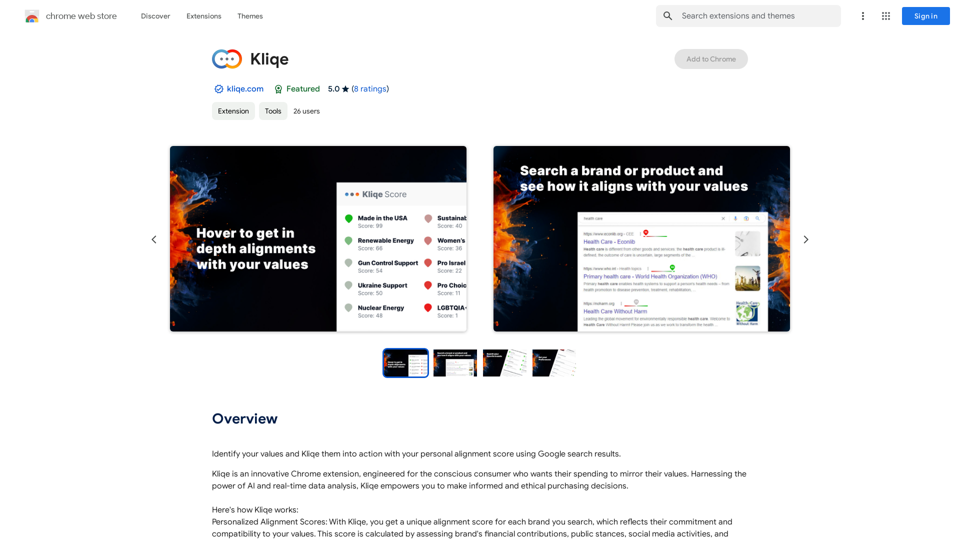
Discover your core beliefs and put them into practice with your unique alignment score, powered by Google search data.
Visit Website
Click
Visit Website

Introduction

Kliqe is a Chrome extension designed for conscious consumers. It provides personalized alignment scores for brands, helping users make informed and ethical purchasing decisions. Using AI and real-time data analysis, Kliqe reflects a brand's commitment to a user's values, integrating seamlessly into Google search results.

Feature

Personalized Alignment Scores

Kliqe calculates unique alignment scores for each brand searched, based on:

  • Financial contributions
  • Public stances
  • Social media activities
  • User's set values

Real-Time Updates

  • Scores evolve with real-time changes in brand commitments
  • Provides up-to-date information for purchasing decisions

Seamless Integration

  • Integrates into Google search results
  • Allows quick evaluation of brand compatibility

Data Collection and Analysis

  • Collects data from various sources:
    • Press releases
    • Brand statements
    • Social media activities
  • Calculates alignment scores using AI

Subscription Options

  • Free version with limited features
  • Paid subscription with additional benefits

FAQ

How can I maximize my use of Kliqe?

  • Set your values and preferences for accurate alignment scores
  • Use real-time updates to stay informed about brand changes
  • Take advantage of seamless integration for quick evaluations
  • Amplify your ability to promote sustainable progress through consumer choices

What are the benefits of using Kliqe?

  • Make informed and ethical purchasing decisions
  • Support companies aligning with your values
  • Promote long-term, sustainable progress
  • Amplify your ability to drive positive change through purchasing power

How does Kliqe ensure data accuracy and user privacy?

  • Collects data from various reliable sources
  • Calculates scores using AI and user-set values
  • Respects user privacy and keeps personal information secure

Can I cancel my subscription?

Yes, you can cancel your subscription at any time.

How do I contact Kliqe?

You can contact Kliqe through their website or email [email protected].

Related Websites

Get ChatGPT for Free with Google

You can now access ChatGPT, a powerful language model, for free with Google. Here's how:

Method 1: Google Colab

* Open Google Colab ([colab.research.google.com](http://colab.research.google.com))
* Create a new notebook
* Install the `transformers` library by running `!pip install transformers`
* Import the `transformers` library and load the ChatGPT model using `from transformers import AutoModelForCausalLM, AutoTokenizer; model = AutoModelForCausalLM.from_pretrained('chatgpt'); tokenizer = AutoTokenizer.from_pretrained('chatgpt')`
* Use the model to generate text using `input_text = "Your input here"; inputs = tokenizer.encode_plus(input_text, return_tensors='pt', max_length=1024, padding='max_length', truncation=True); output = model(inputs['input_ids'], attention_mask=inputs['attention_mask']); print(tokenizer.decode(output.logits[0], skip_special_tokens=True))`

Method 2: Google Apps Script

* Open Google Apps Script ([script.google.com](http://script.google.com))
* Create a new project
* Install the `transformers` library by running `npm install transformers`
* Import the `transformers` library and load the ChatGPT model using `const { AutoModelForCausalLM, AutoTokenizer } = require('transformers'); const model = new AutoModelForCausalLM('chatgpt'); const tokenizer = new AutoTokenizer('chatgpt');`
* Use the model to generate text using `const inputText = "Your input here"; const inputs = tokenizer.encodePlus(inputText, { return_tensors: 'pt', max_length: 1024, padding: 'max_length', truncation: true }); const output = model(inputs.inputIds, inputs.attentionMask); console.log(tokenizer.decode(output.logits[0], { skipSpecialTokens: true }));`

Note: These methods require some technical knowledge and may have limitations compared to the original ChatGPT model.
View Detail

Get ChatGPT for Free with Google You can now access ChatGPT, a powerful language model, for free with Google. Here's how: Method 1: Google Colab * Open Google Colab ([colab.research.google.com](http://colab.research.google.com)) * Create a new notebook * Install the `transformers` library by running `!pip install transformers` * Import the `transformers` library and load the ChatGPT model using `from transformers import AutoModelForCausalLM, AutoTokenizer; model = AutoModelForCausalLM.from_pretrained('chatgpt'); tokenizer = AutoTokenizer.from_pretrained('chatgpt')` * Use the model to generate text using `input_text = "Your input here"; inputs = tokenizer.encode_plus(input_text, return_tensors='pt', max_length=1024, padding='max_length', truncation=True); output = model(inputs['input_ids'], attention_mask=inputs['attention_mask']); print(tokenizer.decode(output.logits[0], skip_special_tokens=True))` Method 2: Google Apps Script * Open Google Apps Script ([script.google.com](http://script.google.com)) * Create a new project * Install the `transformers` library by running `npm install transformers` * Import the `transformers` library and load the ChatGPT model using `const { AutoModelForCausalLM, AutoTokenizer } = require('transformers'); const model = new AutoModelForCausalLM('chatgpt'); const tokenizer = new AutoTokenizer('chatgpt');` * Use the model to generate text using `const inputText = "Your input here"; const inputs = tokenizer.encodePlus(inputText, { return_tensors: 'pt', max_length: 1024, padding: 'max_length', truncation: true }); const output = model(inputs.inputIds, inputs.attentionMask); console.log(tokenizer.decode(output.logits[0], { skipSpecialTokens: true }));` Note: These methods require some technical knowledge and may have limitations compared to the original ChatGPT model.

Get ChatGPT for Free with Google You can now access ChatGPT, a powerful language model, for free with Google. Here's how: Method 1: Google Colab * Open Google Colab ([colab.research.google.com](http://colab.research.google.com)) * Create a new notebook * Install the `transformers` library by running `!pip install transformers` * Import the `transformers` library and load the ChatGPT model using `from transformers import AutoModelForCausalLM, AutoTokenizer; model = AutoModelForCausalLM.from_pretrained('chatgpt'); tokenizer = AutoTokenizer.from_pretrained('chatgpt')` * Use the model to generate text using `input_text = "Your input here"; inputs = tokenizer.encode_plus(input_text, return_tensors='pt', max_length=1024, padding='max_length', truncation=True); output = model(inputs['input_ids'], attention_mask=inputs['attention_mask']); print(tokenizer.decode(output.logits[0], skip_special_tokens=True))` Method 2: Google Apps Script * Open Google Apps Script ([script.google.com](http://script.google.com)) * Create a new project * Install the `transformers` library by running `npm install transformers` * Import the `transformers` library and load the ChatGPT model using `const { AutoModelForCausalLM, AutoTokenizer } = require('transformers'); const model = new AutoModelForCausalLM('chatgpt'); const tokenizer = new AutoTokenizer('chatgpt');` * Use the model to generate text using `const inputText = "Your input here"; const inputs = tokenizer.encodePlus(inputText, { return_tensors: 'pt', max_length: 1024, padding: 'max_length', truncation: true }); const output = model(inputs.inputIds, inputs.attentionMask); console.log(tokenizer.decode(output.logits[0], { skipSpecialTokens: true }));` Note: These methods require some technical knowledge and may have limitations compared to the original ChatGPT model.

How to Add ChatGPT to All Google Searches ===================================================== Step 1: Create a Custom Search Engine -------------------------------------- * Go to the [Google Custom Search Engine](https://cse.google.com/) website and sign in with your Google account. * Click on the "New Search Engine" button. * Fill in the required information, such as the name and description of your search engine. * Click on the "Create" button. Step 2: Add ChatGPT to the Search Engine ----------------------------------------- * In the "Setup" tab, click on the "Add" button next to "Sites to search". * Enter the following URL: `https://chat.openai.com/` * Click on the "Add" button. Step 3: Configure the Search Engine -------------------------------------- * In the "Setup" tab, click on the "Edit" button next to "Search engine keywords". * Add the following keywords: `ChatGPT` * Click on the "Save" button. Step 4: Get the Search Engine Code ------------------------------------- * In the "Setup" tab, click on the "Get code" button. * Copy the HTML code provided. Step 5: Add the Search Engine to Your Browser ------------------------------------------------ * Open your browser and go to the "Settings" or "Options" page. * Look for the "Search engine" or "Default search engine" option. * Click on the "Add" or "Manage search engines" button. * Paste the HTML code you copied earlier. * Click on the "Add" or "Save" button. You're Done! =============== Now, whenever you search on Google, ChatGPT will be included in the search results. You can also use the custom search engine URL provided by Google to search directly.

193.90 M
Free ChatGPT Sidebar Assistant (GPT-4, AIDraw)
View Detail

Free ChatGPT Sidebar Assistant (GPT-4, AIDraw)

Free ChatGPT Sidebar Assistant (GPT-4, AIDraw)

Free ChatGPT Sidebar Assistant is an AI chatbot developed based on OpenAI's ChatGPT 3.5 and 4 models.

193.90 M
MIA - Writing Assistant
View Detail

MIA - Writing Assistant

MIA - Writing Assistant

Write Faster, Better, and More Engaging Content On LinkedIn and Medium Tired of staring at a blank page? We've all been there. But what if you could write compelling content for LinkedIn and Medium with ease? Here's how: * Find Your Niche: What are you passionate about? What do you know a lot about? Focus your writing on topics that genuinely interest you. * Craft a Killer Headline: Your headline is your first impression. Make it catchy, clear, and benefit-driven. * Structure for Success: Use headings, subheadings, and bullet points to break up your text and make it easy to read. * Tell a Story: People connect with stories. Weave narratives into your content to make it more engaging. * Keep it Concise: Get to the point quickly. People have short attention spans, so respect their time. * Use Visuals: Images, videos, and infographics can break up text and make your content more visually appealing. * Proofread Carefully: Typos and grammatical errors can damage your credibility. Always proofread your work before publishing. * Promote Your Content: Share your articles on social media and engage with your audience in the comments. By following these tips, you can write faster, better, and more engaging content for LinkedIn and Medium.

193.90 M
Shift-Ctrl-F: Semantic Search for the Browser
View Detail

Shift-Ctrl-F: Semantic Search for the Browser

Shift-Ctrl-F: Semantic Search for the Browser

Find information on a webpage using everyday words.

193.90 M
Flash Sale Picks - TemuFilter
View Detail

Flash Sale Picks - TemuFilter

Flash Sale Picks - TemuFilter

TemuFilter is an intelligent product selection tool designed specifically for Temu platform merchants. It uses big data analysis and artificial intelligence technology to provide merchants with accurate market trend predictions, popular product recommendations, and competitor analysis, helping merchants seize the opportunity in the fierce market competition and achieve continuous improvement in sales performance.

193.90 M
SayAI
View Detail

SayAI

SayAI

Adds voice recording and spoken answers to the ChatGPT user interface.

193.90 M
AI Prompt Lab
View Detail

AI Prompt Lab

AI Prompt Lab

AI Prompt Lab is a game-changing tool that optimizes your workflow.

450
WebWise ChatGPT English (USA)
View Detail

WebWise ChatGPT English (USA)

WebWise ChatGPT English (USA)

ChatGPT's power in Chrome: Seamlessly integrated, engage from the toolbar to search results.

193.90 M