Open-source RightAI Tools Directory
  • Discover AI
  • Submit
  • Startup
  • Blog
Open-source RightAI Tools Directory
Discover the best AI tools of 2025 with the RightAI Tools Directory!

Friend Links

AI Anime GeneratorToolsApp AI

Support

Tap4
Privacy policyTerms & ConditionsContact Us
Loading...
loading...

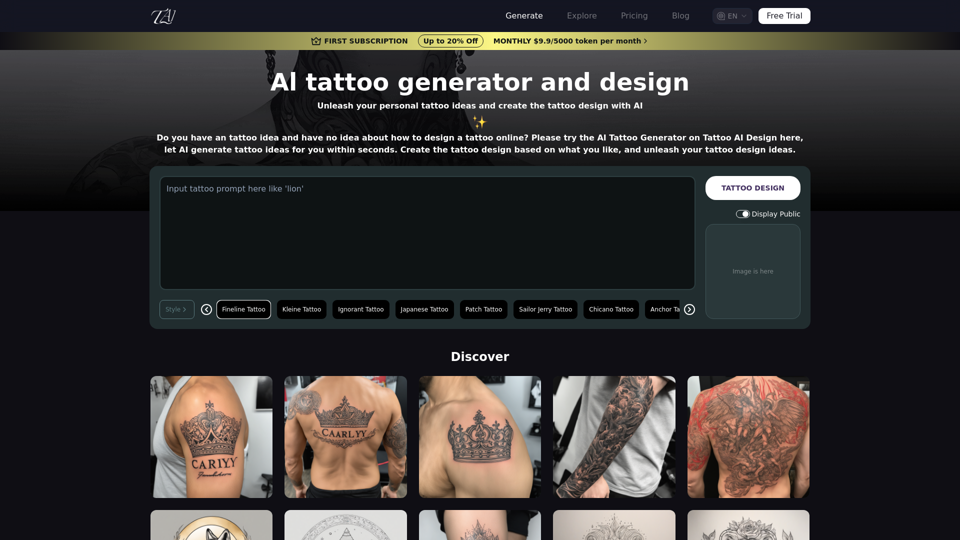
AI Tattoo Generator | Tattoo AI Design

Tattoo AI Design is a tool that offers a free AI Tattoo Generator and Design service. It provides inspiration through AI-generated Tattoo Designs. The goal of Tattoo AI Design is to spark amazing ideas for users and help them create their own unique tattoo designs.
Visit Website
AI Tattoo Generator | Tattoo AI Design
Visit Website

Introduction

Tattoo AI Design is an innovative platform that harnesses artificial intelligence to revolutionize tattoo design. This user-friendly tool allows individuals to explore and create personalized tattoo patterns effortlessly. By combining advanced AI technologies, Tattoo AI Design offers a unique and accessible approach to tattoo design generation, catering to both tattoo enthusiasts and artists alike.

Feature

AI-Powered Tattoo Generation

Users can simply input their desired tattoo description, and the AI will generate a custom design based on the provided details. This feature makes tattoo design accessible to everyone, regardless of artistic skill.

Free Exploration and Creation

Tattoo AI Design offers a free-to-use platform, allowing users to explore and experiment with tattoo designs without any cost. This feature encourages creativity and enables users to try multiple design iterations.

Remix and Download Options

After generating a design, users have the flexibility to remix it or download it directly. This feature provides greater customization and allows users to further refine their tattoo designs.

User-Friendly Interface

The platform boasts a simple and intuitive interface. Users can easily navigate the site, input their design descriptions, and generate tattoos with just a few clicks.

Diverse Design Capabilities

Tattoo AI Design's AI is capable of creating a wide range of tattoo styles and designs, catering to various preferences and artistic tastes.

Free Trial with Upgrade Options

While the basic service is free, Tattoo AI Design offers paid plans for users who require additional features or more extensive use of the platform.

FAQ

How does Tattoo AI Design work?

To create an AI tattoo design, users simply need to open the Tattoo AI Design platform, enter a description of their desired tattoo, and click "Tattoo your design". The AI then processes this information and generates a unique tattoo design based on the input.

Is Tattoo AI Design free to use?

Yes, Tattoo AI Design offers a free trial for everyone to explore and enjoy the AI tattoo generator. Basic features are available at no cost, allowing users to create, remix, and download designs.

Can I customize the AI-generated tattoo designs?

Yes, Tattoo AI Design allows users to remix their generated designs. This feature enables further customization and refinement of the initial AI-created tattoo design.

Are there any limitations to the free version of Tattoo AI Design?

While the basic features are free, there may be limitations compared to paid plans. For more extensive use or additional features, users can consider upgrading to a paid plan.

How accurate are the AI-generated tattoo designs?

The accuracy of the designs depends on the detail and clarity of the user's input description. The AI uses advanced technology to interpret and create designs based on the provided information, but results may vary.

Related Websites

AI Face Studio - AI Face Transformation & Editing Tools
View Detail

AI Face Studio - AI Face Transformation & Editing Tools

AI Face Studio - AI Face Transformation & Editing Tools

AI Face Studio provides face swapping, outfit alterations, video transformations, style conversions, and facial editing with premium security and high-quality outcomes.

27.66 K
Taobao Image Search
View Detail

Taobao Image Search

Taobao Image Search

Market Price, Taobao Image Search, Lowest Price, Purchasing Agent

193.90 M
AI & AR Business Solutions for Skin, Beauty & Fashion
View Detail

AI & AR Business Solutions for Skin, Beauty & Fashion

AI & AR Business Solutions for Skin, Beauty & Fashion

Reimagine AI with YouCam: Elevate Your Brand by Cropping Complete Beauty Tech & Fashion Tech Solutions. Digitally transform your business with AI & AR ecommerce experiences.

7.10 M
Prospecting and Lead Generation Tool
View Detail

Prospecting and Lead Generation Tool

Prospecting and Lead Generation Tool

All-in-one Website Technologies and Prospecting Tool

193.90 M
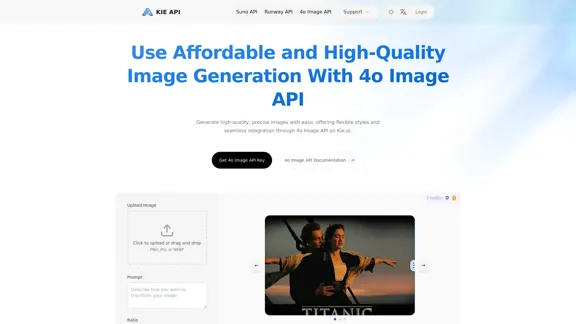
Kie.ai's 4o Image API: Cost-effective, Reliable, and Very Accurate AI Image Creation
View Detail

Kie.ai's 4o Image API: Cost-effective, Reliable, and Very Accurate AI Image Creation

Kie.ai's 4o Image API: Cost-effective, Reliable, and Very Accurate AI Image Creation

Kie.aiโ€™s 4o Image API offers affordable, stable, and highly accurate AI image generation, enabling creators to easily produce high-quality visuals. It provides reliable and efficient solutions for various creative projects, including text-to-image and image-to-image transformations, as well as a range of visual styles.

356.51 K
Journey ArtPrompt with Midjourney

This guide will walk you through creating stunning artwork using Midjourney, a powerful AI art generator. 

1. Accessing Midjourney

* You'll need a Discord account to use Midjourney. 
* Join the official Midjourney server: [https://discord.gg/midjourney](https://discord.gg/midjourney)

2. Understanding the Basics

* `/imagine` Command: This is the core command for generating images.
* Prompt:  A text description of the artwork you want to create. Be specific and descriptive!
* Parameters: Options that control aspects like image size, aspect ratio, and style.

3. Crafting Your Journey Prompt

Think about the story you want to tell with your artwork.  

* Setting: Where does your journey take place? (e.g., a mystical forest, a futuristic city, a desolate wasteland)
* Characters: Who is on this journey? (e.g., a lone traveler, a group of adventurers, mythical creatures)
* Mood: What feeling do you want to evoke? (e.g., adventurous, mysterious, hopeful, melancholic)
* Style: What artistic style appeals to you? (e.g., photorealistic, painterly, abstract)

4. Putting it Together

Combine these elements into a clear and concise prompt. 

Example:

`/imagine A lone traveler journeys through a mystical forest at sunset, bathed in golden light. The path ahead is shrouded in mist, hinting at unknown wonders. Style: painterly, ethereal`

5. Experiment and Refine

* Midjourney is all about experimentation! Try different prompts, parameters, and styles.
* Use the "upscale" command to enlarge your favorite images and reveal more detail.
* Don't be afraid to iterate and refine your prompts based on the results.
View Detail

Journey ArtPrompt with Midjourney This guide will walk you through creating stunning artwork using Midjourney, a powerful AI art generator. 1. Accessing Midjourney * You'll need a Discord account to use Midjourney. * Join the official Midjourney server: [https://discord.gg/midjourney](https://discord.gg/midjourney) 2. Understanding the Basics * `/imagine` Command: This is the core command for generating images. * Prompt: A text description of the artwork you want to create. Be specific and descriptive! * Parameters: Options that control aspects like image size, aspect ratio, and style. 3. Crafting Your Journey Prompt Think about the story you want to tell with your artwork. * Setting: Where does your journey take place? (e.g., a mystical forest, a futuristic city, a desolate wasteland) * Characters: Who is on this journey? (e.g., a lone traveler, a group of adventurers, mythical creatures) * Mood: What feeling do you want to evoke? (e.g., adventurous, mysterious, hopeful, melancholic) * Style: What artistic style appeals to you? (e.g., photorealistic, painterly, abstract) 4. Putting it Together Combine these elements into a clear and concise prompt. Example: `/imagine A lone traveler journeys through a mystical forest at sunset, bathed in golden light. The path ahead is shrouded in mist, hinting at unknown wonders. Style: painterly, ethereal` 5. Experiment and Refine * Midjourney is all about experimentation! Try different prompts, parameters, and styles. * Use the "upscale" command to enlarge your favorite images and reveal more detail. * Don't be afraid to iterate and refine your prompts based on the results.

Journey ArtPrompt with Midjourney This guide will walk you through creating stunning artwork using Midjourney, a powerful AI art generator. 1. Accessing Midjourney * You'll need a Discord account to use Midjourney. * Join the official Midjourney server: [https://discord.gg/midjourney](https://discord.gg/midjourney) 2. Understanding the Basics * `/imagine` Command: This is the core command for generating images. * Prompt: A text description of the artwork you want to create. Be specific and descriptive! * Parameters: Options that control aspects like image size, aspect ratio, and style. 3. Crafting Your Journey Prompt Think about the story you want to tell with your artwork. * Setting: Where does your journey take place? (e.g., a mystical forest, a futuristic city, a desolate wasteland) * Characters: Who is on this journey? (e.g., a lone traveler, a group of adventurers, mythical creatures) * Mood: What feeling do you want to evoke? (e.g., adventurous, mysterious, hopeful, melancholic) * Style: What artistic style appeals to you? (e.g., photorealistic, painterly, abstract) 4. Putting it Together Combine these elements into a clear and concise prompt. Example: `/imagine A lone traveler journeys through a mystical forest at sunset, bathed in golden light. The path ahead is shrouded in mist, hinting at unknown wonders. Style: painterly, ethereal` 5. Experiment and Refine * Midjourney is all about experimentation! Try different prompts, parameters, and styles. * Use the "upscale" command to enlarge your favorite images and reveal more detail. * Don't be afraid to iterate and refine your prompts based on the results.

New backgrounds with Midjourney on new tabs

193.90 M
You
View Detail

You

You

mogU - This is a very good AI assistant.

193.90 M
Chrome Web Store
View Detail

Chrome Web Store

Chrome Web Store

Enhance your browser with new features and customize your browsing experience.

193.90 M