Open-source RightAI Tools Directory
  • Discover AI
  • Submit
  • Startup
  • Blog
Open-source RightAI Tools Directory
Discover the best AI tools of 2025 with the RightAI Tools Directory!

Friend Links

AI Anime GeneratorToolsApp AI

Support

Tap4
Privacy policyTerms & ConditionsContact Us
Loading...
loading...

ChatBotKit

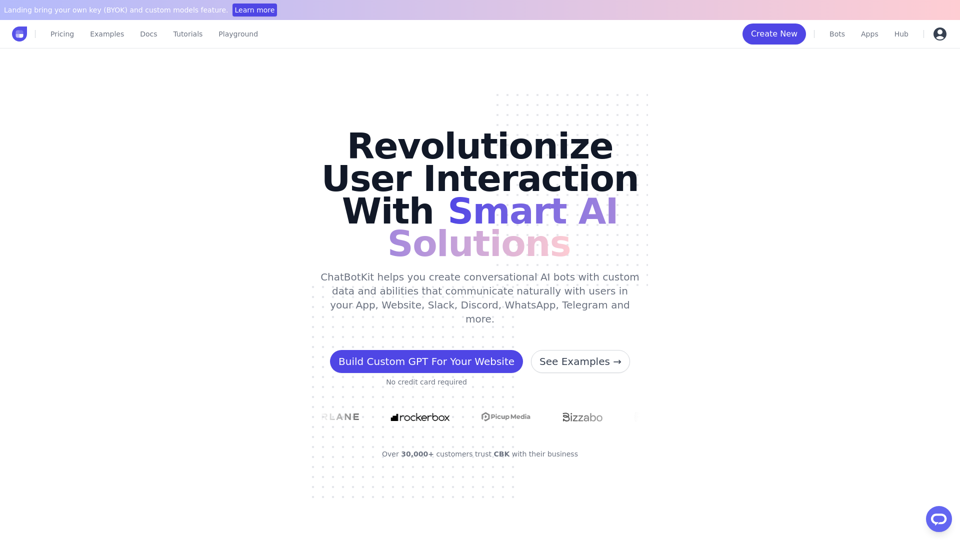
ChatBotKit makes it easy for developers and non-developers alike to build chatbots that can communicate with users in natural language.
Visit Website
ChatBotKit
Visit Website

Introduction

ChatBotKit is a cutting-edge platform for developing conversational AI systems. It provides a comprehensive set of tools and features to create custom chatbots capable of natural and intuitive user interactions. The platform supports multiple languages, custom datasets, and skillsets, making it versatile for various applications.

Feature

Multi-Lingual Support

ChatBotKit enables the creation of chatbots that can communicate with users in their native language, supporting multiple languages.

Custom Datasets and Skillsets

Users can manage and organize bespoke datasets for chatbot responses. Special abilities, such as image generation or web page fetching, can be created as custom skillsets.

Message Peek

This feature enhances engagement and accessibility for the chatbot widget, improving user experience.

Partner API

ChatBotKit offers a Partner API to simplify SaaS development, making integration easier for developers.

Events & Webhooks

Real-time event listening is possible through ChatBotKit's Webhook feature, allowing for immediate responses to user interactions.

Customization and Integration

Users can customize their chatbot's appearance, behavior, and functionality to align with their brand. The platform supports seamless integration with popular messaging platforms like Slack, Discord, and WhatsApp.

Flexible Pricing

ChatBotKit offers monthly memberships with access to all features, custom pricing plans for specific needs, and free trials upon request.

FAQ

What is ChatBotKit used for?

ChatBotKit is a platform for creating and interacting with chatbots, accessing various tools and services, and utilizing pre-built apps for a wide range of tasks.

How do I use a chatbot created with ChatBotKit?

You can interact with the chatbot by typing questions or statements into the chat window. The chatbot generates responses based on its programmed understanding.

What are the pricing options for ChatBotKit?

Plan TypeDescription
Monthly MembershipAccess to any chatbot and all features
Custom PricingTailored plans for specific needs
Free TrialsAvailable upon request

How can I get started with ChatBotKit?

  1. Sign up by clicking the "Get Access" button on the front page
  2. Explore the comprehensive documentation
  3. Contact the support team for assistance if needed

Related Websites
AI Text Shortener | Precise Text Adjuster | WordLimiter
View Detail

AI Text Shortener | Precise Text Adjuster | WordLimiter

AI Text Shortener | Precise Text Adjuster | WordLimiter

WordLimit helps you to shorten your text precisely without losing key information and your unique writing style. Feel free to use it because it will never make your Human-Written content become AI-Written!

834
Arvin: 1-Click to Use AI Copilot Anywhere
View Detail

Arvin: 1-Click to Use AI Copilot Anywhere

Arvin: 1-Click to Use AI Copilot Anywhere

The Arvin ChatGPT extension is a versatile tool that can be used on any website, offering a range of features to enhance your online experience. These features include an AI writer for crafting emails, Twitter posts, and LinkedIn updates, as well as a summarizer for blogs and YouTube videos.

193.90 M
Righty: Right-Click for AI Superpowers
View Detail

Righty: Right-Click for AI Superpowers

Righty: Right-Click for AI Superpowers

Right-click to unlock AI abilities in your web browser.

193.90 M
Kometa AI – Your personal AI assistant!
View Detail

Kometa AI – Your personal AI assistant!

Kometa AI – Your personal AI assistant!

Don't delay preparing a response to a client. Respond immediately to any email, LinkedIn, HH, or WhatsApp message.

193.90 M
Knowyoursnack - Discover What’s Inside Your Snacks
View Detail

Knowyoursnack - Discover What’s Inside Your Snacks

Knowyoursnack - Discover What’s Inside Your Snacks

KnowYourSnack is your personal guide to understanding snack ingredients. Simply snap a photo of the ingredients list on any snack package, and our AI-powered app will identify harmful substances, provide detailed information, and help you make healthier choices.

0
Copy.ai
View Detail

Copy.ai

Copy.ai

Use Artificial Intelligence to write better SEO content.

193.90 M
Search Engine  
AI Chat  
Web  
Video  
Image  
Social
View Detail

Search Engine AI Chat Web Video Image Social

Search Engine AI Chat Web Video Image Social

Quickly search the entire Internet, including websites, search engines, AI chatbots, videos, photos, social media, radio, PDFs, images, online shopping platforms, and AI-powered search chatbots.

193.90 M
Hints Playbook AI

This playbook provides guidance on how to effectively use hints to improve the performance of AI models.

Understanding Hints

Hints are additional pieces of information provided to an AI model to guide its output. They can take various forms, such as:

* Textual prompts: Direct instructions or suggestions.
* Examples: Demonstrating the desired output format or style.
* Constraints: Specifying limitations or boundaries for the response.

Types of Hints

* Zero-shot: Hints are provided without any examples.
* Few-shot: A small number of examples are given to illustrate the desired output.
* Fine-tuning: Hints are incorporated into the training data to adjust the model's behavior.

Best Practices for Using Hints

* Be specific: Clearly articulate what you want the AI to do.
* Provide context: Give the model enough background information to understand the task.
* Use examples: Demonstrate the desired output format or style.
* Iterate and refine: Experiment with different types and formats of hints to find what works best.
* Evaluate results: Assess the quality of the AI's output and adjust hints accordingly.
View Detail

Hints Playbook AI This playbook provides guidance on how to effectively use hints to improve the performance of AI models. Understanding Hints Hints are additional pieces of information provided to an AI model to guide its output. They can take various forms, such as: * Textual prompts: Direct instructions or suggestions. * Examples: Demonstrating the desired output format or style. * Constraints: Specifying limitations or boundaries for the response. Types of Hints * Zero-shot: Hints are provided without any examples. * Few-shot: A small number of examples are given to illustrate the desired output. * Fine-tuning: Hints are incorporated into the training data to adjust the model's behavior. Best Practices for Using Hints * Be specific: Clearly articulate what you want the AI to do. * Provide context: Give the model enough background information to understand the task. * Use examples: Demonstrate the desired output format or style. * Iterate and refine: Experiment with different types and formats of hints to find what works best. * Evaluate results: Assess the quality of the AI's output and adjust hints accordingly.

Hints Playbook AI This playbook provides guidance on how to effectively use hints to improve the performance of AI models. Understanding Hints Hints are additional pieces of information provided to an AI model to guide its output. They can take various forms, such as: * Textual prompts: Direct instructions or suggestions. * Examples: Demonstrating the desired output format or style. * Constraints: Specifying limitations or boundaries for the response. Types of Hints * Zero-shot: Hints are provided without any examples. * Few-shot: A small number of examples are given to illustrate the desired output. * Fine-tuning: Hints are incorporated into the training data to adjust the model's behavior. Best Practices for Using Hints * Be specific: Clearly articulate what you want the AI to do. * Provide context: Give the model enough background information to understand the task. * Use examples: Demonstrate the desired output format or style. * Iterate and refine: Experiment with different types and formats of hints to find what works best. * Evaluate results: Assess the quality of the AI's output and adjust hints accordingly.

Hints automatically updates CRM fields from video calls. Keep your CRM up-to-date.

193.90 M