Open-source RightAI Tools Directory
  • Discover AI
  • Submit
  • Startup
  • Blog
Open-source RightAI Tools Directory
Discover the best AI tools of 2025 with the RightAI Tools Directory!

Friend Links

AI Anime GeneratorToolsApp AI

Support

Tap4
Privacy policyTerms & ConditionsContact Us
Loading...
loading...

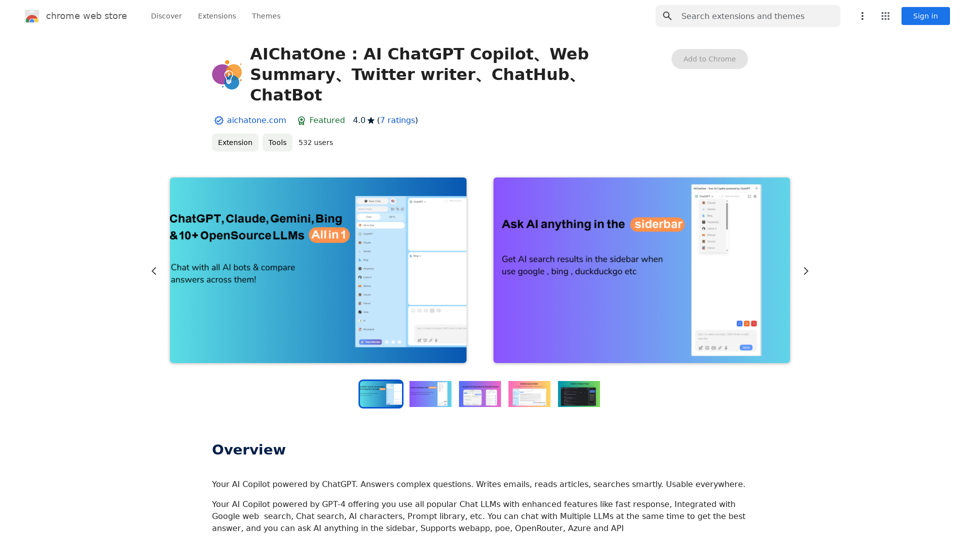
AIChatOne: AI ChatGPT Copilot, Web Summary, Twitter Writer, ChatHub, ChatBot

Your AI Copilot powered by ChatGPT. Answers complex questions. Writes emails. Reads articles. Searches smartly. Usable everywhere.
Visit Website
AIChatOne: AI ChatGPT Copilot, Web Summary, Twitter Writer, ChatHub, ChatBot
Visit Website

Introduction

AIChatOne is a comprehensive AI-driven platform that provides access to various AI technologies, including ChatGPT, GPT-4, and more. It offers free daily usage of GPT-4 and additional benefits for subscribers. The platform integrates multiple AI models and features to enhance productivity, creativity, and efficiency across various tasks.

Feature

Multi-AI Model Integration

  • Support for multiple chatbots (GPT-4, Gemini, Claude3)
  • Side-by-side result comparison
  • Custom AI characters for specific tasks

Document and Media Interaction

  • Chat with documents (doc file upload)
  • Image-based queries (GPT-4V powered)
  • Webpage and YouTube video summarization

Writing and Communication Tools

  • Social media post assistance
  • Automated content drafting with references
  • Email reply suggestions for Gmail and Outlook

Enhanced Search Capabilities

  • Powerful chat history search and filter
  • AI-enhanced results for major search engines

User-Friendly Interface

  • Customizable sidebar for quick AI access
  • Dark mode and theme options
  • Adjustable AI response "temperature"

Browser Integration

  • Chrome extension with toolbar pin
  • Keyboard shortcuts for quick access (Cmd/Ctrl+B, Cmd/Ctrl+M)

FAQ

What search engines does AIChatOne support?

AIChatOne currently supports Google, Bing, and DuckDuckGo, with plans to expand support to more search engines in the future.

Do I need a ChatGPT/OpenAI account to use AIChatOne?

Yes, users need to have their own OpenAI API key as AIChatOne does not provide one.

Is AIChatOne free to use?

Most features of AIChatOne are available for free. The platform also offers premium plans for enhanced functionality and benefits.

How can I contact AIChatOne for support or suggestions?

For any questions or suggestions, users can contact AIChatOne via email at [email protected].

Latest Traffic Insights

  • Monthly Visits

    193.90 M

  • Bounce Rate

    56.27%

  • Pages Per Visit

    2.71

  • Time on Site(s)

    115.91

  • Global Rank

    -

  • Country Rank

    -

Recent Visits

Traffic Sources

  • Social Media:
    0.48%
  • Paid Referrals:
    0.55%
  • Email:
    0.15%
  • Referrals:
    12.81%
  • Search Engines:
    16.21%
  • Direct:
    69.81%
More Data

Related Websites

Picky Conversation
View Detail

Picky Conversation

Picky Conversation

Choosy will choose the best answer between ChatGPT, Gemini, and Claude.

1.61 K
TEE Buddy Free
View Detail

TEE Buddy Free

TEE Buddy Free

Helps you reserve a tee time at your favorite golf course.

193.90 M
Chat-GPT PDF

What is Chat-GPT PDF?

Chat-GPT PDF is a tool that allows users to generate PDF files from Chat-GPT conversations. This innovative tool enables users to save and share their conversations in a more organized and visually appealing format.

How does Chat-GPT PDF work?

The process is simple and straightforward. Here's a step-by-step guide:

1. Copy the conversation: Copy the entire conversation from the Chat-GPT platform.
2. Paste the conversation: Paste the copied conversation into the Chat-GPT PDF tool.
3. Customize the layout: Customize the layout, font, and design of the PDF file according to your preferences.
4. Generate the PDF: Click the "Generate PDF" button to create a downloadable PDF file.

Features of Chat-GPT PDF

Chat-GPT PDF offers several features that make it an essential tool for users:

* Customizable layout: Customize the layout, font, and design of the PDF file to suit your needs.
* Easy sharing: Share the PDF file with others via email, social media, or messaging apps.
* Offline access: Access your conversations offline, even without an internet connection.
* Organization: Organize your conversations in a neat and tidy format, making it easier to review and reference.

Benefits of Chat-GPT PDF

The benefits of using Chat-GPT PDF are numerous:

* Improved productivity: Save time and increase productivity by having all your conversations in one place.
* Enhanced collaboration: Collaborate with others more effectively by sharing conversations in a clear and concise format.
* Better organization: Keep your conversations organized, making it easier to review and reference them later.

Conclusion

Chat-GPT PDF is a game-changer for anyone who uses Chat-GPT regularly. With its ease of use, customization options, and benefits, it's an essential tool for anyone looking to get the most out of their conversations.
View Detail

Chat-GPT PDF What is Chat-GPT PDF? Chat-GPT PDF is a tool that allows users to generate PDF files from Chat-GPT conversations. This innovative tool enables users to save and share their conversations in a more organized and visually appealing format. How does Chat-GPT PDF work? The process is simple and straightforward. Here's a step-by-step guide: 1. Copy the conversation: Copy the entire conversation from the Chat-GPT platform. 2. Paste the conversation: Paste the copied conversation into the Chat-GPT PDF tool. 3. Customize the layout: Customize the layout, font, and design of the PDF file according to your preferences. 4. Generate the PDF: Click the "Generate PDF" button to create a downloadable PDF file. Features of Chat-GPT PDF Chat-GPT PDF offers several features that make it an essential tool for users: * Customizable layout: Customize the layout, font, and design of the PDF file to suit your needs. * Easy sharing: Share the PDF file with others via email, social media, or messaging apps. * Offline access: Access your conversations offline, even without an internet connection. * Organization: Organize your conversations in a neat and tidy format, making it easier to review and reference. Benefits of Chat-GPT PDF The benefits of using Chat-GPT PDF are numerous: * Improved productivity: Save time and increase productivity by having all your conversations in one place. * Enhanced collaboration: Collaborate with others more effectively by sharing conversations in a clear and concise format. * Better organization: Keep your conversations organized, making it easier to review and reference them later. Conclusion Chat-GPT PDF is a game-changer for anyone who uses Chat-GPT regularly. With its ease of use, customization options, and benefits, it's an essential tool for anyone looking to get the most out of their conversations.

Chat-GPT PDF What is Chat-GPT PDF? Chat-GPT PDF is a tool that allows users to generate PDF files from Chat-GPT conversations. This innovative tool enables users to save and share their conversations in a more organized and visually appealing format. How does Chat-GPT PDF work? The process is simple and straightforward. Here's a step-by-step guide: 1. Copy the conversation: Copy the entire conversation from the Chat-GPT platform. 2. Paste the conversation: Paste the copied conversation into the Chat-GPT PDF tool. 3. Customize the layout: Customize the layout, font, and design of the PDF file according to your preferences. 4. Generate the PDF: Click the "Generate PDF" button to create a downloadable PDF file. Features of Chat-GPT PDF Chat-GPT PDF offers several features that make it an essential tool for users: * Customizable layout: Customize the layout, font, and design of the PDF file to suit your needs. * Easy sharing: Share the PDF file with others via email, social media, or messaging apps. * Offline access: Access your conversations offline, even without an internet connection. * Organization: Organize your conversations in a neat and tidy format, making it easier to review and reference. Benefits of Chat-GPT PDF The benefits of using Chat-GPT PDF are numerous: * Improved productivity: Save time and increase productivity by having all your conversations in one place. * Enhanced collaboration: Collaborate with others more effectively by sharing conversations in a clear and concise format. * Better organization: Keep your conversations organized, making it easier to review and reference them later. Conclusion Chat-GPT PDF is a game-changer for anyone who uses Chat-GPT regularly. With its ease of use, customization options, and benefits, it's an essential tool for anyone looking to get the most out of their conversations.

Exporting Chat History to PDF You can export your chat history with Chat-GPT to a PDF file using the following methods: #Method 1: Browser Print Function 1. Open your chat conversation with Chat-GPT in a web browser. 2. Press `Ctrl + P` (Windows) or `Cmd + P` (Mac) to open the print dialog box. 3. Select "Save as PDF" as the printer destination. 4. Choose a location to save the PDF file and set the file name. 5. Click "Save" to export the chat history to a PDF file. #Method 2: Online PDF Conversion Tools 1. Copy the entire chat conversation by pressing `Ctrl + A` (Windows) or `Cmd + A` (Mac) and then `Ctrl + C` (Windows) or `Cmd + C` (Mac). 2. Go to an online PDF conversion tool, such as SmallPDF or Convertio. 3. Paste the chat conversation into the conversion tool's text box. 4. Select the PDF format and click "Convert" to generate the PDF file. 5. Download the PDF file to your computer. #Method 3: Browser Extensions 1. Install a browser extension, such as Print Friendly & PDF or FireShot, that allows you to save web pages as PDF files. 2. Open your chat conversation with Chat-GPT in a web browser. 3. Click the browser extension's icon in the toolbar. 4. Select the "Save as PDF" option and choose a location to save the file. 5. Click "Save" to export the chat history to a PDF file. By following these methods, you can easily export your chat history with Chat-GPT to a PDF file for future reference or sharing.

193.90 M
FisherAI - Your Best Summary Copilot, Supporting ChatGPT & Gemini
View Detail

FisherAI - Your Best Summary Copilot, Supporting ChatGPT & Gemini

FisherAI - Your Best Summary Copilot, Supporting ChatGPT & Gemini

Your Best AI Summary Assistant

193.90 M
Fast and Affordable Logo Generator for Small Businesses
View Detail

Fast and Affordable Logo Generator for Small Businesses

Fast and Affordable Logo Generator for Small Businesses

Generate unique logos quickly and affordably with Aikiu Studio. Create professional designs for small businesses and solopreneurs in minutes. Get high-quality, hassle-free logo creation.

0
Free ChatGPT for Search Engine
View Detail

Free ChatGPT for Search Engine

Free ChatGPT for Search Engine

This is a free ChatGPT extension that helps you get better quality search engine results, making you 500% more efficient!

193.90 M
Software Defined Radio - Generative Pre-trained Transformer
View Detail

Software Defined Radio - Generative Pre-trained Transformer

Software Defined Radio - Generative Pre-trained Transformer

The official SDR-GPT Chrome extension. Hyper-personalization on autopilot.

193.90 M
BNNGPT - Discover the Impossible.
View Detail

BNNGPT - Discover the Impossible.

BNNGPT - Discover the Impossible.

Real-time, accurate responses driven by cutting-edge AI. Enjoy an elegant, visually appealing interface. Experience the future of search with BNNGPT.

0