Open-source RightAI Tools Directory
  • Discover AI
  • Submit
  • Startup
  • Blog
Open-source RightAI Tools Directory
Discover the best AI tools of 2025 with the RightAI Tools Directory!

Friend Links

AI Anime GeneratorToolsApp AI

Support

Tap4
Privacy policyTerms & ConditionsContact Us
Loading...
loading...

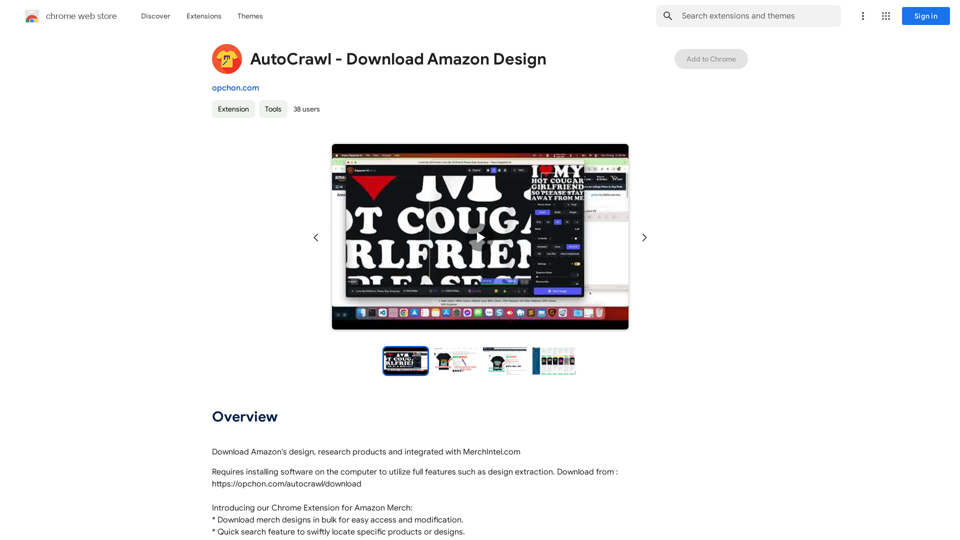
AutoCrawl - Download Amazon Designs This is a tool to help you download designs from Amazon product pages. Here's how it works: 1. Paste the Amazon product URL: Put the link to the Amazon product page you want to download designs from. 2. Select the design type: Choose the type of design you want to download (e.g., images, logos, patterns). 3. Click "Download": The tool will automatically extract and download the selected designs. Features: * Easy to use: Just paste the URL and click a button. * Multiple design types: Download images, logos, patterns, and more. * Fast and efficient: Quickly download multiple designs at once. Disclaimer: * Use this tool responsibly and ethically. * Respect copyright laws and only download designs for personal use.

Download Amazon's design templates, research products, and integrate them with MerchIntel.com.
Visit Website
AutoCrawl - Download Amazon Designs 

This is a tool to help you download designs from Amazon product pages. 

Here's how it works:

1. Paste the Amazon product URL:  Put the link to the Amazon product page you want to download designs from.
2. Select the design type: Choose the type of design you want to download (e.g., images, logos, patterns).
3. Click "Download":  The tool will automatically extract and download the selected designs.

Features:

* Easy to use: Just paste the URL and click a button.
* Multiple design types: Download images, logos, patterns, and more.
* Fast and efficient: Quickly download multiple designs at once.

Disclaimer:

* Use this tool responsibly and ethically.
* Respect copyright laws and only download designs for personal use.
Visit Website

Introduction

AutoCrawl is a Chrome extension designed to enhance the workflow and design process for Amazon Merch sellers. This powerful tool offers features such as bulk design downloads, quick search functionality, and market insights, all seamlessly integrated into the Amazon Merch seller dashboard. With its user-friendly interface and intuitive navigation, AutoCrawl aims to streamline operations and provide valuable data for sellers in the competitive Amazon Merch marketplace.

Feature

Bulk Design Downloads

AutoCrawl enables users to download multiple merch designs simultaneously, facilitating easy access and modification of designs.

Quick Search Functionality

The extension provides a swift search feature, allowing sellers to quickly locate specific products or designs within their inventory.

Market Insights

AutoCrawl offers the ability to count similar products on Amazon Merch, providing valuable market insights to inform selling strategies.

Seamless Dashboard Integration

The extension integrates smoothly with the Amazon Merch seller dashboard, ensuring a cohesive user experience.

User-Friendly Interface

AutoCrawl boasts an intuitive and easy-to-navigate interface, making it accessible for sellers of all experience levels.

BSR and Date Optimization

The extension moves the Best Sellers Rank (BSR) and Date First Available information closer to the price, improving at-a-glance product assessment.

FAQ

What is AutoCrawl?

AutoCrawl is a Chrome extension designed to assist Amazon Merch sellers in optimizing their workflow and design process. It offers features such as bulk design downloads, quick search functionality, and market insights.

How do I use AutoCrawl?

To use AutoCrawl, download and install the extension from the Chrome Web Store. Once installed, access its features by clicking on the extension icon in your Chrome toolbar.

Is AutoCrawl free?

Yes, AutoCrawl is a free Chrome extension. However, to utilize its full range of features, users need to install additional software on their computer.

Latest Traffic Insights

  • Monthly Visits

    193.90 M

  • Bounce Rate

    56.27%

  • Pages Per Visit

    2.71

  • Time on Site(s)

    115.91

  • Global Rank

    -

  • Country Rank

    -

Recent Visits

Traffic Sources

  • Social Media:
    0.48%
  • Paid Referrals:
    0.55%
  • Email:
    0.15%
  • Referrals:
    12.81%
  • Search Engines:
    16.21%
  • Direct:
    69.81%
More Data

Related Websites

GoldDust
View Detail

GoldDust

GoldDust

What is the founding date of Google?

193.90 M
Dream Machine AI
View Detail

Dream Machine AI

Dream Machine AI

Explore Dream Machine AI for the revolutionary AI video generator. Create unique, high-quality videos instantly from text and images. Free to use. Download and enjoy innovative video content now!

7.28 K
AI Voice Over for YouTube 

This is a guide to using AI voice over for your YouTube videos. 

Why Use AI Voice Over?

* Cost-Effective: AI voice over is much cheaper than hiring a professional voice actor.
* Time-Saving: You can generate voice over quickly and easily, without needing to schedule recording sessions.
* Variety of Voices: Choose from a wide range of AI voices, including male, female, and even robotic voices.
* Accessibility: Make your videos accessible to viewers who are deaf or hard of hearing by adding captions generated by AI.

How to Use AI Voice Over

1. Choose a Platform: There are many different platforms that offer AI voice over services, such as:
    * Google Cloud Text-to-Speech
    * Amazon Polly
    * Microsoft Azure Text to Speech
    * Murf.ai
    * NaturalReader
2. Write Your Script:  Write a clear and concise script for your video.
3. Upload Your Script:  Upload your script to the chosen platform.
4. Select a Voice: Choose the voice that best suits your video.
5. Adjust Settings:  Adjust settings such as speed, pitch, and volume.
6. Generate Voice Over:  Click the "Generate" button to create your voice over.
7. Download and Edit: Download the generated voice over file and edit it as needed.
8. Add to Your Video:  Add the voice over to your YouTube video.

Tips for Using AI Voice Over

* Use Natural Language:  Write your script as if you were speaking naturally.
* Vary Your Tone:  Use different tones of voice to keep your viewers engaged.
* Add Pauses:  Include pauses in your script to allow viewers to process information.
* Proofread Carefully:  Always proofread your script before generating the voice over.
* Experiment:  Try different voices, settings, and styles to find what works best for you.
View Detail

AI Voice Over for YouTube This is a guide to using AI voice over for your YouTube videos. Why Use AI Voice Over? * Cost-Effective: AI voice over is much cheaper than hiring a professional voice actor. * Time-Saving: You can generate voice over quickly and easily, without needing to schedule recording sessions. * Variety of Voices: Choose from a wide range of AI voices, including male, female, and even robotic voices. * Accessibility: Make your videos accessible to viewers who are deaf or hard of hearing by adding captions generated by AI. How to Use AI Voice Over 1. Choose a Platform: There are many different platforms that offer AI voice over services, such as: * Google Cloud Text-to-Speech * Amazon Polly * Microsoft Azure Text to Speech * Murf.ai * NaturalReader 2. Write Your Script: Write a clear and concise script for your video. 3. Upload Your Script: Upload your script to the chosen platform. 4. Select a Voice: Choose the voice that best suits your video. 5. Adjust Settings: Adjust settings such as speed, pitch, and volume. 6. Generate Voice Over: Click the "Generate" button to create your voice over. 7. Download and Edit: Download the generated voice over file and edit it as needed. 8. Add to Your Video: Add the voice over to your YouTube video. Tips for Using AI Voice Over * Use Natural Language: Write your script as if you were speaking naturally. * Vary Your Tone: Use different tones of voice to keep your viewers engaged. * Add Pauses: Include pauses in your script to allow viewers to process information. * Proofread Carefully: Always proofread your script before generating the voice over. * Experiment: Try different voices, settings, and styles to find what works best for you.

AI Voice Over for YouTube This is a guide to using AI voice over for your YouTube videos. Why Use AI Voice Over? * Cost-Effective: AI voice over is much cheaper than hiring a professional voice actor. * Time-Saving: You can generate voice over quickly and easily, without needing to schedule recording sessions. * Variety of Voices: Choose from a wide range of AI voices, including male, female, and even robotic voices. * Accessibility: Make your videos accessible to viewers who are deaf or hard of hearing by adding captions generated by AI. How to Use AI Voice Over 1. Choose a Platform: There are many different platforms that offer AI voice over services, such as: * Google Cloud Text-to-Speech * Amazon Polly * Microsoft Azure Text to Speech * Murf.ai * NaturalReader 2. Write Your Script: Write a clear and concise script for your video. 3. Upload Your Script: Upload your script to the chosen platform. 4. Select a Voice: Choose the voice that best suits your video. 5. Adjust Settings: Adjust settings such as speed, pitch, and volume. 6. Generate Voice Over: Click the "Generate" button to create your voice over. 7. Download and Edit: Download the generated voice over file and edit it as needed. 8. Add to Your Video: Add the voice over to your YouTube video. Tips for Using AI Voice Over * Use Natural Language: Write your script as if you were speaking naturally. * Vary Your Tone: Use different tones of voice to keep your viewers engaged. * Add Pauses: Include pauses in your script to allow viewers to process information. * Proofread Carefully: Always proofread your script before generating the voice over. * Experiment: Try different voices, settings, and styles to find what works best for you.

Watch foreign language YouTube videos in your own language.

193.90 M
ChatGPT Context Companion

The ChatGPT Context Companion is an innovative tool designed to enhance the conversational experience with ChatGPT, a cutting-edge language model. This companion tool provides users with a more comprehensive and engaging interaction by offering real-time suggestions, relevant information, and personalized responses.

Key Features

* Real-time Suggestions: The Context Companion provides users with relevant suggestions based on the conversation, enabling them to explore new topics, ask follow-up questions, or delve deeper into a subject.
* Relevant Information: The tool offers users access to a vast knowledge base, providing them with accurate and up-to-date information on a wide range of topics, from science and history to entertainment and culture.
* Personalized Responses: By analyzing the conversation context, the Context Companion generates personalized responses that cater to the user's interests, preferences, and communication style.

Benefits

* Enhanced Engagement: The ChatGPT Context Companion fosters a more engaging and interactive conversation, encouraging users to explore new ideas, ask questions, and learn from the conversation.
* Improved Understanding: By providing users with relevant information and suggestions, the tool helps to clarify complex topics, resolve misunderstandings, and promote a deeper understanding of the subject matter.
* Increased Productivity: The Context Companion saves users time and effort by offering quick access to relevant information, enabling them to focus on the conversation and achieve their goals more efficiently.

Applications

* Education: The ChatGPT Context Companion is an invaluable resource for students, teachers, and researchers, providing them with a wealth of information, suggestions, and insights to support their learning and research endeavors.
* Business: The tool is an excellent communication aid for professionals, enabling them to access relevant information, generate ideas, and respond to customer inquiries more effectively.
* Entertainment: The Context Companion adds a new dimension to online conversations, making them more engaging, informative, and enjoyable for users.
View Detail

ChatGPT Context Companion The ChatGPT Context Companion is an innovative tool designed to enhance the conversational experience with ChatGPT, a cutting-edge language model. This companion tool provides users with a more comprehensive and engaging interaction by offering real-time suggestions, relevant information, and personalized responses. Key Features * Real-time Suggestions: The Context Companion provides users with relevant suggestions based on the conversation, enabling them to explore new topics, ask follow-up questions, or delve deeper into a subject. * Relevant Information: The tool offers users access to a vast knowledge base, providing them with accurate and up-to-date information on a wide range of topics, from science and history to entertainment and culture. * Personalized Responses: By analyzing the conversation context, the Context Companion generates personalized responses that cater to the user's interests, preferences, and communication style. Benefits * Enhanced Engagement: The ChatGPT Context Companion fosters a more engaging and interactive conversation, encouraging users to explore new ideas, ask questions, and learn from the conversation. * Improved Understanding: By providing users with relevant information and suggestions, the tool helps to clarify complex topics, resolve misunderstandings, and promote a deeper understanding of the subject matter. * Increased Productivity: The Context Companion saves users time and effort by offering quick access to relevant information, enabling them to focus on the conversation and achieve their goals more efficiently. Applications * Education: The ChatGPT Context Companion is an invaluable resource for students, teachers, and researchers, providing them with a wealth of information, suggestions, and insights to support their learning and research endeavors. * Business: The tool is an excellent communication aid for professionals, enabling them to access relevant information, generate ideas, and respond to customer inquiries more effectively. * Entertainment: The Context Companion adds a new dimension to online conversations, making them more engaging, informative, and enjoyable for users.

ChatGPT Context Companion The ChatGPT Context Companion is an innovative tool designed to enhance the conversational experience with ChatGPT, a cutting-edge language model. This companion tool provides users with a more comprehensive and engaging interaction by offering real-time suggestions, relevant information, and personalized responses. Key Features * Real-time Suggestions: The Context Companion provides users with relevant suggestions based on the conversation, enabling them to explore new topics, ask follow-up questions, or delve deeper into a subject. * Relevant Information: The tool offers users access to a vast knowledge base, providing them with accurate and up-to-date information on a wide range of topics, from science and history to entertainment and culture. * Personalized Responses: By analyzing the conversation context, the Context Companion generates personalized responses that cater to the user's interests, preferences, and communication style. Benefits * Enhanced Engagement: The ChatGPT Context Companion fosters a more engaging and interactive conversation, encouraging users to explore new ideas, ask questions, and learn from the conversation. * Improved Understanding: By providing users with relevant information and suggestions, the tool helps to clarify complex topics, resolve misunderstandings, and promote a deeper understanding of the subject matter. * Increased Productivity: The Context Companion saves users time and effort by offering quick access to relevant information, enabling them to focus on the conversation and achieve their goals more efficiently. Applications * Education: The ChatGPT Context Companion is an invaluable resource for students, teachers, and researchers, providing them with a wealth of information, suggestions, and insights to support their learning and research endeavors. * Business: The tool is an excellent communication aid for professionals, enabling them to access relevant information, generate ideas, and respond to customer inquiries more effectively. * Entertainment: The Context Companion adds a new dimension to online conversations, making them more engaging, informative, and enjoyable for users.

Boost Your Web Experience with Customizable AI-Prompts

193.90 M
Intelligent Web Translation - Automatic Translation, Bilingual Comparison, AI Dialogue
View Detail

Intelligent Web Translation - Automatic Translation, Bilingual Comparison, AI Dialogue

Intelligent Web Translation - Automatic Translation, Bilingual Comparison, AI Dialogue

Supports 20+ foreign languages/national languages, one-key rapid translation, supports bilingual comparison, automatic translation, AI summary, and phrase translation.

193.90 M
AI Search
View Detail

AI Search

AI Search

Stop wasting time browsing ad-ridden, Search-Engine-Optimised sites and find what you are looking for

193.90 M
Browser Copilot
View Detail

Browser Copilot

Browser Copilot

Use existing or create your own AI helpers to make your web application tasks easier.

193.90 M
KauGPT
View Detail

KauGPT

KauGPT

This extension gives you access to GPT-4, along with access to other GPT models and files.

193.90 M