Open-source RightAI Tools Directory
  • Discover AI
  • Submit
  • Startup
  • Blog
Open-source RightAI Tools Directory
Discover the best AI tools of 2025 with the RightAI Tools Directory!

Friend Links

AI Anime GeneratorToolsApp AI

Support

Tap4
Privacy policyTerms & ConditionsContact Us
Loading...
loading...

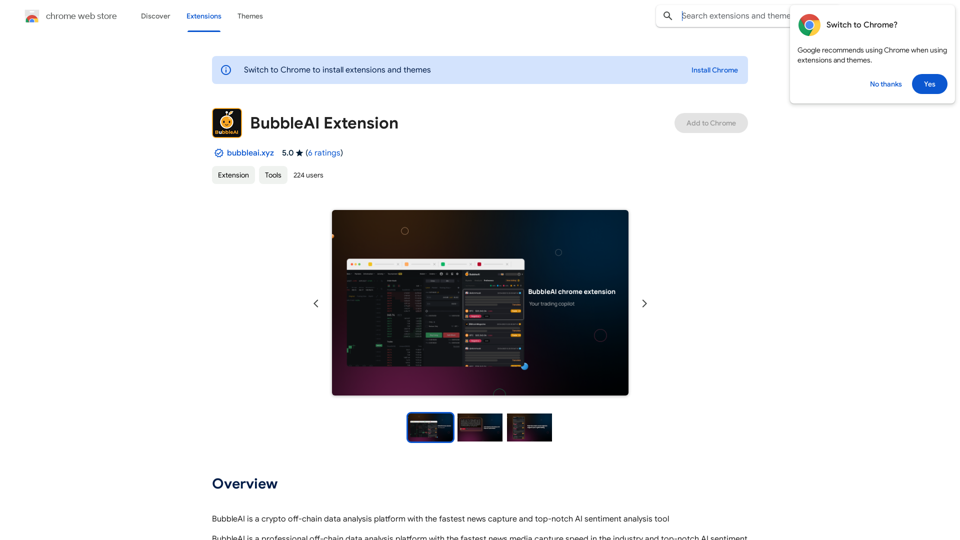
Bubble AI Extension

BubbleAI is a cryptocurrency off-chain data analysis platform with the fastest news capture and a top-notch AI sentiment analysis tool.
Visit Website
Bubble AI Extension
Visit Website

Introduction

BubbleAI is a cutting-edge crypto off-chain data analysis platform designed to empower traders with rapid decision-making capabilities. It offers the industry's fastest news capture speed and advanced AI sentiment analysis tools, providing traders with a comprehensive suite of resources for navigating the volatile cryptocurrency market.

Feature

Fastest News Capture Speed

BubbleAI boasts unparalleled news media capture speed, ensuring traders are always at the forefront of market trends and developments. This feature allows users to react swiftly to breaking news that could impact their trading strategies.

Top-Notch AI Sentiment Analysis

The platform's sophisticated AI sentiment analysis tools deliver accurate and dependable insights. These tools help traders gauge market sentiment, enabling them to make more informed and data-driven decisions.

Professional Off-Chain Data Analysis

BubbleAI offers in-depth off-chain data analysis, providing traders with a holistic view of the market. This feature allows users to consider factors beyond on-chain data, leading to more comprehensive trading strategies.

Free Trial and Subscription Options

Users can experience BubbleAI's capabilities through a free trial, with the option to subscribe for extended access and additional benefits. This tiered approach allows traders to test the platform before committing to a paid plan.

Customizable Pricing Plans

BubbleAI offers flexible pricing plans tailored to various trader needs. While specific details are not provided, interested users can contact the company for more information on available options.

FAQ

What is BubbleAI?

BubbleAI is a crypto off-chain data analysis platform that provides the fastest news capture and top-notch AI sentiment analysis tools, helping traders make quick trading decisions.

How does BubbleAI work?

BubbleAI's platform utilizes AI-powered sentiment analysis tools to provide traders with accurate and reliable insights. It captures news at high speed and analyzes off-chain data to offer a comprehensive market understanding.

Is BubbleAI free?

BubbleAI offers a free trial for users to experience its features. However, for extended access and additional benefits, traders need to subscribe to the platform.

What are the pricing plans for BubbleAI?

Specific pricing details are not provided in the content. Interested users are encouraged to contact BubbleAI directly for more information on their pricing plans, which are designed to cater to different trader needs.

Latest Traffic Insights

  • Monthly Visits

    193.90 M

  • Bounce Rate

    56.27%

  • Pages Per Visit

    2.71

  • Time on Site(s)

    115.91

  • Global Rank

    -

  • Country Rank

    -

Recent Visits

Traffic Sources

  • Social Media:
    0.48%
  • Paid Referrals:
    0.55%
  • Email:
    0.15%
  • Referrals:
    12.81%
  • Search Engines:
    16.21%
  • Direct:
    69.81%
More Data

Related Websites

Track Changes GPT
View Detail

Track Changes GPT

Track Changes GPT

Add track change function and text edit mode to ChatGPT

193.90 M
Kaspian
View Detail

Kaspian

Kaspian

Kaspian searches through all your apps to help you find exactly what you need and discover things you should know.

193.90 M
AiJobSaga
View Detail

AiJobSaga

AiJobSaga

Craft personalized applications & gain AI-powered insights to land your dream job with AIJobSaga.

0
Ai5 - The AI Art Newsletter
View Detail

Ai5 - The AI Art Newsletter

Ai5 - The AI Art Newsletter

Ai5 is your go-to twice-weekly email outlining the most important events happening in generative AI. Stay informed, get smarter, and be entertained with Ai5.

0
Know all, speak all.
View Detail

Know all, speak all.

Know all, speak all.

Seller Smart AI Assistant - The Scientific World for Cross-Border E-commerce People!

193.90 M
Luma Dream Machine
View Detail

Luma Dream Machine

Luma Dream Machine

Dream Machine is an AI model that generates high-quality, realistic videos quickly from text and images using Luma AI.

1.87 M
Suggesty

Suggesty is a cutting-edge AI-powered tool designed to assist users in generating high-quality content quickly and efficiently.
View Detail

Suggesty Suggesty is a cutting-edge AI-powered tool designed to assist users in generating high-quality content quickly and efficiently.

Suggesty Suggesty is a cutting-edge AI-powered tool designed to assist users in generating high-quality content quickly and efficiently.

Get human-like answers powered by GPT-3 to your Google searches

193.90 M
ChatGPT Keyboard Shortcuts

#Navigation

* Ctrl + →: Move to the next message
* Ctrl + ←: Move to the previous message
* Home: Move to the beginning of the conversation
* End: Move to the end of the conversation

#Editing

* Ctrl + A: Select all text
* Ctrl + C: Copy selected text
* Ctrl + X: Cut selected text
* Ctrl + V: Paste copied or cut text
* Ctrl + Z: Undo
* Ctrl + Y: Redo
* Ctrl + Shift + F: Format text as code

#Actions

* Enter: Send the message
* Shift + Enter: Insert a new line
* Ctrl + Shift + Enter: Send the message and insert a new line
* Esc: Cancel editing and close the message input field
* Ctrl + Shift + Space: Open the emoji picker
* Ctrl + Shift + /: Open the help menu

#Accessibility

* Ctrl + +: Increase font size
* Ctrl + -: Decrease font size
* Ctrl + 0: Reset font size to default
View Detail

ChatGPT Keyboard Shortcuts #Navigation * Ctrl + →: Move to the next message * Ctrl + ←: Move to the previous message * Home: Move to the beginning of the conversation * End: Move to the end of the conversation #Editing * Ctrl + A: Select all text * Ctrl + C: Copy selected text * Ctrl + X: Cut selected text * Ctrl + V: Paste copied or cut text * Ctrl + Z: Undo * Ctrl + Y: Redo * Ctrl + Shift + F: Format text as code #Actions * Enter: Send the message * Shift + Enter: Insert a new line * Ctrl + Shift + Enter: Send the message and insert a new line * Esc: Cancel editing and close the message input field * Ctrl + Shift + Space: Open the emoji picker * Ctrl + Shift + /: Open the help menu #Accessibility * Ctrl + +: Increase font size * Ctrl + -: Decrease font size * Ctrl + 0: Reset font size to default

ChatGPT Keyboard Shortcuts #Navigation * Ctrl + →: Move to the next message * Ctrl + ←: Move to the previous message * Home: Move to the beginning of the conversation * End: Move to the end of the conversation #Editing * Ctrl + A: Select all text * Ctrl + C: Copy selected text * Ctrl + X: Cut selected text * Ctrl + V: Paste copied or cut text * Ctrl + Z: Undo * Ctrl + Y: Redo * Ctrl + Shift + F: Format text as code #Actions * Enter: Send the message * Shift + Enter: Insert a new line * Ctrl + Shift + Enter: Send the message and insert a new line * Esc: Cancel editing and close the message input field * Ctrl + Shift + Space: Open the emoji picker * Ctrl + Shift + /: Open the help menu #Accessibility * Ctrl + +: Increase font size * Ctrl + -: Decrease font size * Ctrl + 0: Reset font size to default

Enhance your ChatGPT experience with easy-to-use keyboard shortcuts.

193.90 M