Open-source RightAI Tools Directory
  • Discover AI
  • Submit
  • Startup
  • Blog
Open-source RightAI Tools Directory
Discover the best AI tools of 2025 with the RightAI Tools Directory!

Friend Links

AI Anime GeneratorToolsApp AI

Support

Tap4
Privacy policyTerms & ConditionsContact Us
Loading...
loading...

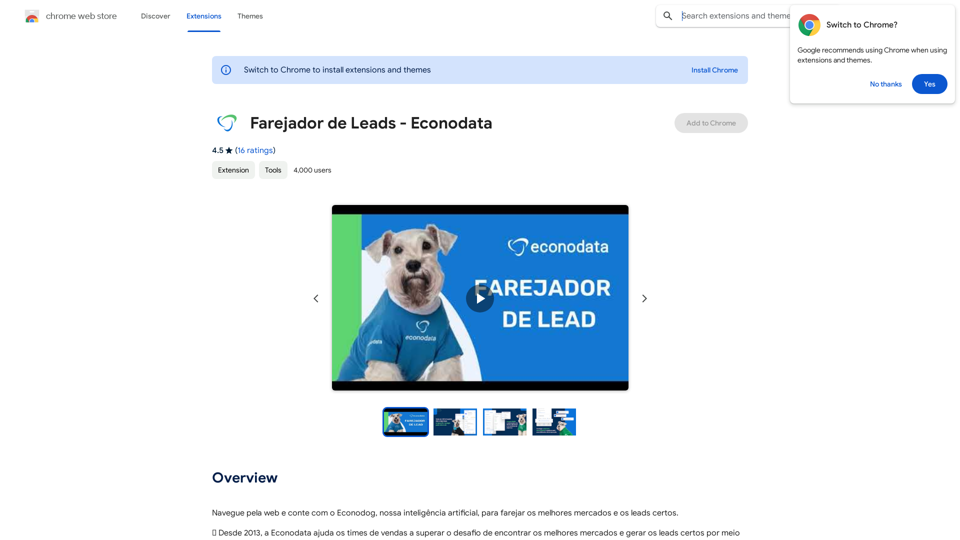
Lead Prospector - Econodata

Browse the web and count on Econodog, our artificial intelligence, to sniff out the best markets and the right leads.
Visit Website
Lead Prospector - Econodata
Visit Website

Introduction

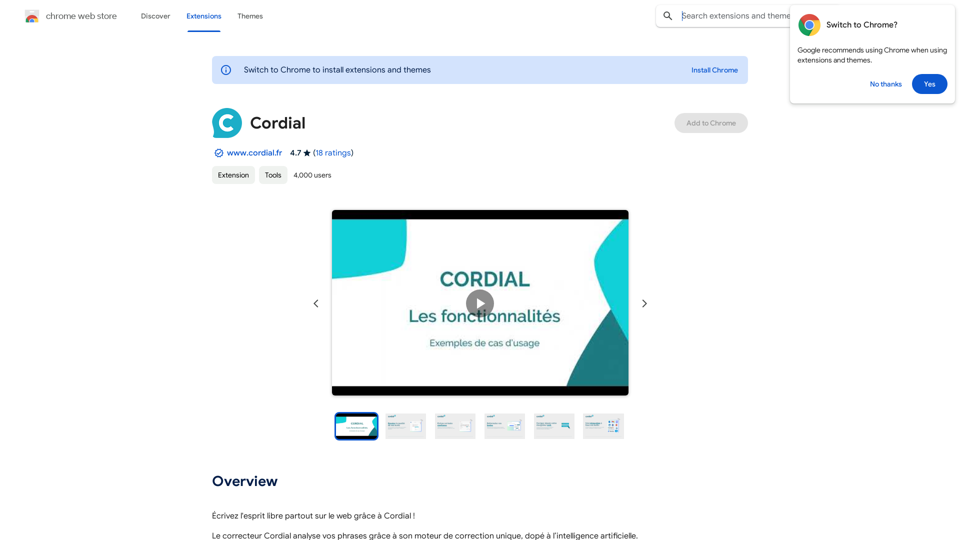
Lead Sniffer - Econodata is an AI-powered platform designed to revolutionize sales prospecting. It provides sales teams with strategic company information, helping them identify the best markets and generate accurate leads. The platform leverages big data and AI technologies to offer real-time, relevant information about potential prospects, streamlining the sales process and boosting efficiency.

Feature

Chrome Extension for Easy Access

Lead Sniffer - Econodata offers a Chrome extension that allows users to visualize company information while browsing the internet, providing seamless integration into the user's workflow.

Real-Time Information Updates

The platform provides 24/7 access to up-to-date company information, ensuring that sales teams always have the most current data at their fingertips.

Efficient Prospecting Process

By focusing on information that truly matters, Lead Sniffer - Econodata makes the prospecting process more efficient, allowing sales teams to work smarter, not harder.

AI-Driven Lead Generation

Utilizing advanced AI technologies, the platform helps users find the best markets and generate accurate leads, improving the overall quality of sales prospects.

Flexible Pricing Options

Lead Sniffer - Econodata offers both a free version and a paid version with additional features, making it an affordable solution for sales teams of all sizes.

FAQ

How does Lead Sniffer - Econodata work?

Lead Sniffer - Econodata works as a Chrome extension. Once installed, it provides users with strategic information about companies they want to prospect, directly in their browser. The platform uses AI and big data to offer real-time, relevant information to streamline the prospecting process.

What types of information does the platform provide?

While specific details aren't mentioned, the platform provides strategic information about companies that is crucial for sales prospecting. This likely includes data such as company size, industry, financial information, and other relevant details that can help sales teams qualify leads more effectively.

Is Lead Sniffer - Econodata suitable for all types of businesses?

The platform appears to be designed for sales teams across various industries. Its ability to provide strategic information about companies makes it potentially useful for B2B sales in particular, but it could be valuable for any business looking to improve its lead generation and prospecting processes.

Latest Traffic Insights

  • Monthly Visits

    193.90 M

  • Bounce Rate

    56.27%

  • Pages Per Visit

    2.71

  • Time on Site(s)

    115.91

  • Global Rank

    -

  • Country Rank

    -

Recent Visits

Traffic Sources

  • Social Media:
    0.48%
  • Paid Referrals:
    0.55%
  • Email:
    0.15%
  • Referrals:
    12.81%
  • Search Engines:
    16.21%
  • Direct:
    69.81%
More Data

Related Websites

Get ChatGPT for Free with Google

You can now access ChatGPT, a powerful language model, for free with Google. Here's how:

Method 1: Google Colab

* Open Google Colab ([colab.research.google.com](http://colab.research.google.com))
* Create a new notebook
* Install the `transformers` library by running `!pip install transformers`
* Import the `transformers` library and load the ChatGPT model using `from transformers import AutoModelForCausalLM, AutoTokenizer; model = AutoModelForCausalLM.from_pretrained('chatgpt'); tokenizer = AutoTokenizer.from_pretrained('chatgpt')`
* Use the model to generate text using `input_text = "Your input here"; inputs = tokenizer.encode_plus(input_text, return_tensors='pt', max_length=1024, padding='max_length', truncation=True); output = model(inputs['input_ids'], attention_mask=inputs['attention_mask']); print(tokenizer.decode(output.logits[0], skip_special_tokens=True))`

Method 2: Google Apps Script

* Open Google Apps Script ([script.google.com](http://script.google.com))
* Create a new project
* Install the `transformers` library by running `npm install transformers`
* Import the `transformers` library and load the ChatGPT model using `const { AutoModelForCausalLM, AutoTokenizer } = require('transformers'); const model = new AutoModelForCausalLM('chatgpt'); const tokenizer = new AutoTokenizer('chatgpt');`
* Use the model to generate text using `const inputText = "Your input here"; const inputs = tokenizer.encodePlus(inputText, { return_tensors: 'pt', max_length: 1024, padding: 'max_length', truncation: true }); const output = model(inputs.inputIds, inputs.attentionMask); console.log(tokenizer.decode(output.logits[0], { skipSpecialTokens: true }));`

Note: These methods require some technical knowledge and may have limitations compared to the original ChatGPT model.
View Detail

Get ChatGPT for Free with Google You can now access ChatGPT, a powerful language model, for free with Google. Here's how: Method 1: Google Colab * Open Google Colab ([colab.research.google.com](http://colab.research.google.com)) * Create a new notebook * Install the `transformers` library by running `!pip install transformers` * Import the `transformers` library and load the ChatGPT model using `from transformers import AutoModelForCausalLM, AutoTokenizer; model = AutoModelForCausalLM.from_pretrained('chatgpt'); tokenizer = AutoTokenizer.from_pretrained('chatgpt')` * Use the model to generate text using `input_text = "Your input here"; inputs = tokenizer.encode_plus(input_text, return_tensors='pt', max_length=1024, padding='max_length', truncation=True); output = model(inputs['input_ids'], attention_mask=inputs['attention_mask']); print(tokenizer.decode(output.logits[0], skip_special_tokens=True))` Method 2: Google Apps Script * Open Google Apps Script ([script.google.com](http://script.google.com)) * Create a new project * Install the `transformers` library by running `npm install transformers` * Import the `transformers` library and load the ChatGPT model using `const { AutoModelForCausalLM, AutoTokenizer } = require('transformers'); const model = new AutoModelForCausalLM('chatgpt'); const tokenizer = new AutoTokenizer('chatgpt');` * Use the model to generate text using `const inputText = "Your input here"; const inputs = tokenizer.encodePlus(inputText, { return_tensors: 'pt', max_length: 1024, padding: 'max_length', truncation: true }); const output = model(inputs.inputIds, inputs.attentionMask); console.log(tokenizer.decode(output.logits[0], { skipSpecialTokens: true }));` Note: These methods require some technical knowledge and may have limitations compared to the original ChatGPT model.

Get ChatGPT for Free with Google You can now access ChatGPT, a powerful language model, for free with Google. Here's how: Method 1: Google Colab * Open Google Colab ([colab.research.google.com](http://colab.research.google.com)) * Create a new notebook * Install the `transformers` library by running `!pip install transformers` * Import the `transformers` library and load the ChatGPT model using `from transformers import AutoModelForCausalLM, AutoTokenizer; model = AutoModelForCausalLM.from_pretrained('chatgpt'); tokenizer = AutoTokenizer.from_pretrained('chatgpt')` * Use the model to generate text using `input_text = "Your input here"; inputs = tokenizer.encode_plus(input_text, return_tensors='pt', max_length=1024, padding='max_length', truncation=True); output = model(inputs['input_ids'], attention_mask=inputs['attention_mask']); print(tokenizer.decode(output.logits[0], skip_special_tokens=True))` Method 2: Google Apps Script * Open Google Apps Script ([script.google.com](http://script.google.com)) * Create a new project * Install the `transformers` library by running `npm install transformers` * Import the `transformers` library and load the ChatGPT model using `const { AutoModelForCausalLM, AutoTokenizer } = require('transformers'); const model = new AutoModelForCausalLM('chatgpt'); const tokenizer = new AutoTokenizer('chatgpt');` * Use the model to generate text using `const inputText = "Your input here"; const inputs = tokenizer.encodePlus(inputText, { return_tensors: 'pt', max_length: 1024, padding: 'max_length', truncation: true }); const output = model(inputs.inputIds, inputs.attentionMask); console.log(tokenizer.decode(output.logits[0], { skipSpecialTokens: true }));` Note: These methods require some technical knowledge and may have limitations compared to the original ChatGPT model.

How to Add ChatGPT to All Google Searches ===================================================== Step 1: Create a Custom Search Engine -------------------------------------- * Go to the [Google Custom Search Engine](https://cse.google.com/) website and sign in with your Google account. * Click on the "New Search Engine" button. * Fill in the required information, such as the name and description of your search engine. * Click on the "Create" button. Step 2: Add ChatGPT to the Search Engine ----------------------------------------- * In the "Setup" tab, click on the "Add" button next to "Sites to search". * Enter the following URL: `https://chat.openai.com/` * Click on the "Add" button. Step 3: Configure the Search Engine -------------------------------------- * In the "Setup" tab, click on the "Edit" button next to "Search engine keywords". * Add the following keywords: `ChatGPT` * Click on the "Save" button. Step 4: Get the Search Engine Code ------------------------------------- * In the "Setup" tab, click on the "Get code" button. * Copy the HTML code provided. Step 5: Add the Search Engine to Your Browser ------------------------------------------------ * Open your browser and go to the "Settings" or "Options" page. * Look for the "Search engine" or "Default search engine" option. * Click on the "Add" or "Manage search engines" button. * Paste the HTML code you copied earlier. * Click on the "Add" or "Save" button. You're Done! =============== Now, whenever you search on Google, ChatGPT will be included in the search results. You can also use the custom search engine URL provided by Google to search directly.

193.90 M
Dalle3 Tools This is a collection of tools
View Detail

Dalle3 Tools This is a collection of tools

Dalle3 Tools This is a collection of tools

ChatGPT Plus, DALL-E 3, Productivity Tools * Notifications * Download All * Retrieve Image Prompt

193.90 M
XOR Extension
View Detail

XOR Extension

XOR Extension

The XOR Extension lets recruiters talk to candidates from their Applicant Tracking System (ATS), job boards, or LinkedIn.

193.90 M
Free Transcription Tool | Deepgram
View Detail

Free Transcription Tool | Deepgram

Free Transcription Tool | Deepgram

Easily convert your conversations, audio files, or YouTube videos into text for free with our advanced transcription tool.

835.16 K
Face Swap - FaceArt
View Detail

Face Swap - FaceArt

Face Swap - FaceArt

FaceArt is a powerful AI face swap plugin that utilizes AI technology to generate face swap images in one click!

193.90 M
Dream Machine AI
View Detail

Dream Machine AI

Dream Machine AI

Explore Dream Machine AI for the revolutionary AI video generator. Create unique, high-quality videos instantly from text and images. Free to use. Download and enjoy innovative video content now!

7.28 K
Media Vault AI | Your AI-Powered Media Curator and Cloud Storage Solution
View Detail

Media Vault AI | Your AI-Powered Media Curator and Cloud Storage Solution

Media Vault AI | Your AI-Powered Media Curator and Cloud Storage Solution

Media Vault AI is your comprehensive solution for media storage, curation, and analysis. Seamlessly integrating with your favorite generative AI tools, our platform provides AI-powered file naming, tagging, and unique folder structures, a powerful semantic search feature, and insightful analytics tools. Visit Discord today for early access.

203
TikTok Voice Generator
==========================

The TikTok voice generator is a popular feature on the social media platform that allows users to create and share videos with unique and entertaining voiceovers. This feature has become a sensation among TikTok users, with many using it to add humor, creativity, and personality to their videos.

How Does it Work?
--------------------

The TikTok voice generator uses advanced AI technology to convert written text into a spoken voice. Users can type in the text they want to convert, and the generator will produce a natural-sounding voiceover in a matter of seconds. The voice generator offers a range of voices, accents, and languages to choose from, allowing users to customize their voiceovers to fit their style and preferences.

Features and Benefits
-------------------------

Variety of Voices

The TikTok voice generator offers a vast library of voices, including male and female voices, different accents, and languages. This allows users to experiment with different voices and find the one that best suits their content.

Easy to Use

The voice generator is incredibly easy to use. Users simply need to type in the text they want to convert, select the voice they want to use, and the generator will do the rest.

Add Humor and Creativity

The TikTok voice generator is a great way to add humor and creativity to videos. Users can use the generator to create funny voiceovers, parody songs, or even create their own characters.

Increase Engagement

Videos with voiceovers generated by the TikTok voice generator tend to perform better in terms of engagement. The unique and entertaining voiceovers can help capture viewers' attention and increase the chances of going viral.

Conclusion
----------

The TikTok voice generator is a powerful tool that can help users take their content to the next level. With its advanced AI technology, ease of use, and variety of voices, it's no wonder why it has become a favorite among TikTok users. Whether you're looking to add humor, creativity, or personality to your videos, the TikTok voice generator is definitely worth trying out.
View Detail

TikTok Voice Generator ========================== The TikTok voice generator is a popular feature on the social media platform that allows users to create and share videos with unique and entertaining voiceovers. This feature has become a sensation among TikTok users, with many using it to add humor, creativity, and personality to their videos. How Does it Work? -------------------- The TikTok voice generator uses advanced AI technology to convert written text into a spoken voice. Users can type in the text they want to convert, and the generator will produce a natural-sounding voiceover in a matter of seconds. The voice generator offers a range of voices, accents, and languages to choose from, allowing users to customize their voiceovers to fit their style and preferences. Features and Benefits ------------------------- Variety of Voices The TikTok voice generator offers a vast library of voices, including male and female voices, different accents, and languages. This allows users to experiment with different voices and find the one that best suits their content. Easy to Use The voice generator is incredibly easy to use. Users simply need to type in the text they want to convert, select the voice they want to use, and the generator will do the rest. Add Humor and Creativity The TikTok voice generator is a great way to add humor and creativity to videos. Users can use the generator to create funny voiceovers, parody songs, or even create their own characters. Increase Engagement Videos with voiceovers generated by the TikTok voice generator tend to perform better in terms of engagement. The unique and entertaining voiceovers can help capture viewers' attention and increase the chances of going viral. Conclusion ---------- The TikTok voice generator is a powerful tool that can help users take their content to the next level. With its advanced AI technology, ease of use, and variety of voices, it's no wonder why it has become a favorite among TikTok users. Whether you're looking to add humor, creativity, or personality to your videos, the TikTok voice generator is definitely worth trying out.

TikTok Voice Generator ========================== The TikTok voice generator is a popular feature on the social media platform that allows users to create and share videos with unique and entertaining voiceovers. This feature has become a sensation among TikTok users, with many using it to add humor, creativity, and personality to their videos. How Does it Work? -------------------- The TikTok voice generator uses advanced AI technology to convert written text into a spoken voice. Users can type in the text they want to convert, and the generator will produce a natural-sounding voiceover in a matter of seconds. The voice generator offers a range of voices, accents, and languages to choose from, allowing users to customize their voiceovers to fit their style and preferences. Features and Benefits ------------------------- Variety of Voices The TikTok voice generator offers a vast library of voices, including male and female voices, different accents, and languages. This allows users to experiment with different voices and find the one that best suits their content. Easy to Use The voice generator is incredibly easy to use. Users simply need to type in the text they want to convert, select the voice they want to use, and the generator will do the rest. Add Humor and Creativity The TikTok voice generator is a great way to add humor and creativity to videos. Users can use the generator to create funny voiceovers, parody songs, or even create their own characters. Increase Engagement Videos with voiceovers generated by the TikTok voice generator tend to perform better in terms of engagement. The unique and entertaining voiceovers can help capture viewers' attention and increase the chances of going viral. Conclusion ---------- The TikTok voice generator is a powerful tool that can help users take their content to the next level. With its advanced AI technology, ease of use, and variety of voices, it's no wonder why it has become a favorite among TikTok users. Whether you're looking to add humor, creativity, or personality to your videos, the TikTok voice generator is definitely worth trying out.

Use the Tiktok Voice Generator to convert text into engaging speech. Perfect for creating unique content with Tiktok text to speech.

193.90 M