Open-source RightAI Tools Directory
  • Discover AI
  • Submit
  • Startup
  • Blog
Open-source RightAI Tools Directory
Discover the best AI tools of 2025 with the RightAI Tools Directory!

Friend Links

AI Anime GeneratorToolsApp AI

Support

Tap4
Privacy policyTerms & ConditionsContact Us
Loading...
loading...

JustRecap

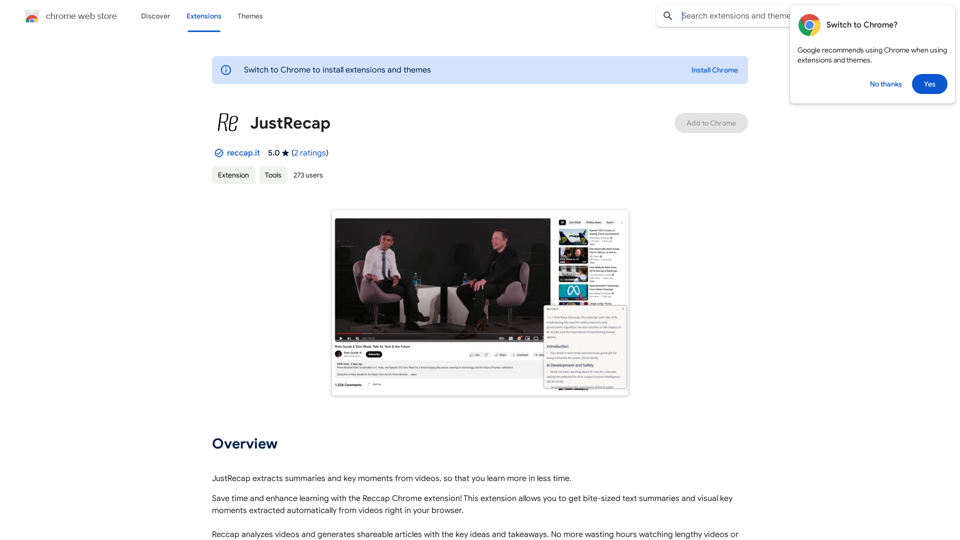
JustRecap extracts summaries and key moments from videos so you can learn more in less time.
Visit Website
JustRecap
Visit Website

Introduction

Reccap is a Chrome extension designed to enhance video learning efficiency. It automatically extracts summaries and key moments from videos, allowing users to grasp essential information quickly. This tool bridges the gap between visual and textual learning, offering a unique approach to content consumption that saves time and improves retention.

Feature

One-Click Summary Extraction

Reccap provides instant access to bite-sized text summaries and visual key moments from videos with just a single click, streamlining the learning process.

Dual-Format Learning

Users can benefit from both summarized text and visual frames highlighting key points, enhancing information retention and catering to diverse learning preferences.

Flexible Learning Experience

Seamless Switching Between Reading and Watching

Reccap allows users to effortlessly alternate between text summaries and video content, accommodating various learning styles and preferences.

Focused Content Delivery

The extension offers a consolidated set of concise takeaways, helping users concentrate on the most crucial information without getting overwhelmed by excessive details.

Time-Efficient Learning

By providing quick access to core content, Reccap enables users to learn more efficiently and get to the essence of the material faster.

Subscription Model

While basic features are available to all users, a subscription grants additional benefits and extended access beyond free usage limits.

FAQ

What is Reccap?

Reccap is a Chrome extension that automatically extracts summaries and key moments from videos, enabling users to learn more efficiently in less time.

How does Reccap work?

Reccap analyzes video content and generates concise text summaries and visual key moments, which users can access with a single click directly in their browser.

What are the main benefits of using Reccap?

Key Benefits of Reccap:

BenefitDescription
Time-savingQuickly access core content without watching entire videos
Improved retentionPair summarized text with visual frames for better information recall
Flexible learningSwitch between reading and watching to suit individual learning styles
Focused learningConcentrate on essential information with concise takeaways

Is Reccap free to use?

Reccap offers basic features for free, but also provides a subscription model with additional benefits and extended access beyond free usage limits.

How can I get started with Reccap?

To begin using Reccap, simply install the Chrome extension and start extracting summaries and key moments from videos you watch in your browser.

Latest Traffic Insights

  • Monthly Visits

    193.90 M

  • Bounce Rate

    56.27%

  • Pages Per Visit

    2.71

  • Time on Site(s)

    115.91

  • Global Rank

    -

  • Country Rank

    -

Recent Visits

Traffic Sources

  • Social Media:
    0.48%
  • Paid Referrals:
    0.55%
  • Email:
    0.15%
  • Referrals:
    12.81%
  • Search Engines:
    16.21%
  • Direct:
    69.81%
More Data

Related Websites

Linkster.ai
View Detail

Linkster.ai

Linkster.ai

Transform your video experience: AI summaries, mood insights, & trending highlights in one plugin!

193.90 M
Home
View Detail

Home

Home

The #1 Social Media Brand Protection tool. Protect your posts and ads from negative/spam comments.

0
Buffup - AI Copilot of ChatGPT4 & Claude3 with 1,000+ bots
View Detail

Buffup - AI Copilot of ChatGPT4 & Claude3 with 1,000+ bots

Buffup - AI Copilot of ChatGPT4 & Claude3 with 1,000+ bots

AI Copilot of ChatGPT4 & Claude3 with 1K+ bots, GPTs, Internet Connectivity, Translation, Summarization This AI copilot combines the power of ChatGPT4 and Claude3, along with over 1,000 bots, GPTs, and internet connectivity, to provide advanced features such as translation and summarization.

193.90 M
CozyEQ
View Detail

CozyEQ

CozyEQ

CozyEQ automatically adjusts the volume of media, preventing loud noises and creating a comfortable listening experience for users.

193.90 M
Youtube Video Summarizer with Mind Map
View Detail

Youtube Video Summarizer with Mind Map

Youtube Video Summarizer with Mind Map

Get YouTube video summaries with visualization mind maps in just one click.

193.90 M
ChatGPT + Google, Bing, Yahoo
View Detail

ChatGPT + Google, Bing, Yahoo

ChatGPT + Google, Bing, Yahoo

Combine the power of OpenAI's ChatGPT with major search engines.

193.90 M
Siuuu.ai: Your Most Powerful AI Writing Copilot
View Detail

Siuuu.ai: Your Most Powerful AI Writing Copilot

Siuuu.ai: Your Most Powerful AI Writing Copilot

Siuuu.ai provides personalized writing tools for writers, students, educators, marketing professionals, and others. Our goal is to support and enhance your writing experience across a wide range of content types, including novels, research papers, marketing emails, blogs, and more.

0
Get ChatGPT for Free with Google

You can now access ChatGPT, a powerful language model, for free with Google. Here's how:

Method 1: Google Colab

* Open Google Colab ([colab.research.google.com](http://colab.research.google.com))
* Create a new notebook
* Install the `transformers` library by running `!pip install transformers`
* Import the `transformers` library and load the ChatGPT model using `from transformers import AutoModelForCausalLM, AutoTokenizer; model = AutoModelForCausalLM.from_pretrained('chatgpt'); tokenizer = AutoTokenizer.from_pretrained('chatgpt')`
* Use the model to generate text using `input_text = "Your input here"; inputs = tokenizer.encode_plus(input_text, return_tensors='pt', max_length=1024, padding='max_length', truncation=True); output = model(inputs['input_ids'], attention_mask=inputs['attention_mask']); print(tokenizer.decode(output.logits[0], skip_special_tokens=True))`

Method 2: Google Apps Script

* Open Google Apps Script ([script.google.com](http://script.google.com))
* Create a new project
* Install the `transformers` library by running `npm install transformers`
* Import the `transformers` library and load the ChatGPT model using `const { AutoModelForCausalLM, AutoTokenizer } = require('transformers'); const model = new AutoModelForCausalLM('chatgpt'); const tokenizer = new AutoTokenizer('chatgpt');`
* Use the model to generate text using `const inputText = "Your input here"; const inputs = tokenizer.encodePlus(inputText, { return_tensors: 'pt', max_length: 1024, padding: 'max_length', truncation: true }); const output = model(inputs.inputIds, inputs.attentionMask); console.log(tokenizer.decode(output.logits[0], { skipSpecialTokens: true }));`

Note: These methods require some technical knowledge and may have limitations compared to the original ChatGPT model.
View Detail

Get ChatGPT for Free with Google You can now access ChatGPT, a powerful language model, for free with Google. Here's how: Method 1: Google Colab * Open Google Colab ([colab.research.google.com](http://colab.research.google.com)) * Create a new notebook * Install the `transformers` library by running `!pip install transformers` * Import the `transformers` library and load the ChatGPT model using `from transformers import AutoModelForCausalLM, AutoTokenizer; model = AutoModelForCausalLM.from_pretrained('chatgpt'); tokenizer = AutoTokenizer.from_pretrained('chatgpt')` * Use the model to generate text using `input_text = "Your input here"; inputs = tokenizer.encode_plus(input_text, return_tensors='pt', max_length=1024, padding='max_length', truncation=True); output = model(inputs['input_ids'], attention_mask=inputs['attention_mask']); print(tokenizer.decode(output.logits[0], skip_special_tokens=True))` Method 2: Google Apps Script * Open Google Apps Script ([script.google.com](http://script.google.com)) * Create a new project * Install the `transformers` library by running `npm install transformers` * Import the `transformers` library and load the ChatGPT model using `const { AutoModelForCausalLM, AutoTokenizer } = require('transformers'); const model = new AutoModelForCausalLM('chatgpt'); const tokenizer = new AutoTokenizer('chatgpt');` * Use the model to generate text using `const inputText = "Your input here"; const inputs = tokenizer.encodePlus(inputText, { return_tensors: 'pt', max_length: 1024, padding: 'max_length', truncation: true }); const output = model(inputs.inputIds, inputs.attentionMask); console.log(tokenizer.decode(output.logits[0], { skipSpecialTokens: true }));` Note: These methods require some technical knowledge and may have limitations compared to the original ChatGPT model.

Get ChatGPT for Free with Google You can now access ChatGPT, a powerful language model, for free with Google. Here's how: Method 1: Google Colab * Open Google Colab ([colab.research.google.com](http://colab.research.google.com)) * Create a new notebook * Install the `transformers` library by running `!pip install transformers` * Import the `transformers` library and load the ChatGPT model using `from transformers import AutoModelForCausalLM, AutoTokenizer; model = AutoModelForCausalLM.from_pretrained('chatgpt'); tokenizer = AutoTokenizer.from_pretrained('chatgpt')` * Use the model to generate text using `input_text = "Your input here"; inputs = tokenizer.encode_plus(input_text, return_tensors='pt', max_length=1024, padding='max_length', truncation=True); output = model(inputs['input_ids'], attention_mask=inputs['attention_mask']); print(tokenizer.decode(output.logits[0], skip_special_tokens=True))` Method 2: Google Apps Script * Open Google Apps Script ([script.google.com](http://script.google.com)) * Create a new project * Install the `transformers` library by running `npm install transformers` * Import the `transformers` library and load the ChatGPT model using `const { AutoModelForCausalLM, AutoTokenizer } = require('transformers'); const model = new AutoModelForCausalLM('chatgpt'); const tokenizer = new AutoTokenizer('chatgpt');` * Use the model to generate text using `const inputText = "Your input here"; const inputs = tokenizer.encodePlus(inputText, { return_tensors: 'pt', max_length: 1024, padding: 'max_length', truncation: true }); const output = model(inputs.inputIds, inputs.attentionMask); console.log(tokenizer.decode(output.logits[0], { skipSpecialTokens: true }));` Note: These methods require some technical knowledge and may have limitations compared to the original ChatGPT model.

How to Add ChatGPT to All Google Searches ===================================================== Step 1: Create a Custom Search Engine -------------------------------------- * Go to the [Google Custom Search Engine](https://cse.google.com/) website and sign in with your Google account. * Click on the "New Search Engine" button. * Fill in the required information, such as the name and description of your search engine. * Click on the "Create" button. Step 2: Add ChatGPT to the Search Engine ----------------------------------------- * In the "Setup" tab, click on the "Add" button next to "Sites to search". * Enter the following URL: `https://chat.openai.com/` * Click on the "Add" button. Step 3: Configure the Search Engine -------------------------------------- * In the "Setup" tab, click on the "Edit" button next to "Search engine keywords". * Add the following keywords: `ChatGPT` * Click on the "Save" button. Step 4: Get the Search Engine Code ------------------------------------- * In the "Setup" tab, click on the "Get code" button. * Copy the HTML code provided. Step 5: Add the Search Engine to Your Browser ------------------------------------------------ * Open your browser and go to the "Settings" or "Options" page. * Look for the "Search engine" or "Default search engine" option. * Click on the "Add" or "Manage search engines" button. * Paste the HTML code you copied earlier. * Click on the "Add" or "Save" button. You're Done! =============== Now, whenever you search on Google, ChatGPT will be included in the search results. You can also use the custom search engine URL provided by Google to search directly.

193.90 M