Open-source RightAI Tools Directory
  • Discover AI
  • Submit
  • Startup
  • Blog
Open-source RightAI Tools Directory
Discover the best AI tools of 2025 with the RightAI Tools Directory!

Friend Links

AI Anime GeneratorToolsApp AI

Support

Tap4
Privacy policyTerms & ConditionsContact Us
Loading...
loading...

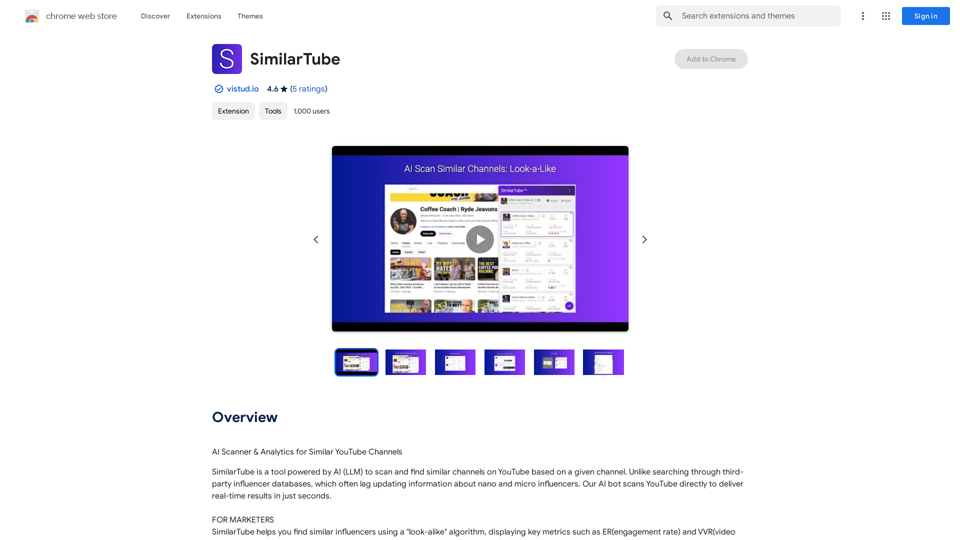
SimilarTube

AI Scanner & Analytics for Similar YouTube Channels
Visit Website
SimilarTube
Visit Website

Introduction

SimilarTube is an AI-powered tool designed to help users find similar YouTube channels based on a given channel. Unlike traditional third-party influencer databases, SimilarTube uses an AI bot to scan YouTube directly, providing real-time results within seconds. This approach ensures up-to-date information, especially for nano and micro influencers, making it an efficient solution for influencer marketing and channel discovery.

Feature

AI-Powered Algorithm

SimilarTube's AI bot scans YouTube directly, delivering real-time results in seconds, ensuring the most current information.

Key Metrics Extraction

The AI automatically extracts public email addresses and other social media accounts (Facebook, Instagram, TikTok, etc.), facilitating quick contact information retrieval.

Automatic Email Matching and Template Filling

This feature accelerates the outreach process, making it 10 times faster than traditional methods.

AI Insight Feature

Automatically assesses niche value and highlights core metric differences among YouTubers of various tiers, providing valuable market insights.

Filtering and Sorting Capabilities

Enables convenient analysis of search results, allowing users to efficiently find the most suitable channels.

Look-Alike Algorithm

Finds similar influencers based on a given channel, displaying key metrics like engagement rate (ER) and video view rate (VVR) for quick screening.

FAQ

How does SimilarTube work?

SimilarTube uses an AI bot to scan YouTube directly, delivering real-time results in seconds. This method ensures more accurate and up-to-date information compared to traditional influencer databases.

What are the benefits of using SimilarTube?

Benefits include:

  • Time-saving with real-time results
  • Accurate and current information
  • Efficient influencer discovery
  • Enhanced analysis through AI Insights
  • Streamlined outreach process

How much does SimilarTube cost?

SimilarTube offers in-app purchases. Users can subscribe to affordable products for extended access and additional features.

What are some helpful tips for using SimilarTube?

  • Use it to find similar influencers for marketing campaigns
  • Utilize the AI Insight feature to analyze the competitive landscape
  • Take advantage of automatic email matching and template filling for faster outreach

Latest Traffic Insights

  • Monthly Visits

    193.90 M

  • Bounce Rate

    56.27%

  • Pages Per Visit

    2.71

  • Time on Site(s)

    115.91

  • Global Rank

    -

  • Country Rank

    -

Recent Visits

Traffic Sources

  • Social Media:
    0.48%
  • Paid Referrals:
    0.55%
  • Email:
    0.15%
  • Referrals:
    12.81%
  • Search Engines:
    16.21%
  • Direct:
    69.81%
More Data

Related Websites

Intelligent Web Translation - Automatic Translation, Bilingual Comparison, AI Dialogue
View Detail

Intelligent Web Translation - Automatic Translation, Bilingual Comparison, AI Dialogue

Intelligent Web Translation - Automatic Translation, Bilingual Comparison, AI Dialogue

Supports 20+ foreign languages/national languages, one-key rapid translation, supports bilingual comparison, automatic translation, AI summary, and phrase translation.

193.90 M
Leisure
View Detail

Leisure

Leisure

Your personal librarian for the internet

193.90 M
Astra Vision
View Detail

Astra Vision

Astra Vision

Astra Vision is an AI-powered web extension that includes a set of powerful AI tools: Astra Guard and AI Snapper.

193.90 M
Free AI YouTube Video Title Generator
View Detail

Free AI YouTube Video Title Generator

Free AI YouTube Video Title Generator

AI YouTube Video Title Generator for Creators: Generate Titles, Descriptions, Hooks, and Outlines to Engage and Expand Your Audience.

193.90 M
GPTs Hunter - Explore the GPT Marketplace
View Detail

GPTs Hunter - Explore the GPT Marketplace

GPTs Hunter - Explore the GPT Marketplace

Share and Discover the Best Custom GPTs in the GPT Store by OpenAI

193.90 M
Get ChatGPT for Free with Google

You can now access ChatGPT, a powerful language model, for free with Google. Here's how:

Method 1: Google Colab

* Open Google Colab ([colab.research.google.com](http://colab.research.google.com))
* Create a new notebook
* Install the `transformers` library by running `!pip install transformers`
* Import the `transformers` library and load the ChatGPT model using `from transformers import AutoModelForCausalLM, AutoTokenizer; model = AutoModelForCausalLM.from_pretrained('chatgpt'); tokenizer = AutoTokenizer.from_pretrained('chatgpt')`
* Use the model to generate text using `input_text = "Your input here"; inputs = tokenizer.encode_plus(input_text, return_tensors='pt', max_length=1024, padding='max_length', truncation=True); output = model(inputs['input_ids'], attention_mask=inputs['attention_mask']); print(tokenizer.decode(output.logits[0], skip_special_tokens=True))`

Method 2: Google Apps Script

* Open Google Apps Script ([script.google.com](http://script.google.com))
* Create a new project
* Install the `transformers` library by running `npm install transformers`
* Import the `transformers` library and load the ChatGPT model using `const { AutoModelForCausalLM, AutoTokenizer } = require('transformers'); const model = new AutoModelForCausalLM('chatgpt'); const tokenizer = new AutoTokenizer('chatgpt');`
* Use the model to generate text using `const inputText = "Your input here"; const inputs = tokenizer.encodePlus(inputText, { return_tensors: 'pt', max_length: 1024, padding: 'max_length', truncation: true }); const output = model(inputs.inputIds, inputs.attentionMask); console.log(tokenizer.decode(output.logits[0], { skipSpecialTokens: true }));`

Note: These methods require some technical knowledge and may have limitations compared to the original ChatGPT model.
View Detail

Get ChatGPT for Free with Google You can now access ChatGPT, a powerful language model, for free with Google. Here's how: Method 1: Google Colab * Open Google Colab ([colab.research.google.com](http://colab.research.google.com)) * Create a new notebook * Install the `transformers` library by running `!pip install transformers` * Import the `transformers` library and load the ChatGPT model using `from transformers import AutoModelForCausalLM, AutoTokenizer; model = AutoModelForCausalLM.from_pretrained('chatgpt'); tokenizer = AutoTokenizer.from_pretrained('chatgpt')` * Use the model to generate text using `input_text = "Your input here"; inputs = tokenizer.encode_plus(input_text, return_tensors='pt', max_length=1024, padding='max_length', truncation=True); output = model(inputs['input_ids'], attention_mask=inputs['attention_mask']); print(tokenizer.decode(output.logits[0], skip_special_tokens=True))` Method 2: Google Apps Script * Open Google Apps Script ([script.google.com](http://script.google.com)) * Create a new project * Install the `transformers` library by running `npm install transformers` * Import the `transformers` library and load the ChatGPT model using `const { AutoModelForCausalLM, AutoTokenizer } = require('transformers'); const model = new AutoModelForCausalLM('chatgpt'); const tokenizer = new AutoTokenizer('chatgpt');` * Use the model to generate text using `const inputText = "Your input here"; const inputs = tokenizer.encodePlus(inputText, { return_tensors: 'pt', max_length: 1024, padding: 'max_length', truncation: true }); const output = model(inputs.inputIds, inputs.attentionMask); console.log(tokenizer.decode(output.logits[0], { skipSpecialTokens: true }));` Note: These methods require some technical knowledge and may have limitations compared to the original ChatGPT model.

Get ChatGPT for Free with Google You can now access ChatGPT, a powerful language model, for free with Google. Here's how: Method 1: Google Colab * Open Google Colab ([colab.research.google.com](http://colab.research.google.com)) * Create a new notebook * Install the `transformers` library by running `!pip install transformers` * Import the `transformers` library and load the ChatGPT model using `from transformers import AutoModelForCausalLM, AutoTokenizer; model = AutoModelForCausalLM.from_pretrained('chatgpt'); tokenizer = AutoTokenizer.from_pretrained('chatgpt')` * Use the model to generate text using `input_text = "Your input here"; inputs = tokenizer.encode_plus(input_text, return_tensors='pt', max_length=1024, padding='max_length', truncation=True); output = model(inputs['input_ids'], attention_mask=inputs['attention_mask']); print(tokenizer.decode(output.logits[0], skip_special_tokens=True))` Method 2: Google Apps Script * Open Google Apps Script ([script.google.com](http://script.google.com)) * Create a new project * Install the `transformers` library by running `npm install transformers` * Import the `transformers` library and load the ChatGPT model using `const { AutoModelForCausalLM, AutoTokenizer } = require('transformers'); const model = new AutoModelForCausalLM('chatgpt'); const tokenizer = new AutoTokenizer('chatgpt');` * Use the model to generate text using `const inputText = "Your input here"; const inputs = tokenizer.encodePlus(inputText, { return_tensors: 'pt', max_length: 1024, padding: 'max_length', truncation: true }); const output = model(inputs.inputIds, inputs.attentionMask); console.log(tokenizer.decode(output.logits[0], { skipSpecialTokens: true }));` Note: These methods require some technical knowledge and may have limitations compared to the original ChatGPT model.

How to Add ChatGPT to All Google Searches ===================================================== Step 1: Create a Custom Search Engine -------------------------------------- * Go to the [Google Custom Search Engine](https://cse.google.com/) website and sign in with your Google account. * Click on the "New Search Engine" button. * Fill in the required information, such as the name and description of your search engine. * Click on the "Create" button. Step 2: Add ChatGPT to the Search Engine ----------------------------------------- * In the "Setup" tab, click on the "Add" button next to "Sites to search". * Enter the following URL: `https://chat.openai.com/` * Click on the "Add" button. Step 3: Configure the Search Engine -------------------------------------- * In the "Setup" tab, click on the "Edit" button next to "Search engine keywords". * Add the following keywords: `ChatGPT` * Click on the "Save" button. Step 4: Get the Search Engine Code ------------------------------------- * In the "Setup" tab, click on the "Get code" button. * Copy the HTML code provided. Step 5: Add the Search Engine to Your Browser ------------------------------------------------ * Open your browser and go to the "Settings" or "Options" page. * Look for the "Search engine" or "Default search engine" option. * Click on the "Add" or "Manage search engines" button. * Paste the HTML code you copied earlier. * Click on the "Add" or "Save" button. You're Done! =============== Now, whenever you search on Google, ChatGPT will be included in the search results. You can also use the custom search engine URL provided by Google to search directly.

193.90 M
Fabric - Your assistant for all your files and cloud storage.
View Detail

Fabric - Your assistant for all your files and cloud storage.

Fabric - Your assistant for all your files and cloud storage.

🍱 All your things in one place. 👋 Work together on anything.

193.90 M
Wallow

To roll or move about in a lazy, relaxed way, often in a pleasant or enjoyable manner.
View Detail

Wallow To roll or move about in a lazy, relaxed way, often in a pleasant or enjoyable manner.

Wallow To roll or move about in a lazy, relaxed way, often in a pleasant or enjoyable manner.

Wallow streamlines digital product development with real-time incident tracking, team alignment, and integrated communication tools. Experience seamless collaboration and boost productivity with Wallow.

847