Open-source RightAI Tools Directory
  • Discover AI
  • Submit
  • Startup
  • Blog
Open-source RightAI Tools Directory
Discover the best AI tools of 2025 with the RightAI Tools Directory!

Friend Links

AI Anime GeneratorToolsApp AI

Support

Tap4
Privacy policyTerms & ConditionsContact Us
Loading...
loading...

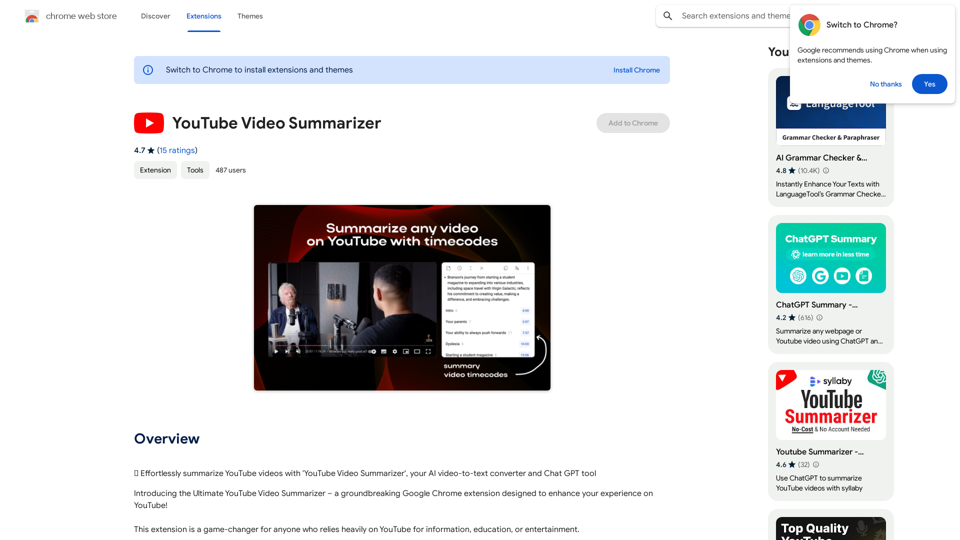
YouTube Video Summarizer

Effortlessly summarize YouTube videos with 'YouTube Video Summarizer', your AI video-to-text converter and Chat GPT tool
Visit Website
YouTube Video Summarizer
Visit Website

Introduction

YouTube Video Summarizer is a Chrome extension that revolutionizes the YouTube experience. It uses advanced AI technology to provide concise summaries of video content, making it invaluable for students, professionals, researchers, and casual viewers. The tool aims to save time, enhance comprehension, and improve productivity for users who rely on YouTube for information, education, or entertainment.

Feature

Time-Efficient Video Summaries

The extension generates concise summaries of YouTube videos, allowing users to grasp key points quickly without watching entire videos. This feature is particularly useful for long lectures, tutorials, and documentaries.

Enhanced Comprehension

By providing quick summaries, the tool helps users understand the main points of videos more efficiently, improving overall comprehension and retention of information.

Multi-Purpose Functionality

YouTube Video Summarizer caters to a wide range of users, including:

  • Students
  • Professionals
  • Researchers
  • Casual YouTube viewers

Advanced AI Technology

The extension employs sophisticated AI algorithms to analyze video content and generate accurate, concise summaries.

Transcribe Video to Text

This feature enhances accessibility by converting video content to text, making it easier for users who prefer reading over listening.

Productivity Boost

By reducing time spent on watching full videos, users can allocate more time to other tasks, thereby improving overall productivity.

FAQ

How does YouTube Video Summarizer work?

The extension uses advanced AI technology to analyze YouTube video content and provide accurate, concise summaries. This process is particularly effective for lengthy videos such as lectures, tutorials, and documentaries.

Can I use the extension for educational purposes?

Yes, the YouTube Video Summarizer is ideal for students and lifelong learners. It aids in better understanding and retention of information by providing quick summaries of educational content.

Is there a clear way to cancel the subscription?

Unfortunately, the developer has not provided a clear method for canceling the subscription. Some users have reported difficulties in this area.

Are there any concerns about the legitimacy of this extension?

Some users have reported that the extension might be a clone of an existing code base and have expressed concerns about it potentially being a scam. It's advisable to exercise caution and research thoroughly before use.

What is the price of YouTube Video Summarizer?

The exact price of the extension is not explicitly stated. However, some users have reported being charged for a subscription without clear instructions on cancellation or pricing details.

Related Websites

AI Voice Generator & Text to Speech | Deepgram

Transform written text into natural-sounding speech with our AI voice generator and text-to-speech technology.
View Detail

AI Voice Generator & Text to Speech | Deepgram Transform written text into natural-sounding speech with our AI voice generator and text-to-speech technology.

AI Voice Generator & Text to Speech | Deepgram Transform written text into natural-sounding speech with our AI voice generator and text-to-speech technology.

Unlock the potential of Deepgram's AI Voice Generator. Experience natural-sounding text to speech for all your projects.

835.16 K
AI Emoji Maker 

This is a fun tool that lets you create your own custom emojis using artificial intelligence! 

Just type in a description of the emoji you want, and our AI will generate some unique options for you to choose from. 

You can then customize your emoji further by adjusting its colors, size, and other features. 

Share your creations with friends and family, or use them to add a personal touch to your online conversations. 


Let your creativity flow and make some awesome emojis!
View Detail

AI Emoji Maker This is a fun tool that lets you create your own custom emojis using artificial intelligence! Just type in a description of the emoji you want, and our AI will generate some unique options for you to choose from. You can then customize your emoji further by adjusting its colors, size, and other features. Share your creations with friends and family, or use them to add a personal touch to your online conversations. Let your creativity flow and make some awesome emojis!

AI Emoji Maker This is a fun tool that lets you create your own custom emojis using artificial intelligence! Just type in a description of the emoji you want, and our AI will generate some unique options for you to choose from. You can then customize your emoji further by adjusting its colors, size, and other features. Share your creations with friends and family, or use them to add a personal touch to your online conversations. Let your creativity flow and make some awesome emojis!

Make your own unique emojis with our emoji creator that shows off your personality!

193.90 M
Everything about AI | aicrunch.io
View Detail

Everything about AI | aicrunch.io

Everything about AI | aicrunch.io

Everything about the world of AI | Latest AI tools, news, guides, market insights on aicrunch.io

0
Upgrade My Chat
View Detail

Upgrade My Chat

Upgrade My Chat

ChatGPT Improvements: Enhanced User Experience: * Seamless Chat History Search: Easily find past conversations and specific messages within your chat history. New Features: * Search your Chat History: A dedicated search bar allows you to quickly locate past interactions, saving time and effort.

193.90 M
Chrome Web Store
View Detail

Chrome Web Store

Chrome Web Store

Enhance your browser with new features and customize your browsing experience.

193.90 M
What is a Prompster?

A Prompster is a person who assists a speaker, actor, or presenter by providing them with lines or cues, usually in a subtle and discreet manner, during a performance, presentation, or speech.
View Detail

What is a Prompster? A Prompster is a person who assists a speaker, actor, or presenter by providing them with lines or cues, usually in a subtle and discreet manner, during a performance, presentation, or speech.

What is a Prompster? A Prompster is a person who assists a speaker, actor, or presenter by providing them with lines or cues, usually in a subtle and discreet manner, during a performance, presentation, or speech.

Slash Commands for ChatGPT and Bard ===================================== Introduction Slash commands are a convenient way to interact with ChatGPT and Bard, allowing you to perform various tasks and actions within the chat interface. This guide provides an overview of the available slash commands for both ChatGPT and Bard. ChatGPT Slash Commands #General Commands * `/help`: Displays a list of available slash commands and their descriptions. * `/reset`: Resets the conversation, clearing all previous messages and context. #Conversation Management * `/start`: Starts a new conversation, allowing you to begin a fresh topic or task. * `/stop`: Ends the current conversation, stopping any ongoing tasks or topics. #Language and Tone * `/lang <language_code>`: Sets the language for the conversation (e.g., `/lang en` for English). * `/tone <tone>`: Adjusts the tone of the responses (e.g., `/tone formal` for formal tone). #Task Management * `/task <task_name>`: Creates a new task or topic for the conversation (e.g., `/task math problem`). * `/done`: Marks the current task as completed. #Information and Resources * `/define <word>`: Provides the definition of a word or phrase. * `/wiki <topic>`: Displays information about a topic from Wikipedia. Bard Slash Commands #General Commands * `/help`: Displays a list of available slash commands and their descriptions. * `/reset`: Resets the conversation, clearing all previous messages and context. #Conversation Management * `/start`: Starts a new conversation, allowing you to begin a fresh topic or task. * `/stop`: Ends the current conversation, stopping any ongoing tasks or topics. #Language and Tone * `/lang <language_code>`: Sets the language for the conversation (e.g., `/lang en` for English). * `/tone <tone>`: Adjusts the tone of the responses (e.g., `/tone formal` for formal tone). #Task Management * `/task <task_name>`: Creates a new task or topic for the conversation (e.g., `/task math problem`). * `/done`: Marks the current task as completed. #Information and Resources * `/define <word>`: Provides the definition of a word or phrase. * `/wiki <topic>`: Displays information about a topic from Wikipedia. * `/news <topic>`: Displays news articles related to a specific topic. Conclusion Slash commands provide a convenient way to interact with ChatGPT and Bard, allowing you to manage conversations, adjust language and tone, and access various resources. By mastering these commands, you can optimize your experience and get the most out of your interactions with these AI models.

193.90 M
Ai5 - The AI Art Newsletter
View Detail

Ai5 - The AI Art Newsletter

Ai5 - The AI Art Newsletter

Ai5 is your go-to twice-weekly email outlining the most important events happening in generative AI. Stay informed, get smarter, and be entertained with Ai5.

0
Fast AI
View Detail

Fast AI

Fast AI

A fast and helpful tool that lets you use ChatGPT on any website.

193.90 M