Open-source RightAI Tools Directory
  • Discover AI
  • Submit
  • Startup
  • Blog
Open-source RightAI Tools Directory
Discover the best AI tools of 2025 with the RightAI Tools Directory!

Friend Links

AI Anime GeneratorToolsApp AI

Support

Tap4
Privacy policyTerms & ConditionsContact Us
Loading...
loading...

Make AI Text More Human

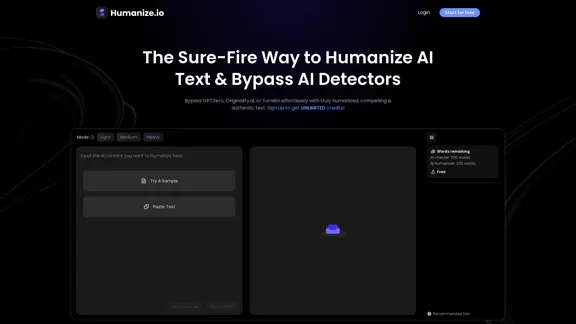
Meet Humanize.io, the best AI tool to make your AI content sound more human. Try our AI humanizer for free now!
Visit Website
Make AI Text More Human
Visit Website

Introduction

Humanize.io offers an innovative solution for transforming AI-generated text into engaging, human-like content. The platform is designed to help users bypass AI detection tools while maintaining high readability and authenticity. With a focus on user-friendliness, Humanize.io caters to a wide range of users, from students to professionals, providing unlimited credits for free upon sign-up.

Feature

  1. 100% Undetectable Content

    Humanize.io boasts a 99% success rate in bypassing advanced AI detectors like GPTZero and Turnitin, ensuring that your content remains undetected.

  2. Advanced Humanize AI Technology

    The tool mimics real human writing styles, producing text that is engaging and authentic, similar to that crafted by professional writers.

  3. High-Quality, Human-Sounding Outputs

    It excels in rephrasing AI-generated text, eliminating robotic undertones and enhancing the reader's experience.

  4. SEO-Rich Outputs

    Humanize.io aligns with SEO best practices, ensuring that humanized content retains essential keywords to boost online visibility.

  5. Built-In AI Checker

    The platform integrates with popular AI detectors, providing collective AI scores in one place, saving time and ensuring content passes checks seamlessly.

  6. Multi-Language Support

    Humanize.io supports over 50 languages, allowing users to humanize text for diverse readerships while maintaining engagement.

How to Use?

  1. Visit the Humanize.io website and log in to your account.
  2. Paste your AI-generated text into the web portal.
  3. Select your preferred AI bypass mode (Heavy, Medium, Light).
  4. Click the 'Humanize' button to transform your content.
  5. Review the output to ensure it meets your expectations.

FAQ

What Is Humanize.io?

Humanize.io is a cutting-edge tool that transforms robotic-sounding text into engaging, authentic writing using advanced algorithms and natural language processing.

How Does the AI Humanizer Work?

The AI humanizer understands the nuances of human writing styles, tone, and context, allowing it to produce more natural and engaging content compared to basic text editors.

Is Humanize.io Free?

Yes, Humanize.io offers a free version of its AI humanizer, providing unlimited credits for users to transform their AI-generated content.

Can I Humanize AI Text in Various Languages?

Absolutely! The tool supports humanizing text in over 50 languages, ensuring content resonates with diverse audiences.

How Effective Is Humanize.io at Bypassing AI Detection?

The AI text humanizer has a remarkable 99% success rate in evading detection by advanced AI detection systems.

Price

  • Free Version: Unlimited credits available upon sign-up.
The price is for reference only, please refer to the latest official data for actual information.

Evaluation

  1. Humanize.io effectively transforms AI-generated text into engaging content, making it a valuable tool for users looking to enhance their writing.
  2. The high success rate in bypassing AI detection tools is a significant advantage, especially for those concerned about originality.
  3. While the platform is user-friendly, some users may require a learning curve to fully utilize its features and achieve the best results.
  4. The ability to support multiple languages is a strong point, but further enhancements in language processing could improve the quality of outputs in less common languages.
  5. Overall, Humanize.io is a powerful tool for anyone looking to humanize AI text, though continuous updates and improvements will be essential to maintain its competitive edge.

Related Websites
Quest
View Detail

Quest

Quest

Find information fast.

193.90 M
Vöiston
View Detail

Vöiston

Vöiston

Vöiston Integration Extension

193.90 M
Job Clerk Co-pilot
View Detail

Job Clerk Co-pilot

Job Clerk Co-pilot

Your AI assistant for job applications. Visit jobclerk.com for more.

193.90 M
AI Voice Over for YouTube 

This is a guide to using AI voice over for your YouTube videos. 

Why Use AI Voice Over?

* Cost-Effective: AI voice over is much cheaper than hiring a professional voice actor.
* Time-Saving: You can generate voice over quickly and easily, without needing to schedule recording sessions.
* Variety of Voices: Choose from a wide range of AI voices, including male, female, and even robotic voices.
* Accessibility: Make your videos accessible to viewers who are deaf or hard of hearing by adding captions generated by AI.

How to Use AI Voice Over

1. Choose a Platform: There are many different platforms that offer AI voice over services, such as:
    * Google Cloud Text-to-Speech
    * Amazon Polly
    * Microsoft Azure Text to Speech
    * Murf.ai
    * NaturalReader
2. Write Your Script:  Write a clear and concise script for your video.
3. Upload Your Script:  Upload your script to the chosen platform.
4. Select a Voice: Choose the voice that best suits your video.
5. Adjust Settings:  Adjust settings such as speed, pitch, and volume.
6. Generate Voice Over:  Click the "Generate" button to create your voice over.
7. Download and Edit: Download the generated voice over file and edit it as needed.
8. Add to Your Video:  Add the voice over to your YouTube video.

Tips for Using AI Voice Over

* Use Natural Language:  Write your script as if you were speaking naturally.
* Vary Your Tone:  Use different tones of voice to keep your viewers engaged.
* Add Pauses:  Include pauses in your script to allow viewers to process information.
* Proofread Carefully:  Always proofread your script before generating the voice over.
* Experiment:  Try different voices, settings, and styles to find what works best for you.
View Detail

AI Voice Over for YouTube This is a guide to using AI voice over for your YouTube videos. Why Use AI Voice Over? * Cost-Effective: AI voice over is much cheaper than hiring a professional voice actor. * Time-Saving: You can generate voice over quickly and easily, without needing to schedule recording sessions. * Variety of Voices: Choose from a wide range of AI voices, including male, female, and even robotic voices. * Accessibility: Make your videos accessible to viewers who are deaf or hard of hearing by adding captions generated by AI. How to Use AI Voice Over 1. Choose a Platform: There are many different platforms that offer AI voice over services, such as: * Google Cloud Text-to-Speech * Amazon Polly * Microsoft Azure Text to Speech * Murf.ai * NaturalReader 2. Write Your Script: Write a clear and concise script for your video. 3. Upload Your Script: Upload your script to the chosen platform. 4. Select a Voice: Choose the voice that best suits your video. 5. Adjust Settings: Adjust settings such as speed, pitch, and volume. 6. Generate Voice Over: Click the "Generate" button to create your voice over. 7. Download and Edit: Download the generated voice over file and edit it as needed. 8. Add to Your Video: Add the voice over to your YouTube video. Tips for Using AI Voice Over * Use Natural Language: Write your script as if you were speaking naturally. * Vary Your Tone: Use different tones of voice to keep your viewers engaged. * Add Pauses: Include pauses in your script to allow viewers to process information. * Proofread Carefully: Always proofread your script before generating the voice over. * Experiment: Try different voices, settings, and styles to find what works best for you.

AI Voice Over for YouTube This is a guide to using AI voice over for your YouTube videos. Why Use AI Voice Over? * Cost-Effective: AI voice over is much cheaper than hiring a professional voice actor. * Time-Saving: You can generate voice over quickly and easily, without needing to schedule recording sessions. * Variety of Voices: Choose from a wide range of AI voices, including male, female, and even robotic voices. * Accessibility: Make your videos accessible to viewers who are deaf or hard of hearing by adding captions generated by AI. How to Use AI Voice Over 1. Choose a Platform: There are many different platforms that offer AI voice over services, such as: * Google Cloud Text-to-Speech * Amazon Polly * Microsoft Azure Text to Speech * Murf.ai * NaturalReader 2. Write Your Script: Write a clear and concise script for your video. 3. Upload Your Script: Upload your script to the chosen platform. 4. Select a Voice: Choose the voice that best suits your video. 5. Adjust Settings: Adjust settings such as speed, pitch, and volume. 6. Generate Voice Over: Click the "Generate" button to create your voice over. 7. Download and Edit: Download the generated voice over file and edit it as needed. 8. Add to Your Video: Add the voice over to your YouTube video. Tips for Using AI Voice Over * Use Natural Language: Write your script as if you were speaking naturally. * Vary Your Tone: Use different tones of voice to keep your viewers engaged. * Add Pauses: Include pauses in your script to allow viewers to process information. * Proofread Carefully: Always proofread your script before generating the voice over. * Experiment: Try different voices, settings, and styles to find what works best for you.

Watch foreign language YouTube videos in your own language.

193.90 M
Bing Search Engine
View Detail

Bing Search Engine

Bing Search Engine

Use the Bing Search Engine to make your searches even better, powered by GPT-4!

193.90 M
Datafi for Chrome
View Detail

Datafi for Chrome

Datafi for Chrome

Datafi Extension for Chrome

193.90 M
GoldDust
View Detail

GoldDust

GoldDust

What is the founding date of Google?

193.90 M
Bing Chatbot
View Detail

Bing Chatbot

Bing Chatbot

Powered by GPT-4, Bing Chatbot changes the way you explore and search the internet!

193.90 M