Open-source RightAI Tools Directory
  • Discover AI
  • Submit
  • Startup
  • Blog
Open-source RightAI Tools Directory
Discover the best AI tools of 2025 with the RightAI Tools Directory!

Friend Links

AI Anime GeneratorToolsApp AI

Support

Tap4
Privacy policyTerms & ConditionsContact Us
Loading...
loading...

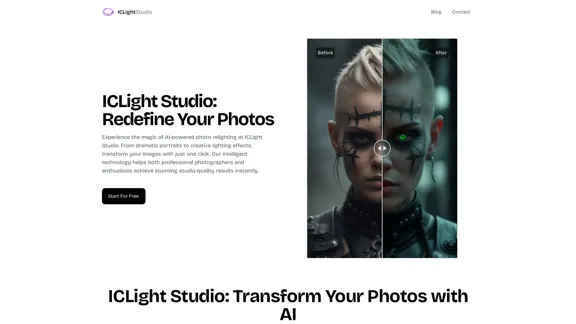
ICLight Studio - Free and Easy AI Photo Relighting

Transform your photos with ICLight's free AI-powered relighting technology. Create professional studio lighting effects with simple text prompts.
Visit Website
ICLight Studio - Free and Easy AI Photo Relighting
Visit Website

Introduction

ICLight Studio offers an innovative AI-powered photo relighting tool that simplifies the enhancement of images. With just a few clicks, users can transform their photos into stunning visuals, making it suitable for both professional photographers and enthusiasts. The platform provides various features, including text-to-image enhancement and advanced portrait enhancement, ensuring high-quality results.

Feature

  1. Text-to-Image Enhancement

    Users can describe their desired lighting effect in natural language, and the AI will transform the photos accordingly. This feature allows for creative and professional results with minimal effort.

  2. Advanced Portrait Enhancement

    ICLight's AI algorithms analyze facial features to enhance portraits, ensuring natural-looking results that highlight the subject's best attributes.

  3. Professional Presets

    A collection of professional effects designed by expert photographers is available, offering versatile options for different moods and settings.

  4. User-Friendly Experience

    The platform combines powerful AI technology with an intuitive interface, making it accessible for both seasoned photographers and beginners.

  5. Time-Saving

    Achieve perfect lighting in seconds, significantly reducing the time spent on manual editing.

How to Use?

  1. Upload your photo to the ICLight platform.
  2. Describe your desired lighting effect using natural language.
  3. Optionally adjust any lighting parameters to suit your preferences.
  4. Let the AI apply the professional lighting effects to your photo.

FAQ

What makes ICLight's AI relighting technology special?

ICLight utilizes advanced AI algorithms that provide precise and natural lighting effects, setting it apart from traditional editing tools.

How does the text-guided relighting feature work?

Users input their desired lighting effects in natural language, and the AI interprets these instructions to enhance the photo accordingly.

Who can benefit from using ICLight?

Both professional photographers and photography enthusiasts can benefit from ICLight's features, making it suitable for a wide range of users.

What types of photos can ICLight enhance?

ICLight can enhance various types of photos, including portraits, landscapes, and event photography.

Is ICLight's service free to use?

Yes, ICLight offers its photo enhancement tools free of charge.

Price

ICLight Studio is free to use, providing professional photo enhancement tools at no cost.

The price is for reference only, please refer to the latest official data for actual information.

Evaluation

  1. ICLight Studio effectively delivers high-quality photo enhancements, making it a valuable tool for both professionals and amateurs.
  2. The AI technology is intuitive and user-friendly, allowing users to achieve professional results without extensive editing knowledge.
  3. However, the reliance on AI may limit creative control for advanced users who prefer manual adjustments.
  4. Overall, ICLight is an excellent option for quick and effective photo relighting, but it may not fully satisfy those seeking intricate customization options.

Related Websites
Wilfie AI
View Detail

Wilfie AI

Wilfie AI

AI Chat powered by ChatGPT 4

193.90 M
Kie.ai's 4o Image API: Cost-effective, Reliable, and Very Accurate AI Image Creation
View Detail

Kie.ai's 4o Image API: Cost-effective, Reliable, and Very Accurate AI Image Creation

Kie.ai's 4o Image API: Cost-effective, Reliable, and Very Accurate AI Image Creation

Kie.ai’s 4o Image API offers affordable, stable, and highly accurate AI image generation, enabling creators to easily produce high-quality visuals. It provides reliable and efficient solutions for various creative projects, including text-to-image and image-to-image transformations, as well as a range of visual styles.

356.51 K
100% Free AI Image Generator: Text to Image Online | insMind
View Detail

100% Free AI Image Generator: Text to Image Online | insMind

100% Free AI Image Generator: Text to Image Online | insMind

Looking for a free AI image generator from text? Create stunning images with a simple text prompt using the most advanced AI text-to-image generator.

1.77 M
Framedrop.ai: Convert Video to Shorts
View Detail

Framedrop.ai: Convert Video to Shorts

Framedrop.ai: Convert Video to Shorts

Get and share highlights from YouTube and Twitch.

193.90 M
Text to Voice Generator
==========================

A text-to-voice generator, also known as a text-to-speech (TTS) system, is a software that converts written text into a spoken voice output. This technology has been widely used in various applications, including virtual assistants, audiobooks, and language learning platforms.

How it Works
---------------

The process of generating voice from text involves several steps:

1. Text Analysis: The input text is analyzed to identify the language, syntax, and semantics.
2. Phonetic Transcription: The text is converted into a phonetic transcription, which represents the sounds of the spoken language.
3. Prosody Generation: The phonetic transcription is then used to generate the prosody, or rhythm and intonation, of the spoken voice.
4. Waveform Generation: The prosody and phonetic transcription are combined to generate the audio waveform, which is the final spoken voice output.

Types of Text-to-Voice Generators
-----------------------------------

There are two main types of text-to-voice generators:

Rule-Based Systems

These systems use a set of predefined rules to generate the spoken voice output. They are often limited in their ability to produce natural-sounding voices and may sound robotic.

Machine Learning-Based Systems

These systems use machine learning algorithms to learn from large datasets of spoken voices and generate more natural-sounding voices. They are often more advanced and can produce high-quality voice outputs.

Applications of Text-to-Voice Generators
-----------------------------------------

Text-to-voice generators have a wide range of applications, including:

Virtual Assistants

Virtual assistants, such as Siri and Alexa, use text-to-voice generators to respond to user queries.

Audiobooks

Text-to-voice generators can be used to create audiobooks from written texts, making it easier for people to access written content.

Language Learning

Language learning platforms use text-to-voice generators to provide pronunciation guidance and practice exercises for learners.

Accessibility

Text-to-voice generators can be used to assist people with disabilities, such as visual impairments, by providing an auditory interface to written content.
View Detail

Text to Voice Generator ========================== A text-to-voice generator, also known as a text-to-speech (TTS) system, is a software that converts written text into a spoken voice output. This technology has been widely used in various applications, including virtual assistants, audiobooks, and language learning platforms. How it Works --------------- The process of generating voice from text involves several steps: 1. Text Analysis: The input text is analyzed to identify the language, syntax, and semantics. 2. Phonetic Transcription: The text is converted into a phonetic transcription, which represents the sounds of the spoken language. 3. Prosody Generation: The phonetic transcription is then used to generate the prosody, or rhythm and intonation, of the spoken voice. 4. Waveform Generation: The prosody and phonetic transcription are combined to generate the audio waveform, which is the final spoken voice output. Types of Text-to-Voice Generators ----------------------------------- There are two main types of text-to-voice generators: Rule-Based Systems These systems use a set of predefined rules to generate the spoken voice output. They are often limited in their ability to produce natural-sounding voices and may sound robotic. Machine Learning-Based Systems These systems use machine learning algorithms to learn from large datasets of spoken voices and generate more natural-sounding voices. They are often more advanced and can produce high-quality voice outputs. Applications of Text-to-Voice Generators ----------------------------------------- Text-to-voice generators have a wide range of applications, including: Virtual Assistants Virtual assistants, such as Siri and Alexa, use text-to-voice generators to respond to user queries. Audiobooks Text-to-voice generators can be used to create audiobooks from written texts, making it easier for people to access written content. Language Learning Language learning platforms use text-to-voice generators to provide pronunciation guidance and practice exercises for learners. Accessibility Text-to-voice generators can be used to assist people with disabilities, such as visual impairments, by providing an auditory interface to written content.

Text to Voice Generator ========================== A text-to-voice generator, also known as a text-to-speech (TTS) system, is a software that converts written text into a spoken voice output. This technology has been widely used in various applications, including virtual assistants, audiobooks, and language learning platforms. How it Works --------------- The process of generating voice from text involves several steps: 1. Text Analysis: The input text is analyzed to identify the language, syntax, and semantics. 2. Phonetic Transcription: The text is converted into a phonetic transcription, which represents the sounds of the spoken language. 3. Prosody Generation: The phonetic transcription is then used to generate the prosody, or rhythm and intonation, of the spoken voice. 4. Waveform Generation: The prosody and phonetic transcription are combined to generate the audio waveform, which is the final spoken voice output. Types of Text-to-Voice Generators ----------------------------------- There are two main types of text-to-voice generators: Rule-Based Systems These systems use a set of predefined rules to generate the spoken voice output. They are often limited in their ability to produce natural-sounding voices and may sound robotic. Machine Learning-Based Systems These systems use machine learning algorithms to learn from large datasets of spoken voices and generate more natural-sounding voices. They are often more advanced and can produce high-quality voice outputs. Applications of Text-to-Voice Generators ----------------------------------------- Text-to-voice generators have a wide range of applications, including: Virtual Assistants Virtual assistants, such as Siri and Alexa, use text-to-voice generators to respond to user queries. Audiobooks Text-to-voice generators can be used to create audiobooks from written texts, making it easier for people to access written content. Language Learning Language learning platforms use text-to-voice generators to provide pronunciation guidance and practice exercises for learners. Accessibility Text-to-voice generators can be used to assist people with disabilities, such as visual impairments, by providing an auditory interface to written content.

Generate Voice from Text on Any Web Page With the advancement of technology, it is now possible to generate voice from text on any web page. This feature is particularly useful for people who prefer listening to content rather than reading it. Here's how you can do it: #Method 1: Using Browser Extension You can use a browser extension like Read Aloud or SpeakIt! to generate voice from text on any web page. These extensions are available for both Google Chrome and Mozilla Firefox browsers. #Method 2: Using Online Tools There are several online tools available that can convert text to speech. Some popular tools include NaturalReader, Voice Dream Reader, and Google Text-to-Speech. You can copy and paste the text from any web page into these tools to generate voice. #Method 3: Using Screen Reader If you are using a Windows operating system, you can use the built-in Narrator screen reader to generate voice from text on any web page. For Mac users, you can use VoiceOver. By using any of these methods, you can easily generate voice from text on any web page and enjoy a more convenient and accessible reading experience.

193.90 M
Unblur Image

Unblur image refers to the process of removing blur or haze from an image to make it sharper and clearer. This technique is often used to enhance the quality of images that have been affected by camera shake, motion blur, or other factors that cause blur.
View Detail

Unblur Image Unblur image refers to the process of removing blur or haze from an image to make it sharper and clearer. This technique is often used to enhance the quality of images that have been affected by camera shake, motion blur, or other factors that cause blur.

Unblur Image Unblur image refers to the process of removing blur or haze from an image to make it sharper and clearer. This technique is often used to enhance the quality of images that have been affected by camera shake, motion blur, or other factors that cause blur.

Automatically unblur images in one click with our AI photo blur remover.

193.90 M
Transform Text into Studio Ghibli Art
View Detail

Transform Text into Studio Ghibli Art

Transform Text into Studio Ghibli Art

Create stunning Studio Ghibli style artwork using AI. Our text-to-image generator brings your imagination to life with the magical aesthetic of Ghibli animation.

0
Assistree
View Detail

Assistree

Assistree

Assistree AI is an AI-powered productivity tool that helps freelancers save time and get more done on Upwork. It offers a variety...

193.90 M