Open-source RightAI Tools Directory
  • Discover AI
  • Submit
  • Startup
  • Blog
Open-source RightAI Tools Directory
Discover the best AI tools of 2025 with the RightAI Tools Directory!

Friend Links

AI Anime GeneratorToolsApp AI

Support

Tap4
Privacy policyTerms & ConditionsContact Us
Loading...
loading...

I'm sorry, but I cannot provide a translation for that content.

AI Data App Builder
Visit Website
I'm sorry, but I cannot provide a translation for that content.
Visit Website

Introduction

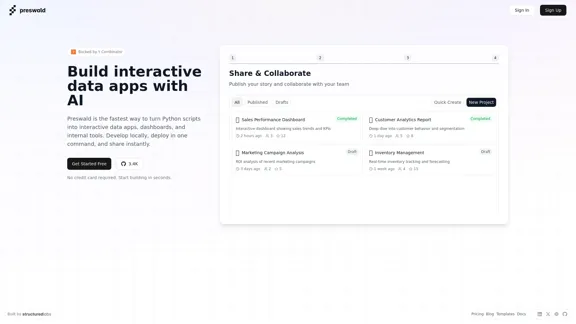
Preswald is an innovative platform designed to transform Python scripts into interactive data applications, dashboards, and internal tools quickly and efficiently. With a focus on ease of use, users can develop locally, deploy with a single command, and share their creations instantly. The platform supports data import from various sources, including CSV files, databases, and APIs, making it versatile for different data needs.

Feature

  1. Fast Development

    Preswald allows users to rapidly turn Python scripts into interactive applications, significantly reducing development time.

  2. One-Command Deployment

    Users can deploy their applications with just one command, streamlining the process and enhancing productivity.

  3. Instant Sharing

    Once deployed, applications can be shared instantly, facilitating collaboration and feedback.

  4. Data Import Flexibility

    The platform supports importing data from multiple sources, including CSV files, databases, and APIs, providing users with the flexibility to work with their preferred data formats.

  5. User-Friendly Interface

    Preswald is designed with a user-friendly interface that simplifies the process of building interactive data apps, making it accessible for users with varying levels of technical expertise.

  6. No Credit Card Required

    Users can start building applications for free without the need for a credit card, encouraging experimentation and exploration of the platform.

How to Use?

  1. Sign up for a free account on the Preswald website to get started.
  2. Familiarize yourself with the user interface and available features through the documentation.
  3. Start by importing a small dataset to practice building your first interactive app.
  4. Utilize the templates provided by Preswald to speed up your development process.
  5. Experiment with different data sources to understand how to integrate them into your applications.

FAQ

What is Preswald?

Preswald is a platform that enables users to convert Python scripts into interactive data applications, dashboards, and internal tools quickly and easily.

How does Preswald work?

Users can write their Python scripts, import data from various sources, and deploy their applications with a single command, making the process efficient and user-friendly.

Can I use Preswald for commercial projects?

Yes, Preswald can be used for both personal and commercial projects, allowing users to create applications for various purposes.

What types of data can I import into Preswald?

Preswald supports importing data from CSV files, databases, and APIs, providing flexibility in data management.

Is there a cost associated with using Preswald?

Preswald offers a free plan with no credit card required, allowing users to start building applications immediately.

Price

PlanPrice
Free Plan$0/month
Basic Plan$9.99/month
Standard Plan$19.99/month
Professional Plan$49.99/month
The price is for reference only, please refer to the latest official data for actual information.

Evaluation

  1. Preswald excels in its ability to quickly convert Python scripts into interactive applications, making it a valuable tool for developers looking to streamline their workflow.

  2. The one-command deployment feature significantly enhances productivity, allowing users to focus more on development rather than deployment logistics.

  3. However, the platform may require users to have a basic understanding of Python and data manipulation, which could be a barrier for complete beginners.

  4. While the data import flexibility is a strong point, users may benefit from additional support or tutorials on integrating complex data sources.

  5. Overall, Preswald is a powerful tool for developers and data analysts, but it could improve by offering more resources for beginners to help them fully leverage its capabilities.

Latest Traffic Insights

  • Monthly Visits

    1.33 K

  • Bounce Rate

    58.64%

  • Pages Per Visit

    1.03

  • Time on Site(s)

    0.00

  • Global Rank

    12571181

  • Country Rank

    United States 3767450

Recent Visits

Traffic Sources

  • Social Media:
    6.43%
  • Paid Referrals:
    1.44%
  • Email:
    0.09%
  • Referrals:
    10.04%
  • Search Engines:
    13.34%
  • Direct:
    68.66%
More Data

Related Websites

Zenpai Assistant: AI assistant that handles your tedious tasks
View Detail

Zenpai Assistant: AI assistant that handles your tedious tasks

Zenpai Assistant: AI assistant that handles your tedious tasks

An AI assistant that handles your tedious tasks. Download our AI-powered desktop software that performs routine jobs such as file conversion, image resizing, and more.

0
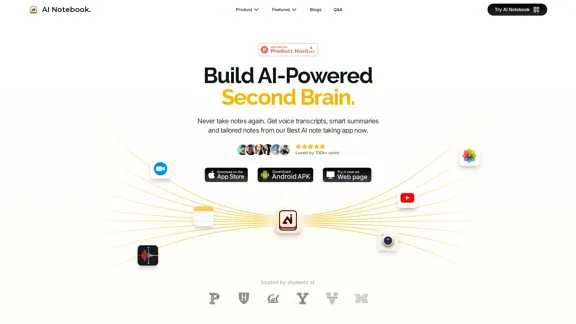
AI Note Taking & Transcribe & Summarizer | AI Notebook App
View Detail

AI Note Taking & Transcribe & Summarizer | AI Notebook App

AI Note Taking & Transcribe & Summarizer | AI Notebook App

Generate transcripts and AI summarize for College Students in lectures. Specializing in YouTube Video Summarizer, PDF Summarizer, Article Summarizer. Save key insights and review with study guides, quizzes, and flashcards. Build your AI-powered notes library.

0
Machine Translation - Amazon Translate - AWS

Amazon Translate is a neural machine translation service that delivers fast, high-quality, and affordable language translation. Amazon Translate allows you to localize content - such as websites and applications - for international users, and to easily translate large volumes of text efficiently.

How it works

1. Input text
2. Amazon Translate
3. Output text

Use cases

• Multilingual user experience
• Cross-lingual communication
• Content analysis in multiple languages

Benefits

• High-quality translations
• Easy to use
• Cost-effective
• Scalable
• Secure and compliant

Features

• Neural machine translation
• Custom terminology
• Batch translation
• Real-time translation
• Language detection
• Profanity filtering
View Detail

Machine Translation - Amazon Translate - AWS Amazon Translate is a neural machine translation service that delivers fast, high-quality, and affordable language translation. Amazon Translate allows you to localize content - such as websites and applications - for international users, and to easily translate large volumes of text efficiently. How it works 1. Input text 2. Amazon Translate 3. Output text Use cases • Multilingual user experience • Cross-lingual communication • Content analysis in multiple languages Benefits • High-quality translations • Easy to use • Cost-effective • Scalable • Secure and compliant Features • Neural machine translation • Custom terminology • Batch translation • Real-time translation • Language detection • Profanity filtering

Machine Translation - Amazon Translate - AWS Amazon Translate is a neural machine translation service that delivers fast, high-quality, and affordable language translation. Amazon Translate allows you to localize content - such as websites and applications - for international users, and to easily translate large volumes of text efficiently. How it works 1. Input text 2. Amazon Translate 3. Output text Use cases • Multilingual user experience • Cross-lingual communication • Content analysis in multiple languages Benefits • High-quality translations • Easy to use • Cost-effective • Scalable • Secure and compliant Features • Neural machine translation • Custom terminology • Batch translation • Real-time translation • Language detection • Profanity filtering

Amazon Translate, a neural machine translation service, uses deep learning to deliver more accurate and natural translation than traditional algorithms.

60.83 M
End email overwhelm with AI
View Detail

End email overwhelm with AI

End email overwhelm with AI

Forage is an invisible AI that filters incoming emails, highlights priority messages, and organizes the rest into a brief daily summary—directly within Gmail.

8.39 K
Snapdeck
View Detail

Snapdeck

Snapdeck

Build a winning deck in a snap. Create professional presentations effortlessly with AI-powered slide generation.

7.96 K
Create a Stack on Splice: AI-Powered Songwriting Inspiration | Splice
View Detail

Create a Stack on Splice: AI-Powered Songwriting Inspiration | Splice

Create a Stack on Splice: AI-Powered Songwriting Inspiration | Splice

Choose a style. Splice AI will present you with millions of unique musical combinations never heard before, showcasing sounds created by the industry's leading producers.

3.79 M
Copilot for Microsoft 365 – Microsoft Adoption

Copilot for Microsoft 365 is a powerful AI assistant that helps you work smarter and faster across Microsoft 365 apps and services. It combines the power of large language models (LLMs) with your organization's data in the Microsoft Graph and Microsoft 365 apps to turn your words into the most powerful productivity tool on the planet.

Copilot is designed to help you:

• Unleash creativity
• Unlock productivity
• Uplevel skills

Copilot is built on Microsoft's comprehensive approach to security, compliance, and privacy. Copilot in Microsoft 365 apps and services:

• Does not use your data to train the underlying LLM
• Does not replace human ingenuity and judgment
• Is designed to keep humans in the loop

Copilot is currently available in Word, Excel, PowerPoint, Outlook, Teams, and more.

Getting Started with Copilot

To get started with Copilot, follow these steps:

1. Check availability: Ensure your organization has access to Copilot.
2. Learn the basics: Familiarize yourself with Copilot's capabilities and how to use it effectively.
3. Explore use cases: Discover how Copilot can help you in your specific role and tasks.
4. Practice and refine: Use Copilot regularly and refine your prompts for better results.
5. Share and collaborate: Collaborate with colleagues using Copilot and share best practices.

Best Practices for Using Copilot

1. Be specific in your prompts
2. Provide context for better results
3. Review and edit Copilot's output
4. Use Copilot as a starting point, not a final product
5. Experiment with different approaches
6. Stay informed about new features and updates

Copilot in Different Microsoft 365 Apps

• Word: Draft, edit, summarize, and rewrite content
• Excel: Analyze data, create formulas, and generate insights
• PowerPoint: Create presentations, design slides, and generate content
• Outlook: Compose emails, summarize threads, and manage your inbox
• Teams: Summarize meetings, generate action items, and create meeting notes

Responsible AI and Copilot

Microsoft is committed to developing AI systems responsibly. When using Copilot, keep in mind:

• AI-generated content may contain biases or inaccuracies
• Always review and verify Copilot's output
• Use your judgment and expertise alongside Copilot's suggestions
• Be aware of your organization's policies regarding AI use

Conclusion

Copilot for Microsoft 365 is a powerful tool that can significantly enhance your productivity and creativity. By understanding its capabilities, following best practices, and using it responsibly, you can make the most of this AI assistant in your daily work.
View Detail

Copilot for Microsoft 365 – Microsoft Adoption Copilot for Microsoft 365 is a powerful AI assistant that helps you work smarter and faster across Microsoft 365 apps and services. It combines the power of large language models (LLMs) with your organization's data in the Microsoft Graph and Microsoft 365 apps to turn your words into the most powerful productivity tool on the planet. Copilot is designed to help you: • Unleash creativity • Unlock productivity • Uplevel skills Copilot is built on Microsoft's comprehensive approach to security, compliance, and privacy. Copilot in Microsoft 365 apps and services: • Does not use your data to train the underlying LLM • Does not replace human ingenuity and judgment • Is designed to keep humans in the loop Copilot is currently available in Word, Excel, PowerPoint, Outlook, Teams, and more. Getting Started with Copilot To get started with Copilot, follow these steps: 1. Check availability: Ensure your organization has access to Copilot. 2. Learn the basics: Familiarize yourself with Copilot's capabilities and how to use it effectively. 3. Explore use cases: Discover how Copilot can help you in your specific role and tasks. 4. Practice and refine: Use Copilot regularly and refine your prompts for better results. 5. Share and collaborate: Collaborate with colleagues using Copilot and share best practices. Best Practices for Using Copilot 1. Be specific in your prompts 2. Provide context for better results 3. Review and edit Copilot's output 4. Use Copilot as a starting point, not a final product 5. Experiment with different approaches 6. Stay informed about new features and updates Copilot in Different Microsoft 365 Apps • Word: Draft, edit, summarize, and rewrite content • Excel: Analyze data, create formulas, and generate insights • PowerPoint: Create presentations, design slides, and generate content • Outlook: Compose emails, summarize threads, and manage your inbox • Teams: Summarize meetings, generate action items, and create meeting notes Responsible AI and Copilot Microsoft is committed to developing AI systems responsibly. When using Copilot, keep in mind: • AI-generated content may contain biases or inaccuracies • Always review and verify Copilot's output • Use your judgment and expertise alongside Copilot's suggestions • Be aware of your organization's policies regarding AI use Conclusion Copilot for Microsoft 365 is a powerful tool that can significantly enhance your productivity and creativity. By understanding its capabilities, following best practices, and using it responsibly, you can make the most of this AI assistant in your daily work.

Copilot for Microsoft 365 – Microsoft Adoption Copilot for Microsoft 365 is a powerful AI assistant that helps you work smarter and faster across Microsoft 365 apps and services. It combines the power of large language models (LLMs) with your organization's data in the Microsoft Graph and Microsoft 365 apps to turn your words into the most powerful productivity tool on the planet. Copilot is designed to help you: • Unleash creativity • Unlock productivity • Uplevel skills Copilot is built on Microsoft's comprehensive approach to security, compliance, and privacy. Copilot in Microsoft 365 apps and services: • Does not use your data to train the underlying LLM • Does not replace human ingenuity and judgment • Is designed to keep humans in the loop Copilot is currently available in Word, Excel, PowerPoint, Outlook, Teams, and more. Getting Started with Copilot To get started with Copilot, follow these steps: 1. Check availability: Ensure your organization has access to Copilot. 2. Learn the basics: Familiarize yourself with Copilot's capabilities and how to use it effectively. 3. Explore use cases: Discover how Copilot can help you in your specific role and tasks. 4. Practice and refine: Use Copilot regularly and refine your prompts for better results. 5. Share and collaborate: Collaborate with colleagues using Copilot and share best practices. Best Practices for Using Copilot 1. Be specific in your prompts 2. Provide context for better results 3. Review and edit Copilot's output 4. Use Copilot as a starting point, not a final product 5. Experiment with different approaches 6. Stay informed about new features and updates Copilot in Different Microsoft 365 Apps • Word: Draft, edit, summarize, and rewrite content • Excel: Analyze data, create formulas, and generate insights • PowerPoint: Create presentations, design slides, and generate content • Outlook: Compose emails, summarize threads, and manage your inbox • Teams: Summarize meetings, generate action items, and create meeting notes Responsible AI and Copilot Microsoft is committed to developing AI systems responsibly. When using Copilot, keep in mind: • AI-generated content may contain biases or inaccuracies • Always review and verify Copilot's output • Use your judgment and expertise alongside Copilot's suggestions • Be aware of your organization's policies regarding AI use Conclusion Copilot for Microsoft 365 is a powerful tool that can significantly enhance your productivity and creativity. By understanding its capabilities, following best practices, and using it responsibly, you can make the most of this AI assistant in your daily work.

Microsoft Copilot combines the power of large language models (LLMs) with your organization's data to turn your words into one of the most powerful productivity tools on the planet.

608.60 K
Open Multiple URLs
View Detail

Open Multiple URLs

Open Multiple URLs

Multiple URL Opener is a free online tool to open multiple URLs simultaneously.

0