Open-source RightAI Tools Directory
  • Discover AI
  • Submit
  • Startup
  • Blog
Open-source RightAI Tools Directory
Discover the best AI tools of 2025 with the RightAI Tools Directory!

Friend Links

AI Anime GeneratorToolsApp AI

Support

Tap4
Privacy policyTerms & ConditionsContact Us
Loading...
loading...

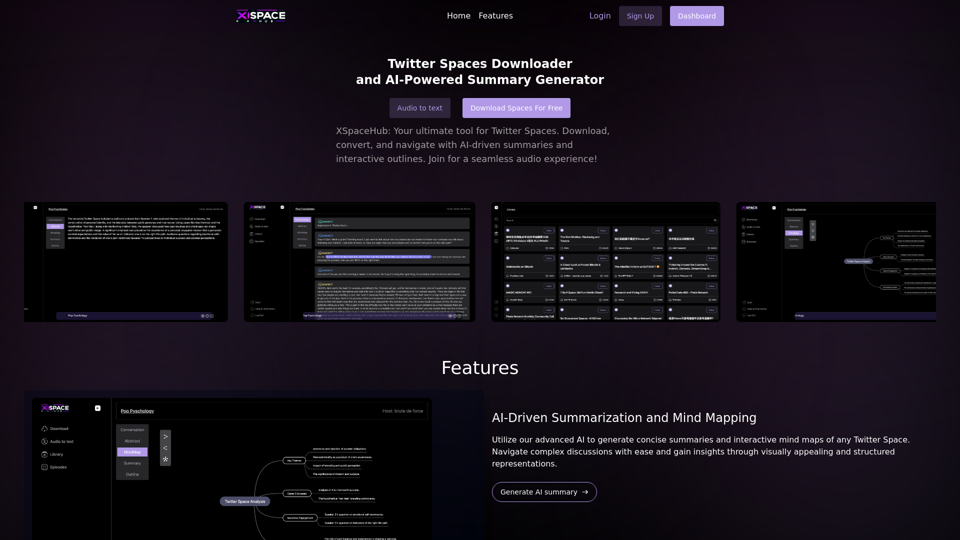
Spaces Downloader and AI-Powered Summary Generator | xspacehub.com

XSPaceHub is your ultimate tool to download, convert, summarize, and navigate Twitter Spaces. Access a rich library, enjoy AI-driven summaries, interactive mind maps, and detailed outlines with clickable audio timestamps. Join now for a seamless audio experience!
Visit Website
Spaces Downloader and AI-Powered Summary Generator |  xspacehub.com
Visit Website

Introduction

XSpaceHub is a cutting-edge platform that revolutionizes the way users interact with Twitter Spaces. It offers advanced AI-driven features for downloading, converting, and navigating audio content from Twitter. The platform provides users with tools to transform live audio interactions into accessible text, generate concise summaries, and create interactive mind maps, making it easier to extract valuable insights from Twitter Spaces.

Feature

AI-Driven Summarization and Mind Mapping

  • Advanced AI technology generates concise summaries
  • Creates interactive mind maps of Twitter Spaces
  • Facilitates navigation of complex discussions
  • Provides visually appealing and structured representations

Transform Twitter Spaces into Text

  • Download Twitter Spaces audio content
  • Convert audio to readable transcripts
  • Enhances accessibility to Twitter audio content

Interactive Audio Outlines

  • Explore audio outlines with clickable timestamps
  • Jump directly to points of interest in the Space
  • Ideal for accessing specific parts of a discussion

User-Friendly Platform

  • Easy-to-use features for all users
  • Seamless integration with existing workflows
  • Tailored features to enhance user experience

Affordable Pricing

  • Subscription-based model
  • Access to a range of advanced features
  • Suitable for various user needs

FAQ

Can I download and summarize Twitter Spaces for free?

Yes, XSpaceHub offers a limited number of free downloads and summaries per day.

How do I access XSpaceHub's AI-driven summaries and mind maps?

Simply download and convert your Twitter Space, and our AI technology will generate a concise summary and interactive mind map.

Can I customize my XSpaceHub experience?

Yes, our platform offers tailored features and seamless integration to enhance your workflow.

Latest Traffic Insights

  • Monthly Visits

    0

  • Bounce Rate

    0.00%

  • Pages Per Visit

    0.00

  • Time on Site(s)

    0.00

  • Global Rank

    -

  • Country Rank

    -

Recent Visits

Traffic Sources

  • Social Media:
    0.00%
  • Paid Referrals:
    0.00%
  • Email:
    0.00%
  • Referrals:
    0.00%
  • Search Engines:
    0.00%
  • Direct:
    0.00%
More Data

Related Websites

ChatGPT on Google
View Detail

ChatGPT on Google

ChatGPT on Google

Use Google to access ChatGPT and see the AI chatbot's answers next to regular search results.

193.90 M
My AI
View Detail

My AI

My AI

AI enables all social media platforms, e-commerce platforms, and websites that you visit.

193.90 M
Home of AI Stock Images
View Detail

Home of AI Stock Images

Home of AI Stock Images

Your source for high-quality AI-generated stock images. Browse our curated collection of royalty-free images, both free and premium. Sell AI art and earn a 90% commission.

0
AI Image Generator - Free Text to Image | Freepik

Generate stunning images from text prompts with our AI-powered tool. No design skills needed!
View Detail

AI Image Generator - Free Text to Image | Freepik Generate stunning images from text prompts with our AI-powered tool. No design skills needed!

AI Image Generator - Free Text to Image | Freepik Generate stunning images from text prompts with our AI-powered tool. No design skills needed!

Real-time Text-to-Image AI Tool: Convert Your Ideas into Images and Illustrations Instantly!

98.96 M
Cloudbooklet AI Tools, AI News & More
View Detail

Cloudbooklet AI Tools, AI News & More

Cloudbooklet AI Tools, AI News & More

Cloudbooklet AI is the free and most popular source to find and use all the artificial intelligence tools and AI news. Follow us to stay updated in AI.

167.63 K
Buyers List Builder
View Detail

Buyers List Builder

Buyers List Builder

Build a Cash Buyer List Fast and Easy

193.90 M
Simplified Chrome Extension

This is a basic Chrome extension designed to be easy to understand and modify. 

Manifest File (manifest.json):

```json
{
  "manifest_version": 3,
  "name": "Simplified Extension",
  "version": "1.0",
  "description": "A simple Chrome extension example.",
  "permissions": [
    "activeTab"
  ],
  "action": {
    "default_popup": "popup.html"
  }
}
```

Popup HTML (popup.html):

```html
<!DOCTYPE html>
<html>
<head>
  <title>Simplified Extension</title>
</head>
<body>
  <h1>Hello from the extension!</h1>
  <p>This is a simple popup.</p>
</body>
</html>
```

Explanation:

* manifest.json: This file tells Chrome what your extension does.
    * `manifest_version`: Specifies the version of the manifest file format.
    * `name`: The name of your extension.
    * `version`: The current version of your extension.
    * `description`: A brief description of your extension.
    * `permissions`: Lists the permissions your extension needs to function. Here, it needs access to the active tab.
    * `action`: Defines the popup that appears when the extension icon is clicked.

* popup.html: This file contains the HTML code for the popup window.

How it works:

1. When you install the extension, Chrome reads the `manifest.json` file.
2. When you click the extension icon, Chrome opens the `popup.html` file in a new window.
3. The popup displays the "Hello from the extension!" message.
View Detail

Simplified Chrome Extension This is a basic Chrome extension designed to be easy to understand and modify. Manifest File (manifest.json): ```json { "manifest_version": 3, "name": "Simplified Extension", "version": "1.0", "description": "A simple Chrome extension example.", "permissions": [ "activeTab" ], "action": { "default_popup": "popup.html" } } ``` Popup HTML (popup.html): ```html <!DOCTYPE html> <html> <head> <title>Simplified Extension</title> </head> <body> <h1>Hello from the extension!</h1> <p>This is a simple popup.</p> </body> </html> ``` Explanation: * manifest.json: This file tells Chrome what your extension does. * `manifest_version`: Specifies the version of the manifest file format. * `name`: The name of your extension. * `version`: The current version of your extension. * `description`: A brief description of your extension. * `permissions`: Lists the permissions your extension needs to function. Here, it needs access to the active tab. * `action`: Defines the popup that appears when the extension icon is clicked. * popup.html: This file contains the HTML code for the popup window. How it works: 1. When you install the extension, Chrome reads the `manifest.json` file. 2. When you click the extension icon, Chrome opens the `popup.html` file in a new window. 3. The popup displays the "Hello from the extension!" message.

Simplified Chrome Extension This is a basic Chrome extension designed to be easy to understand and modify. Manifest File (manifest.json): ```json { "manifest_version": 3, "name": "Simplified Extension", "version": "1.0", "description": "A simple Chrome extension example.", "permissions": [ "activeTab" ], "action": { "default_popup": "popup.html" } } ``` Popup HTML (popup.html): ```html <!DOCTYPE html> <html> <head> <title>Simplified Extension</title> </head> <body> <h1>Hello from the extension!</h1> <p>This is a simple popup.</p> </body> </html> ``` Explanation: * manifest.json: This file tells Chrome what your extension does. * `manifest_version`: Specifies the version of the manifest file format. * `name`: The name of your extension. * `version`: The current version of your extension. * `description`: A brief description of your extension. * `permissions`: Lists the permissions your extension needs to function. Here, it needs access to the active tab. * `action`: Defines the popup that appears when the extension icon is clicked. * popup.html: This file contains the HTML code for the popup window. How it works: 1. When you install the extension, Chrome reads the `manifest.json` file. 2. When you click the extension icon, Chrome opens the `popup.html` file in a new window. 3. The popup displays the "Hello from the extension!" message.

Design & Collaborate Marketing made easy #Simplified

193.90 M
Wilfie AI
View Detail

Wilfie AI

Wilfie AI

AI Chat powered by ChatGPT 4

193.90 M