Open-source RightAI Tools Directory
  • Discover AI
  • Submit
  • Startup
  • Blog
Open-source RightAI Tools Directory
Discover the best AI tools of 2025 with the RightAI Tools Directory!

Friend Links

AI Anime GeneratorToolsApp AI

Support

Tap4
Privacy policyTerms & ConditionsContact Us
Loading...
loading...

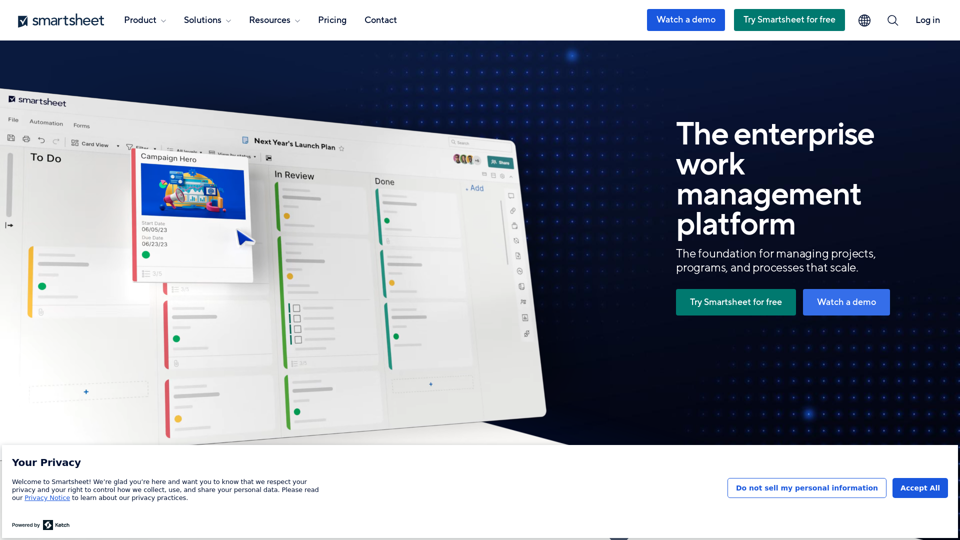
The enterprise work management platform

Smartsheet empowers teams to manage projects, automate workflows, and scale programs within a single robust platform. It helps maintain transparency and keeps dispersed teams connected.
Visit Website
The enterprise work management platform
Visit Website

Introduction

Smartsheet is an enterprise work management platform designed to streamline project management, collaboration, and workflow automation for organizations of all sizes. It offers a comprehensive suite of tools to manage projects, programs, and processes at scale, catering to various industries and work styles.

Feature

Comprehensive Project Management

Smartsheet provides robust project and portfolio management capabilities, allowing teams to plan, track, and execute projects efficiently. Users can leverage multiple views, workflows, and dashboards to manage their work effectively.

Collaboration and Communication

The platform offers team collaboration tools, enabling seamless communication and file sharing. Features like proofing and review tools enhance the collaborative process, ensuring smooth teamwork across departments.

Automation and Integration

Smartsheet's automation capabilities help streamline repetitive tasks and workflows. The platform also integrates with various software tools, allowing users to connect their existing tech stack for improved productivity.

Customizable Solutions

Users can create no-code work apps tailored to their specific needs. The platform's flexibility allows it to adapt to different work styles and scales, making it suitable for both small businesses and large enterprises.

Advanced Reporting and Analytics

With customizable dashboards and reporting features, Smartsheet enables users to gain insights into project progress and team performance. The addition of AI-powered predictive analytics enhances decision-making capabilities.

Enterprise-Grade Security

Smartsheet prioritizes data protection with enterprise-grade security and compliance measures, ensuring that sensitive information remains secure.

FAQ

Is Smartsheet suitable for small businesses?

Yes, Smartsheet offers solutions for businesses of all sizes, from small and medium enterprises to large corporations. Its flexible pricing plans and scalable features make it adaptable to various business needs.

What kind of integrations does Smartsheet offer?

Smartsheet integrates with a wide range of software, including popular productivity and collaboration tools. This allows users to connect their existing tech stack and create a seamless workflow across different platforms.

How does Smartsheet support new users?

Smartsheet provides comprehensive support for new users, including:

  • A knowledge base with articles and guides
  • Community forums for user-generated content and support
  • Smartsheet University for in-depth learning
  • Professional training services
  • Regular product updates and feature announcements

What AI features does Smartsheet offer?

Smartsheet has introduced AI-powered features to enhance productivity:

  • Intelligent workflows for automating complex processes
  • Predictive analytics for forecasting project outcomes
  • Natural language processing for conversational interactions
  • Smart suggestions for task management and resource allocation

Does Smartsheet host any user conferences?

Yes, Smartsheet hosts an annual conference called ENGAGE. The event brings together customers, experts, and partners to share experiences and best practices. ENGAGE 2024 is scheduled for October 8-10 in Seattle, with an early bird registration deadline of July 26.

Latest Traffic Insights

  • Monthly Visits

    22.15 M

  • Bounce Rate

    39.45%

  • Pages Per Visit

    4.63

  • Time on Site(s)

    346.92

  • Global Rank

    2267

  • Country Rank

    United States 734

Recent Visits

Traffic Sources

  • Social Media:
    0.23%
  • Paid Referrals:
    0.79%
  • Email:
    0.06%
  • Referrals:
    6.25%
  • Search Engines:
    22.39%
  • Direct:
    70.29%
More Data

Related Websites

BlacktoothAI - All-in-One AI Assistant
View Detail

BlacktoothAI - All-in-One AI Assistant

BlacktoothAI - All-in-One AI Assistant

Blacktooth is a powerful AI platform for generating text, images, and more. Access ChatGPT, Claude, Gemini, Stable Diffusion, Flux PRO, ElevenLabs, and more.

191
UCG - Chrome Web Store
View Detail

UCG - Chrome Web Store

UCG - Chrome Web Store

ChatGPT without leaving the tab or visible chat!

193.90 M
Augurisk: Explore Disaster and Crime risk in the US
View Detail

Augurisk: Explore Disaster and Crime risk in the US

Augurisk: Explore Disaster and Crime risk in the US

Here is the translation: Discover Natural Disaster and Crime risk for cities and counties in your state, including Flood, Hurricanes, Tornadoes, Wildfires, Drought and Earthquakes.

22.03 K
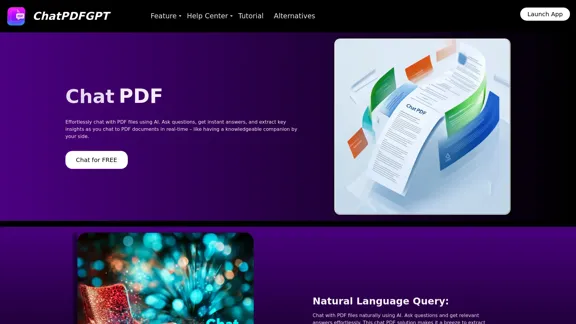
AI to PDF
View Detail

AI to PDF

AI to PDF

AI to PDF Converter is a free and fast online file conversion service.

0
Free Online Tool to Extract Domains
View Detail

Free Online Tool to Extract Domains

Free Online Tool to Extract Domains

Free online Domain Extractor tool to easily extract domain names from text or URLs. Extract domains quickly and efficiently.

0
Copilot for Microsoft 365 – Microsoft Adoption

Copilot for Microsoft 365 is a powerful AI assistant that helps you work smarter and faster across Microsoft 365 apps and services. It combines the power of large language models (LLMs) with your organization's data in the Microsoft Graph and Microsoft 365 apps to turn your words into the most powerful productivity tool on the planet.

Copilot is designed to help you:

• Unleash creativity
• Unlock productivity
• Uplevel skills

Copilot is built on Microsoft's comprehensive approach to security, compliance, and privacy. Copilot in Microsoft 365 apps and services:

• Does not use your data to train the underlying LLM
• Does not replace human ingenuity and judgment
• Is designed to keep humans in the loop

Copilot is currently available in Word, Excel, PowerPoint, Outlook, Teams, and more.

Getting Started with Copilot

To get started with Copilot, follow these steps:

1. Check availability: Ensure your organization has access to Copilot.
2. Learn the basics: Familiarize yourself with Copilot's capabilities and how to use it effectively.
3. Explore use cases: Discover how Copilot can help you in your specific role and tasks.
4. Practice and refine: Use Copilot regularly and refine your prompts for better results.
5. Share and collaborate: Collaborate with colleagues using Copilot and share best practices.

Best Practices for Using Copilot

1. Be specific in your prompts
2. Provide context for better results
3. Review and edit Copilot's output
4. Use Copilot as a starting point, not a final product
5. Experiment with different approaches
6. Stay informed about new features and updates

Copilot in Different Microsoft 365 Apps

• Word: Draft, edit, summarize, and rewrite content
• Excel: Analyze data, create formulas, and generate insights
• PowerPoint: Create presentations, design slides, and generate content
• Outlook: Compose emails, summarize threads, and manage your inbox
• Teams: Summarize meetings, generate action items, and create meeting notes

Responsible AI and Copilot

Microsoft is committed to developing AI systems responsibly. When using Copilot, keep in mind:

• AI-generated content may contain biases or inaccuracies
• Always review and verify Copilot's output
• Use your judgment and expertise alongside Copilot's suggestions
• Be aware of your organization's policies regarding AI use

Conclusion

Copilot for Microsoft 365 is a powerful tool that can significantly enhance your productivity and creativity. By understanding its capabilities, following best practices, and using it responsibly, you can make the most of this AI assistant in your daily work.
View Detail

Copilot for Microsoft 365 – Microsoft Adoption Copilot for Microsoft 365 is a powerful AI assistant that helps you work smarter and faster across Microsoft 365 apps and services. It combines the power of large language models (LLMs) with your organization's data in the Microsoft Graph and Microsoft 365 apps to turn your words into the most powerful productivity tool on the planet. Copilot is designed to help you: • Unleash creativity • Unlock productivity • Uplevel skills Copilot is built on Microsoft's comprehensive approach to security, compliance, and privacy. Copilot in Microsoft 365 apps and services: • Does not use your data to train the underlying LLM • Does not replace human ingenuity and judgment • Is designed to keep humans in the loop Copilot is currently available in Word, Excel, PowerPoint, Outlook, Teams, and more. Getting Started with Copilot To get started with Copilot, follow these steps: 1. Check availability: Ensure your organization has access to Copilot. 2. Learn the basics: Familiarize yourself with Copilot's capabilities and how to use it effectively. 3. Explore use cases: Discover how Copilot can help you in your specific role and tasks. 4. Practice and refine: Use Copilot regularly and refine your prompts for better results. 5. Share and collaborate: Collaborate with colleagues using Copilot and share best practices. Best Practices for Using Copilot 1. Be specific in your prompts 2. Provide context for better results 3. Review and edit Copilot's output 4. Use Copilot as a starting point, not a final product 5. Experiment with different approaches 6. Stay informed about new features and updates Copilot in Different Microsoft 365 Apps • Word: Draft, edit, summarize, and rewrite content • Excel: Analyze data, create formulas, and generate insights • PowerPoint: Create presentations, design slides, and generate content • Outlook: Compose emails, summarize threads, and manage your inbox • Teams: Summarize meetings, generate action items, and create meeting notes Responsible AI and Copilot Microsoft is committed to developing AI systems responsibly. When using Copilot, keep in mind: • AI-generated content may contain biases or inaccuracies • Always review and verify Copilot's output • Use your judgment and expertise alongside Copilot's suggestions • Be aware of your organization's policies regarding AI use Conclusion Copilot for Microsoft 365 is a powerful tool that can significantly enhance your productivity and creativity. By understanding its capabilities, following best practices, and using it responsibly, you can make the most of this AI assistant in your daily work.

Copilot for Microsoft 365 – Microsoft Adoption Copilot for Microsoft 365 is a powerful AI assistant that helps you work smarter and faster across Microsoft 365 apps and services. It combines the power of large language models (LLMs) with your organization's data in the Microsoft Graph and Microsoft 365 apps to turn your words into the most powerful productivity tool on the planet. Copilot is designed to help you: • Unleash creativity • Unlock productivity • Uplevel skills Copilot is built on Microsoft's comprehensive approach to security, compliance, and privacy. Copilot in Microsoft 365 apps and services: • Does not use your data to train the underlying LLM • Does not replace human ingenuity and judgment • Is designed to keep humans in the loop Copilot is currently available in Word, Excel, PowerPoint, Outlook, Teams, and more. Getting Started with Copilot To get started with Copilot, follow these steps: 1. Check availability: Ensure your organization has access to Copilot. 2. Learn the basics: Familiarize yourself with Copilot's capabilities and how to use it effectively. 3. Explore use cases: Discover how Copilot can help you in your specific role and tasks. 4. Practice and refine: Use Copilot regularly and refine your prompts for better results. 5. Share and collaborate: Collaborate with colleagues using Copilot and share best practices. Best Practices for Using Copilot 1. Be specific in your prompts 2. Provide context for better results 3. Review and edit Copilot's output 4. Use Copilot as a starting point, not a final product 5. Experiment with different approaches 6. Stay informed about new features and updates Copilot in Different Microsoft 365 Apps • Word: Draft, edit, summarize, and rewrite content • Excel: Analyze data, create formulas, and generate insights • PowerPoint: Create presentations, design slides, and generate content • Outlook: Compose emails, summarize threads, and manage your inbox • Teams: Summarize meetings, generate action items, and create meeting notes Responsible AI and Copilot Microsoft is committed to developing AI systems responsibly. When using Copilot, keep in mind: • AI-generated content may contain biases or inaccuracies • Always review and verify Copilot's output • Use your judgment and expertise alongside Copilot's suggestions • Be aware of your organization's policies regarding AI use Conclusion Copilot for Microsoft 365 is a powerful tool that can significantly enhance your productivity and creativity. By understanding its capabilities, following best practices, and using it responsibly, you can make the most of this AI assistant in your daily work.

Microsoft Copilot combines the power of large language models (LLMs) with your organization's data to turn your words into one of the most powerful productivity tools on the planet.

608.60 K
Home - Coming Together
View Detail

Home - Coming Together

Home - Coming Together

🎉 Proxy 1.0 Your AI assistant for your daily tasks Proxy is a fully automated AI assistant for your daily tasks. Message* New Templates Shuffle Show less Summarize articles about a company Find relevant jobs Find trending GitHub authors' LinkedIn profiles Summarize pull requests on Github Summarize top news stories as an email Summarize daily […]

11.66 K
Elixir Observability
View Detail

Elixir Observability

Elixir Observability

Elixir is an AI Ops & QA platform designed for multimodal, audio-first experiences.

725