Open-source RightAI Tools Directory
  • Discover AI
  • Submit
  • Startup
  • Blog
Open-source RightAI Tools Directory
Discover the best AI tools of 2025 with the RightAI Tools Directory!

Friend Links

AI Anime GeneratorToolsApp AI

Support

Tap4
Privacy policyTerms & ConditionsContact Us
Loading...
loading...

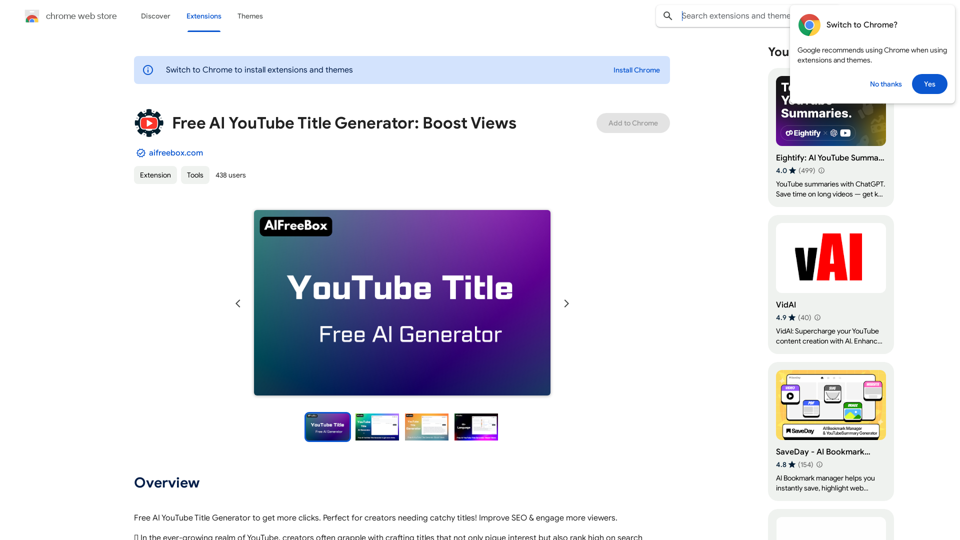
Free AI YouTube Title Generator: Boost Your Views

Free AI YouTube Title Generator to Get More Clicks. Perfect for Creators Needing Catchy Titles! Improve SEO & Engage More Viewers.
Visit Website
Free AI YouTube Title Generator: Boost Your Views
Visit Website

Introduction

The AI YouTube Title Generator is a powerful tool designed to simplify the process of creating effective and SEO-optimized titles for YouTube videos. By leveraging artificial intelligence, it predicts titles that will resonate with target audiences and stand out in search results. This free Chrome extension offers data-driven insights and suggestions, helping creators eliminate guesswork and unlock opportunities for channel growth and monetization.

Feature

Eliminate Guesswork

The tool provides data-driven insights and suggestions, ensuring that video titles are both engaging and SEO-optimized to reach a broader audience.

Unlock Opportunities

With optimized titles, creators can experience an increase in views, subscribers, and overall channel growth, leading to more opportunities and potential monetization.

AI-Powered Predictions

The generator uses artificial intelligence to predict titles that will resonate with the target audience and stand out in search results.

Free Chrome Extension

Available as a free extension from the Chrome Web Store, making it accessible to all YouTube creators.

Commercial Use

The tool can be used for commercial purposes, allowing creators to generate titles for their YouTube videos without restrictions.

Data Privacy

The developer has disclosed that user data will not be collected or used for training purposes, ensuring privacy and security.

FAQ

How does the AI YouTube Title Generator work?

The AI YouTube Title Generator leverages artificial intelligence to predict titles that will resonate with your target audience and stand out in search results. It offers data-driven insights and suggestions to ensure your video titles are engaging and SEO-optimized.

How can I maximize my use of the AI YouTube Title Generator?

To maximize your use of the tool:

  1. Use it regularly to generate potential titles for your videos
  2. Experiment with different keywords and phrases
  3. Analyze competitors' titles to identify market gaps

What is the cost of the AI YouTube Title Generator?

The AI YouTube Title Generator is a free extension available for download from the Chrome Web Store.

Is my data used for training purposes?

No, the developer has disclosed that they will not collect or use your data for any purpose.

Can I use the AI YouTube Title Generator for commercial purposes?

Yes, the tool is available for commercial use and can be used to generate titles for your YouTube videos without restrictions.

How do I get started with the AI YouTube Title Generator?

To get started, simply download the extension from the Chrome Web Store and follow the prompts to begin using the tool.

Related Websites
Midjourney SREF Codes Library for Style Reference

What are SREF Codes?

SREF codes are special text strings used in Midjourney to quickly and easily apply specific artistic styles to your image generations. 

How to Use SREF Codes:

Simply add an SREF code to your Midjourney prompt. For example:

`/imagine a majestic dragon, SREF:cyberpunk`

SREF Code Library:

This library contains a collection of SREF codes categorized by style. 

* Art Styles:
    * `photorealistic`: Creates images with high levels of realism.
    * `impressionistic`:  Captures the essence of a scene with loose brushstrokes and vibrant colors.
    * `cubist`:  Breaks down objects into geometric shapes.
    * `surrealist`:  Creates dreamlike and fantastical images.
    * `abstract`:  Focuses on form, color, and composition rather than representational imagery.

* Visual Effects:
    * `cinematic`:  Gives images a cinematic look and feel.
    * `HDR`:  Creates images with high dynamic range, resulting in greater detail and contrast.
    * `neon`:  Adds vibrant neon lights to the image.
    * `pixel art`:  Generates images in a retro pixel art style.

* Other Styles:
    * `anime`:  Creates images in the style of Japanese animation.
    * `manga`:  Similar to anime, but with a more comic book aesthetic.
    * `sketch`:  Generates images that resemble pencil sketches.
    * `watercolor`:  Creates images with the look and feel of watercolor paintings.

Note: This is just a small sample of the many SREF codes available. 

Explore and Experiment:

The best way to learn about SREF codes is to experiment with them! Try combining different codes to create unique and interesting styles.
View Detail

Midjourney SREF Codes Library for Style Reference What are SREF Codes? SREF codes are special text strings used in Midjourney to quickly and easily apply specific artistic styles to your image generations. How to Use SREF Codes: Simply add an SREF code to your Midjourney prompt. For example: `/imagine a majestic dragon, SREF:cyberpunk` SREF Code Library: This library contains a collection of SREF codes categorized by style. * Art Styles: * `photorealistic`: Creates images with high levels of realism. * `impressionistic`: Captures the essence of a scene with loose brushstrokes and vibrant colors. * `cubist`: Breaks down objects into geometric shapes. * `surrealist`: Creates dreamlike and fantastical images. * `abstract`: Focuses on form, color, and composition rather than representational imagery. * Visual Effects: * `cinematic`: Gives images a cinematic look and feel. * `HDR`: Creates images with high dynamic range, resulting in greater detail and contrast. * `neon`: Adds vibrant neon lights to the image. * `pixel art`: Generates images in a retro pixel art style. * Other Styles: * `anime`: Creates images in the style of Japanese animation. * `manga`: Similar to anime, but with a more comic book aesthetic. * `sketch`: Generates images that resemble pencil sketches. * `watercolor`: Creates images with the look and feel of watercolor paintings. Note: This is just a small sample of the many SREF codes available. Explore and Experiment: The best way to learn about SREF codes is to experiment with them! Try combining different codes to create unique and interesting styles.

Midjourney SREF Codes Library for Style Reference What are SREF Codes? SREF codes are special text strings used in Midjourney to quickly and easily apply specific artistic styles to your image generations. How to Use SREF Codes: Simply add an SREF code to your Midjourney prompt. For example: `/imagine a majestic dragon, SREF:cyberpunk` SREF Code Library: This library contains a collection of SREF codes categorized by style. * Art Styles: * `photorealistic`: Creates images with high levels of realism. * `impressionistic`: Captures the essence of a scene with loose brushstrokes and vibrant colors. * `cubist`: Breaks down objects into geometric shapes. * `surrealist`: Creates dreamlike and fantastical images. * `abstract`: Focuses on form, color, and composition rather than representational imagery. * Visual Effects: * `cinematic`: Gives images a cinematic look and feel. * `HDR`: Creates images with high dynamic range, resulting in greater detail and contrast. * `neon`: Adds vibrant neon lights to the image. * `pixel art`: Generates images in a retro pixel art style. * Other Styles: * `anime`: Creates images in the style of Japanese animation. * `manga`: Similar to anime, but with a more comic book aesthetic. * `sketch`: Generates images that resemble pencil sketches. * `watercolor`: Creates images with the look and feel of watercolor paintings. Note: This is just a small sample of the many SREF codes available. Explore and Experiment: The best way to learn about SREF codes is to experiment with them! Try combining different codes to create unique and interesting styles.

Explore a list of 177 unique Midjourney sref codes and style references to find your perfect Midjourney sref code effect.

149.96 K
Everest Data Scraper
View Detail

Everest Data Scraper

Everest Data Scraper

Everest Data Bot: turning your web data into useful information right away.

193.90 M
Chrome Web Store
View Detail

Chrome Web Store

Chrome Web Store

Add new features to your browser and personalize your browsing experience.

193.90 M
ReText
View Detail

ReText

ReText

An AI-powered text processing tool to fix and simplify your text, making your texting experience as easy as possible.

193.90 M
super memory
View Detail

super memory

super memory

An extension for https://supermemory.ai - an AI hub for all your bookmarks.

193.90 M
AutoCrawl - Download Amazon Designs 

This is a tool to help you download designs from Amazon product pages. 

Here's how it works:

1. Paste the Amazon product URL:  Put the link to the Amazon product page you want to download designs from.
2. Select the design type: Choose the type of design you want to download (e.g., images, logos, patterns).
3. Click "Download":  The tool will automatically extract and download the selected designs.

Features:

* Easy to use: Just paste the URL and click a button.
* Multiple design types: Download images, logos, patterns, and more.
* Fast and efficient: Quickly download multiple designs at once.

Disclaimer:

* Use this tool responsibly and ethically.
* Respect copyright laws and only download designs for personal use.
View Detail

AutoCrawl - Download Amazon Designs This is a tool to help you download designs from Amazon product pages. Here's how it works: 1. Paste the Amazon product URL: Put the link to the Amazon product page you want to download designs from. 2. Select the design type: Choose the type of design you want to download (e.g., images, logos, patterns). 3. Click "Download": The tool will automatically extract and download the selected designs. Features: * Easy to use: Just paste the URL and click a button. * Multiple design types: Download images, logos, patterns, and more. * Fast and efficient: Quickly download multiple designs at once. Disclaimer: * Use this tool responsibly and ethically. * Respect copyright laws and only download designs for personal use.

AutoCrawl - Download Amazon Designs This is a tool to help you download designs from Amazon product pages. Here's how it works: 1. Paste the Amazon product URL: Put the link to the Amazon product page you want to download designs from. 2. Select the design type: Choose the type of design you want to download (e.g., images, logos, patterns). 3. Click "Download": The tool will automatically extract and download the selected designs. Features: * Easy to use: Just paste the URL and click a button. * Multiple design types: Download images, logos, patterns, and more. * Fast and efficient: Quickly download multiple designs at once. Disclaimer: * Use this tool responsibly and ethically. * Respect copyright laws and only download designs for personal use.

Download Amazon's design templates, research products, and integrate them with MerchIntel.com.

193.90 M
Smart Scholar
View Detail

Smart Scholar

Smart Scholar

Finding relevant articles can be a tedious and time-consuming task. Smart Scholar simplifies your search by personalizing search results based on your interests and preferences.

193.90 M
Meetingtor: Record online meetings
View Detail

Meetingtor: Record online meetings

Meetingtor: Record online meetings

Automatically record, transcribe, and summarize online meetings.

193.90 M