Open-source RightAI Tools Directory
  • Discover AI
  • Submit
  • Startup
  • Blog
Open-source RightAI Tools Directory
Discover the best AI tools of 2025 with the RightAI Tools Directory!

Friend Links

AI Anime GeneratorToolsApp AI

Support

Tap4
Privacy policyTerms & ConditionsContact Us
Loading...
loading...

Podly - AI Toolset for Merch By Amazon

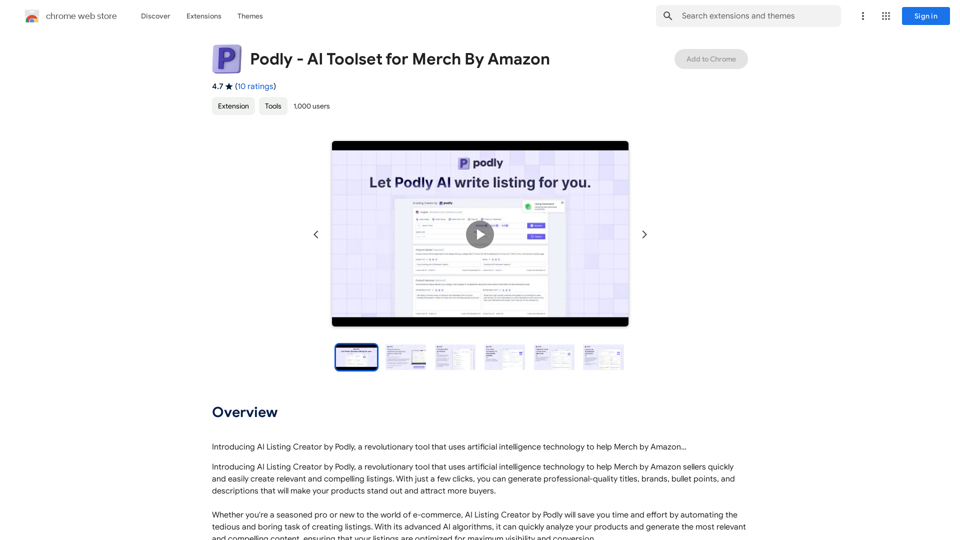
Introducing AI Listing Creator by Podly, a revolutionary tool that uses artificial intelligence technology to help Merch by Amazon sellers create high-quality product listings quickly and efficiently.
Visit Website
Podly - AI Toolset for Merch By Amazon
Visit Website

Introduction

Podly is an AI-powered toolset designed for Merch by Amazon sellers. It simplifies the process of creating compelling product listings by utilizing advanced AI algorithms. Podly analyzes products and generates professional-quality titles, brands, bullet points, and descriptions, helping sellers attract more buyers and stand out in the marketplace.

Feature

AI Listing Creator

Podly's AI Listing Creator employs artificial intelligence technology to help Merch by Amazon sellers create high-quality listings with minimal effort. This feature saves time and streamlines the listing creation process.

Free Account Option

Users can sign up for a free account, allowing them to explore and utilize Podly's basic features without committing to a paid subscription. This accessibility enables sellers to test the tool's capabilities before deciding on a premium plan.

Advanced AI Algorithms

The platform's sophisticated AI algorithms quickly analyze products and generate optimized listings. This technology significantly reduces the time and effort required for sellers to create compelling product descriptions.

Chrome Extension

Podly offers a Chrome extension, making it easy for users to integrate the tool into their workflow and create listings directly from their browser.

Customization Options

Users can experiment with different settings and options to tailor their listings and optimize results, allowing for a personalized approach to product presentation.

Paid Subscription Plans

In addition to the free account, Podly offers paid subscription plans with advanced features and benefits for users who require more comprehensive tools.

FAQ

Is Podly free to use?

Yes, Podly offers a free account option that allows users to sign up and start using the tool without committing to a paid subscription. This enables sellers to explore the basic features and functionality of the platform.

What are the main benefits of using Podly?

Podly's AI Listing Creator helps Merch by Amazon sellers create high-quality listings quickly and easily, saving time and effort. The advanced AI algorithms optimize listings for maximum visibility and conversion, potentially leading to increased sales and business growth.

Can I upgrade to a paid subscription with Podly?

Yes, Podly offers paid subscription plans that provide additional features and benefits beyond the free account. These premium options cater to users who require more advanced tools and capabilities for their Merch by Amazon business.

Latest Traffic Insights

  • Monthly Visits

    193.90 M

  • Bounce Rate

    56.27%

  • Pages Per Visit

    2.71

  • Time on Site(s)

    115.91

  • Global Rank

    -

  • Country Rank

    -

Recent Visits

Traffic Sources

  • Social Media:
    0.48%
  • Paid Referrals:
    0.55%
  • Email:
    0.15%
  • Referrals:
    12.81%
  • Search Engines:
    16.21%
  • Direct:
    69.81%
More Data

Related Websites

Crushbank Extension
View Detail

Crushbank Extension

Crushbank Extension

A browser extension for Crushbank that lets you use the site in a standalone, portable way.

193.90 M
AI Sticker Maker
View Detail

AI Sticker Maker

AI Sticker Maker

Turning your text into amazing stickers that will impress your friends, fans, and customers!

193.90 M
Love Proofreading
View Detail

Love Proofreading

Love Proofreading

Enhance your writing skills with an all-powerful proofreading tool, including typo correction, grammar checking, AI rewriting, and more.

193.90 M
Hebbia
View Detail

Hebbia

Hebbia

AI Agents for serious work.

18.57 K
GPTBrowser: ChatGPT for websites, PDFs & YouTube
View Detail

GPTBrowser: ChatGPT for websites, PDFs & YouTube

GPTBrowser: ChatGPT for websites, PDFs & YouTube

Boost your web experience with ChatGPT integrated into every website you visit.

193.90 M
Chrome Web Store
View Detail

Chrome Web Store

Chrome Web Store

Enhance your browser with new features and tailor your browsing experience to your preferences.

193.90 M
AI for Auto Applicants
View Detail

AI for Auto Applicants

AI for Auto Applicants

Automatically Apply for Jobs Using AI Imagine a world where you can apply for jobs with just a few clicks, powered by the intelligence of artificial intelligence. That's the promise of AI-powered job application tools. These tools can: * Scan your resume and identify relevant jobs: AI algorithms can analyze your skills and experience to match you with suitable opportunities. * Customize your cover letter for each application: Say goodbye to generic cover letters! AI can tailor your message to highlight the specific requirements of each job description. * Automate the application process: From filling out forms to submitting your documents, AI can handle the tedious tasks, saving you time and effort. * Track your applications and provide insights: Stay informed about the status of your applications and receive valuable feedback on your performance. By leveraging the power of AI, you can streamline your job search, increase your chances of getting noticed, and focus on what matters most: landing your dream job.

193.90 M
Chat-GPT PDF

What is Chat-GPT PDF?

Chat-GPT PDF is a tool that allows users to generate PDF files from Chat-GPT conversations. This innovative tool enables users to save and share their conversations in a more organized and visually appealing format.

How does Chat-GPT PDF work?

The process is simple and straightforward. Here's a step-by-step guide:

1. Copy the conversation: Copy the entire conversation from the Chat-GPT platform.
2. Paste the conversation: Paste the copied conversation into the Chat-GPT PDF tool.
3. Customize the layout: Customize the layout, font, and design of the PDF file according to your preferences.
4. Generate the PDF: Click the "Generate PDF" button to create a downloadable PDF file.

Features of Chat-GPT PDF

Chat-GPT PDF offers several features that make it an essential tool for users:

* Customizable layout: Customize the layout, font, and design of the PDF file to suit your needs.
* Easy sharing: Share the PDF file with others via email, social media, or messaging apps.
* Offline access: Access your conversations offline, even without an internet connection.
* Organization: Organize your conversations in a neat and tidy format, making it easier to review and reference.

Benefits of Chat-GPT PDF

The benefits of using Chat-GPT PDF are numerous:

* Improved productivity: Save time and increase productivity by having all your conversations in one place.
* Enhanced collaboration: Collaborate with others more effectively by sharing conversations in a clear and concise format.
* Better organization: Keep your conversations organized, making it easier to review and reference them later.

Conclusion

Chat-GPT PDF is a game-changer for anyone who uses Chat-GPT regularly. With its ease of use, customization options, and benefits, it's an essential tool for anyone looking to get the most out of their conversations.
View Detail

Chat-GPT PDF What is Chat-GPT PDF? Chat-GPT PDF is a tool that allows users to generate PDF files from Chat-GPT conversations. This innovative tool enables users to save and share their conversations in a more organized and visually appealing format. How does Chat-GPT PDF work? The process is simple and straightforward. Here's a step-by-step guide: 1. Copy the conversation: Copy the entire conversation from the Chat-GPT platform. 2. Paste the conversation: Paste the copied conversation into the Chat-GPT PDF tool. 3. Customize the layout: Customize the layout, font, and design of the PDF file according to your preferences. 4. Generate the PDF: Click the "Generate PDF" button to create a downloadable PDF file. Features of Chat-GPT PDF Chat-GPT PDF offers several features that make it an essential tool for users: * Customizable layout: Customize the layout, font, and design of the PDF file to suit your needs. * Easy sharing: Share the PDF file with others via email, social media, or messaging apps. * Offline access: Access your conversations offline, even without an internet connection. * Organization: Organize your conversations in a neat and tidy format, making it easier to review and reference. Benefits of Chat-GPT PDF The benefits of using Chat-GPT PDF are numerous: * Improved productivity: Save time and increase productivity by having all your conversations in one place. * Enhanced collaboration: Collaborate with others more effectively by sharing conversations in a clear and concise format. * Better organization: Keep your conversations organized, making it easier to review and reference them later. Conclusion Chat-GPT PDF is a game-changer for anyone who uses Chat-GPT regularly. With its ease of use, customization options, and benefits, it's an essential tool for anyone looking to get the most out of their conversations.

Chat-GPT PDF What is Chat-GPT PDF? Chat-GPT PDF is a tool that allows users to generate PDF files from Chat-GPT conversations. This innovative tool enables users to save and share their conversations in a more organized and visually appealing format. How does Chat-GPT PDF work? The process is simple and straightforward. Here's a step-by-step guide: 1. Copy the conversation: Copy the entire conversation from the Chat-GPT platform. 2. Paste the conversation: Paste the copied conversation into the Chat-GPT PDF tool. 3. Customize the layout: Customize the layout, font, and design of the PDF file according to your preferences. 4. Generate the PDF: Click the "Generate PDF" button to create a downloadable PDF file. Features of Chat-GPT PDF Chat-GPT PDF offers several features that make it an essential tool for users: * Customizable layout: Customize the layout, font, and design of the PDF file to suit your needs. * Easy sharing: Share the PDF file with others via email, social media, or messaging apps. * Offline access: Access your conversations offline, even without an internet connection. * Organization: Organize your conversations in a neat and tidy format, making it easier to review and reference. Benefits of Chat-GPT PDF The benefits of using Chat-GPT PDF are numerous: * Improved productivity: Save time and increase productivity by having all your conversations in one place. * Enhanced collaboration: Collaborate with others more effectively by sharing conversations in a clear and concise format. * Better organization: Keep your conversations organized, making it easier to review and reference them later. Conclusion Chat-GPT PDF is a game-changer for anyone who uses Chat-GPT regularly. With its ease of use, customization options, and benefits, it's an essential tool for anyone looking to get the most out of their conversations.

Exporting Chat History to PDF You can export your chat history with Chat-GPT to a PDF file using the following methods: #Method 1: Browser Print Function 1. Open your chat conversation with Chat-GPT in a web browser. 2. Press `Ctrl + P` (Windows) or `Cmd + P` (Mac) to open the print dialog box. 3. Select "Save as PDF" as the printer destination. 4. Choose a location to save the PDF file and set the file name. 5. Click "Save" to export the chat history to a PDF file. #Method 2: Online PDF Conversion Tools 1. Copy the entire chat conversation by pressing `Ctrl + A` (Windows) or `Cmd + A` (Mac) and then `Ctrl + C` (Windows) or `Cmd + C` (Mac). 2. Go to an online PDF conversion tool, such as SmallPDF or Convertio. 3. Paste the chat conversation into the conversion tool's text box. 4. Select the PDF format and click "Convert" to generate the PDF file. 5. Download the PDF file to your computer. #Method 3: Browser Extensions 1. Install a browser extension, such as Print Friendly & PDF or FireShot, that allows you to save web pages as PDF files. 2. Open your chat conversation with Chat-GPT in a web browser. 3. Click the browser extension's icon in the toolbar. 4. Select the "Save as PDF" option and choose a location to save the file. 5. Click "Save" to export the chat history to a PDF file. By following these methods, you can easily export your chat history with Chat-GPT to a PDF file for future reference or sharing.

193.90 M