Open-source RightAI Tools Directory
  • Discover AI
  • Submit
  • Startup
  • Blog
Open-source RightAI Tools Directory
Discover the best AI tools of 2025 with the RightAI Tools Directory!

Friend Links

AI Anime GeneratorToolsApp AI

Support

Tap4
Privacy policyTerms & ConditionsContact Us
Loading...
loading...

SyntheticEye AI Detector This is a tool to detect AI-generated text. It analyzes the text for patterns and characteristics commonly found in AI-written content. You can use it to identify potentially fake news, spam, or other types of AI-generated text. Keep in mind that no AI detection tool is perfect, and some sophisticated AI-generated text may be difficult to detect.

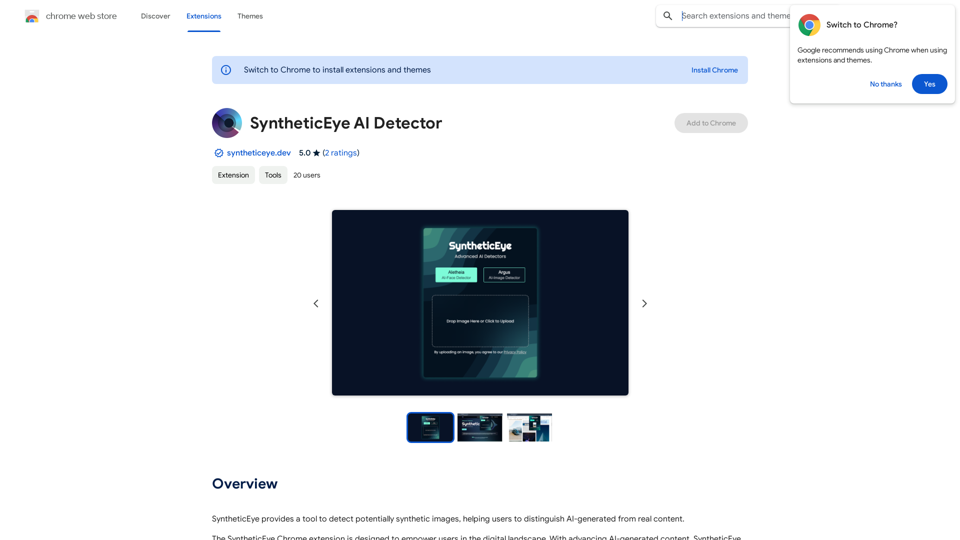
SyntheticEye provides a tool to detect images that may have been created by artificial intelligence, helping users tell the difference between AI-generated images and real ones.
Visit Website
SyntheticEye AI Detector 

This is a tool to detect AI-generated text. 


It analyzes the text for patterns and characteristics commonly found in AI-written content. 


You can use it to identify potentially fake news, spam, or other types of AI-generated text. 


Keep in mind that no AI detection tool is perfect, and some sophisticated AI-generated text may be difficult to detect.
Visit Website

Introduction

SyntheticEye AI Detector is a Chrome extension designed to help users identify potentially synthetic images. By leveraging AI-powered models, it assists in distinguishing between AI-generated and real content, providing a valuable tool for verifying image authenticity in the digital landscape. This free-to-use extension supports multiple detection models and offers an easy-to-use interface for image verification.

Feature

AI-Powered Image Detection

SyntheticEye utilizes advanced AI models to analyze and detect potentially synthetic images, providing users with a prediction on the likelihood of AI generation.

Multiple Detection Models

The extension supports various models, including:

  • Aletheia: Specialized for detecting AI-generated faces
  • Argus: Designed for general AI-generated image detection

User-Friendly Interface

SyntheticEye offers a simple and intuitive process for image verification:

  1. Install the Chrome extension
  2. Activate while browsing
  3. Upload an image for verification
  4. Select a detection model
  5. Receive an evaluation of the image's authenticity

Free to Use

SyntheticEye AI Detector is completely free, with no subscription or payment required for its use.

Deepfake Detection

The extension can be utilized to identify potential deepfakes and other AI-generated content, enhancing digital literacy and awareness.

FAQ

How does SyntheticEye AI Detector work?

SyntheticEye employs AI-powered models to analyze images and provide predictions on the likelihood of them being AI-generated. It uses different models for specific types of content, such as faces or general images.

Is there a cost associated with using SyntheticEye?

No, the SyntheticEye AI Detector Chrome extension is completely free to use. There are no subscriptions or payments required to access its features.

Can SyntheticEye detect deepfakes?

Yes, the extension can be used to detect potential deepfakes and other forms of AI-generated content, helping users verify the authenticity of digital images they encounter online.

Related Websites

AI Image Editor
View Detail

AI Image Editor

AI Image Editor

Use AI to create images from text descriptions; find high-quality free stock photos without using Pexels or Unsplash.

193.90 M
Text to Voice Generator
==========================

A text-to-voice generator, also known as a text-to-speech (TTS) system, is a software that converts written text into a spoken voice output. This technology has been widely used in various applications, including virtual assistants, audiobooks, and language learning platforms.

How it Works
---------------

The process of generating voice from text involves several steps:

1. Text Analysis: The input text is analyzed to identify the language, syntax, and semantics.
2. Phonetic Transcription: The text is converted into a phonetic transcription, which represents the sounds of the spoken language.
3. Prosody Generation: The phonetic transcription is then used to generate the prosody, or rhythm and intonation, of the spoken voice.
4. Waveform Generation: The prosody and phonetic transcription are combined to generate the audio waveform, which is the final spoken voice output.

Types of Text-to-Voice Generators
-----------------------------------

There are two main types of text-to-voice generators:

Rule-Based Systems

These systems use a set of predefined rules to generate the spoken voice output. They are often limited in their ability to produce natural-sounding voices and may sound robotic.

Machine Learning-Based Systems

These systems use machine learning algorithms to learn from large datasets of spoken voices and generate more natural-sounding voices. They are often more advanced and can produce high-quality voice outputs.

Applications of Text-to-Voice Generators
-----------------------------------------

Text-to-voice generators have a wide range of applications, including:

Virtual Assistants

Virtual assistants, such as Siri and Alexa, use text-to-voice generators to respond to user queries.

Audiobooks

Text-to-voice generators can be used to create audiobooks from written texts, making it easier for people to access written content.

Language Learning

Language learning platforms use text-to-voice generators to provide pronunciation guidance and practice exercises for learners.

Accessibility

Text-to-voice generators can be used to assist people with disabilities, such as visual impairments, by providing an auditory interface to written content.
View Detail

Text to Voice Generator ========================== A text-to-voice generator, also known as a text-to-speech (TTS) system, is a software that converts written text into a spoken voice output. This technology has been widely used in various applications, including virtual assistants, audiobooks, and language learning platforms. How it Works --------------- The process of generating voice from text involves several steps: 1. Text Analysis: The input text is analyzed to identify the language, syntax, and semantics. 2. Phonetic Transcription: The text is converted into a phonetic transcription, which represents the sounds of the spoken language. 3. Prosody Generation: The phonetic transcription is then used to generate the prosody, or rhythm and intonation, of the spoken voice. 4. Waveform Generation: The prosody and phonetic transcription are combined to generate the audio waveform, which is the final spoken voice output. Types of Text-to-Voice Generators ----------------------------------- There are two main types of text-to-voice generators: Rule-Based Systems These systems use a set of predefined rules to generate the spoken voice output. They are often limited in their ability to produce natural-sounding voices and may sound robotic. Machine Learning-Based Systems These systems use machine learning algorithms to learn from large datasets of spoken voices and generate more natural-sounding voices. They are often more advanced and can produce high-quality voice outputs. Applications of Text-to-Voice Generators ----------------------------------------- Text-to-voice generators have a wide range of applications, including: Virtual Assistants Virtual assistants, such as Siri and Alexa, use text-to-voice generators to respond to user queries. Audiobooks Text-to-voice generators can be used to create audiobooks from written texts, making it easier for people to access written content. Language Learning Language learning platforms use text-to-voice generators to provide pronunciation guidance and practice exercises for learners. Accessibility Text-to-voice generators can be used to assist people with disabilities, such as visual impairments, by providing an auditory interface to written content.

Text to Voice Generator ========================== A text-to-voice generator, also known as a text-to-speech (TTS) system, is a software that converts written text into a spoken voice output. This technology has been widely used in various applications, including virtual assistants, audiobooks, and language learning platforms. How it Works --------------- The process of generating voice from text involves several steps: 1. Text Analysis: The input text is analyzed to identify the language, syntax, and semantics. 2. Phonetic Transcription: The text is converted into a phonetic transcription, which represents the sounds of the spoken language. 3. Prosody Generation: The phonetic transcription is then used to generate the prosody, or rhythm and intonation, of the spoken voice. 4. Waveform Generation: The prosody and phonetic transcription are combined to generate the audio waveform, which is the final spoken voice output. Types of Text-to-Voice Generators ----------------------------------- There are two main types of text-to-voice generators: Rule-Based Systems These systems use a set of predefined rules to generate the spoken voice output. They are often limited in their ability to produce natural-sounding voices and may sound robotic. Machine Learning-Based Systems These systems use machine learning algorithms to learn from large datasets of spoken voices and generate more natural-sounding voices. They are often more advanced and can produce high-quality voice outputs. Applications of Text-to-Voice Generators ----------------------------------------- Text-to-voice generators have a wide range of applications, including: Virtual Assistants Virtual assistants, such as Siri and Alexa, use text-to-voice generators to respond to user queries. Audiobooks Text-to-voice generators can be used to create audiobooks from written texts, making it easier for people to access written content. Language Learning Language learning platforms use text-to-voice generators to provide pronunciation guidance and practice exercises for learners. Accessibility Text-to-voice generators can be used to assist people with disabilities, such as visual impairments, by providing an auditory interface to written content.

Generate Voice from Text on Any Web Page With the advancement of technology, it is now possible to generate voice from text on any web page. This feature is particularly useful for people who prefer listening to content rather than reading it. Here's how you can do it: #Method 1: Using Browser Extension You can use a browser extension like Read Aloud or SpeakIt! to generate voice from text on any web page. These extensions are available for both Google Chrome and Mozilla Firefox browsers. #Method 2: Using Online Tools There are several online tools available that can convert text to speech. Some popular tools include NaturalReader, Voice Dream Reader, and Google Text-to-Speech. You can copy and paste the text from any web page into these tools to generate voice. #Method 3: Using Screen Reader If you are using a Windows operating system, you can use the built-in Narrator screen reader to generate voice from text on any web page. For Mac users, you can use VoiceOver. By using any of these methods, you can easily generate voice from text on any web page and enjoy a more convenient and accessible reading experience.

193.90 M
Supportbot Pro - AI-powered customer support
View Detail

Supportbot Pro - AI-powered customer support

Supportbot Pro - AI-powered customer support

The AI-powered chatbot which leverages your company data to answer customer questions and generate leads.

0
Baby Generator | AI Future Baby Prediction | Free Trial
View Detail

Baby Generator | AI Future Baby Prediction | Free Trial

Baby Generator | AI Future Baby Prediction | Free Trial

Create realistic AI predictions of your future baby with Baby Generator. Free trial for new users! Advanced technology transforms parents' photos into lifelike baby images.

0
Launch Your App in Days, Not Weeks | ShipAppFast
View Detail

Launch Your App in Days, Not Weeks | ShipAppFast

Launch Your App in Days, Not Weeks | ShipAppFast

The Swift boilerplate with all the necessary elements to bring your product to customers. From concept to production in just 5 minutes.

0
FlyMSG: AI Writer & Autofill Text Expander
View Detail

FlyMSG: AI Writer & Autofill Text Expander

FlyMSG: AI Writer & Autofill Text Expander

AI Writer & Autofill Text Expander App. Write, Expand, & Engage Everywhere!

193.90 M
Image Splitter: Free Online Instagram Grid Maker
View Detail

Image Splitter: Free Online Instagram Grid Maker

Image Splitter: Free Online Instagram Grid Maker

Create stunning Instagram grids with our free online image splitter. Easily divide your images into multiple squares to enhance your feed. Perfect for creating eye-catching layouts and boosting your social media presence!

0
AI Image Editor │ Free Comprehensive Photo AI Tools
View Detail

AI Image Editor │ Free Comprehensive Photo AI Tools

AI Image Editor │ Free Comprehensive Photo AI Tools

AIImageEditor.me offers 12 Free AI image tools—from image enhancement and watermark removal to style transfer and background editing—to simplify image editing.

21.99 K