RightAI工具目錄
  • 發現AI
  • 提交
  • 启动项目
  • 博客
RightAI工具目錄
發現2025年最佳AI工具,盡在RightAI工具目錄!

友情鏈接

AI Anime GeneratorToolsApp AI

支持

Tap4
隱私政策條款和條件聯繫我們
Loading...
加載中...

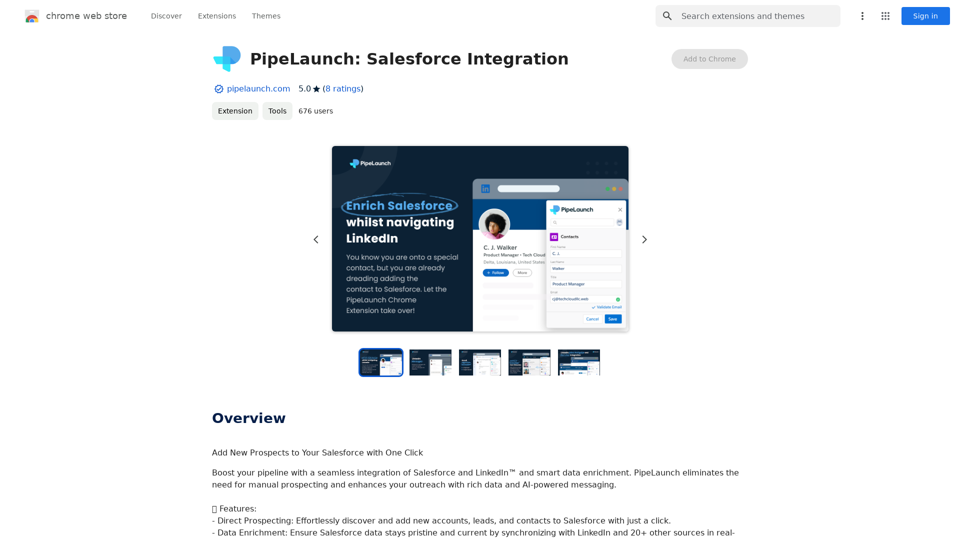
PipeLaunch: Salesforce 整合

使用一鍵將新客戶添加到您的 Salesforce 中
訪問網站
PipeLaunch: Salesforce 整合
訪問網站

介紹

PipeLaunch 是一個創新的 AI 驅動平台,無縫整合 Salesforce 和 LinkedIn。它通過讓團隊能夠輕鬆地一鍵發現並將新帳戶、潛在客戶和聯絡人添加到 Salesforce 中,徹底改變了銷售流程。通過消除手動尋找潛在客戶的需求,並利用全面的數據和 AI 生成的訊息豐富外展活動,PipeLaunch 顯著提高了銷售專業人員的生產力和參與度。

功能

直接尋找潛在客戶

  • 一鍵發現並將新帳戶、潛在客戶和聯絡人添加到 Salesforce
  • 消除手動複製貼上,每位銷售代表每週可節省多達 9 小時

數據豐富

  • 實時同步 Salesforce 數據與 LinkedIn 和 20 多個其他來源
  • 維護乾淨和最新的 CRM 數據
  • 從 Gmail、Google 日曆、Google Meet 和網站提取新聯絡人

銷售洞察

  • 利用深度銷售情報增強外展活動
  • 獲取工作歷史和公司技術堆棧
  • 使用 AI 生成的訊息提高參與度

無縫整合

  • LinkedIn 到 Salesforce 的整合
  • 支持 LinkedIn Sales Navigator、Recruiter 和 Recruiter Lite

多樣化使用案例

  • 銷售團隊尋找潛在客戶
  • 營銷活動的名單建立
  • 校友職業追蹤
  • 簡化招聘流程

用戶友好設置

  • 幾分鐘內快速輕鬆設置
  • 7 天無風險試用,無需信用卡
  • 完全符合 GDPR 規範,確保數據安全

常見問題

什麼是 PipeLaunch?

PipeLaunch 是一個 AI 驅動的平台,整合了 Salesforce 和 LinkedIn,為銷售團隊提供無縫體驗,只需一鍵即可發現並將新帳戶、潛在客戶和聯絡人添加到 Salesforce。

PipeLaunch 的主要功能有哪些?

PipeLaunch 的主要功能包括:

  • 直接尋找潛在客戶
  • 數據豐富
  • 銷售洞察
  • 無縫 LinkedIn 到 Salesforce 整合
  • 即時數據豐富
  • 一鍵添加符合您理想客戶檔案的聯絡人

PipeLaunch 如何增強與潛在客戶的互動?

PipeLaunch 通過提供以下內容增強與潛在客戶的互動:

  • 公司更新洞察
  • 技術堆棧信息
  • AI 生成的個性化外展訊息

PipeLaunch 是否符合 GDPR 規範?

是的,PipeLaunch 完全符合 GDPR 規範,確保用戶的數據安全和隱私。
相關網站

收據及發票擷取、比對、分類
查看詳情

收據及發票擷取、比對、分類

收據及發票擷取、比對、分類

透過線上拍攝發票和帳單,自動化費用管理!然後,自動與任何信用卡或銀行帳戶的交易匹配!

193.90 M
AI 影片 API
查看詳情

AI 影片 API

AI 影片 API

一站式 AI 影片生成 API 平台

16.01 K
ChatGPT 至 Markdown 加
查看詳情

ChatGPT 至 Markdown 加

ChatGPT 至 Markdown 加

```markdown ChatGPT Chat History You: Export chat history from ChatGPT website to normal format as Markdown, which can be opened via typora exactly. ChatGPT: ```markdown ChatGPT Chat History You: Export chat history from ChatGPT website to normal format as Markdown, which can be opened via typora exactly. ChatGPT: I can help you with that! Unfortunately, there's no direct way to export your chat history from the ChatGPT website in a format that's perfectly compatible with Typora. The website doesn't offer a dedicated download feature for chat logs. However, you can manually copy and paste your conversation into a Markdown file. Here's how: 1. Go to the ChatGPT website and log in to your account. 2. Navigate to the conversation you want to export. 3. Select all the text in the conversation window. 4. Copy the selected text (Ctrl+C or Cmd+C). 5. Open a new Markdown file in Typora. 6. Paste the copied text into the Typora file (Ctrl+V or Cmd+V). Keep in mind that this method might not preserve all formatting elements perfectly, especially if your conversation includes special characters or code blocks. ```

193.90 M
圖像 GPT
查看詳情

圖像 GPT

圖像 GPT

AI 輔助交易夥伴

193.90 M
Prompt 黑客 | ChatGPT 提示生成器
查看詳情

Prompt 黑客 | ChatGPT 提示生成器

Prompt 黑客 | ChatGPT 提示生成器

最先進的 ChatGPT 提示生成器和提示庫

193.90 M
HexarAI
查看詳情

HexarAI

HexarAI

Unlock你的商業潛力與HexarAI,一個全方位的人工智慧平台。無縫整合行銷、技術開發、會計、設計和商業管理,實現無與倫比的效率和成功。

0
Chorus.ai 的語音轉錄助理
查看詳情

Chorus.ai 的語音轉錄助理

Chorus.ai 的語音轉錄助理

此擴充程式能識別 chorus.ai 的文字紀錄,並允許您將其複製到剪貼簿。

193.90 M
發布.ai
查看詳情

發布.ai

發布.ai

使用全球第一個專門為數位出版商設計的人工智慧,創造高品質圖書比以往更快、更具成本效益。

5.18 K